If you’re looking to elevate your system’s speed and performance, selecting the right NVMe to PCIe adapter card is essential. These cards can considerably enhance data transfer rates and overall efficiency, especially for demanding tasks. From reliable brands to advanced features, the options are vast. Let’s explore the top contenders that can make a real difference in your setup. You’ll want to know which ones stand out for your specific needs.
SABRENT M.2 NVMe SSD to PCIe Adapter Card with Aluminum Heatsink

If you’re looking to upgrade your desktop’s storage performance, the SABRENT M.2 NVMe SSD to PCIe Adapter Card with Aluminum Heatsink is an ideal choice. This adapter supports various M.2 NVMe SSD sizes, including 2230, 2242, 2260, and 2280. It requires a PCIe x16, x8, or x4 slot, ensuring compatibility with modern systems running Windows 7 (with hotfixes), Windows 8/10/11, or Linux. Installation’s a breeze with a tool-free setup using the included screws and screwdriver. Plus, the durable aluminum heatsink and thermal pad effectively manage heat, promoting long-lasting performance and ultra-fast transfer speeds for your desktop.
Best For: Users seeking to enhance their desktop storage performance with compatible M.2 NVMe SSDs.
Pros:
- Ultra-fast transfer speeds improve overall desktop performance.
- Tool-free installation makes it easy to set up and mount SSDs quickly.
- Effective thermal management with an aluminum heatsink and thermal pad ensures long-lasting performance.
Cons:
- Requires specific PCIe slots (x16, x8, or x4), limiting compatibility with some systems.
- Not compatible with SATA drives, which may restrict options for some users.
- Windows 7 requires hotfixes for NVMe support, which could complicate setup for some users.
M.2 NVME to PCIe Adapter with Aluminum Heatsink

The M.2 NVMe to PCIe Adapter with Aluminum Heatsink is an ideal choice for enthusiasts and professionals seeking to enhance their system’s storage performance. This adapter supports various M.2 sizes and utilizes PCIe 4.0 lanes to deliver up to 64Gbps bandwidth, ensuring you fully leverage your SSD’s speed. Compatibility spans across major operating systems like Windows 11, Linux, and more—no additional drivers needed for most. The included aluminum heatsink and thermal pads effectively dissipate heat, keeping your SSD cool during intensive tasks. With all necessary installation components included, you’ll enjoy a smooth and efficient upgrade experience.
Best For: Enthusiasts and professionals looking to upgrade their system’s storage performance with a high-speed M.2 NVMe SSD.
Pros:
- High Speed: Utilizes PCIe 4.0 lanes for up to 64Gbps bandwidth, maximizing SSD performance.
- Wide Compatibility: Supports various M.2 sizes and works with major operating systems without the need for additional drivers.
- Effective Cooling: Includes an aluminum heatsink and thermal pads for efficient heat dissipation during intensive tasks.
Cons:
- Driver Requirement for Older Systems: Windows 7 and Windows Server 2008 R2 require additional drivers for NVMe SSD recognition.
- Limited to M.2 NVMe and AHCI SSDs: Does not support other types of SSDs, which may limit options for some users.
- Installation Complexity: Some users may find the installation process challenging if they are not familiar with hardware upgrades.
GLOTRENDS M.2 NVMe to PCIe Adapter with Heatsink

For gamers and content creators seeking high-speed data transfer, the GLOTRENDS M.2 NVMe to PCIe Adapter with Heatsink is an ideal choice. This PCIe 4.0 X4 adapter supports M.2 NVMe SSDs with no capacity limit, ensuring you can utilize 2T or 4T drives. It fits various M.2 sizes and effectively lowers SSD temperatures by 5-20°C with its heatsink. Compatible with Windows, Linux, and Mac OS, you can boot from your NVMe SSD, except on some older motherboards. Plus, the included brackets allow easy installation in diverse PC cases, making it a reliable and versatile option for your setup.
Best For: Gamers and content creators seeking high-speed data transfer and efficient cooling for their M.2 NVMe SSDs.
Pros:
- Supports M.2 NVMe SSDs with no capacity limit, allowing for 2T and 4T drives.
- Effective heatsink design lowers SSD temperatures by 5-20°C, enhancing performance and longevity.
- Versatile installation options with included brackets for various PC cases and compatibility with multiple operating systems.
Cons:
- Requires Intel CPUs of 11th gen or higher for full PCIe 4.0 support, limiting use with older systems.
- Not compatible with M.2 SATA SSDs, which may restrict options for some users.
- Windows 7 users must download an NVMe driver, adding an extra step for installation.
SABRENT M.2 NVMe SSD to PCIe x16 Tool-Free Adapter with Heatsink

Designed for gamers and content creators seeking high-speed data transfer, the SABRENT M.2 NVMe SSD to PCIe x16 Tool-Free Adapter with Heatsink delivers exceptional performance with its x4 PCIe 5.0 connection, offering transfer speeds up to 16GBps. Weighing just 3.1 ounces, it fits comfortably in x4/x8 PCIe slots and supports various M.2 SSD types. The built-in aluminum heatsink effectively maintains ideal temperatures without active cooling, ensuring quiet operation. Plus, tool-free installation makes setup a breeze. With a solid 4.5-star rating and a 30-day return policy, this adapter is a reliable choice for enhancing your system’s performance.
Best For: Gamers and content creators seeking high-speed data transfer and easy installation for their NVMe SSDs.
Pros:
- Tool-free installation simplifies setup, making it user-friendly for all levels of expertise.
- High transfer speeds of up to 16GBps enhance system performance for demanding applications.
- Built-in aluminum heatsink ensures optimal SSD temperatures without generating noise from active cooling.
Cons:
- Limited to NVMe M.2 SSDs may not accommodate other types of storage devices.
- Compatibility concerns with older systems if PCIe slots are not available or supported.
- Weight of 3.1 ounces may be seen as slightly heavy for portable setups.
RIITOP 4-Port NVMe PCIe Adapter

Looking to maximize your storage capabilities? The RIITOP 4-Port NVMe PCIe Adapter is the perfect solution, letting you add four NVMe SSDs via a PCIe 4.0/3.0 x16 slot. It supports SSD sizes from 30x22mm to 80x22mm, ensuring compatibility with a wide range of drives. Enjoy blazing speeds up to 4x 32Gbps, and rest easy with its 0.32-inch heatsink that keeps your SSDs cool. You’ll appreciate the individual LED indicators for monitoring each drive’s status. Just make sure your motherboard supports PCIe x16 bifurcation and that you’re using M.2 PCIe NVMe SSDs for peak performance.
Best For: Users looking to expand their storage capacity with high-speed NVMe SSDs in a server or compatible motherboard setup.
Pros:
- Supports up to four NVMe SSDs for significant storage expansion.
- Delivers high-speed data transfer rates of up to 4x 32Gbps.
- Equipped with a heatsink and individual LED indicators for optimal performance monitoring.
Cons:
- Does not support hardware RAID, limiting RAID configurations to software solutions only.
- Requires a motherboard that supports PCIe x16 bifurcation, which may not be available on all models.
- Only compatible with M.2 PCIe NVMe SSDs, excluding M.2 SATA-based drives.
SABRENT 4-Drive NVMe M.2 SSD to PCIe 3.0 x4 Adapter Card [EC-P3X4]
![SABRENT 4-Drive NVMe M.2 SSD to PCIe 3.0 x4 Adapter Card [EC-P3X4]](https://m.media-amazon.com/images/I/41NmfT8xoAL._SL500_.jpg)
If you’re aiming to maximize storage capacity and performance in your computer, the SABRENT 4-Drive NVMe M.2 SSD to PCIe 3.0 x4 Adapter Card [EC-P3X4] is an excellent choice. This adapter lets you add up to four NVMe SSDs through a single PCIe 3.0 x4 slot, compatible with various PCIe configurations. Installation is a breeze, thanks to included screws and screwdriver. It supports peak performance with advanced power management features and efficient cooling, featuring an aluminum heatsink. Plus, you’ll appreciate SABRENT’s reliable customer support and the solid 4.5-star rating from users, ensuring peace of mind with your purchase.
Best For: Users looking to expand their computer’s storage capacity and performance with multiple NVMe SSDs in a single PCIe slot.
Pros:
- Supports up to four NVMe SSDs, maximizing storage options.
- Easy installation with included screws and screwdriver.
- Efficient cooling system with aluminum heatsink to prevent throttling.
Cons:
- Only compatible with M-Key NVMe SSDs, limiting SSD options.
- Requires a PCIe 3.0 x4 slot, which may not be available in all systems.
- Performance may be limited by the maximum bandwidth of PCIe 2.0/1.0 when backward compatible.
Dual M.2 PCIe Adapter for NVMe and SATA SSD

The Dual M.2 PCIe Adapter for NVMe and SATA SSD is ideal for users who want to maximize storage flexibility without compromising performance. This adapter supports simultaneous connections of one NVMe and one SATA SSD, accommodating various M.2 sizes. It converts an M.2 NVMe SSD to a PCIe 3.0 x4 interface and an M.2 SATA SSD to a 6Gbps interface, requiring just a simple SATA cable. With advanced thermal management, including two heat sinks, your drives stay cool during intense tasks. Plus, installation is a breeze with no driver setup needed and both regular and low-profile brackets included.
Best For: Users seeking to enhance their computer’s storage capabilities with flexible options for both NVMe and SATA SSDs.
Pros:
- Supports simultaneous connection of both NVMe and SATA SSDs, maximizing storage flexibility.
- Advanced thermal management with dual heat sinks ensures optimal performance during heavy usage.
- Easy installation with no driver required and includes both regular and low-profile brackets.
Cons:
- Requires a separate SATA cable for the SATA SSD, which may not be included.
- Limited to M.2 SSD sizes, which may not accommodate larger or non-M.2 drives.
- Potential compatibility issues with certain motherboard configurations or BIOS settings.
ASUS Hyper M.2 X16 PCIe Expansion Card V2
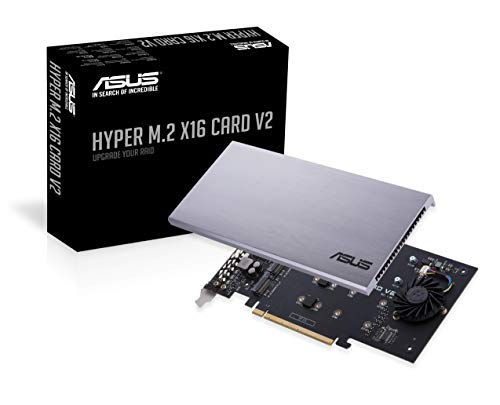
For enthusiasts and professionals seeking to maximize their system’s storage capabilities, the ASUS Hyper M.2 X16 PCIe Expansion Card V2 stands out with its ability to support up to four NVMe M.2 drives. With a bandwidth of up to 128 Gbps, it guarantees lightning-fast data transfer. This expansion card is compatible with Intel VROC and AMD Ryzen Threadripper NVMe RAID, making it versatile for various setups. Its stylish heatsink and integrated blower-style fan prevent overheating, guaranteeing peak performance. Plus, with a two-phase power solution delivering up to 14W, your drives stay powered. It’s a solid choice for anyone looking to enhance their storage.
Best For: Enthusiasts and professionals looking to maximize storage capabilities with high-speed NVMe M.2 drives.
Pros:
- Supports up to four NVMe M.2 drives for expanded storage options.
- High bandwidth of up to 128 Gbps ensures rapid data transfer speeds.
- Efficient cooling system with a stylish heatsink and blower-style fan prevents overheating.
Cons:
- Requires a PCIe x16 slot, which may limit compatibility with some motherboards.
- The power solution may be overkill for users with less demanding storage needs.
- Some users may find installation challenging without prior experience.
10Gtek Dual M.2 NVMe SSD Adapter Card

Looking to expand your desktop’s storage capabilities? The 10Gtek Dual M.2 NVMe SSD Adapter Card is a solid choice. It fits into a PCIe 3.0 x8 slot and supports two NVMe drives through bifurcation, offering high-speed storage expansion. Confirm your motherboard and BIOS support bifurcation; otherwise, only the first drive will be recognized. It accommodates various M.2 sizes and is compatible with multiple operating systems, including Windows and macOS. Weighing just 4.2 ounces, it comes with both full-height and low-profile brackets. With a 4.5-star rating from customers, it’s a reliable option for enhancing your system’s performance.
Best For: Users looking to expand their desktop storage with high-speed NVMe SSDs and who have a compatible motherboard for bifurcation.
Pros:
- Supports dual NVMe drives for increased storage capacity and speed.
- Compatible with various M.2 sizes and different operating systems including Windows, macOS, and Linux.
- Includes both full-height and low-profile PCIe brackets for flexible installation options.
Cons:
- Requires motherboard and BIOS support for bifurcation; otherwise, only one drive will be recognized.
- Standard mounting screws are not included, which may require an additional purchase.
- Performance may be limited on older PCIe 2.0 or 1.0 motherboards.
RIITOP Quad NVMe PCIe Adapter (4 Ports)
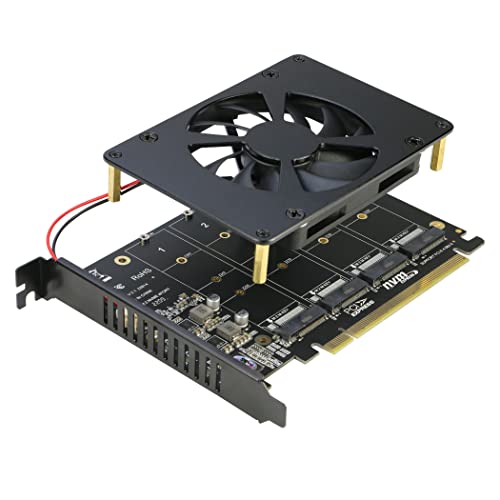
If you’re a power user or a gamer seeking to maximize storage performance, the RIITOP Quad NVMe PCIe Adapter is an excellent choice. This 4-port M.2 NVMe SSD to PCIe 4.0/3.0 x16 card supports speeds of up to 4x 32Gbps, guaranteeing lightning-fast data access. It’s compatible with various M.2 NVMe SSDs and features LED indicators for each SSD’s status. Just verify your motherboard supports PCIe x16 bifurcation. With dimensions of 6.19 x 4.74 x 0.86 inches and a weight of 7.4 ounces, it fits well in most systems. Enjoy enhanced performance and reliability with this powerful adapter!
Best For: Power users and gamers looking to maximize storage performance with fast data access and multiple NVMe SSD options.
Pros:
- High Speed: Supports speeds of up to 4x 32Gbps for rapid data transfer.
- Multiple SSD Support: Can accommodate four M.2 NVMe SSDs, enhancing storage capacity.
- LED Indicators: Offers visual status for each SSD, making it easy to monitor performance.
Cons:
- Bifurcation Requirement: Requires a motherboard that supports PCIe x16 bifurcation, which may limit compatibility.
- Limited Operating System: Only compatible with Windows 10, restricting use with other OS options.
- No SATA Support: Does not support M.2 SATA-based SSDs, limiting the types of drives that can be used.
Factors to Consider When Choosing an NVMe to PCIe Adapter Card
When choosing an NVMe to PCIe adapter card, you should consider several key factors. Compatibility with your motherboard and supported SSD sizes can make or break your setup. Additionally, pay attention to performance specifications, thermal management features, and how easy the installation process is.
Compatibility With Motherboards
To guarantee peak performance and compatibility, you must consider several factors when selecting an NVMe to PCIe adapter card for your motherboard. First, verify your motherboard has the right PCIe slot—x4, x8, or x16—as some adapters won’t work in x1 slots. Check if it supports PCIe bifurcation if you plan to use multiple NVMe drives on one adapter. Don’t forget to verify that your motherboard’s BIOS is updated to recognize NVMe SSDs properly. Also, confirm compatibility with M.2 sizes like 2230, 2242, 2260, and 2280. Finally, consider your motherboard’s chipset and its PCIe version (3.0, 4.0, or 5.0) to maximize data transfer speeds and performance.
Supported SSD Sizes
Choosing the right NVMe to PCIe adapter card hinges on understanding the supported SSD sizes. Most adapter cards support various M.2 SSD sizes, including 2230, 2242, 2260, and 2280 millimeters. It’s essential to check that the adapter explicitly lists compatibility with the specific M.2 lengths you plan to use, as some may only support certain sizes. Many adapters can accommodate multiple SSD sizes at once, giving you flexibility and maximizing storage capacity. Additionally, verify the adapter’s physical slot matches the M.2 keying—M Key for NVMe SSDs—for proper connectivity. If you need high-capacity options, look for adapters that also support larger sizes like 22110, which can be advantageous for your storage needs.
Performance Specifications
Performance specifications play an integral role in selecting the right NVMe to PCIe adapter card. You’ll want to evaluate bandwidth capabilities; PCIe 3.0 supports speeds up to 32 Gbps, while PCIe 4.0 can reach 64 Gbps, enhancing data transfer rates considerably. Look for adapters utilizing x4 PCIe lanes, as they maximize your NVMe SSD’s performance, allowing it to operate at full potential. Checking for backward compatibility with earlier PCIe versions, like 1.0 and 2.0, is vital for ensuring functionality with older systems. Additionally, the maximum payload size matters, as larger sizes enable more data transmission per transaction, improving overall efficiency. By focusing on these specifications, you can make an informed choice for peak performance.
Thermal Management Features
While evaluating NVMe to PCIe adapter cards, it’s essential to take into account thermal management features to guarantee peak performance and longevity of your SSD. Effective solutions like aluminum heatsinks and thermal pads are vital for maintaining ideal temperatures during demanding tasks. Many adapters come with integrated heatsinks that can lower M.2 SSD temperatures by 5 to 20°C, helping to prevent overheating and throttling. Look for models that utilize advanced cooling solutions with multiple thermal pads for enhanced heat dissipation, both between the SSD and the adapter and between the adapter and the heatsink. Additionally, LED indicators can provide real-time feedback on device activity, aiding in the monitoring of temperature-related performance issues. A solid thermal management system truly enhances reliability and performance.
Installation Ease
When considering an NVMe to PCIe adapter card, installation ease plays an essential role in your overall experience. Look for tool-free installation options that let you mount SSDs without needing extra tools. Most adapters include screws and a screwdriver, simplifying setup and ensuring compatibility with various M.2 SSD sizes. It’s vital to choose an adapter compatible with different PCIe slot configurations (x16, x8, x4) so it fits your motherboard. If you have a compact PC case, opt for adapters with low-profile brackets for added flexibility. Additionally, clear installation instructions and status indicators help you monitor the connection, ensuring everything’s functioning properly during setup. A smooth installation process can greatly enhance your enjoyment of the new hardware.
Price and Warranty Options
After ensuring a smooth installation process, the next crucial aspect to evaluate is the price and warranty options for NVMe to PCIe adapter cards. Prices can vary considerably, typically ranging from $20 to over $100, depending on features like the number of ports and cooling solutions. When considering a card, pay attention to warranty options, which may range from 30 days to lifetime support. This coverage is essential for long-term reliability and peace of mind. Be aware of potential restocking fees if you return a product due to misuse, as this affects overall value. Finally, check customer reviews to assess the reliability of the product and the manufacturer’s support services, ensuring you make a well-informed decision.