A dependable wired connection can reduce congestion, simplify cable management, and help more gaming devices share your home network without relying on Wi-Fi.
We compare 10 network switches for gaming, including compact Gigabit models, fanless 2.5GbE switches, and advanced 10GbE options for high-speed networks.
Best 10 Network Switches for Gaming Picks for 2026
Top Multi-Gig Upgrade

- 8× 2.5Gbps RJ45 ports
- Up to 40Gbps switching capacity
- Fanless plug-and-play design
Best For: Large gaming setups, LAN parties, and multi-gig home networks
Best Value 8-Port Pick

- Eight full-speed 2.5Gbps ports
- Up to 40Gbps switching capacity
- Silent, software-free setup
Best For: Budget-conscious gaming setups and LAN parties
Best Compact Choice

- Five 2.5Gbps RJ45 ports
- Up to 25Gbps switching capacity
- Metal, fanless enclosure
Best For: Small gaming desks and compact multi-gig networks
Best Thermal Design

- Eight 2.5Gbps Ethernet ports
- Metal case with passive cooling
- Quiet plug-and-play operation
Best For: Extended gaming sessions and multi-gig NAS networks
Best Budget Pick
NETGEAR GS305 5-Port Gigabit Switch

- Five auto-negotiating 1Gbps ports
- Plug-and-play, fanless operation
- Compact metal desktop or wall-mount design
Best For: Small, budget-friendly wired gaming setups
Best High-Speed Expansion
TP-Link TL-SX1008 8-Port 10G Switch

- Eight 10G ports and 160Gbps switching capacity
- Negotiates 100Mbps through 10G speeds
- Desktop or rackmount metal design
Best For: Multi-gigabit gaming, storage, and media networks
Best Mixed-Speed Option
NICGIGA 6-Port 10G/2.5G Switch

- Four 2.5G and two 10G RJ45 ports
- 60Gbps switching capacity
- Fanless desktop or wall-mount metal design
Best For: Gaming networks combining 2.5G and 10G devices
Best All-Around Pick
TP-Link TL-SG108 8-Port Gigabit Switch

- Eight Gigabit ports for multiple wired devices
- Silent fanless metal housing
- Plug-and-play setup with energy-efficient operation
Best For: Gaming rooms with several consoles, PCs, and Ethernet devices
Best for Large Setups
NETGEAR GS316v3 16-Port Gigabit Switch

- Sixteen 1.0 Gbps Ethernet ports
- Fanless, energy-efficient operation
- Desktop or wall-mount installation
Best For: Large gaming rooms and households with many wired devices
Best Simple Pick
TP-Link TL-SG105 5-Port Gigabit Switch
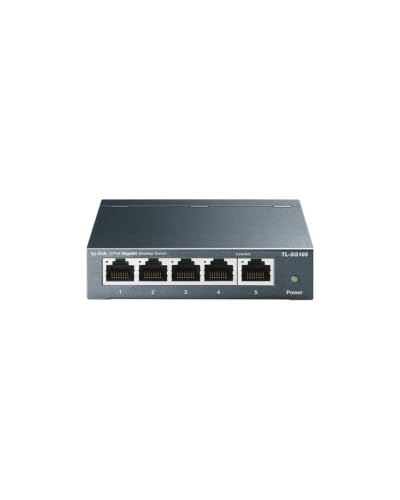
- Five Gigabit ports for smaller setups
- Quiet fanless metal design
- Plug-and-play with QoS and IGMP Snooping
Best For: Compact gaming desks and small entertainment centers
Top Multi-Gig Upgrade – TP-Link TL-SG108S-M2
The TP-Link TL-SG108S-M2 is a strong choice among network switches for gaming when you need eight wired connections and 2.5Gbps support throughout your setup. Its unmanaged, fanless design keeps installation simple and operation quiet.
Best For: Gamers, LAN parties, home offices, and setups with 2.5G PCs, NAS devices, or Wi-Fi access points.
Pros:
- Eight 2.5Gbps ports provide up to 40Gbps of switching capacity.
- Auto-negotiates between 100Mbps, 1Gbps, and 2.5Gbps connections.
- Fanless operation is suitable for quiet gaming rooms and workspaces.
- Desktop or wall mounting and backward compatibility simplify installation.
Cons:
- Unmanaged design offers no advanced traffic controls or configuration options.
- It has more ports and capacity than smaller setups may need.
Choose this model if you want broad 2.5G coverage without replacing existing wiring or dealing with network-management software. It is particularly practical for a multi-device gaming or home entertainment network.
Best Value 8-Port Pick – BrosTrend 2.5Gb Switch
The BrosTrend 2.5Gb Switch is a straightforward option for network switches for gaming, offering eight 2.5Gbps RJ45 ports without SFP ports or configuration requirements. It connects gaming PCs, consoles, NAS devices, and access points with a simple plug-and-play setup.
Best For: Gamers who want eight multi-gig wired ports and a compact, silent switch for home entertainment or LAN-party use.
Pros:
- All eight ports support 2.5Gbps speeds, with up to 40Gbps switching capacity.
- Works with PCs, consoles, TVs, NAS devices, servers, and wireless access points.
- Fanless construction provides quiet operation during demanding use.
- Compact housing supports desktop or wall placement.
Cons:
- Unmanaged operation does not provide advanced network controls.
- It lacks optical SFP ports for fiber-based connections.
This is a practical fit when maximum port flexibility matters more than managed features. Its eight identical 2.5G ports make expansion easy for a busy gaming and entertainment network.
Best Compact Choice – TP-Link TL-SG105S-M2
The TP-Link TL-SG105S-M2 is a compact five-port option for network switches for gaming, delivering 2.5Gbps connectivity without software or manual configuration. Its metal casing, fanless design, and mounting options suit smaller gaming desks and home networks.
Best For: Smaller gaming setups connecting a router, gaming PC, console, NAS, and one additional wired device.
Pros:
- Five 2.5Gbps ports provide up to 25Gbps of switching capacity.
- Auto-negotiates 100Mbps, 1Gbps, and 2.5Gbps links.
- Fanless operation keeps the switch silent.
- Durable metal housing supports desktop or wall mounting.
Cons:
- Five ports may be limiting for larger gaming or LAN-party networks.
- Unmanaged operation omits advanced configuration features.
For a focused gaming station, this switch provides the essential multi-gig connections without taking up much networking complexity. Consider a larger model if you expect to add many wired devices later.
Best Thermal Design – UGREEN 8-Port 2.5Gb Switch
The UGREEN 8-Port 2.5Gb Switch is designed for gamers who want eight 2.5Gbps connections and a hardware-focused approach to cooling. Its metal housing, heatsinks, thermal pads, and ventilation support stable extended use while the unmanaged setup stays easy to install.
Best For: Gaming PCs, NAS devices, consoles, and Wi-Fi 6 or 6E routers in a multi-gig home network.
Pros:
- Eight 2.5Gbps ports support high-speed wired connections.
- Automatically adapts to 100Mbps, 1Gbps, and 2.5Gbps links.
- Metal construction and thermal components help manage heat.
- Fanless design, LED indicators, non-slip feet, and wall or desk placement improve usability.
Cons:
- Unmanaged operation provides no advanced network-management features.
- Its larger metal enclosure may be more than a small setup requires.
UGREEN’s combination of eight multi-gig ports and enhanced passive cooling makes this a sensible choice for networks that stay busy for long sessions. It offers a simple upgrade path for gaming and storage devices without configuration overhead.
Best Budget Pick – NETGEAR GS305 5-Port Gigabit Switch
For a straightforward home setup, the NETGEAR GS305 is one of the simplest network switches for gaming. Its five Gigabit Ethernet ports add wired connections for a gaming PC, console, router, or other compatible device without requiring software or manual configuration.
Best For: Budget-conscious gamers who need a compact, quiet Gigabit switch for a small wired network.
Pros:
- Five 1Gbps auto-negotiating Ethernet ports
- Plug-and-play setup with no configuration required
- Fanless metal design supports silent desktop or wall-mounted operation
- IEEE 802.3az energy-efficient operation
Cons:
- Limited to five ports
- Gigabit speeds are lower than multi-gigabit alternatives
- Specified for use in the U.S. and Canada
The GS305 is a practical choice when you want reliable wired expansion without advanced networking features. It is best suited to smaller gaming setups that do not need 2.5Gbps or 10Gbps connectivity.
Best High-Speed Expansion – TP-Link TL-SX1008 8-Port 10G Switch
The TP-Link TL-SX1008 is built for gaming networks that need more than standard Gigabit performance. Its eight 10G ports support automatic negotiation across 100Mbps, 1G, 2.5G, 5G, and 10G speeds, making it suitable for gaming PCs, 10G storage, Wi-Fi access points, and other high-bandwidth devices.
Best For: Enthusiast gaming networks with multiple multi-gigabit devices, high-speed storage, or 8K media equipment.
Pros:
- Eight 10Gbps ports with up to 160Gbps switching capacity
- Supports five link speeds for broad device compatibility
- Plug-and-play setup with no software installation
- Metal desktop/rackmount design with smart fan operation
Cons:
- Likely excessive for basic Gigabit gaming setups
- Larger and heavier than compact five-port switches
- Its higher-speed benefits require compatible devices and cabling
With eight high-speed ports and automatic speed negotiation, the TL-SX1008 offers substantial room for a growing network. Choose it when your gaming setup includes several 10G or multi-gigabit components and you want a simple unmanaged design.
Best Mixed-Speed Option – NICGIGA 6-Port 10G/2.5G Switch
The NICGIGA six-port switch combines four 2.5Gbps ports with two 10Gbps RJ45 ports, giving gaming setups a flexible mix of connection speeds. It supports devices such as gaming PCs, consoles, Wi-Fi 7 routers, NAS systems, and 10G network adapters while keeping installation simple through plug-and-play operation.
Best For: Gamers building a mixed-speed network with a few 10G devices and several 2.5G connections.
Pros:
- Four 2.5G ports plus two 10G RJ45 ports
- Up to 60Gbps switching capacity
- Fanless metal design with desktop or wall-mount support
- Automatic MDI/MDIX and no configuration required
Cons:
- Only six total ports
- One-year warranty is shorter than some competing options
- Its performance depends on compatible multi-gigabit devices and cabling
This NICGIGA model is a useful middle ground between a basic Gigabit switch and an all-10G unit. Its combination of 2.5G and 10G ports suits gaming networks that are expanding gradually rather than upgrading every device at once.
Best All-Around Pick – TP-Link TL-SG108 8-Port Gigabit Switch
The TP-Link TL-SG108 is a practical choice for gamers who need to connect several wired devices without adding setup complexity. With eight Gigabit ports, fanless operation, and traffic optimization, it is a well-rounded option among network switches for gaming setups.
Best For: Gaming rooms or home offices with multiple consoles, PCs, printers, and other Ethernet devices.
Pros:
- Eight 10/100/1000 Mbps ports provide room for multiple wired devices.
- Plug-and-play setup requires no software or configuration.
- Fanless metal design runs quietly and supports heat dissipation.
- Automatic power adjustment helps reduce energy use.
Cons:
- As an unmanaged switch, it does not provide advanced network configuration.
- Its eight-port capacity may be more than needed for smaller setups but limiting for larger ones.
For most gaming environments, the TL-SG108 balances useful port capacity, quiet operation, and straightforward installation. Its unmanaged design makes it especially suitable when reliable wired expansion matters more than detailed network controls.
Best for Large Setups – NETGEAR GS316v3 16-Port Gigabit Switch
The NETGEAR GS316v3 is designed for gaming spaces that need many wired connections in one place. Its 16 Gigabit ports, compact metal housing, and desktop or wall-mounting flexibility make it a strong option among network switches for gaming and connected home setups.
Best For: Large gaming rooms, home offices, or households connecting many Ethernet devices.
Pros:
- Sixteen 1.0 Gbps ports accommodate substantial device expansion.
- Auto-negotiating ports work with existing Cat5e or Cat6 cables.
- Fanless operation provides silent performance.
- Supports desktop or wall-mounted placement.
Cons:
- Its larger size and 2.9-pound weight may be excessive for compact setups.
- It is an unmanaged switch, so advanced configuration features are not included.
- It is made for use in the U.S. and Canada only.
The GS316v3 stands out when port count is the priority. It offers simple installation and quiet operation while leaving plenty of room for consoles, computers, printers, and other wired equipment.
Best Simple Pick – TP-Link TL-SG105 5-Port Gigabit Switch
The TP-Link TL-SG105 is a compact way to add wired connections where only a handful of ports are needed. Its five Gigabit ports, fanless metal design, and plug-and-play setup make it a convenient choice among network switches for gaming desks and smaller entertainment centers.
Best For: Small gaming setups connecting a router, console, gaming PC, and a few additional devices.
Pros:
- Five 10/100/1000 Mbps ports fit compact gaming setups.
- Fanless construction provides quiet operation.
- Metal casing supports desktop or wall-mounted placement.
- QoS and IGMP Snooping help prioritize certain traffic types.
Cons:
- Five ports offer less expansion room than larger switches.
- As an unmanaged model, it does not offer full network administration controls.
The TL-SG105 is a sensible choice when you want a small, quiet switch without configuration work. It covers the basics for a few wired gaming devices while adding useful traffic-management features for supported data types.
How We Picked the Best Network Switches for Gaming
We focused on unmanaged switches that are straightforward to install and practical for gaming rooms, home offices, streaming setups, and small networks. The selection covers five- and eight-port models, a larger 16-port option, and several speed tiers: Gigabit, 2.5GbE, and 10GbE.
We also considered port capacity, supported Ethernet speeds, fanless operation, desktop or wall-mount flexibility, metal construction, and the likely cost of upgrading connected devices. Because these are primarily plug-and-play switches, ease of setup and everyday reliability matter more than advanced management features.
Quick Comparison
| Best For | Recommended Speed | Typical Port Count |
|---|---|---|
| Basic consoles and PCs | Gigabit | 5–16 ports |
| Multi-gig internet, NAS, and modern PCs | 2.5GbE | 5–8 ports |
| High-speed file transfers and advanced networks | 10GbE | 6–8 ports |
Key Buying Factors for Network Switches for Gaming
Port Speed
Gigabit Ethernet is sufficient for many consoles, gaming PCs, and internet plans. Choose 2.5GbE if your router, computer, NAS, or broadband service supports multi-gig speeds. A 10GbE switch makes sense mainly when several devices can use 10GbE or when local file transfers are a priority.
Number of Ports
Count every device that may need a wired connection, including consoles, PCs, access points, TVs, streaming hardware, and future additions. A five-port switch suits a small setup, while eight ports provide more room. Choose 16 ports if you are wiring several rooms or want significant expansion capacity.
Unmanaged Design and Placement
Unmanaged switches require no configuration: connect power and Ethernet cables, and they begin forwarding traffic automatically. Look for fanless operation if the switch will sit near a desk or gaming setup. A compact metal enclosure and wall-mount support can improve durability and placement options.
Compatibility and Upgrade Value
A faster switch does not automatically make a Gigabit console or router faster. Check the Ethernet ports on your devices, router, cabling, and internet equipment. Cat 5e can often support Gigabit and some 2.5GbE connections over typical home distances, while higher speeds may benefit from better cabling and compatible hardware throughout the path.
Who Should Buy Which Network Switches for Gaming?
Choose a five-port Gigabit model for a basic console or PC setup on a standard broadband connection. An eight-port Gigabit switch is a better value when you need several wired devices or expect modest growth.
Choose an eight-port 2.5GbE switch for modern gaming PCs, multi-gig internet, Wi-Fi access points, or a NAS that can benefit from faster local transfers. For a small but high-performance setup, a five-port 2.5GbE model can reduce cost and desk space.
Choose a 10GbE switch only when your network hardware can use that speed; otherwise, a 2.5GbE option is usually the more balanced upgrade. Finally, select a 16-port Gigabit switch when port capacity matters more than peak speed.