The right memory card reader can make a noticeable difference when you are moving large RAW photo libraries, high-bitrate video, or daily backups. A memory card reader with UHS-II support can deliver much faster transfers than standard UHS-I readers—provided your cards, computer, and cable support the same speeds.
We selected 10 dual-slot and portable options covering SD, microSD, CFast, and CFexpress workflows. The comparison below focuses on interface speed, slot compatibility, build quality, portability, and the practical features that matter when downloading media regularly.
Best 10 Memory Card Reader with Uhs Ii Support Picks for 2026
Professional Dual-Slot Pick
ProGrade CFast and SD UHS-II Reader

- Dual slots for CFast and SD UHS-II cards
- Up to 1,250 MB/s via USB 3.2 Gen 2
- Magnetic laptop plate and two-year warranty
Best For: Professional photo and video workflows using CFast and SD UHS-II media
Versatile USB-C Pick

- UHS-II slots for SD and microSD cards
- Reads and writes two cards simultaneously
- Durable aluminum body with braided cable
Best For: USB-C laptops, tablets, phones, and mixed SD/microSD workflows
CFexpress Workflow Pick
Unitek CFexpress Type B and SD UHS-II Reader

- Supports CFexpress Type B and SD4.0 UHS-II
- 10 Gbps USB 3.2 Gen 2 interface
- Compact aluminum housing with USB-C cable
Best For: Photographers and videographers using CFexpress Type B and SD cards
Travel-Friendly Pick
Kingston MobileLite Plus UHS-II Reader

- Supports UHS-II and backward-compatible UHS-I cards
- Compact single-slot design for travel
- Works across Windows, macOS, Linux, and Chrome OS
Best For: Portable microSD and SDXC transfers, especially with Kingston cards
Best Compact USB-C Pick
Lexar Dual-Slot SD/microSD Reader
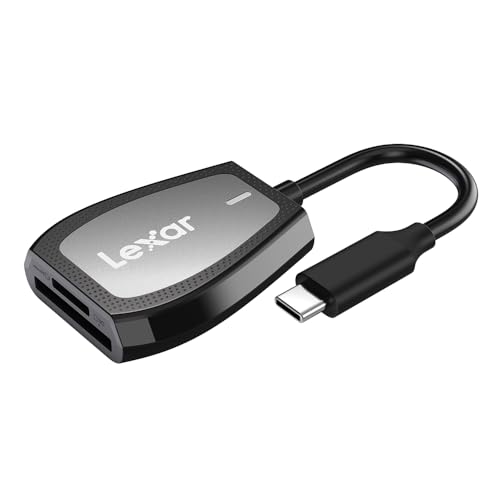
- Up to 312MB/s read speed
- USB-C and dual-slot design
- Supports SD and microSD UHS-I cards
Best For: Compact USB-C transfers with UHS-I cards
Best Flexible UHS-II Value
UGREEN USB-C SD 4.0 Card Reader

- Supports UHS-II cards up to 312MB/s
- USB-A and USB-C connectivity
- Two slots support cards up to 2TB
Best For: Mixed computer and mobile workflows
Best Professional Performance
ProGrade Digital SD UHS-II Reader
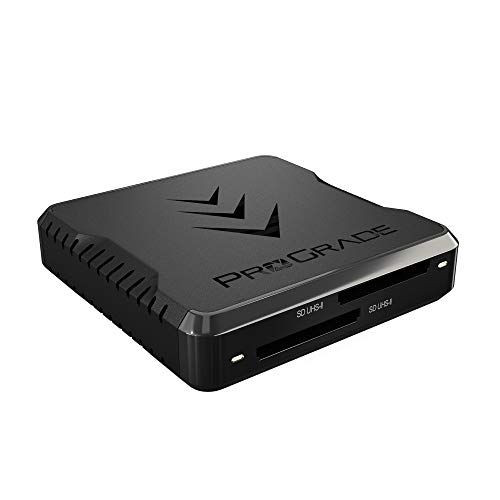
- Up to 1.25GB/s from both cards simultaneously
- Dual SD UHS-II slots
- USB 3.2 Gen 2 and two-year warranty
Best For: Fast professional photo and video workflows
Best for USB-C Creators

- UHS-II speeds up to 312 MB/s
- SD and microSD dual-slot support
- Compact USB-C design with plug-and-play setup
Best For: USB-C photographers, videographers, and content creators
Best for Dual-Slot Transfers

- UHS-II SD and microSD support
- Simultaneous transfers through both slots
- Integrated 6-inch USB-C cable
Best For: Users moving files between SD and microSD cards
Best for Rugged Portability
Exascend Dual-Slot UHS-II Reader

- Approximately 300 MB/s UHS-II transfers
- Compact, lightweight, protective design
- Supports SD and microSD formats
Best For: Traveling photographers and action-camera creators
Professional Dual-Slot Pick – ProGrade CFast and SD UHS-II Reader
If you need a professional memory card reader with UHS II support, the ProGrade Digital PG02 combines CFast and SD UHS-II slots with USB 3.2 Gen 2 connectivity. It is designed for fast transfers in demanding photo and video workflows, including simultaneous use of both cards.
Best For: Professional filmmakers, photographers, and content creators who work with both CFast and SD UHS-II media.
Pros:
- Supports CFast and SD UHS-II cards in a dual-slot design.
- USB 3.2 Gen 2 supports transfers up to 1,250 MB/s, with both cards usable simultaneously.
- Includes a magnetic adhesive plate for a compact laptop workstation and comes with a two-year warranty.
Cons:
- It is not compatible with CompactFlash cards.
- Its professional feature set may be more than casual users need.
The PG02 is a strong workflow-focused choice when fast dual-card transfers and field organization matter. Confirm that your cards are CFast or SD UHS-II rather than CompactFlash before buying.
Versatile USB-C Pick – UGREEN SD 4.0 UHS-II Reader
The UGREEN SD 4.0 reader is a practical memory card reader with UHS II support for USB-C laptops, tablets, phones, and other compatible devices. Its SD and microSD slots support simultaneous reading and writing, while transfer speeds can reach 312 MB/s with suitable UHS-II cards and connections.
Best For: Users who regularly move files between full-size SD and microSD cards on USB-C devices.
Pros:
- Provides dedicated UHS-II SD and UHS-II microSD slots.
- Supports simultaneous file transfers between two cards.
- Aluminum housing and a braided cable improve durability, and UGREEN includes 24-month warranty service.
Cons:
- Android devices need OTG support.
- Actual performance depends on the card and host device; the listed USB interface supports up to 5 Gbps.
Choose this model for flexible SD and microSD handling rather than professional CFast or CFexpress support. Its compact USB-C design suits mobile workflows and everyday file sharing.
CFexpress Workflow Pick – Unitek CFexpress Type B and SD UHS-II Reader
For photographers and videographers using CFexpress Type B alongside SD media, the Unitek R1022B is a useful memory card reader with UHS II support. Its USB 3.2 Gen 2 connection is rated for up to 10 Gbps, and both slots can be read at the same time.
Best For: Creators who need one compact reader for CFexpress Type B and SD4.0 UHS-II cards.
Pros:
- Combines CFexpress Type B and SD4.0 UHS-II slots.
- USB 3.2 Gen 2 supports transfer speeds up to 10 Gbps, subject to the card and host port.
- Compact aluminum housing helps with durability and heat dissipation; a USB-C-to-C cable is included.
Cons:
- It does not support CFexpress Type A, CFexpress Type C, or XQD cards.
- Reaching the maximum speed requires a USB 3.2 Gen 2-capable USB-C port.
- The supplied notes list a one-year warranty.
This is the better fit for modern camera systems built around CFexpress Type B and SD cards. Check your camera media type carefully, especially if you use Type A or XQD cards.
Travel-Friendly Pick – Kingston MobileLite Plus UHS-II Reader
The Kingston MobileLite Plus is a compact memory card reader with UHS II support for microSD and SDXC media. It is backward-compatible with UHS-I cards and connects over USB 3.2 Gen 1, making it a straightforward option for transferring images and videos while traveling.
Best For: Travelers and Kingston card users who want a small reader for microSD and SDXC transfers.
Pros:
- Supports UHS-II performance while remaining backward-compatible with UHS-I cards.
- Compact, minimalist design is easy to carry.
- Works with Windows, macOS, Linux, and Chrome OS and includes a two-year manufacturer warranty.
Cons:
- It has a single slot rather than a dual-slot design.
- It is intended for SD/microSD media, not CFast or CFexpress cards.
- It uses USB 3.2 Gen 1, so it is not the fastest interface in this group.
The MobileLite Plus makes sense when portability and simple SD-family compatibility matter more than dual-card transfers or top-end interface speeds. It is especially suited to users already using Kingston Canvas cards.
Best Compact USB-C Pick – Lexar Dual-Slot SD/microSD Reader
For shoppers seeking a memory card reader with UHS-II support, the Lexar Dual-Slot reader offers a compact USB-C design with support for SD and microSD cards. Its stated read speed reaches up to 312MB/s, while its UHS-I backward compatibility makes it a practical fit for everyday transfers.
Best For: USB-C laptop and desktop users who primarily work with SD or microSD UHS-I cards.
Pros:
- Up to 312MB/s read speed
- Dual SD and microSD slots
- USB 3.2 Gen 1 Type-C connectivity
- Compact design, LED activity light, and two-year limited warranty
Cons:
- Notes specify UHS-I backward compatibility rather than UHS-II support
- USB-C connectivity may require an adapter for USB-A-only devices
The Lexar is a sensible choice when portability and USB-C convenience matter more than UHS-II performance. If UHS-II is essential, consider a reader explicitly rated for that standard.
Best Flexible UHS-II Value – UGREEN USB-C SD 4.0 Card Reader
This UGREEN model is a versatile memory card reader with UHS-II support, offering both USB-A and USB-C connections. Its two slots support a broad range of SD and microSD formats, and transfers can reach up to 312MB/s with a UHS-II card.
Best For: Users who need UHS-II support, dual-interface connectivity, and compatibility with computers or OTG-enabled mobile devices.
Pros:
- Supports UHS-II and UHS-I cards
- USB-A and USB-C interfaces
- Up to 5Gbps transfer rate and up to 312MB/s with UHS-II cards
- Supports cards up to 2TB and includes a secure eject mechanism
Cons:
- Mobile use requires a compatible USB-C OTG device
- Its 60g weight is higher than some compact card readers
With broad format support and both common USB connector types, the UGREEN reader is a well-rounded option for mixed-device workflows. It is especially appealing when UHS-II speed and mobile compatibility are both priorities.
Best Professional Performance – ProGrade Digital SD UHS-II Reader
For demanding workflows, the ProGrade Digital PG08 is a high-performance memory card reader with UHS-II support and dual SD slots. Its USB 3.2 Gen 2 connection is rated for transfers up to 1.25GB/s from both cards simultaneously, making it suited to fast photo, video, and post-production work.
Best For: Photographers, videographers, and creators who need rapid dual-card transfers and a portable professional workflow.
Pros:
- USB 3.2 Gen 2 speeds up to 10Gb/s
- Up to 1.25GB/s from both cards simultaneously
- Dual SD UHS-II slots for efficient transfers
- Magnetic laptop-mounting plate, Refresh Pro support, and two-year warranty
Cons:
- Supports SD media rather than microSD in the supplied specifications
- At 204g, it is heavier than the other listed options
- Its performance is best matched with a compatible high-speed host and cards
The PG08 stands out for professional users who can take advantage of simultaneous dual-card transfers. Its added mounting and card-management features make it more workflow-focused than a basic reader.
Best for USB-C Creators – uni UHS-II SD Card Reader
If you need a memory card reader with uhs ii support for a USB-C laptop, tablet, or compatible phone, the uni USB-C SD 4.0 Card Reader combines fast transfers with broad SD and microSD support. Its UHS-II slots are rated for speeds up to 312 MB/s, while plug-and-play operation keeps setup simple.
Best For: Photographers, videographers, and content creators using USB-C devices who need a compact dual-slot reader.
Pros:
- UHS-II transfer support up to 312 MB/s.
- Supports both standard SD and microSD cards, including SDXC and microSDXC.
- Compact aluminum design with a 15 cm cable and plug-and-play setup.
- Works with Windows, macOS, ChromeOS, Linux, iOS, and Android devices listed by the manufacturer.
Cons:
- Uses USB-C and does not support Lightning-port iPads or iPhones.
- Actual speeds depend on the card and host device.
The uni is a strong choice when you want fast UHS-II performance and flexible card compatibility in a travel-friendly USB-C design. Check your device port before buying, particularly if you use an older Apple mobile device.
Best for Dual-Slot Transfers – SABRENT USB-C UHS-II Reader
The SABRENT USB-C Card Reader is a practical memory card reader with uhs ii support for users who work with both full-size SD and microSD media. It supports transfer speeds up to 312 MB/s, includes an integrated USB-C cable, and can transfer content through both slots simultaneously.
Best For: Creators and laptop users who want dual-format support, an attached cable, and straightforward USB-C connectivity.
Pros:
- Supports UHS-II SDXC and microSDXC cards at speeds up to 312 MB/s.
- Allows simultaneous file and media transfers through both slots.
- Integrated 6-inch USB 3.2 Gen 1 USB-C cable reduces loose accessories.
- Plug-and-play, bus-powered operation requires no separate power supply or drivers.
Cons:
- USB host connectivity is limited by the reader’s USB-C interface and supported device.
- Older cards and USB connections operate at their respective lower speed limits.
Choose the SABRENT if simultaneous access to SD and microSD cards is more useful than a removable cable. Its integrated lead and backward compatibility make it convenient for modern systems while retaining support for older media.
Best for Rugged Portability – Exascend Dual-Slot UHS-II Reader
For photographers and videographers who need a memory card reader with uhs ii support on the move, the Exascend Dual-Slot Reader offers SD and microSD compatibility through USB 3.2. It supports transfers up to approximately 300 MB/s with UHS-II cards and has a compact, impact-resistant design.
Best For: Drone, action-camera, DSLR, and mirrorless users transferring large files during travel or demanding shooting sessions.
Pros:
- Supports UHS-II and backward-compatible UHS-I SD and microSD cards.
- Rated for approximately 300 MB/s with UHS-II cards and up to about 180 MB/s with UHS-I.
- Very compact and lightweight at approximately 54 × 33.5 × 9 mm and 12 g.
- Includes impact-resistant construction plus ESD, overload, and temperature protection.
Cons:
- Uses a USB connection with a USB Type-A hardware interface, which may require an adapter for USB-C-only devices.
- Transfer speeds vary according to the card and connected computer.
The Exascend stands out for its small footprint and protective construction, making it well suited to field kits. It is especially appealing if you regularly transfer footage from both SD and microSD cards, but confirm your computer’s port requirements first.
How We Picked the Best Memory Card Reader with Uhs Ii Support
We focused on readers that clearly support UHS-II SD cards and offer a modern connection such as USB-C or USB 3.2. We also considered whether each model supports microSD, CFast, or CFexpress cards, since compatibility is often more important than a reader’s headline speed. Dual-slot designs received attention for photographers and filmmakers who regularly work with multiple card formats.
Other selection factors included transfer-rate potential, portability, construction, plug-and-play convenience, and suitability for laptops, desktops, tablets, and mobile workflows. Advertised speeds are maximum figures; actual performance depends on the card, host device, cable, file type, and workload.
Quick Comparison
| Best For | Look For | Recommended Type |
|---|---|---|
| Professional photo and video work | USB 3.2, dependable construction, dual slots | ProGrade Digital or Unitek-style professional readers |
| Travel and laptop use | Compact USB-C design and broad compatibility | UGREEN, Kingston, Lexar, or uni models |
| SD and microSD workflows | Dedicated UHS-II support for both formats | Dual-slot SD/microSD readers |
| Specialty camera formats | CFast or CFexpress support | A format-specific or multi-format reader |
Key Buying Factors for a Memory Card Reader with UHS-II Support
Card Compatibility
Check the exact cards used by your camera. UHS-II SD readers are not automatically compatible with CFast or CFexpress, and a microSD slot may have different speed or capacity specifications. If you use adapters, confirm that the reader supports the underlying card format and capacity.
Connection and Real-World Speed
USB 3.2 Gen 1 and Gen 2 can provide different performance ceilings, while USB-C describes the connector rather than the transfer standard. A fast reader will not reach its potential through an older USB port, low-quality cable, or slower computer storage. For large video files, prioritize a reader with a high-speed USB interface and stable sustained transfers.
Single-Slot Versus Dual-Slot Design
A single-slot reader is smaller and often easier to carry. Dual-slot readers are more flexible and can reduce cable swapping when working with SD and microSD media. Do not assume both slots can transfer simultaneously; check the manufacturer’s specifications if parallel copying matters.
Portability and Durability
For field work, favor a compact reader with a securely attached or included cable and a casing that can handle frequent packing. Desktop users may prefer a larger enclosure with clearly labeled slots and better cable clearance.
Who Should Buy Which Memory Card Reader with Uhs Ii Support?
Professional photographers and filmmakers should choose a robust USB 3.2 reader with UHS-II support and the exact specialty slots their cameras require. Hybrid creators who use both full-size SD and microSD cards will benefit from a dual-slot model. Traveling creators and students should prioritize a compact USB-C reader that works directly with their laptop or tablet. Occasional users can save money with a basic UHS-II SD reader, but should avoid paying for CFast or CFexpress support they will never use.
Before buying, match the reader to your fastest card, computer ports, and preferred workflow. That combination—not the reader’s advertised maximum alone—determines how quickly and reliably your files reach their destination.