A good gaming desk should do more than hold a monitor and keyboard. It should keep cords organized, support your gear, and make your setup feel intentional instead of cluttered.
In this roundup of the best LED gaming desks with cable management, we focused on desks that balance style, useful storage, and practical features for gaming, streaming, and home office use.
Best 10 LED Gaming Desk with Cable Management Picks for 2026
Best for LED Ambience
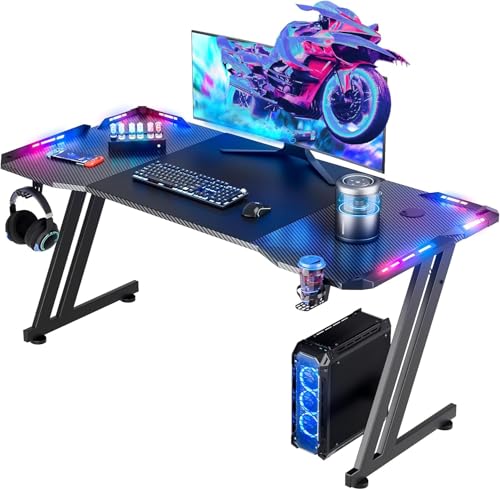
- Built-in cable manager keeps cords under control
- RGB lighting adds an immersive gaming look
- Includes mouse pad, headphone hook, and cup holder
Best For: Gamers who want a compact RGB desk with tidy cable management and handy extras.
Best for RGB Cable Management
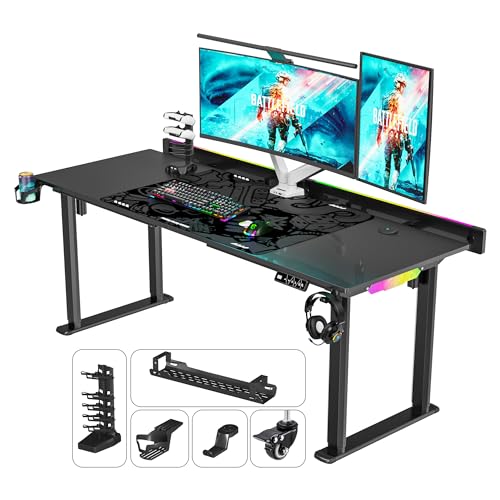
- Dual motors for smooth, quick height changes
- Flip-up rear panel helps hide and organize cables
- LED lighting adds 6 colors and 6 dynamic effects
Best For: Gamers and workstation users who want adjustable height, strong support, and cleaner cable routing.
Best Budget
HLDIRECT 55-Inch LED Gaming Desk
- Built-in cable manager keeps cords under control
- RGB lighting with app control creates a gaming look
- 55-inch top fits dual monitors and accessories
Best For: Gamers who want a stylish RGB desk with cable organization and dual-monitor space.
Best for Streamers
71" LED Standing Desk with Flip-Top Cable Management

- 71" desktop suits dual or triple monitor setups
- Flip-top compartment hides cables and power strips
- 4-leg frame improves stability for gaming and streaming
Best For: Gamers and streamers who want a large standing desk with lighting and cleaner cable routing.
Best for Small Spaces
AODK L Shaped Gaming Desk with LED Lights

- Reversible L-shaped layout fits corners well
- Built-in outlets and USB ports help reduce cable mess
- Includes shelves, hook, CPU stand, and storage bag
Best For: Small rooms and corner setups that need lighting, charging, and storage in one compact desk.
Best for RGB Atmosphere
HLDIRECT 40-Inch LED Gaming Desk
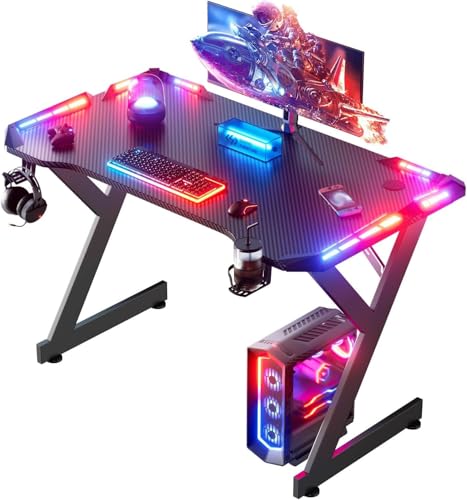
- RGB lighting with remote-controlled effects
- Cable management holes keep cords organized
- Compact size with cup holder and headphone hook
Best For: Gamers and students who want a compact, stylish desk with built-in cable control.
Best for Comfort
PRAISUN L Shaped Gaming Desk with LED Lights
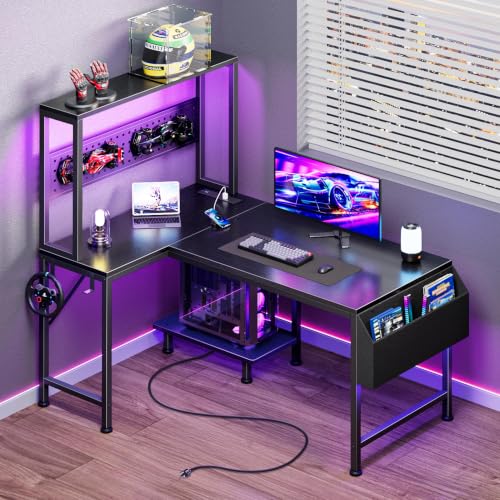
- 7 built-in charging ports for a cleaner, more connected setup
- Customizable LED lighting with music sync and 60,000+ colors
- Reversible corner layout with pegboard, hooks, and storage bag
Best For: Gamers and remote workers who need a compact corner desk with charging and storage.
Best for Storage
Casaottima 48'' LED Gaming Desk

- Built-in storage tower with drawer, shelf, and CPU stand
- Reversible layout suits left- or right-side room setups
- LED lighting and headphone hook add gamer-friendly extras
Best For: Gamers who want a compact, organized desk with flexible storage and a clean setup.
Best for Storage and Charging
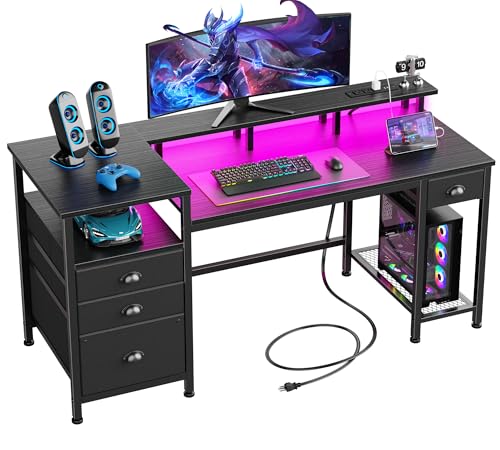
- Built-in outlets and USB ports simplify cable-heavy setups
- RGB lighting adds customizable gaming ambiance
- Four drawers and shelves provide strong storage capacity
Best For: Gamers and remote workers who want a spacious desk with charging, lighting, and organization.
Best for RGB Ambiance

- 20-color LED lighting with multiple modes
- Built-in outlets and USB ports reduce clutter
- Monitor shelf and hooks improve desktop organization
Best For: Gamers who want an RGB corner desk with built-in charging and organized storage.
Best for LED Ambience – HLDIRECT 47" RGB Gaming Desk
If you want an led gaming desk with cable management that adds style without overcomplicating your setup, this HLDIRECT 47-inch desk is a solid fit. It pairs RGB lighting with a tidy desktop layout, two-monitor-friendly sizing, and built-in storage accessories for a cleaner gaming or work station.
Best For: Gamers and home-office users who want a compact RGB desk with practical organization and a modern look.
Pros:
- Built-in cable manager helps reduce desktop clutter
- RGB light strips with app control create a strong gaming atmosphere
- Includes a mouse pad, headphone hook, and cup holder for better organization
- 47-inch size fits smaller rooms while still handling dual monitors
Cons:
- Single 47-inch size may feel tight for very large multi-monitor setups
- LED-focused design may be more flashy than some minimalist buyers want
- Not ideal if you need a very deep desk for oversized gear
This is a good value pick if you want an led gaming desk with cable management that balances presentation and everyday utility. The lighting and included accessories make it easy to build a neat-looking setup fast, especially in a bedroom, dorm, or compact office.
Best for RGB Cable Management – JWX 4-Leg Standing Desk
If you want an led gaming desk with cable management that looks sharp and keeps your setup organized, this JWX standing desk is built around those priorities. The dual motors make height changes quick and smooth, while the flip-up rear panel helps hide cords for a cleaner gaming or work space.
Best For: Gamers and desk users who want adjustable height, strong support, and built-in RGB-style ambiance with easier cable hiding.
Pros:
- Dual motors deliver fast, smooth height adjustments for sit-stand flexibility.
- Flip-up rear panel makes cable routing and clutter control much easier.
- LED strip offers 6 static colors and 6 dynamic effects for a gaming look.
- Heavy-duty frame supports large monitor and accessory setups with confidence.
Cons:
- The LED styling may be more than some buyers want for a minimalist office.
- At 4 legs and dual motors, it’s likely bulkier than simpler desks.
- Premium features can push it above entry-level standing desk pricing.
Overall, this is a strong fit if you want an led gaming desk with cable management that combines practical organization with a more immersive setup. It leans hard into both function and visual appeal, which makes it especially appealing for gaming rooms and high-end home offices.
Best Budget – HLDIRECT 55-Inch LED Gaming Desk
If you want an LED gaming desk with cable management that feels more like a compact battle station than a basic table, this HLDIRECT model is a strong fit. The 55-inch surface can handle dual monitors, while the built-in cable manager, headset hook, and cup holder help keep the setup organized and usable for both gaming and everyday work.
Best For: Gamers and home-office users who want an RGB desk with tidy cable control, dual-monitor space, and a clean modern look.
Pros:
- Built-in cable manager helps reduce desktop clutter
- RGB LED lighting with app control adds a more immersive setup
- 55-inch surface fits dual monitors and a monitor arm
- Includes useful extras like a cup holder, headphone hook, and mouse pad
Cons:
- LED features may be more than some buyers need for a simple workstation
- Z-shaped frame may not suit every chair or legroom preference
- Assembly is fairly quick, but still requires following the included steps carefully
Overall, this is a good pick if you want an LED gaming desk with cable management that balances style, storage, and a roomy work surface. It is especially appealing for setups that need RGB flair without sacrificing day-to-day practicality.
Best for Streamers – 71" LED Standing Desk with Flip-Top Cable Management
If you want a led gaming desk with cable management that also works as a real workstation, this 71-inch sit-stand model is built for long sessions, cleaner wiring, and a more immersive setup. The four-leg frame adds confidence for multi-monitor rigs, while the flip-top compartment helps hide power strips and excess cables.
Best For: Gamers, streamers, and home-office users who want a large adjustable desk with built-in lighting and a tidier desktop.
Pros:
- 71" surface fits dual or triple monitors with room to spare
- Flip-top cable management keeps cords and accessories out of sight
- 4-leg design offers extra stability for heavier gaming setups
- LED lights, hooks, cup holder, tray, and mouse pad add value
Cons:
- Larger footprint may be too big for compact rooms
- Wheels are useful, but the desk is still a substantial piece of furniture
- RGB styling may not suit a minimal office look
This is a strong pick if you want an led gaming desk with cable management that balances style and practicality. It stands out most for creators who need a spacious, organized setup with sit-stand flexibility and a more polished stream-ready look.
Best for Small Spaces – AODK L Shaped Gaming Desk with LED Lights
If you need an led gaming desk with cable management that fits a tighter room, this AODK L-shaped option packs in useful extras without taking up much floor space. The reversible layout, built-in shelves, power outlets, and LED strip make it a practical pick for gaming, studying, or home office setups.
Best For: Small rooms, corner setups, and buyers who want a compact desk with charging, storage, and RGB lighting built in.
Pros:
- Reversible L-shape works well in corners and can adapt to your layout
- Built-in power outlets and USB ports reduce cable clutter
- Includes shelves, CPU stand, hook, and storage bag for better organization
- LED lighting adds a gaming-friendly look with multiple colors and modes
Cons:
- 43-inch desktop size may feel tight for dual-monitor setups
- Storage is useful, but not as roomy as larger gaming desks
Overall, this is a smart value choice if you want an led gaming desk with cable management that helps keep accessories organized while maximizing a corner or smaller workspace.
Best for RGB Atmosphere – HLDIRECT 40-Inch LED Gaming Desk
If you want a compact led gaming desk with cable management that still delivers a flashy setup, this HLDIRECT 40-inch model is a strong fit. It combines RGB lighting, a carbon-fiber style top, and built-in cable holes to keep your gaming area organized without taking up too much room.
Best For: Gamers, students, and home office users who want a small but stylish desk with built-in cable control and LED effects.
Pros:
- Built-in cable management holes help reduce desktop clutter
- RGB LED lighting with remote control for color, speed, and brightness
- Compact 40-inch size fits smaller rooms and gaming corners
- Includes convenient cup holder and headphone hook
Cons:
- 40-inch surface may feel tight for dual-monitor setups
- LED features add style more than practical task lighting
- Not ideal if you need a very large work-from-home desk
This is a smart pick if you want a led gaming desk with cable management that looks good and keeps the essentials tidy. The lighting, storage touches, and stable frame make it an appealing entry-level desk for a gaming-first setup.
Best for Comfort – PRAISUN L Shaped Gaming Desk with LED Lights
If you want an led gaming desk with cable management that packs in power, storage, and lighting without taking over the room, this PRAISUN L-shaped desk is a practical pick. It combines built-in outlets, LED ambiance, and corner-friendly layout to keep a gaming or work setup organized.
Best For: Gamers, streamers, and home office users who need a compact corner desk with charging access and extra storage.
Pros:
- 7 built-in charging ports help power your monitor, PC, and accessories from one spot
- LED lights offer 60,000+ colors, music sync, and adjustable brightness for a customizable setup
- Reversible L-shape, pegboard, hooks, and storage bag make it easy to stay organized
- Compact footprint suits small rooms, apartments, and corner setups
Cons:
- Smaller surface area may feel tight for larger multi-monitor battlestations
- Particleboard construction is sturdy, but not as premium as solid wood desks
Overall, this is a strong fit if you want an led gaming desk with cable management that balances style and utility in a space-saving design. It’s especially appealing for smaller rooms where charging, storage, and a clean look matter just as much as RGB flair.
Best for Storage – Casaottima 48'' LED Gaming Desk
If you want an led gaming desk with cable management that helps keep a compact setup organized, this Casaottima model is a practical pick. The mix of LED lighting, a CPU stand, shelving, a fabric drawer, and a headphone hook gives you several ways to reduce desktop clutter without giving up gamer styling.
Best For: Gamers and PC users who want a compact desk with built-in storage, a reversible layout, and a clean-looking setup.
Pros:
- Multi-tier storage helps organize a PC tower, accessories, and everyday gear.
- Reversible shelf layout makes it easier to fit different room plans.
- Carbon fiber-textured top adds a durable, modern gaming look.
- Includes LED lights and a headphone hook for a more complete setup.
Cons:
- 48-inch size may feel tight for dual-monitor or expansive setups.
- Fabric drawer storage is useful, but not as robust as solid wood drawers.
- LEDs add style more than functional task lighting.
Overall, this is a strong fit if you want an led gaming desk with cable management that prioritizes storage and space efficiency over a larger desktop footprint. It’s especially appealing for smaller rooms, beginner battlestations, or anyone who wants a tidy, all-in-one gaming desk setup.
Best for Storage and Charging – Furologee 60" LED Gaming Desk
If you want a practical led gaming desk with cable management that also doubles as an organized work surface, this Furologee model is built around utility. The built-in power outlets and USB ports keep chargers and accessories close at hand, while the LED strip adds a customizable gaming look without taking up extra space.
Best For: Gamers and home-office users who need a long desk with lots of storage, device charging, and a clean setup.
Pros:
- Built-in 3-outlet power station plus 2 USB ports for easy charging
- RGB LED lights with multiple colors, modes, and brightness levels
- Four drawers plus open shelving help keep gear, files, and peripherals organized
- 60-inch monitor stand and reversible layout add comfort and flexibility
Cons:
- Fabric drawers may not feel as durable as solid wood storage
- Assembly is more involved than a basic desk
- LED lighting may be unnecessary if you prefer a minimalist setup
This is a strong pick if you want an led gaming desk with cable management-friendly convenience, especially when you need charging, storage, and a full-width surface in one setup. It’s less about flashy extras and more about keeping a gaming or work station neat and functional.
Best for RGB Ambiance – Huuger L Shaped Gaming Desk
If you want an led gaming desk with cable management that does more than just hold a monitor, this Huuger L-shaped setup is a smart pick. It combines built-in lighting, desktop power, and a practical corner layout to keep your gaming or work area organized and easy to use.
Best For: Gamers and home-office users who want a corner desk with LED lighting, integrated charging, and a cleaner desktop setup.
Pros:
- Built-in LED lighting with 20 colors, 22 modes, and adjustable brightness
- Desktop power strip with 4 outlets and 2 USB ports helps reduce cable clutter
- Monitor shelf and hooks add storage and keep accessories within reach
- Sturdy steel-and-particleboard build works well for gaming, studying, or office use
Cons:
- L-shaped footprint needs more room than a standard straight desk
- LED features may be more than some buyers need
- Assembly can take time, especially for first-time desk builders
This is a strong choice if you want an led gaming desk with cable management that looks flashy but still handles everyday practicality. The power outlets, USB ports, and accessory hooks make it easier to keep cords and gear under control while maximizing corner space.
How We Picked the Best LED Gaming Desk with Cable Management
We looked for desks that combine integrated lighting with real cable-management help, not just flashy design. The best options in this category offer practical routing features such as flip-up cable access, power outlets, monitor shelves, drawers, or layouts that reduce visible wire mess.
We also considered desk size, shape, stability, and how well each model fits different rooms and setups. A great LED Gaming Desk with Cable Management should feel sturdy, support accessories, and make it easier to keep chargers, monitors, consoles, and peripherals under control.
Quick Comparison
For compact rooms, smaller rectangular desks are often the easiest fit. If you need more surface area or want separate zones for gaming and work, L-shaped models are usually the better choice. Standing desks and larger sit-stand models are ideal for users who want flexibility and a more ergonomic workspace.
Storage also matters. Desks with shelves, drawers, CPU stands, hooks, and built-in power help reduce clutter, while LED lighting adds a more immersive look without affecting function. Choose lighting as a bonus, not the main reason to buy.
Key Buying Factors for a LED Gaming Desk with Cable Management
Desk Shape and Size
Measure your room before buying. A 40- to 48-inch desk works well in tighter spaces, while 55 inches and up gives you more room for multiple monitors, speakers, or stream gear. L-shaped desks are useful in corners and for separating gaming from work tasks.
Cable Routing and Power Access
Look for built-in cable cutouts, flip-up panels, rear gaps, or integrated outlets. These features make it easier to route power strips, monitor cables, and charging wires out of sight. For a cleaner setup, a LED Gaming Desk with Cable Management should make cable routing simple from the start.
Storage and Organization
Hooks, shelves, drawers, and CPU stands help keep essentials off the desktop. If you use a PC tower, controller dock, printer, or headset stand, storage features can make a big difference in day-to-day usability.
Ergonomics and Stability
A stable frame matters, especially for heavier monitors or fast-paced gaming. Consider desk height, legroom, and monitor placement. If you game and work at the same desk, a sit-stand option may improve comfort over long sessions.
Who Should Buy Which LED Gaming Desk with Cable Management?
Choose a compact desk if you want a simple single-monitor setup or have limited space. Go with an L-shaped desk if you need extra surface area or want better separation between gaming and productivity. Pick a larger sit-stand desk if ergonomics and flexibility are priorities. If cable clutter drives you crazy, prioritize the models with built-in outlets, routing spaces, and storage before worrying about the lighting.
In short, the best pick is the one that fits your room, your gear, and the way you actually use your setup every day.