Need to control a Mac from another room without running a long HDMI and USB bundle? The best KVM extenders for Mac send video, keyboard, and mouse signals over structured network cable while keeping your workstation accessible and tidy.
This roundup compares 10 options ranging from compact point-to-point extenders to longer-distance and IP-based systems. Pay close attention to Mac display compatibility, supported resolution and refresh rate, USB behavior, cable quality, and whether the installation requires one or two power supplies.
Best 10 Kvm Extenders for Mac Picks for 2026
Best 4K Single-Cable Pick
4K HDMI KVM Extender with Loop Out
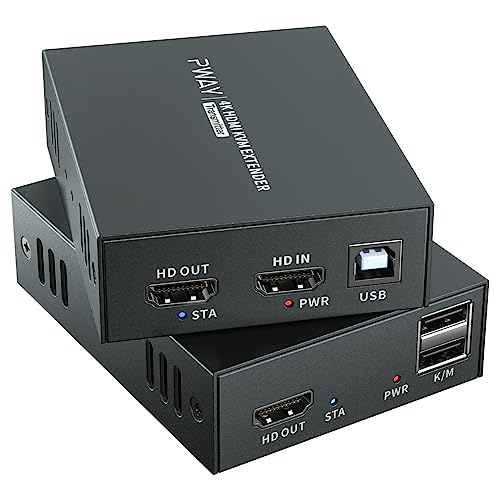
- 4K at 60Hz over Cat6/Cat7
- 196-foot HDMI and USB range
- HDMI loop out and single-power POC
Best For: 4K Mac workstations needing local and remote displays
Best Budget 1080p Option
AV Access 80M HDMI KVM Extender
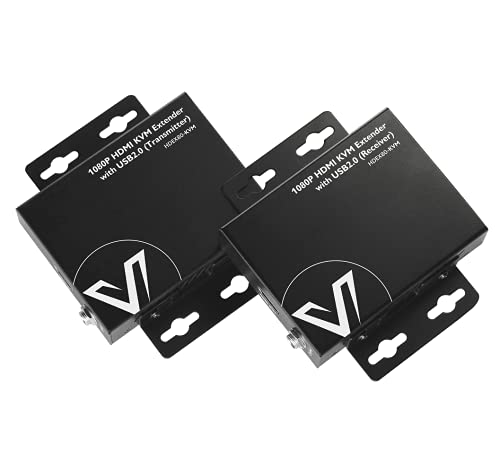
- 1080p at 60Hz up to 260 feet
- Compatible with Mac OS and Linux
- Two USB 2.0 ports with two-way PoE
Best For: Long-distance 1080p Mac setups
Best for Audio Flexibility

- 4K at 60Hz up to 230 feet
- HDR and HDCP 2.2 support
- 3.5mm audio output and HDMI loop out
Best For: Mac AV setups needing flexible video and audio
Best for Long-Range Networking

- Up to 492 feet over Cat6/7
- Works with macOS without drivers
- Three USB ports and support for 16 sets
Best For: Scalable Mac control rooms and distributed workstations
Best Overall
gofanco 4K60Hz HDMI USB KVM Extender

- 4K60Hz HDR video over CAT6/7
- 230-foot HDMI and USB extension
- HDMI loop-out and PoC power
Best For: Mac workstations needing high-refresh 4K and remote keyboard-and-mouse control
Best for Networked Installations
AV Access 4K HDMI KVM Extender Over IP

- Extends up to 150m over Cat6/6A/7
- Uses direct links or Gigabit Ethernet switches
- Three remote USB 2.0 ports
Best For: Distributed Mac workstations and networked control-room installations
Best Plug-and-Play Choice
AV Access 4K HDMI & USB KVM Extender

- Driver-free support for macOS
- 230-foot zero-latency extension
- HDMI loop-out and PoC included
Best For: Simple Mac point-to-point setups with local and remote displays
Best Value 50m Option
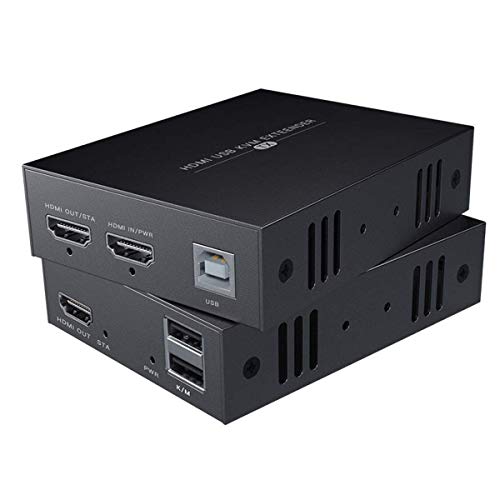
- 1080p at 60Hz over Cat5e/6/7
- USB keyboard-and-mouse control
- Mac OS 9.1+ compatibility
Best For: Single-monitor Mac setups up to 50m
Best for Dual Monitors

- Dual 1080p/60Hz HDMI transmission
- Four receiver-side USB 2.0 ports
- Plug-and-play Mac compatibility
Best For: Two-screen Mac workstations up to 60m
Best Long-Range Pick

- Up to 120m over Cat5e/6/7
- 1080p at 60Hz with HDMI loop-out
- Mac OS 9.1+ compatibility
Best For: Long-distance Mac setups using a keyboard and mouse
Best 4K Single-Cable Pick – 4K HDMI KVM Extender with Loop Out
If you need kvm extenders for mac that combine high-resolution video with remote keyboard and mouse control, this model is a practical option. It sends HDMI and USB signals up to 196 feet over Cat6 or Cat7 cable and supports 4K at 60Hz.
Best For: Mac-compatible office, classroom, studio, security, and home theater setups that need 4K video, remote USB control, and a local display feed.
Pros:
- Supports 4K at 60Hz and multiple common HDMI resolutions.
- Extends keyboard and mouse control over the same Ethernet cable.
- HDMI loop out enables simultaneous local and remote viewing.
- POC operation uses one power adapter for a cleaner installation.
Cons:
- Its 196-foot range is shorter than some longer-distance options.
- USB functionality is focused on keyboard and mouse control rather than multiple peripheral ports.
With 4K60 support, EDID, metal housing, and loop-out functionality, this is a well-rounded choice when a Mac-based workstation needs a dependable remote display and control connection.
Best Budget 1080p Option – AV Access 80M HDMI KVM Extender
For buyers looking for kvm extenders for mac without paying for 4K capability, this AV Access model focuses on reliable 1080p transmission. It extends HDMI and USB signals up to 260 feet over a single Cat5e, Cat6, Cat6a, or Cat7 cable and requires no drivers.
Best For: Mac users with 1080p displays who want long-distance keyboard and mouse control in offices, NVR installations, classrooms, or compact AV systems.
Pros:
- Works with Mac OS, Windows, and Linux.
- Extends 1080p at 60Hz up to 260 feet.
- Provides two USB 2.0 ports for remote keyboard and mouse use.
- Two-way PoE allows one power supply at either side.
Cons:
- Maximum video resolution is 1080p rather than 4K.
- It is less suitable for high-resolution creative or gaming displays.
This is a straightforward, space-conscious solution for Mac setups where 1080p is sufficient. Its broad operating-system compatibility and metal enclosure add flexibility for everyday remote-control installations.
Best for Audio Flexibility – OREI 4K HDMI KVM Extender
This OREI unit is one of the more versatile kvm extenders for mac when video quality and audio options matter. It transmits 4K at 60Hz up to 230 feet over Cat6 or Cat7 cable and adds HDMI loop out, analog audio extraction, and EDID pass-through.
Best For: Mac workstations, presentation systems, and AV installations that need 4K60 video, remote keyboard and mouse control, and flexible audio connectivity.
Pros:
- Supports 4K at 60Hz with HDMI 2.0b and HDCP 2.2 compliance.
- Compatible with HDR formats including HDR10+, Dolby Vision, and HLG.
- Provides 3.5mm stereo audio output at the receiver.
- HDMI loop out and EDID pass-through support local monitoring and display compatibility.
Cons:
- Its range is lower than the longest-distance model in this roundup.
- The supplied notes do not specify Mac OS compatibility by name.
The combination of 4K60 transmission, USB KVM control, audio extraction, and loop out makes this a strong fit for Mac users building a polished, flexible AV or presentation setup.
Best for Long-Range Networking – AV Access 4K KVM over IP
If your Mac setup needs to use existing network infrastructure, this AV Access model offers a scalable approach to kvm extenders for mac. It carries 4K video, audio, and USB signals up to 390 feet over Cat5e, or up to 492 feet over Cat6, Cat6a, or Cat7 cable, with support for network-based deployment.
Best For: Mac workstations, server rooms, control centers, studios, and distributed installations requiring long reach, multiple extender sets, or extra USB peripherals.
Pros:
- Works with macOS, Windows, and Linux without drivers.
- Supports 4K at 30Hz, 1080p at 120Hz, and 7.1-channel audio.
- Can operate over an existing IP network and supports up to 16 sets through DIP-switch pairing.
- Receiver provides three USB ports for peripherals such as flash drives, gamepads, or printers.
Cons:
- 4K support is limited to 30Hz.
- Network-based installation can be more involved than a direct point-to-point extender.
- Maximum range depends on the cable category used.
This is the most scalable option here for a Mac environment spread across rooms or facilities. Its network capability, extended reach, and three-port USB receiver make it especially useful for professional installations.
Best Overall – gofanco 4K60Hz HDMI USB KVM Extender
For shoppers comparing kvm extenders for mac, the gofanco KVMHD20Ext-LT is a strong point-to-point option when you need sharp 4K video and remote keyboard-and-mouse control. It sends HDMI and USB signals up to 230 feet over CAT6/7 cable and requires no drivers.
Best For: Mac workstations needing 4K60Hz video, local monitoring, and straightforward remote USB control.
Pros:
- Supports up to 4K at 60Hz with HDR formats and YUV 4:4:4.
- Extends USB keyboard and mouse control up to 230 feet with near-zero latency.
- Includes HDMI loop-out, EDID management, and bidirectional power over cable.
Cons:
- Requires good-quality CAT6/7 cabling for reliable video performance.
- USB extension is limited to USB 1.1 keyboard and mouse use.
- Dolby Atmos is not supported.
This is the most capable choice here for users prioritizing 4K60Hz output and robust installation features. Verify that your Mac and displays use compatible HDMI connections, and plan the cable run carefully.
Best for Networked Installations – AV Access 4K HDMI KVM Extender Over IP
If you need kvm extenders for mac across an existing network, this AV Access model carries 4K HDMI and USB 2.0 through Cat5e/6/7 infrastructure. It supports direct connections or compatible Gigabit Ethernet switches, making it suitable for distributed workstations and server-room setups.
Best For: Networked Mac workstations, control rooms, and installations where longer, scalable cable paths matter.
Pros:
- Extends video and USB up to 120 meters over Cat5e or up to 150 meters over Cat6/6A/7.
- Works through compatible Gigabit Ethernet switches as well as direct connections.
- Provides three USB 2.0 peripheral ports at the receiver.
Cons:
- Maximum stated video resolution is 4K at 30Hz rather than 4K at 60Hz.
- Requires compatible Gigabit Ethernet equipment for switched-network deployments.
- Its larger installation range may be unnecessary for a simple point-to-point setup.
The IP-based design is the standout feature, especially when the computer and remote controls must be placed in different areas of a building. Choose it over a basic extender when network flexibility and multiple remote USB peripherals are priorities.
Best Plug-and-Play Choice – AV Access 4K HDMI & USB KVM Extender
This AV Access extender is a practical pick among kvm extenders for mac when you want a simple dedicated link over CAT6/6A/7. It provides zero-latency HDMI and USB extension up to 230 feet, supports macOS without drivers, and includes a local HDMI loop-out.
Best For: Mac users who want straightforward remote keyboard-and-mouse control with local and remote displays.
Pros:
- Supports 4K at 30Hz with 4:4:4 color and HDCP 1.4.
- Works with Windows, macOS, and Linux without drivers.
- Includes HDMI loop-out, EDID management, and bidirectional PoC.
Cons:
- Does not provide 4K at 60Hz.
- USB extension is intended for standard keyboard and mouse control.
- Requires CAT6/6A/7 cabling for the stated 230-foot range.
Its plug-and-play setup and macOS support make it easy to deploy in an office, control room, or monitoring station. Consider the gofanco model instead if 4K60Hz is essential; otherwise, this offers a balanced feature set for dedicated point-to-point use.
Best Value 50m Option – 1080p HDMI KVM Extender
If you need kvm extenders for mac for a straightforward single-monitor setup, this model sends 1080p HDMI video and USB keyboard-and-mouse control over Cat5e, Cat6, or Cat7 cable. It supports distances up to 50m with Cat6/7 and is compatible with Mac OS 9.1 and higher.
Best For: Mac users extending one HDMI display and basic USB controls across a room.
Pros:
- Supports 1080p at 60Hz for smooth Full HD video.
- Provides KVM control for a remote keyboard and mouse.
- Works with Mac OS, Windows, and Linux systems.
- Can reach up to 50m over Cat6 or Cat7 cable.
Cons:
- Transmission distance is shorter than the longer-range models in this roundup.
- Designed around a single HDMI signal rather than dual-monitor output.
- The transmitter requires a power adapter.
This is a practical pick when you want basic Mac-compatible KVM extension without dual-display features. For best results, use Cat6 or Cat7 cabling.
Best for Dual Monitors – Dual 1080p HDMI KVM Extender
For Mac users building a two-screen workstation, this dual-monitor KVM extender sends two 1080p HDMI signals plus USB 2.0 over one Cat5e, Cat6, Cat6a, or Cat7 cable. It reaches up to 60m and requires no extra software or drivers.
Best For: Dual-display Mac workstations that also need remote USB peripherals.
Pros:
- Transmits dual 1080p HDMI signals at 60Hz.
- Extends USB 2.0 devices up to 60m, including keyboards, mice, printers, and scanners.
- Includes four USB 2.0 ports on the receiver.
- Supports Mac OS, Windows, and Linux with plug-and-play setup.
Cons:
- USB 2.0 limits performance for higher-bandwidth peripherals.
- Its dual-monitor design may be unnecessary for a single-display setup.
- The upper temperature rating listed is 45°C.
Among these kvm extenders for mac, this is the strongest fit for a dual-screen office or workstation. Its one-way PoC function can also simplify installation by allowing the receiver to power the transmitter over the Cat cable.
Best Long-Range Pick – 120m HDMI KVM Extender
When distance is the main concern, this HDMI KVM extender carries 1080p video and basic USB keyboard-and-mouse control up to 120m over Cat5e, Cat6, or Cat7 cable. It also adds a local HDMI loop-out, making it useful for monitoring the source display while extending the signal.
Best For: Long-distance Mac installations in classrooms, conference rooms, and home theaters.
Pros:
- Offers up to 120m of transmission distance over suitable Ethernet cable.
- Supports 1080p at 60Hz with backward compatibility for lower resolutions.
- Provides an HDMI loop-out for local monitoring.
- Works with Mac OS 9.1 and higher, Windows, and Linux.
Cons:
- USB support is limited to USB 1.1 keyboards and mice.
- Does not support gaming peripherals or USB switches.
- Both transmitter and receiver require separate power; single-side power is not supported.
This is the best choice here for maximum reach, but its USB 1.1 limitation makes it less suitable for modern high-performance peripherals. Use an IEEE-568B-wired UTP cable and plan for power at both ends.
How We Picked the Best Kvm Extenders for Mac
We prioritized extenders that carry both HDMI video and USB keyboard-and-mouse signals over Cat5e, Cat6, Cat6a, or Cat7 cable. The selection covers 1080p and 4K models, point-to-point links, loop-out designs, power-over-cable options, and longer-range IP-based systems.
For Mac users, advertised resolution is only part of the decision. A reliable setup also depends on HDMI output compatibility, EDID handling, HDCP support, cable quality, and whether the extender behaves predictably with macOS peripherals and displays. Product claims should be checked against the exact Mac, monitor, dock, and cable configuration you plan to use.
Quick Comparison
| Feature | What to look for | Best suited to |
|---|---|---|
| Video resolution | 1080p for basic office use; 4K at 60Hz for high-detail work | Office, creative, and multi-window workflows |
| Transmission distance | About 164–197 feet for ordinary rooms; up to 390–394 feet for longer runs | Home offices, classrooms, studios, and commercial spaces |
| Connection type | Direct point-to-point or TCP/IP over network hardware | Simple installations or scalable infrastructure |
| USB support | Two-way keyboard and mouse extension, preferably with clear device limits | Remote Mac control |
| Power design | POC can reduce outlet requirements, but verify receiver needs | Clean, practical installations |
Key Buying Factors for Kvm Extenders for Mac
Resolution, Refresh Rate, and Mac Display Support
Choose a 4K 60Hz model for sharp text, detailed design work, or modern displays. A 1080p extender can be sufficient for basic administration and is often more forgiving over long cable runs. Confirm that the extender supports the Mac’s HDMI output path, including any USB-C or Thunderbolt dock used in the system.
Cable Type and Distance
Use the recommended cable category and keep the run within the manufacturer’s stated limit. Cat6 or better is generally the safer choice for 4K and longer links. Avoid assuming that an Ethernet extender can share an ordinary network switch unless the product explicitly supports IP operation; many direct extenders require a dedicated cable between transmitter and receiver.
USB, EDID, HDCP, and Loop-Out Features
Check whether the USB ports support only keyboard and mouse or also storage and other peripherals. EDID management can help the Mac maintain a stable display profile, while HDCP support matters for protected content and some display chains. A loop-out port is useful when you want a local monitor connected at the Mac while sending a second signal remotely.
Who Should Buy Which Kvm Extenders for Mac?
Choose a compact 4K point-to-point model for a home office, editing desk, or conference room where the cable run is moderate. Select a 1080p option when price, simplicity, and long-distance basic control matter more than fine detail. For installations approaching 230 feet or beyond, favor products explicitly rated for the required distance and use high-quality cabling.
IP-based extenders make the most sense for structured installations that need network-based routing or future expansion, but they can involve more configuration and compatibility checks. If you want the simplest setup, look for plug-and-play operation, POC, EDID support, and clearly labeled transmitter and receiver connections.