If you want to clone a drive without opening your PC, a hard drive enclosure with offline cloning can save time and reduce upgrade hassles. The best models make disk duplication simple, whether you are moving to a larger HDD, replacing a failing SSD, or staging multiple drives.
Below, we focus on practical features that matter most: drive compatibility, cloning speed, cooling, and day-to-day usability.
Best 10 Hard Drive Enclosure with Offline Cloning Picks for 2026
Dual-Bay Classic

- Dual-bay dock for 2.5-inch/3.5-inch SATA drives
- Offline cloning up to 60Mbps without a PC
- USB 3.0 plug-and-play setup with no drivers
Best For: SATA users who want a simple cloning dock
Hybrid Speed Dock
SABRENT NVMe & SATA Lay-Flat Dock

- Supports NVMe and SATA 2.5-inch/3.5-inch drives
- Offline clone controls with LEDs and no PC needed
- USB-C 10Gbps dock with both cable types included
Best For: Mixed NVMe and SATA users who want one dock
Dual-Bay SATA Workhorse

- Dual-bay dock for 2.5-inch and 3.5-inch SATA drives
- Offline cloning up to 60Mbps, source to target
- USB 3.0 plus USB-C with UASP support
Best For: SATA backup users who want a simple clone dock
Three-Bay Cooler
Xiaobi NVMe & SATA Dock with Fan
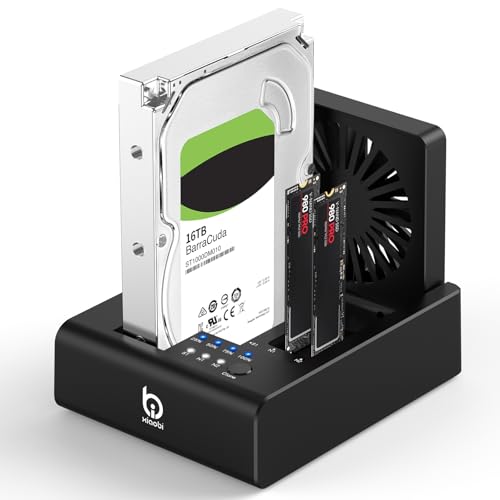
- Supports 2 NVMe SSDs plus 2.5-inch/3.5-inch SATA drives
- One-touch offline cloning with no software required
- Built-in 80mm fan and USB-C 10Gbps connection
Best For: Users who want a cooled multi-drive cloning dock
Dual-Bay SATA Cloner Dock
SABRENT EC-CH2B dual-bay SATA clone dock

- Offline clone button works with no computer attached
- Dual-bay USB-C dock mounts both drives separately
- Fits 2.5-inch and 3.5-inch SATA HDDs and SSDs
Best For: SATA users who want a simple dock and standalone cloner
High-Speed NVMe Duplicator
UGREEN 20Gbps dual-bay NVMe clone enclosure

- One-click offline cloning for two NVMe SSDs
- Tool-free aluminum enclosure with S.M.A.R.T. support
- Up to 20Gbps transfer speeds with compatible gear
Best For: NVMe owners who want fast, standalone drive cloning
Hybrid NVMe + SATA Cloner Dock
GRAUGEAR 18140 hybrid NVMe/SATA clone dock

- Offline cloning works between SATA and NVMe drives
- Supports one NVMe SSD plus one SATA HDD or SSD
- Built-in 3-speed fan for extra cooling during use
Best For: Mixed-drive users who want one dock for cloning and access
Dual-Bay Offline Clone Dock
ORICO Dual Bay Hard Drive Docking Station

- Offline clone button for computer-free duplication
- Supports 2.5-inch/3.5-inch SATA HDDs and SSDs
- USB 3.0 UASP support with tool-free hot swapping
Best For: Simple dual-bay SATA cloning and backup
Triple-Bay Multi-Drive Cloner
ICY BOX USB-C 10Gbps NVMe Cloner

- One-touch offline cloning without PC setup
- Supports NVMe and SATA drive combinations
- Triple-bay design with 10Gbps USB 3.2 Gen 2
Best For: Mixed NVMe and SATA cloning in one dock
Cross-Protocol Clone Dock
GRAUGEAR M.2 NVMe & SATA Cloner Dock

- Offline cloning between NVMe and SATA drives
- Built-in adjustable cooling fan for longer sessions
- USB 3.2 Gen 2 with up to 10Gbps transfer speed
Best For: Cross-protocol cloning with active cooling
Dual-Bay Classic – SABRENT USB 3.0 Dock & Cloner
If you want a straightforward hard drive enclosure with offline cloning for 2.5-inch or 3.5-inch SATA drives, this SABRENT dock is built around simple setup and dependable basics. It supports standard SATA HDDs and SSDs, works without drivers, and includes offline duplication so you can copy a drive without using a PC.
Best For: Users who want an easy dual-bay SATA dock for cloning and everyday drive access.
Pros:
- Supports 2.5-inch and 3.5-inch SATA HDDs and SSDs
- Offline cloning up to 60Mbps with no computer required
- Plug-and-play design with USB 3.0 connectivity
- Supports drives up to 10TB each, 20TB total storage capacity listed
Cons:
- Limited to SATA drives only, not NVMe
- Cloning speed is capped at 60Mbps
- Bulkier than a single-drive enclosure
This is a practical pick if your workflow centers on SATA backups, drive swaps, and offline duplication rather than cutting-edge SSD formats. It keeps the feature set focused and easy to use.
Hybrid Speed Dock – SABRENT NVMe & SATA Lay-Flat Dock
This hard drive enclosure with offline cloning stands out if you move between NVMe and SATA storage. It supports M.2 PCIe NVMe SSDs plus 2.5-inch and 3.5-inch SATA SSDs or HDDs, and its USB-C 10Gbps design makes it a flexible dock for backups and drive-to-drive work.
Best For: People who need one dock for both NVMe and SATA drives with no-PC cloning.
Pros:
- Works with M.2 PCIe NVMe and 2.5-inch/3.5-inch SATA drives
- Offline clone feature with direction switch, button, and progress LEDs
- USB-C dock includes both USB-C to USB-C and USB-A to USB-C cables
- Tool-free, cross-platform support for Windows, macOS, and Linux
Cons:
- Only one drive bay is supported at a time
- Clone target must be equal to or larger than the source drive
- 3.5-inch drives need the included 12V power adapter
For mixed-drive households or technicians, this model is more versatile than a SATA-only dock. The tradeoff is that it focuses on one active drive slot, but the format support is broader than most cloning docks.
Dual-Bay SATA Workhorse – WAVLINK USB 3.0/USB-C Dock
If you need a hard drive enclosure with offline cloning for standard SATA drives, this WAVLINK dual-bay dock keeps things focused on compatibility and practical backup use. It supports 2.5-inch and 3.5-inch SATA HDDs and SSDs, offers UASP-enabled transfer speeds, and includes a built-in offline duplicator function.
Best For: Users who want a dual-bay SATA dock with offline cloning and simple tool-free setup.
Pros:
- Supports 2.5-inch and 3.5-inch SATA HDDs and SSDs
- Offline cloning up to 60Mbps with source-to-target copying
- USB 3.0 and USB-C support with UASP acceleration
- Built-in power switch and tool-free installation
Cons:
- Not compatible with M1/M2-based Macs
- Offline clone only; online clone is not supported
- Maximum capacity is listed at 16TB x2 rather than higher-capacity drives
This is a sensible pick if you want a no-fuss SATA docking station for cloning and direct drive access. It is especially appealing when you value straightforward operation over support for newer NVMe formats.
Three-Bay Cooler – Xiaobi NVMe & SATA Dock with Fan
This hard drive enclosure with offline cloning is aimed at users who want more flexibility than a basic dock. It supports two M.2 NVMe SSDs plus 2.5-inch or 3.5-inch SATA drives, adds USB-C 3.2 Gen 2 connectivity, and includes a built-in cooling fan for heavy transfer sessions.
Best For: Users who want a multi-drive dock with offline cloning and active cooling.
Pros:
- Supports 2 M.2 NVMe SSDs plus 2.5-inch/3.5-inch SATA drives
- One-touch offline cloning with no software or tools required
- USB-C 3.2 Gen 2 interface with up to 10Gbps transfer speeds
- Built-in 80mm foldable cooling fan for heat management
Cons:
- Does not support reverse cloning from NVMe SSD to SATA HDD
- Target drive must be equal to or larger than the source drive
- Not compatible with SATA NGFF or mSATA SSDs
This model makes sense if you regularly juggle different drive types and want cooling built in for longer sessions. Just note the cloning direction limits before choosing it for a specific workflow.
Dual-Bay SATA Cloner Dock – SABRENT EC-CH2B dual-bay SATA clone dock
If you want a hard drive enclosure with offline cloning for SATA drives, the SABRENT EC-CH2B keeps the process simple: insert two bare drives, press the clone button, and let it copy without a computer connected. It also works as a dual-bay USB-C dock, so both drives can mount separately when plugged into a PC or Mac for file transfers and day-to-day access.
Best For: Users who need a straightforward SATA dock that doubles as a no-PC clone station for 2.5-inch and 3.5-inch drives.
Pros:
- Offline 1-to-1 cloning works without a computer and is built for SATA drives.
- Dual bays can mount as separate drives over USB for reading and writing both at once.
- Supports bare 2.5-inch and 3.5-inch SATA HDDs and SATA SSDs.
- USB-C cable is included, and setup is plug-and-play on Windows and Mac.
Cons:
- Cloning is limited to SATA drives only; no IDE, M.2, or NVMe support.
- The target drive must be the same size as the source or larger.
- Offline clone speed is capped at up to 60MBps by design.
This is a practical pick if your priority is simple offline duplication and easy desktop docking for standard SATA storage. It is not a universal enclosure, but for SATA-based backups and drive upgrades, it covers the core job well.
High-Speed NVMe Duplicator – UGREEN 20Gbps dual-bay NVMe clone enclosure
If you need a hard drive enclosure with offline cloning for NVMe SSDs, this UGREEN dual-bay enclosure is built around one-click duplication and high-speed USB 3.2 Gen 2×2 performance. It supports two NVMe drives at once, so you can copy a source drive to a target drive without opening software or connecting to a computer.
Best For: NVMe users who want a fast, tool-free enclosure with offline cloning for drive upgrades and backups.
Pros:
- One-click offline cloning works without a computer.
- Supports two NVMe SSDs up to 8TB each and accepts M-Key and B+M-Key drives.
- 20Gbps USB 3.2 Gen 2×2 support for high-speed transfers when the device and cable match.
- Aluminum build, LED indicators, anti-slip pads, and S.M.A.R.T. monitoring add practicality.
Cons:
- NVMe only; SATA interfaces are not supported.
- Offline cloning requires the target drive to be the same size or larger than the source.
- 20Gbps speeds depend on compatible hardware and cabling.
This enclosure makes sense if your workflow is centered on NVMe drives and you want a compact duplicator with quick setup. It is less versatile than hybrid docks, but it is more focused on fast, no-PC SSD cloning.
Hybrid NVMe + SATA Cloner Dock – GRAUGEAR 18140 hybrid NVMe/SATA clone dock
For buyers who want a hard drive enclosure with offline cloning and broader drive support, the GRAUGEAR 18140 stands out as a hybrid dock. It can clone between SATA and NVMe without a computer, and it also lets you read and write one M.2 NVMe SSD plus one SATA drive at the same time over USB-C.
Best For: People who need one dock for mixed NVMe and SATA drives, including cloning and general file access.
Pros:
- Offline cloning supports SATA to NVMe and NVMe to SATA without a PC.
- Hybrid layout handles one M.2 NVMe SSD plus one SATA drive, including 2.5-inch and 3.5-inch SATA models.
- Up to 10Gbps for NVMe and 6Gbps for SATA helps keep transfers moving.
- Built-in 3-speed cooling fan adds active thermal management.
Cons:
- Only one M.2 NVMe drive and one SATA drive can be used at a time.
- Cloning requires a specific button sequence before the process starts.
- SATA speeds are lower than the NVMe side and limited to 6Gbps.
This is the most flexible option here if your storage mix includes both SATA and NVMe. It is especially useful for upgrades, backups, and hands-on drive migration where one dock has to do several jobs.
Dual-Bay Offline Clone Dock – ORICO Dual Bay Hard Drive Docking Station
If you want a straightforward hard drive enclosure with offline cloning for 2.5-inch and 3.5-inch SATA drives, this ORICO dual-bay dock keeps the process simple. It supports direct disk duplication without a computer, and its USB 3.0 connection with UASP support makes it useful for everyday backup, imaging, and transfer tasks.
Best For: Users who want a simple dual-bay SATA dock for offline drive cloning and general backup work.
Pros:
- Offline clone function lets you duplicate one drive to another without connecting to a computer.
- Supports 2.5-inch and 3.5-inch SATA HDDs and SSDs with up to 44TB total capacity.
- USB 3.0 with UASP and Trim support, plus tool-free hot-swapping for easier drive changes.
- Includes a 36W power supply, LED status indicators, and a dust-proof cover design.
Cons:
- Target disk must be larger than the source disk for cloning.
- No-drive-inserted behavior means the dock will not power on without a drive installed.
- Cloning is limited to SATA drives rather than NVMe storage.
This is a practical choice if your main need is a dependable SATA duplicator with broad device compatibility and a very simple offline cloning workflow.
Triple-Bay Multi-Drive Cloner – ICY BOX USB-C 10Gbps NVMe Cloner
This hard drive enclosure with offline cloning is built for mixed-drive setups, letting you migrate data without a PC and manage multiple drives from one station. It supports M.2 PCIe NVMe SSDs plus 2.5-inch and 3.5-inch SATA SSDs and HDDs, making it a flexible pick when your storage hardware changes often.
Best For: Users who need a versatile cloner for NVMe and SATA drives in a multi-bay desktop setup.
Pros:
- One-touch offline cloning with no software installation or complicated computer setup.
- Supports cloning across drive types, including NVMe to NVMe and SATA to NVMe.
- Triple-bay layout lets you connect and access up to three drives at once.
- USB 3.2 Gen 2 delivers up to 10Gbps and includes a USB-C/USB-A combo cable.
Cons:
- The product notes list a 2.5-inch hard disk form factor in the details, so check compatibility carefully for your exact drive mix.
- It is larger and more specialized than a basic single-drive dock.
- Best value depends on whether you actually need support for multiple drive formats.
If you want a do-it-all cloning dock for mixed storage, this ICY BOX model stands out for its cross-format flexibility and three-slot convenience.
Cross-Protocol Clone Dock – GRAUGEAR M.2 NVMe & SATA Cloner Dock
For buyers looking for a hard drive enclosure with offline cloning that can bridge older SATA drives and newer NVMe storage, this GRAUGEAR dock is built around cross-protocol cloning. It handles M.2 NVMe SSDs plus 2.5-inch and 3.5-inch SATA HDDs and SSDs, and its USB 3.2 Gen 2 connection supports fast transfers when you are not cloning.
Best For: People who need offline cloning between NVMe and SATA drives in a compact, cooled dock.
Pros:
- Cross-protocol offline cloning works between NVMe and SATA interfaces without a computer.
- Supports M.2 NVMe SSDs and 2.5-inch/3.5-inch SATA HDDs and SSDs up to 36TB.
- Built-in adjustable fan helps keep drives cool during long cloning or transfer sessions.
- USB 3.2 Gen 2 provides up to 10Gbps and includes a premium USB-C to C/A 2-in-1 cable.
Cons:
- Does not support NVMe-to-NVMe cloning.
- Target drive must have a larger actual capacity than the source.
- BitLocker-encrypted drives are not supported for cloning.
This dock makes sense if your main goal is migrating data between SATA and NVMe with built-in cooling and a clean desktop footprint.
How We Picked These Hard Drive Enclosure with Offline Cloning Options
We prioritized enclosures that support true standalone cloning, broad drive compatibility, and dependable connections for everyday use. Extra weight went to docks with clear status indicators, solid cooling, and interfaces that make large transfers more practical.
Because the lineup includes both SATA and NVMe designs, we also looked at how well each unit serves different upgrade paths: simple 2.5/3.5-inch SATA duplication, mixed-format docks, and faster M.2-focused cloning stations.
Quick Comparison
Choose SATA-only dual-bay docks if you mainly clone traditional HDDs and 2.5-inch SSDs. Pick mixed NVMe/SATA models if you want more flexibility across older and newer drives. For the fastest workflows, look at higher-bandwidth USB-C or 20Gbps options, especially when handling large NVMe volumes.
Key Buying Factors for a Hard Drive Enclosure with Offline Cloning
Drive Type Support
Confirm whether the enclosure handles 2.5-inch, 3.5-inch, M.2 NVMe, M.2 SATA, or a combination. A lot of frustration comes from buying a dock that clones only one interface when you actually need both.
Clone Direction and Compatibility
Some docks support SATA-to-SATA only, while others can clone between SATA and NVMe or support broader duplication modes. If you plan to migrate between different drive families, check this closely before buying.
Speed and Connection
USB 3.0 is fine for basic use, but USB-C, 10Gbps, and 20Gbps models are better suited to larger SSDs and frequent cloning. Real-world speed still depends on the drives themselves, but the enclosure should not be the bottleneck.
Cooling and Reliability
Offline cloning can take a long time, especially with large-capacity drives. Look for heat management features such as aluminum housings, active fans, or layouts that promote airflow.
Ease of Use
Clear LEDs, one-touch clone controls, and stable drive seating make a big difference. A good Hard Drive Enclosure with Offline Cloning should be easy to understand without requiring software or a lengthy setup.
Who Should Buy Which Hard Drive Enclosure with Offline Cloning?
If you mainly clone standard HDDs or SATA SSDs, a dual-bay SATA dock is usually the best value. If you work with both SATA and NVMe, choose a hybrid enclosure for more flexibility. Power users handling large NVMe transfers or frequent duplication should lean toward faster USB-C or 20Gbps models with stronger cooling.
For most buyers, the right choice comes down to matching your drive types first, then choosing the fastest and simplest dock that fits your upgrade routine.