If you need a hard drive enclosure with cooling fan, the biggest priorities are stability, airflow, and enough power to keep large-capacity drives running reliably.
This roundup focuses on enclosures that balance cooling, connectivity, and practical features for backups, media libraries, and multi-drive storage.
Best 10 Hard Drive Enclosure with Cooling Fan Picks for 2026
Desktop Dock With Fan

- Built-in cooling fan for better drive cooling
- Supports 2.5-inch and 3.5-inch SATA drives up to 22TB
- Plug-and-play, hot-swappable design with no drivers
Best For: Quick backups, cloning, and easy SATA drive swapping
Single-Bay Aluminum Box
Vantec NexStar HX 3.5" Fan Enclosure

- 60mm fan with on/off and variable control
- Metal enclosure with vents for airflow
- Supports one 3.5-inch SATA III drive
Best For: Single-drive desktop storage with active cooling
Quad Drive Cooler
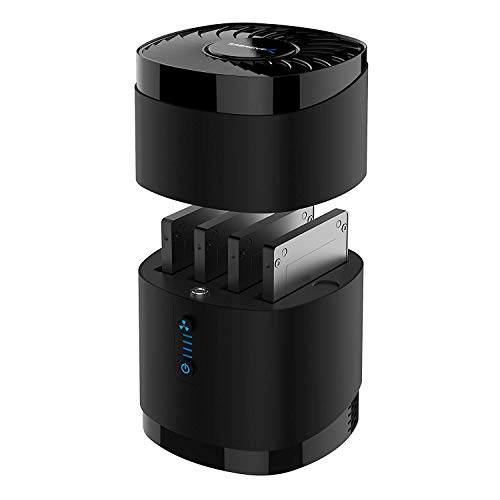
- Supports up to four 2.5-inch SATA drives
- Whisper-quiet cooling fan for long-term use
- Tool-free magnetic cover for quick swaps
Best For: Multi-drive 2.5-inch storage and frequent drive swapping
Dual-Bay RAID Cooler
MAIWO Dual Bay SATA RAID Enclosure

- Dual 3.5-inch bays with up to 48TB expansion
- RAID 0, 1, JBOD, and Normal modes
- Adjustable cooling fan with on/off switch
Best For: Desktop RAID storage with active cooling and two-drive expansion
Budget Single-Bay Workhorse
FIDECO 3.5/2.5 Inch SATA Enclosure

- Supports 2.5-inch and 3.5-inch SATA drives
- Includes cooling fan and 12V power adapter
- USB 3.0 with UASP support
Best For: Simple single-drive storage and everyday backups
RAID Performance Pick

- Two-bay enclosure with RAID 0/1, JBOD, and PM
- Built-in two-speed fan and aluminum body
- USB-C 3.1 Gen2 with UASP support
Best For: Dual-drive users who need RAID and active cooling
4-Bay High-Capacity Pick

- Up to 80TB across four drives
- Aluminum build with 2-inch fan
- USB A/C 3.0 plus eSATA support
Best For: multi-drive users who want high capacity and active cooling
Compact Dual-Bay Value
Aukuoy 2 Bay Cooling Enclosure

- Two-drive enclosure with up to 48TB
- Fan plus ventilated side panel
- USB-C and USB-A cable included
Best For: simple dual-drive storage with active cooling
Tool-Free Hot-Swap Pick

- Three-drive enclosure with hot-swap support
- Tool-free trays for easy installation
- Aluminum body with 2.7-inch fan
Best For: users who want easy drive swapping and active cooling
Desktop Dock With Fan – SABRENT USB 3.0 to SATA Dock
If you want a hard drive enclosure with cooling fan that’s built for quick swaps and straightforward backups, this Sabrent dock is a practical pick. It supports 2.5-inch and 3.5-inch SATA drives, adds active cooling, and keeps setup simple with plug-and-play operation.
Best For: Users who want an easy dock for SATA hard drives, cloning, and large backups.
Pros:
- Built-in cooling fan helps keep drives running cooler during use.
- Supports standard 2.5-inch and 3.5-inch SATA hard drives up to 22TB.
- Hot-swappable, plug-and-play design needs no drivers.
- USB 3.0 offers up to 5 Gbps transfer rates and is backward compatible.
Cons:
- Works as a dock rather than a closed portable enclosure.
- Cooling fan adds moving parts and potential noise.
- Designed for SATA drives only.
Overall, this is a simple, high-capacity docking solution for users who value convenience and built-in cooling. The included Acronis True Image for Sabrent download is a useful bonus for drive cloning and migration.
Single-Bay Aluminum Box – Vantec NexStar HX 3.5" Fan Enclosure
Vantec NexStar HX, 3.5" SATA III Hard Drive Enclosure USB 3.0 With Fan (NST-387S3-BK)
Check Price On AmazonThis hard drive enclosure with cooling fan is aimed at users who want a simple 3.5-inch SATA home for a single drive. It combines a metal enclosure, front ventilation, and a large variable-speed fan for added airflow during everyday storage use.
Best For: Anyone needing a 3.5-inch SATA enclosure with active cooling for desktop storage.
Pros:
- Large 60mm fan includes an on/off and variable switch.
- Vents are designed to exhaust hot air and let in cool air.
- Supports 3.5-inch SATA III drives with backward compatibility.
- Hot-swappable and plug-and-play with no drivers needed on supported systems.
Cons:
- Supports only one 3.5-inch drive.
- Not compatible with phones.
- Intended for specific desktop and laptop operating systems.
For a single-drive setup where airflow matters, this enclosure keeps the formula focused and practical. It is a good fit when you want a straightforward SATA III enclosure with a fan and no software setup.
Quad Drive Cooler – SABRENT 4-Bay 2.5in Fan Dock
If you need a hard drive enclosure with cooling fan for multiple 2.5-inch drives, this four-bay Sabrent dock is built for high-capacity storage and easy swapping. It offers tool-free access, USB 3.0 speeds, and continuous cooling for SSDs or HDDs.
Best For: Users managing several 2.5-inch SATA drives who want fast access and cooling.
Pros:
- Supports up to four 2.5-inch SATA SSDs or HDDs, each up to 16TB.
- Built-in whisper-quiet fan helps keep drives cool.
- Tool-free, magnetic cover design makes drive swaps easy.
- Works with Windows, macOS, and Linux without drivers.
Cons:
- Not compatible with RAID or 15mm drives.
- Supports only 2.5-inch drives.
- Fan and dock design may be more than needed for single-drive use.
This is a strong option when you want to manage several SATA drives in one place without sacrificing airflow. The 24/7 operation focus makes it especially useful for frequent access or long-running storage tasks.
Dual-Bay RAID Cooler – MAIWO Dual Bay SATA RAID Enclosure
For buyers comparing a hard drive enclosure with cooling fan and RAID features, this MAIWO dual-bay model adds flexibility on top of active cooling. It supports two 3.5-inch SATA drives, multiple RAID modes, and a Type-C USB 3.1 Gen2 connection for fast transfer capability.
Best For: Users who want two-drive storage expansion with RAID options and active cooling.
Pros:
- Supports 2 x 3.5-inch SATA HDDs with up to 48TB total capacity expansion.
- Offers RAID 0, RAID 1, JBOD, and Normal modes.
- Includes an adjustable cooling fan with on/off switch.
- USB 3.1 Gen2 and UASP support up to 10Gbps bandwidth.
Cons:
- 2.5-inch drives require a 2.5-to-3.5 bracket.
- Mechanical drive speeds still limit real-world transfer rates.
- Designed around dual-bay desktop use, not portability.
This enclosure is a solid choice when storage expansion and RAID control matter as much as cooling. The aluminum body, strong power supply, and switchable fan make it well suited to a more permanent desktop setup.
Budget Single-Bay Workhorse – FIDECO 3.5/2.5 Inch SATA Enclosure
If you want a hard drive enclosure with cooling fan for a straightforward desktop setup, this FIDECO model keeps the focus on simple plug-and-play storage. It supports 2.5-inch and 3.5-inch SATA drives, includes a 12V power adapter, and offers USB 3.0 speeds with UASP support for better transfer performance.
Best For: Users who need a basic single-drive enclosure for everyday backups and desktop storage.
Pros:
- Supports both 2.5-inch and 3.5-inch SATA HDDs and SSDs.
- Includes a cooling fan plus a 12V power adapter for stable operation.
- USB 3.0 with UASP support for improved transfer performance.
- Compatible with Windows, Mac, and Linux, with no driver setup required.
Cons:
- Does not support IDE hard drives.
- Single-drive design only, so it is not for RAID or multi-bay workflows.
- New drives may need to be initialized before they are recognized.
This is a practical pick if you want a simple hard drive enclosure with cooling fan and broad compatibility without extra features. It is best suited to users who value ease of use over advanced storage management.
RAID Performance Pick – MAIWO Dual Bay RAID Enclosure
This MAIWO hard drive enclosure with cooling fan is aimed at users who need more than simple external storage. With two bays, RAID modes, USB-C 3.1 Gen2 connectivity, and an aluminum case, it is designed for faster workflows and better heat control during heavier use.
Best For: Users who want a dual-bay enclosure with RAID options and active cooling for larger storage projects.
Pros:
- Supports 2.5-inch and 3.5-inch SATA drives in two bays.
- Offers RAID 0, RAID 1, JBOD/LARGE, and PM/NORMAL modes.
- Built-in two-speed cooling fan and aluminum body help dissipate heat.
- Includes USB-C 3.1 Gen2 and UASP support for fast transfers.
Cons:
- 2.5-inch drives may require an additional mounting bracket.
- RAID setup requires care and data should be backed up first.
- More complex than a basic single-bay enclosure.
For buyers comparing a hard drive enclosure with cooling fan and added storage flexibility, this one stands out for RAID support and dual-bay capacity. It is a stronger fit for users who want performance plus configuration options.
Tool-Free Big-Capacity Pick – Yottamaster Dual Bay 3.5-Inch Enclosure
If you need a hard drive enclosure with cooling fan for frequent drive swaps and large-capacity storage, this Yottamaster model is built for convenience. Its magnetic tool-free top cover makes installation fast, while the dual-bay design, USB 3.1 Gen1 Type-C connection, and airflow-focused cooling are aimed at reliable day-to-day use.
Best For: People who want easy tool-free access to large 3.5-inch SATA storage with active cooling.
Pros:
- Tool-free magnetic top cover makes drive swaps quick and simple.
- Supports up to 48TB total capacity across two 24TB bays.
- 60mm fan and air duct design are built for continuous cooling.
- UASP and TRIM support help improve transfer efficiency.
Cons:
- Designed for 3.5-inch drives, so it is not the most flexible choice for 2.5-inch use.
- USB 3.1 Gen1 is not the fastest class available in this roundup.
- Best suited to SATA storage only, not IDE drives.
This is a solid choice if you value easy access, large capacity, and dependable thermal management in a hard drive enclosure with cooling fan. It makes the most sense for users who want simple expansion without fiddly hardware.
4-Bay High-Capacity Pick – CENMATE 4 Bay SATA Enclosure
If you need a hard drive enclosure with cooling fan for a larger desktop storage setup, this 4-bay CENMATE model is built for capacity and steady operation. It supports 2.5/3.5-inch SATA HDDs and SSDs, offers up to 80TB total capacity, and includes USB A/C 3.0 plus eSATA connections for flexible use with Windows, Mac, and Linux systems.
Best For: Users who want a high-capacity external storage enclosure for multiple drives without RAID or NAS features.
Pros:
- Supports up to 80TB total storage across four drives
- Built-in aluminum-alloy body and 2-inch cooling fan for heat management
- USB 3.0 and eSATA connectivity with included A/C cables
- Plug-and-play compatibility for Windows, Mac, and Linux
Cons:
- Fan noise is listed around 40-50 decibels
- No RAID or NAS functionality
- Requires DC 12V power adapter for operation
Overall, this is a practical choice when raw capacity and active cooling matter more than advanced storage management. It’s well suited to users who need a straightforward multi-drive DAS enclosure and can accept some fan noise in exchange for better thermal handling.
Compact Dual-Bay Value – Aukuoy 2 Bay Cooling Enclosure
This hard drive enclosure with cooling fan is a solid fit if you want simple two-drive expansion in a compact aluminum chassis. It supports 2.5/3.5-inch SATA HDDs and SSDs, delivers up to 48TB total storage, and uses USB 3.0 with a 2-in-1 USB-C/USB-A cable for broad compatibility across modern devices.
Best For: Buyers who want a smaller dual-bay storage enclosure with active cooling and easy plug-and-play setup.
Pros:
- Supports two drives with up to 48TB total capacity
- Built-in fan and ventilated side panel help reduce heat buildup
- Includes a 2-in-1 USB-C and USB-A cable
- Works with Windows, Mac, and Linux without drivers
Cons:
- Only supports two drives
- No RAID or NAS features
- Uses USB 3.0 speeds up to 5Gbps, not faster-class storage interfaces
For users who do not need a large multi-bay tower, this model keeps the setup simple while still adding active cooling. It is a practical choice for backups and everyday storage expansion where compatibility and ease of use matter most.
Tool-Free Hot-Swap Pick – CENMATE 3 Bay SATA Enclosure
If you want a hard drive enclosure with cooling fan that also makes drive changes easier, this 3-bay CENMATE model adds hot-swapping and tool-free trays to a cooled aluminum design. It supports 2.5/3.5-inch SATA HDDs and SSDs, offers up to 20TB per drive, and includes USB A/C 3.0 plus eSATA for plug-and-play use on Windows, Mac, and Linux.
Best For: Users who want a three-drive enclosure with hot-swap convenience and straightforward installation.
Pros:
- Tool-free trays make drive installation and removal easy
- Hot-swappable design lets you replace drives without powering off
- Aluminum-alloy housing and 2.7-inch fan help manage heat
- USB 3.0 and eSATA connectivity with broad OS support
Cons:
- Fan noise is listed around 40-50 decibels
- No RAID or NAS functionality
- Overall capacity depends on using drives up to 20TB each
This is a strong option if convenience is as important as cooling and capacity. The combination of hot-swap support and tool-free setup makes it especially appealing for users who change drives often or want a more flexible desktop DAS.
How We Picked the Best Hard Drive Enclosure with Cooling Fan
We focused on enclosure designs that make sense for real-world use: solid cooling, broad SATA compatibility, sensible drive support, and connection options that match current desktops and laptops. We also favored models with useful extras such as tool-free access, RAID support, dual-bay or multi-bay layouts, and USB-C or USB 3.x connectivity where available.
Quick Comparison
In simple terms, the best choice depends on how many drives you want to run and how much performance you need. Single-bay units are easier to set up and work well for one large backup drive. Dual-bay and multi-bay options are better if you want redundancy, expansion, or a compact storage hub for media and project files. A Hard Drive Enclosure with Cooling Fan is especially useful once you move beyond one drive or plan longer copy sessions.
Key Buying Factors for a Hard Drive Enclosure with Cooling Fan
Drive Size and Type
Check whether the enclosure supports 2.5-inch, 3.5-inch, or both. Also confirm SATA HDD and SSD compatibility if you may switch between drive types later.
Cooling Performance
Fan size, vent placement, and chassis material all matter. Metal housings usually shed heat better than plastic, and a stronger fan helps during sustained transfers or RAID use.
Interface and Speed
USB 3.0, USB 3.1, USB-C, and eSATA can all be useful, but the drive itself and the enclosure controller determine real-world speed. If you want faster large-file transfers, look for modern USB-C or 10Gbps-class support.
Capacity and Bay Count
Choose the smallest bay count that still fits your workflow. One bay is ideal for backups and portable storage. Two bays can support mirroring or a work/storage split. Three- and four-bay units are better for users building a compact local archive.
Power and Reliability
3.5-inch drives usually need an external power adapter, while some smaller enclosures are bus-powered. For always-on or heavy-use setups, stable power delivery is more important than convenience.
Who Should Buy Which Hard Drive Enclosure with Cooling Fan?
If you want a simple backup drive, choose a single-bay enclosure with easy setup and dependable cooling. If you need data protection or are managing multiple drives, a dual-bay RAID-capable model is the smarter fit. Users with larger media libraries or workstation-style storage needs should look at 3-bay or 4-bay options with stronger airflow and USB-C or eSATA connectivity. In short, the best Hard Drive Enclosure with Cooling Fan is the one that matches your drive size, workload, and expansion plans without adding unnecessary complexity.