If you want fast transfers, dependable backup options, and cleaner cable management, an external hard drive with Thunderbolt can be a smart upgrade.
Our picks cover rugged portable drives, high-capacity desktop storage, and high-speed SSD options for creators, professionals, and everyday users.
Best 10 External Hard Drive with Thunderbolt Picks for 2026
Speed Leader
OWC Envoy Ultra 2TB Thunderbolt 5 Portable SSD

- Over 6000MB/s Thunderbolt 5 speeds
- Works with Thunderbolt 3/4 and USB4
- Rugged, shock-resistant, waterproof
Best For: Fast portable SSD workflows and modern Thunderbolt setups
Desktop Archive Choice

- 10TB desktop storage capacity
- Up to 240MB/s speeds
- USB-C and Thunderbolt 3 compatible
Best For: Studio and desktop users needing large-capacity storage
Compact Travel SSD
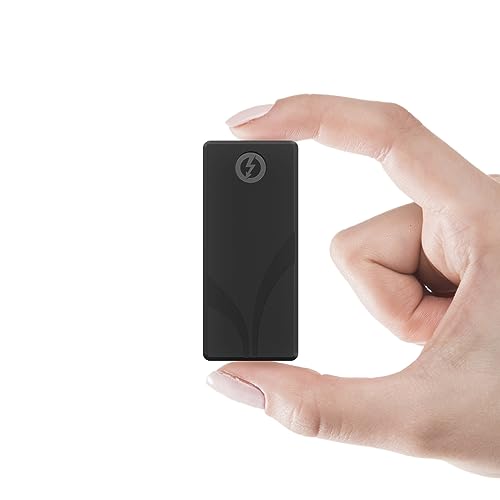
- Up to 2700MB/s over Thunderbolt 3
- Very compact aluminum 2TB SSD
- Both Thunderbolt and USB cables included
Best For: Portable users who want a tiny fast Thunderbolt SSD
Rugged Portable Pick

- Thunderbolt 3 compatible with USB-C-ready connectivity
- Rugged enclosure with shock mounts and bumper protection
- Portable 4TB HDD for files, photos, and video backups
Best For: Traveling creators and users who need a tough portable backup drive
Mac Security Pick
WD My Passport Ultra for Mac 5TB

- USB-C and USB 3.1 compatible for Mac use
- Password protection with 256-bit AES hardware encryption
- 5TB portable drive with a metal enclosure
Best For: Mac users who want portable backup with extra security
Desktop Capacity Pick

- Large 8TB desktop HDD for backups and archives
- Bus-powered USB-C design with no wall adapter
- Includes Rescue Data Recovery Services
Best For: Desktop users who need lots of storage and simple one-cable operation
Rugged Travel Pick

- Drop, shock, dust, and rain resistant
- 4TB portable storage for backups and media
- USB-C support for Mac and PC
Best For: Travel-ready users who want a tough portable backup drive
Big Capacity Budget Pick

- 5TB of portable storage
- Plug-and-play setup with USB 3.0
- Works with Mac, PC, PS4, and Xbox
Best For: Anyone who needs simple high-capacity portable storage
Simple Plug-and-Play Pick

- Compact and lightweight portable design
- Plug-and-play USB 3.2 Gen 1 / USB 3.0
- 2TB for everyday files and backups
Best For: People who want simple everyday storage in a small drive
Portable Rugged Pick – LaCie Rugged Thunderbolt USB 3.0 1TB
If you want an external hard drive with thunderbolt for fast transfers and better travel durability, this LaCie Rugged model is built for exactly that mix. It pairs Thunderbolt and USB 3.0 connectivity with a portable, drop-, dust-, and water-resistant design, making it a practical option for working in the field or moving between locations.
Best For: Creative users who need a rugged portable drive for Mac or PC workflows.
Pros:
- Thunderbolt cable is integrated and wraps around the enclosure when not in use
- Up to 130MB/s transfer speeds for everyday editing and backups
- Drop, dust, and water resistance adds peace of mind on the go
- Includes a one-month Adobe Creative Cloud All Apps Plan trial
Cons:
- 1TB capacity is modest compared with desktop drives
- Mechanical HDD performance is slower than SSD-based options
This is a solid pick if durability matters as much as speed. It is especially appealing for portable creative work, though buyers needing maximum performance or more capacity may want to look at newer SSD-based Thunderbolt drives.
Speed Leader – OWC Envoy Ultra 2TB Thunderbolt 5 Portable SSD
If you need an external hard drive with thunderbolt that pushes far beyond typical portable storage speeds, the OWC Envoy Ultra is aimed at high-demand workflows. Its Thunderbolt 5 NVMe design is built for fast project transfers, while backward compatibility helps it work across Thunderbolt 3, Thunderbolt 4, and USB4 systems.
Best For: Professionals who want top-tier portable SSD speed and broad compatibility.
Pros:
- Over 6000MB/s performance for very fast transfers
- Works with Thunderbolt 3, Thunderbolt 4, and USB4 machines
- Bus-powered with a built-in Thunderbolt cable
- Rugged, shock-resistant, and waterproof protection
Cons:
- Premium speed-focused drive may be more than casual users need
- Best performance depends on compatible high-speed Thunderbolt hardware
This is the strongest performance option in the group if speed is your priority. It stands out for its blend of portability, rugged construction, and modern Thunderbolt 5 performance.
Desktop Archive Choice – LaCie d2 Professional 10TB
For buyers looking for an external hard drive with thunderbolt in a desktop format, the LaCie d2 Professional is built for storage-heavy creative work. It offers a large 10TB capacity, up to 240MB/s speeds, and compatibility with USB-C and Thunderbolt 3 computers, making it a practical archive and project drive.
Best For: Creative users who need high-capacity desktop storage for editing and archiving.
Pros:
- 10TB capacity suits large media libraries and project archives
- Up to 240MB/s speeds for editing and file transfers
- Compatible with USB-C and Thunderbolt 3 computers
- Aluminum enclosure helps reduce noise and vibration
Cons:
- Desktop form factor is not meant for portable use
- Mechanical drive will not match SSD-level responsiveness
This drive makes sense when capacity matters more than pocketability. It is a strong fit for desks, studios, and anyone who wants dependable high-volume storage with Thunderbolt-ready connectivity.
Compact Travel SSD – SABRENT Rocket Nano XTRM 2TB
If you want an external hard drive with thunderbolt in a truly compact body, the Sabrent Rocket Nano XTRM is built for mobile professionals. It delivers up to 2700MB/s over Thunderbolt 3, falls back to USB 3.2 Gen 2 when needed, and keeps a small, bus-powered design that is easy to carry between jobs.
Best For: Users who want a tiny Thunderbolt SSD for fast portable work.
Pros:
- Up to 2700MB/s over Thunderbolt 3 for fast transfers
- Includes both Thunderbolt/USB-C and USB-C to USB-A cables
- Very compact 2TB aluminum body with silicone sleeve protection
- Works with Mac, PC, and Linux
Cons:
- USB fallback speed tops out at 900MB/s, below Thunderbolt mode
- Small size means it is more specialized than a high-capacity desktop drive
This is a strong pick for users who prioritize portability without giving up fast Thunderbolt performance. It is especially useful for travel, field work, and anyone who wants a pocketable SSD with both cable types included.
Rugged Portable Pick – G-DRIVE ArmorATD 4TB
If you want an external hard drive with thunderbolt compatibility for rugged field use, the G-DRIVE ArmorATD is built around portability and protection rather than sheer desktop capacity. Its USB-C-ready design and Thunderbolt 3 compatibility make it easy to plug into modern Macs and laptops, while the reinforced enclosure is aimed at keeping your files safer on the move.
Best For: Creators, travelers, and anyone who needs a tough portable drive for backups and media transfer.
Pros:
- USB-C-ready and Thunderbolt 3 compatible for flexible modern connectivity
- Rugged enclosure with an easy-grip bumper, internal shock mounts, and rain, dust, and crush resistance
- Portable 2.5-inch design with 4TB of storage for photos, videos, and files
- Includes both USB-C to USB-C and USB-C to USB-A cables
Cons:
- Mechanical HDD speeds top out at up to 130MB/s, so it is not the fastest option
- Lower capacity than larger desktop drives if you need a huge archive
- Built for durability first, so it is less about premium speed than rugged backup
This is a practical choice if your priority is a durable external hard drive with thunderbolt support and dependable everyday backup. It is especially appealing when you want a portable drive that can handle travel, work sites, or general on-the-go storage.
Mac Security Pick – WD My Passport Ultra for Mac 5TB
For Mac users looking for an external hard drive with thunderbolt-adjacent USB-C convenience, the WD My Passport Ultra for Mac focuses on portability, security, and simple backup. It is formatted for Mac, uses a refined metal enclosure, and adds password protection with 256-bit AES hardware encryption for more controlled everyday storage.
Best For: Mac users who want a slim portable drive with backup and built-in security features.
Pros:
- USB-C and USB 3.1 compatible for modern Mac setups
- Formatted for Mac right out of the box
- Includes password protection with 256-bit AES hardware encryption
- 5TB capacity in a compact 2.5-inch portable form factor
Cons:
- Not a Thunderbolt drive, so it relies on USB-C/USB 3.1 connectivity instead
- Mechanical drive speeds are geared more toward backup than fast workflows
- Mac-focused formatting may be less convenient for mixed-platform users
This model makes sense if you want a secure, travel-friendly backup drive for a Mac workflow. It is less about raw performance and more about reliable portable storage with encryption and a polished design.
Desktop Capacity Pick – Seagate One Touch 8TB Desktop
If your priority is storage volume over portability, this external hard drive with thunderbolt-style modern connectivity is more of a desktop backup station than a carry-anywhere drive. The Seagate One Touch Desktop uses bus-powered USB-C, so you do not need a wall adapter, and its 8TB capacity makes it suited for large file libraries and regular backups.
Best For: Users who want a large-capacity desktop external drive for backups and shared storage.
Pros:
- 8TB capacity for large archives, projects, and media collections
- Bus-powered USB-C design means no wall outlet or power brick is required
- Works with most Windows and macOS systems
- Includes Rescue Data Recovery Services and a two-year limited warranty
Cons:
- Desktop 3.5-inch form factor is not meant for pocket portability
- Not a Thunderbolt drive; it uses USB-C connectivity instead
- Mechanical HDD performance is better for storage than speed-heavy editing workflows
This is a smart pick when you want maximum capacity and a simple single-cable setup. It is best treated as a stationary backup drive, especially if you value clutter-free desktop use and recovery coverage.
Rugged Travel Pick – LaCie Rugged USB-C 4TB
If you want an external hard drive with thunderbolt-style convenience in a USB-C portable drive, the LaCie Rugged USB-C 4TB is built for travel and everyday backups. Its big advantage is the tough, compact enclosure, which is made to handle drops, shocks, dust, and rain while still giving you 4TB of storage for files, photos, and video.
Best For: Mac and PC users who need a durable portable backup drive for travel or field use.
Pros:
- Drop, shock, dust, and rain resistant design adds extra peace of mind
- 4TB capacity handles large backups and media libraries
- USB-C connectivity suits modern laptops and desktops
- Works with both Mac and PC
Cons:
- It is a mechanical hard drive, so it is not as fast as an SSD
- No Thunderbolt interface is listed in the supplied specs
Overall, this is a strong pick if durability matters as much as capacity. It is best suited to users who want a reliable, portable storage option that can take more abuse than a typical desktop-style drive.
Big Capacity Budget Pick – Seagate Portable 5TB
If you are comparing an external hard drive with thunderbolt expectations but mainly need simple, roomy storage, the Seagate Portable 5TB keeps things straightforward. It offers 5TB of portable capacity, plug-and-play setup, and USB 3.0 connectivity for quick backups, media storage, and general file access.
Best For: Users who want a simple high-capacity portable drive for Mac, PC, or consoles.
Pros:
- 5TB capacity gives you plenty of room for large files and backups
- Plug-and-play setup with automatic recognition and no software required
- Works with Windows, Mac, PS4, and Xbox models listed in the notes
- Includes an 18-inch USB 3.0 cable for easy setup
Cons:
- Uses USB 3.0 Type-A, not USB-C
- No Thunderbolt interface is listed in the supplied specs
This is a practical storage-first choice rather than a premium connectivity pick. If your priority is easy expansion and lots of space, it delivers a lot of capacity without adding complexity.
Simple Plug-and-Play Pick – WD Elements Portable 2TB
The WD Elements Portable 2TB is a straightforward external hard drive with thunderbolt-style simplicity in a compact USB drive, focused on easy storage expansion. It uses USB 3.2 Gen 1 / USB 3.0 connectivity and plug-and-play setup, making it a practical option for photos, videos, documents, and general personal storage.
Best For: Users who want a no-fuss portable drive for everyday file storage and backup.
Pros:
- Small, lightweight portable design is easy to carry
- Plug-and-play expandability keeps setup simple
- USB 3.2 Gen 1 / USB 3.0 interface supports standard modern connections
- Compatible with PCs and listed gaming consoles/desktops
Cons:
- 2TB capacity is smaller than the other drives in this roundup
- No Thunderbolt interface is listed in the supplied specs
For basic storage expansion, this drive is easy to recommend. It is the most minimal option here, which makes it useful if you just want dependable external storage without extra features.
How We Picked the Best External Hard Drive with Thunderbolt
We focused on real-world value: connection type, speed, portability, capacity, durability, software support, and cross-platform compatibility. Because an External Hard Drive with Thunderbolt can mean either a traditional HDD or a much faster SSD, we included both where they make sense.
Quick Comparison
For speed-first buyers, Thunderbolt SSDs are the best fit. For large backups and media archives, desktop HDDs usually offer more storage for the money. Rugged portable models sit in the middle, giving you a balance of mobility and protection. If you work on a Mac, also check whether the drive is fully formatted or optimized for macOS out of the box.
Key Buying Factors for External Hard Drive with Thunderbolt
Speed and Interface
Thunderbolt is ideal when you move large video files, photo libraries, or project folders often. Check whether the drive is Thunderbolt 3 or Thunderbolt 5, and remember that the drive’s internal storage type matters just as much as the port. An SSD will be dramatically faster than an HDD, even with the same Thunderbolt connection.
Capacity and Use Case
Choose 1TB to 2TB for portable editing or daily carry, 4TB to 5TB for mixed backup and media storage, and 8TB to 10TB if you need a desktop archive or long-term local backup.
Durability and Portability
If you travel or work on location, ruggedization matters. Shock, dust, and water resistance can protect your data, but it often comes with a slightly larger size or higher cost.
Compatibility and Included Cables
Look for clear Mac and Windows support, plus bundled USB-C or Thunderbolt cables. Some drives are Thunderbolt-compatible but still run over USB-C in certain setups, so verify the maximum performance you can actually get from your computer.
Who Should Buy Which External Hard Drive with Thunderbolt?
If you need the fastest workflow for creative work, go with a Thunderbolt SSD. If you want a dependable backup drive for Time Machine, File History, or general storage, a high-capacity HDD is the better value. If you need something for field use, choose a rugged portable drive. For desktop users archiving large libraries, a higher-capacity External Hard Drive with Thunderbolt-style connectivity and a stable enclosure is the most practical choice.