Choosing an external hard drive with RAID is about more than raw capacity. You’re balancing speed, data protection, and how much drive management you want to handle day to day.
This roundup focuses on desktop RAID storage for backups, creative workflows, and expandable media libraries, with options for solo users and teams that need dependable performance.
Best 10 External Hard Drive with Raid Picks for 2026
Large-Capacity RAID Desktop Backup

- 20TB desktop RAID enclosure
- USB 3.1 Gen 1 with USB 3.0 compatibility
- Password protection and AES encryption
Best For: Desktop backup with high capacity and built-in security
Thunderbolt 3 Performance RAID

- 40TB RAID desktop drive
- Thunderbolt 3 connection
- 550 MB/s rated read speed
Best For: Fast Thunderbolt 3 desktop storage with large capacity
Expandable Multi-Bay Storage
TerraMaster D4-320 4-Bay Enclosure

- 4-bay diskless DAS enclosure
- USB 3.2 Gen 2 up to 10Gbps
- No RAID function included
Best For: Flexible multi-drive expansion without built-in RAID
Balanced RAID Desktop Storage
- 16TB RAID-ready desktop drive
- USB 3.1 Gen 1 with dual USB hub ports
- AES encryption and password protection
Best For: Secure desktop backup with solid capacity
4-Bay RAID Enclosure
CENMATE Aluminum 4-Bay RAID Enclosure

- 4-bay DAS enclosure with 8 RAID modes
- Up to 80TB across 2.5-inch and 3.5-inch drives
- USB A/C 3.0 plus eSATA connectivity
Best For: Large-capacity users who want configurable RAID storage
Simple Capacity Pick
WD 20TB Elements Desktop External Hard Drive

- 20TB desktop external hard drive
- Plug-and-play for Windows PCs
- USB 3.0 transfer support
Best For: Users who want straightforward high-capacity storage
Pro RAID Performer
SanDisk Professional G-RAID Project 2

- Ships in RAID 0 for faster transfers
- Thunderbolt 3 and USB 3.2 Gen 2x1 support
- PRO-BLADE SSD Mag slot for expansion
Best For: Creative pros needing fast desktop RAID storage
Simple Bulk Storage
WD Elements 18TB Desktop Drive

- 18TB desktop external storage
- USB 2.0/3.0 plug-and-play setup
- Fast transfers for basic storage needs
Best For: Simple high-capacity storage and backup
Pro RAID Workhorse

- RAID 0/1 desktop storage
- Up to 550MB/s transfer speeds
- 48TB with enterprise-class drives
Best For: Professional media creators needing RAID flexibility
Smaller RAID Option
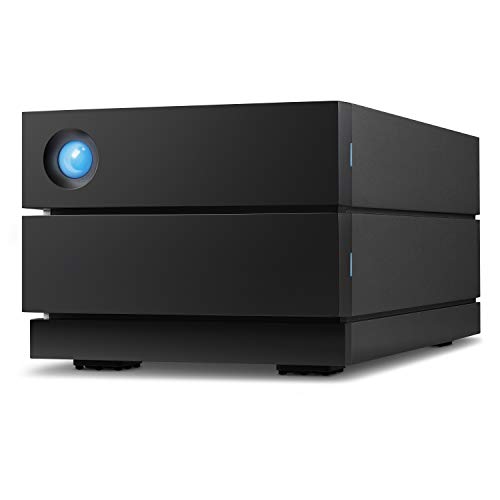
- RAID 0/1 support in a smaller size
- Up to 440MB/s speed
- USB-C/USB 3.0 for Mac and PC
Best For: Users wanting a compact RAID desktop drive
Large-Capacity RAID Desktop Backup – WD My Book Duo 20TB
If you want an external hard drive with raid for big desktop backups, the WD My Book Duo brings 20TB of capacity, RAID-0 readiness, and built-in backup tools in a single enclosure. It also includes password protection, 256-bit AES hardware encryption, and two USB 3.0 hub ports for added convenience.
Best For: Desktop users who want high-capacity RAID storage with backup and security features.
Pros:
- 20TB desktop RAID storage with RAID-0 ready out of the box
- USB 3.1 Gen 1 support with USB 3.0 compatibility
- 256-bit AES hardware encryption and password protection
- Includes auto backup software and system backup support
Cons:
- Designed for desktop use rather than portability
- Requires external power and a larger footprint
- Speed is listed at 360 MB/s, which may not suit every heavy workflow
Overall, this model is a strong fit if you want a roomy RAID desktop drive with backup software and security features built in. It balances capacity, convenience, and protection in a straightforward all-in-one package.
Thunderbolt 3 Performance RAID – Glyph BlackBox Pro 40TB
Glyph BlackBox Pro 40TB RAID Desktop Drive Thunderbolt 3 | 7200 RPM, Up to 550MB/s
Check Price On AmazonFor creative workstations that need an external hard drive with raid and fast connection speeds, the Glyph BlackBox Pro pairs 40TB of storage with Thunderbolt 3 and a desktop RAID design. Its 7200 rpm drive and rated 550 MB/s read speed make it a practical choice when you need a high-capacity workspace drive.
Best For: Thunderbolt 3 desktop users who want a high-capacity RAID drive for fast local storage.
Pros:
- 40TB RAID desktop drive with Thunderbolt 3 connectivity
- Rated read speed up to 550 MB/s
- 7200 rpm drive for desktop performance
- Includes Thunderbolt 3 cable and rugged removable cover
Cons:
- Heavier than typical desktop drives at 5.01 kg
- Requires Thunderbolt 3 to get the intended connection speed
- More specialized than a simple USB external drive
This is a strong option if your setup already relies on Thunderbolt 3 and you want a large RAID storage pool. It is clearly aimed at performance-focused desktop workflows rather than casual backup use.
Expandable Multi-Bay Storage – TerraMaster D4-320 4-Bay Enclosure
If you need an external hard drive with raid-style expansion but want to build your own setup, the TerraMaster D4-320 is a 4-bay diskless enclosure with USB 3.2 Gen 2 and support for up to 120TB total capacity. Note that it is a DAS, not a NAS, and it supports four individual disks with no RAID function.
Best For: Users who want a fast diskless 4-bay enclosure for flexible storage expansion.
Pros:
- 4-bay diskless enclosure with support for up to 120TB total capacity
- USB 3.2 Gen 2 with up to 10Gbps transfer rate
- Hot-swappable and tool-free drive trays
- Compatible with Mac, Windows, and Linux
Cons:
- No RAID function is included
- Drives are not included, so you must buy them separately
- DAS design may not suit users who want network storage
The D4-320 makes sense if you want fast, flexible multi-drive expansion and do not need built-in RAID. It is best viewed as a clean, high-speed enclosure for users who want to choose their own drives and storage setup.
Balanced RAID Desktop Storage – WD My Book Duo 16TB
The WD My Book Duo is an external hard drive with raid built for desktop users who want a large backup solution with simple setup features. This 16TB model offers RAID-0 readiness, USB 3.1 Gen 1 support, password protection, 256-bit AES hardware encryption, and two USB 3.0 hub ports.
Best For: PC users who want a secure desktop RAID drive with plenty of storage.
Pros:
- 16TB desktop RAID storage with RAID-0 ready out of the box
- USB 3.1 Gen 1 and USB 3.0 compatibility
- Includes auto backup software and system backup support
- 256-bit AES hardware encryption with password protection
Cons:
- Desktop design is not meant for travel
- Requires more space and power than a portable drive
- Capacity is lower than the 20TB version in the same line
This model is a practical middle ground if you want the My Book Duo feature set without jumping to the highest capacity version. It keeps the same desktop RAID convenience, security, and backup tools in a slightly smaller package.
4-Bay RAID Enclosure – CENMATE Aluminum 4-Bay RAID Enclosure
If you want an external hard drive with raid support that can serve as a flexible desktop storage hub, this CENMATE 4-bay enclosure is built for that role. It accepts 2.5-inch and 3.5-inch SATA HDDs/SSDs, supports up to 80TB total capacity, and offers multiple RAID modes for users who want control over performance, redundancy, or simple combined storage.
Best For: Users who want a 4-bay DAS enclosure for customizable RAID setups, large-capacity backups, or mixed HDD/SSD storage.
Pros:
- Supports 8 RAID modes, including RAID 0/1/3/5/10 plus CLONE, LARGE, and NORMAL.
- Works with 2.5-inch and 3.5-inch SATA HDDs/SSDs and supports up to 80TB total capacity.
- Includes USB A/C 3.0 and eSATA cables for broad connectivity.
- Aluminum-alloy build and built-in fan are designed to help with heat management.
Cons:
- Fan noise is listed at around 40–50 decibels, which may bother noise-sensitive users.
- Changing RAID modes requires a specific reset-and-toggle process.
- Mac OS does not have RAID software support noted in the product details.
This is a practical pick if you need a hardware-based RAID enclosure rather than a simple external drive. The tradeoff is that it is more of a storage system than a plug-and-forget drive, so it makes the most sense for users comfortable managing RAID modes and drive installation.
Simple Capacity Pick – WD 20TB Elements Desktop External Hard Drive
The WD 20TB Elements is a straightforward external hard drive with raid-style use in the sense that it can serve as a simple expansion target for backups and storage, but it does not offer RAID features itself. For buyers who mainly want a large desktop drive that is ready for Windows PCs and easy to use, it focuses on capacity, plug-and-play convenience, and WD’s typical desktop-drive approach.
Best For: Users who want a simple high-capacity desktop external drive for Windows storage and backups.
Pros:
- Large 20TB capacity for bulk storage and backups.
- Plug-and-play ready for Windows PCs.
- USB 3.0 interface supports fast data transfers.
- Simple desktop design with WD quality inside and out.
Cons:
- Reformatting is required for use with macOS.
- No RAID modes or multi-drive expansion features are listed.
- Best suited to basic storage rather than performance-tuned workflows.
If your priority is capacity over RAID flexibility, this model is the simplest option in the group. It is best treated as a large single-drive storage solution rather than a RAID enclosure or performance-oriented array device.
Pro RAID Performer – SanDisk Professional G-RAID Project 2
For creators who want an external hard drive with raid performance built in, the SanDisk Professional G-RAID Project 2 is the most premium option here. It ships in RAID 0 for improved speed, uses two 7200RPM Ultrastar enterprise-class drives, and combines Thunderbolt 3 with USB 3.2 Gen 2×1 connectivity for fast transfers and editing workflows.
Best For: Creative professionals who need fast RAID 0 storage for editing, transfers, and backup workflows.
Pros:
- Ships in RAID 0 for improved performance.
- Up to 540MB/s read and 490MB/s write in the listed configuration.
- Thunderbolt 3 plus USB 3.2 Gen 2×1 support broadens compatibility.
- Includes a PRO-BLADE SSD Mag slot to add SSD capacity and speed.
Cons:
- RAID 0 prioritizes speed, so it is not the same as a redundancy-focused setup.
- Premium feature set may be more than casual users need.
- Best performance depends on using the right high-speed connections.
This is the strongest pick for demanding desktop workflows where transfer speed matters more than simplicity. If you are editing large media files or want a high-performance RAID desktop drive, it offers the best blend of speed, enterprise-class components, and expansion options.
Simple Bulk Storage – WD Elements 18TB Desktop Drive
If you want an external hard drive with raid-style big capacity benefits without getting into RAID hardware or setup, the WD Elements 18TB desktop drive is a straightforward add-on storage option. It is built for plug-and-play use on Windows PCs and focuses on fast transfers, simple USB connectivity, and a large single-drive storage pool for business or personal files.
Best For: Buyers who need a simple, high-capacity desktop external drive for everyday storage and backups.
Pros:
- 18TB of high-capacity storage in a desktop form factor
- USB 2.0/3.0 connectivity with plug-and-play setup for Windows PCs
- Designed for fast data transfers and broad compatibility with PC, Mac, laptop, and gaming console use
- Backed by WD quality and a 2-year limited warranty
Cons:
- Not a true RAID enclosure, so it does not offer RAID 0/1 configuration
- Mechanical drive design is less specialized for pro media workflows than dual-drive RAID models
- Best fit is simple storage, not redundancy-focused data management
This is the easiest option in the group if your priority is sheer capacity and simple external storage. It is a practical choice for users who want one large desktop drive rather than a more complex RAID setup.
Pro RAID Workhorse – LaCie 2big RAID 48TB Desktop
For buyers searching for an external hard drive with raid features, the LaCie 2big RAID 48TB is the most direct fit here. It is a desktop RAID storage solution with two hot-swappable enterprise-class drives, RAID 0/1 setup through a step-by-step wizard, and transfer speeds up to 550MB/s for demanding media workflows.
Best For: Photographers, indie filmmakers, and YouTubers who need large, configurable RAID storage with redundancy or performance options.
Pros:
- Supports RAID 0/1 configuration for performance or redundancy
- 48TB capacity with up to 550MB/s speeds
- Hot-swappable IronWolf Pro enterprise-class drives for reliability
- USB-C and USB 3.0 compatibility plus Rescue Data Recovery Services
Cons:
- Large desktop unit is better suited to a fixed workstation than portability
- Higher-end RAID features may be more than casual users need
- Uses a dual-drive design, so it is more complex than a single external drive
This is the strongest choice if RAID matters to your workflow. It combines serious capacity, fast throughput, and built-in redundancy options in a package aimed at professional media storage.
Smaller RAID Option – LaCie 2big RAID 16TB Desktop
The LaCie 2big RAID 16TB gives you the core benefits of an external hard drive with raid support in a smaller-capacity version. It offers RAID 0/1 setup, up to 440MB/s speeds, and USB-C/USB 3.0 compatibility, making it a practical desktop solution for users who want redundancy or performance options without moving to the 48TB model.
Best For: Mac and PC users who want entry-level RAID storage for business or personal use.
Pros:
- RAID 0/1 configuration for either speed or redundancy
- Up to 440MB/s read speed for desktop storage tasks
- USB-C and USB 3.0 compatibility with Mac and PC
- Hot-swappable IronWolf Pro enterprise-class drives and Rescue Data Recovery Services
Cons:
- Much lower capacity than the 48TB version
- Still a desktop RAID unit, so it is not designed for portable use
- Performance is strong, but not as fast as the 48TB model listed here
If you want the RAID features but do not need massive capacity, this model is the more compact choice. It keeps the same core RAID workflow and recovery support in a simpler-sized package.
How We Picked the Best External Hard Drive with Raid
We prioritized RAID-capable desktop drives and enclosures that offer a practical mix of storage capacity, performance, and reliability. Key factors included RAID support, interface speed, drive class, cooling, hardware quality, and how well each model fits common backup and creative-use scenarios.
We also favored products that are easy to set up for non-specialists, while still offering enough flexibility for users who want to choose between speed and redundancy.
Quick Comparison
For the fastest workflows, Thunderbolt 3 models are typically the best fit, especially for video editing and large file transfers. USB 3.x options are usually more affordable and broadly compatible, making them stronger choices for general backup and desktop storage.
Capacity needs matter as much as speed. Larger all-in-one systems are ideal if you want a simple External Hard Drive with Raid, while diskless enclosures are better if you prefer to install your own drives and tailor the array yourself.
Key Buying Factors for an External Hard Drive with Raid
RAID Mode and Data Protection
Look for hardware RAID options that support mirrored protection if your priority is redundancy, or striped configurations if you need maximum throughput. Remember that RAID improves availability and performance, but it is not a substitute for a separate backup.
Interface and Real-World Speed
Thunderbolt generally delivers better sustained performance than standard USB connections, which can matter for multicam video, large photo archives, and project files. If your workload is mostly backups or archival storage, USB may be perfectly adequate.
Capacity, Drive Count, and Expandability
Two-bay systems are simpler and often quieter, while four-bay enclosures offer more flexibility for capacity growth and different RAID levels. Diskless models let you choose your own drives, which can improve customization and long-term upgrade options.
Cooling, Noise, and Reliability
Multi-drive systems generate heat, so look for active cooling, solid airflow design, and enterprise-grade or NAS-oriented drives when reliability matters. Aluminum chassis and quality fans can help maintain performance during long transfers.
Who Should Buy Which External Hard Drive with Raid?
If you want a plug-and-play backup solution, choose a preconfigured desktop RAID unit. If you need maximum flexibility or want to build a custom array, a diskless enclosure is the better path.
Creators and editors should lean toward faster Thunderbolt systems with higher-end drives. Home users and small offices usually get the best value from USB-based models that emphasize simplicity, capacity, and straightforward redundancy.