The right condenser microphone for podcasting can make voices sound clearer, fuller, and more professional without requiring a complicated studio. This roundup compares ten USB and hybrid models for beginners, streamers, creators, and experienced hosts.
Consider your recording space, connection type, monitoring needs, and upgrade plans before choosing. The best microphone is the one that fits both your voice and your workflow.
Best 10 Condenser Microphone for Podcasting Picks for 2026
Best Overall USB Pick

- USB plug-and-play setup
- Four selectable pickup patterns
- Onboard controls and headphone monitoring
Best For: Podcasters and streamers wanting a versatile computer microphone
Best Studio-Style Choice
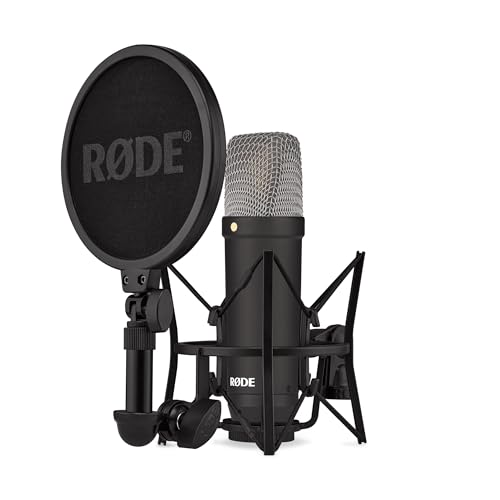
- Low-self-noise large-diaphragm design
- Tight cardioid vocal pickup
- Shock mount, pop filter, and XLR cable included
Best For: XLR-based podcast studios and vocal recording
Best Mobile-Friendly Option

- USB-C and Lightning adapters included
- Noise reduction mode for common background sounds
- Zero-latency monitoring and multiple controls
Best For: Multi-device creators and flexible podcast setups
Best Complete Budget Kit

- Direct USB plug-and-play connection
- Boom arm, shock mount, and pop filter included
- Cardioid capsule for focused voice capture
Best For: First-time podcasters building a home recording setup
Best Plug-and-Play Kit
MAONO A04 USB Podcast Microphone

- 192kHz/24-bit USB recording
- Includes arm, shock mount, and filters
- Plug-and-play setup for multiple devices
Best For: Beginners building an all-in-one USB podcasting setup
Best Simple Desktop Option
Amazon Basics USB Podcast Microphone

- 14mm diaphragm with cardioid pickup
- 360-degree adjustable desktop stand
- One-tap mute and USB plug-and-play
Best For: Simple desktop podcasting, streaming, and online calls
Best Upgradeable Setup

- USB and XLR connectivity
- MAONO Link software controls in USB mode
- Complete arm, shock mount, and filter kit
Best For: Creators wanting USB convenience with an XLR upgrade path
Best Plug-and-Play Value

- USB plug-and-play setup
- Cardioid pickup with volume knob
- Metal body with tripod stand
Best For: Computer podcasting, streaming, and voice-overs
Best Included Accessories
TONOR TC-777 Podcast Microphone

- Pop filter and shock mount included
- USB plug-and-play operation
- Mute and volume controls
Best For: Starter podcast and streaming desktops
Best for Headphone Monitoring
Samson Meteor Mic USB Condenser

- 25mm large diaphragm
- No-latency headphone monitoring
- Driver-free Mac and PC connection
Best For: Desktop podcasters monitoring recordings live
Best Overall USB Pick – Blue Yeti Blackout
The Blue Yeti Blackout is a versatile condenser microphone for podcasting when you want plug-and-play USB setup, onboard controls, and flexible pickup options. Its adjustable desktop stand and direct headphone monitoring make it practical for solo recording, streaming, and other computer-based audio work.
Best For: Podcasters, streamers, and creators who want one USB microphone for multiple recording setups.
Pros:
- Four pickup patterns—cardioid, omni, bidirectional, and stereo—support different recording arrangements.
- Onboard gain, headphone volume, pattern selection, and mute controls simplify live adjustments.
- Blue VO!CE software adds broadcast-style effects and audio samples.
- Includes a positionable desktop stand and supports a mic stand or boom arm.
Cons:
- USB connectivity makes it less suited to traditional XLR interfaces.
- The listed weight of 3.5 pounds may be substantial for some boom arms.
Choose this model if flexibility and convenient computer recording matter more than an XLR studio workflow.
Best Studio-Style Choice – RØDE NT1 Signature
The RØDE NT1 Signature is a studio-focused condenser microphone for podcasting with an XLR connection, a tight cardioid pattern, and notably low self-noise. It includes the core accessories needed to start after adding an audio interface.
Best For: Podcasters who already have, or plan to add, an XLR audio interface and want a focused vocal setup.
Pros:
- Large-diaphragm condenser design uses the established NT1 vocal voicing.
- Cardioid pickup focuses on the speaker and helps reject room sound.
- Very low listed self-noise supports clean vocal recordings.
- Includes an SM6 shock mount, pop filter, XLR cable, and dust cover.
Cons:
- Requires an audio interface rather than connecting directly to a computer.
- XLR setup involves more equipment than a USB microphone.
This is the strongest fit for a more traditional recording chain, especially when vocal clarity and a complete accessory bundle are priorities.
Best Mobile-Friendly Option – ZealSound K66 USB Podcast Mic
The ZealSound K66 is a convenient condenser microphone for podcasting across computers, tablets, and compatible mobile devices. It combines USB plug-and-play connectivity with noise reduction, real-time headphone monitoring, mute, volume, gain, and echo controls for adaptable recording.
Best For: Creators who record on multiple devices or need hands-on controls for podcasts, streams, classes, and meetings.
Pros:
- Includes USB-C and Lightning adapters for supported iPhone, iPad, and modern USB-C devices.
- Noise Reduction Mode is designed to reduce keyboard, fan, air-conditioner, and chatter sounds.
- Built-in 3.5mm headphone monitoring provides zero-latency listening.
- Dedicated controls adjust microphone volume, monitoring volume, echo, and mute.
Cons:
- Its extensive control set may be more than needed for a simple desktop setup.
- Noise reduction is a mode to activate, not a replacement for a quiet recording space.
Consider the K66 when device compatibility and quick control over monitoring and recording levels are central to your workflow.
Best Complete Budget Kit – FIFINE T669 USB Podcast Mic
The FIFINE T669 is a practical condenser microphone for podcasting that pairs USB plug-and-play recording with a boom arm, shock mount, and double pop filter. The bundled hardware makes it a straightforward choice for home studios, voice-over work, and computer-based podcasts.
Best For: New podcasters who want a USB microphone and mounting accessories in one package.
Pros:
- Connects directly to a PC or laptop without additional hardware or drivers.
- Cardioid condenser capsule focuses on sound from the front and helps avoid ambient noise.
- Includes a sturdy adjustable scissor-arm stand with C-clamp and desktop mounting options.
- Double pop filter and shock mount are included alongside the detachable USB cable.
Cons:
- It is incompatible with Xbox according to the supplied notes.
- The included USB setup is less suitable for users seeking an XLR studio chain.
The T669 offers strong practical value when you want to start recording without separately sourcing a boom arm and basic vocal accessories.
Best Plug-and-Play Kit – MAONO A04 USB Podcast Microphone
The MAONO A04 is a practical condenser microphone for podcasting when you want a complete USB setup without buying a separate audio interface. Its 192kHz/24-bit chipset, 16mm capsule, cardioid pattern, and included accessories make it ready for voice recording, streaming, and calls.
Best For: Beginners and creators who want an all-in-one USB podcasting setup with a boom arm, shock mount, pop filter, and windscreen.
Pros:
- Plug-and-play USB connection requires no extra drivers or sound card.
- Includes an adjustable arm stand, shock mount, pop filter, and windscreen.
- 16mm condenser capsule and cardioid pickup support clear voice recording.
- Works with most computers, PS4, PS5, and mobile phones.
Cons:
- Not compatible with Xbox.
- The included desk clamp is designed for desktops under 2.1 inches thick.
- It does not support MAONO Link software.
Choose the A04 if convenience and included hardware matter most. It is a straightforward USB option for a home podcasting station, though users seeking software controls or XLR connectivity should consider the A04 Gen2 instead.
Best Simple Desktop Option – Amazon Basics USB Podcast Microphone
The Amazon Basics model is a compact condenser microphone for podcasting, streaming, and online recording. Its 14mm diaphragm, cardioid pickup pattern, adjustable 360-degree stand, and USB plug-and-play connection keep the setup simple for PC and Mac users.
Best For: Podcasters and streamers who prefer a compact desktop microphone with a convenient mute button.
Pros:
- Cardioid pickup pattern helps isolate background noise.
- One-tap mute function is convenient for calls and live broadcasts.
- 360-degree adjustable stand supports flexible desktop positioning.
- Can detach for use with compatible tripods, boom arms, or 5/8-inch stands.
Cons:
- Supplied details list compatibility primarily with Windows and Mac computers.
- It includes the microphone and cable, rather than a full arm-and-filter kit.
- The enclosure is plastic or plastic alloy.
This is a sensible choice when you want a tidy desktop setup and quick mute control rather than a larger accessory bundle. Its cardioid pattern and simple USB connection suit basic podcasting, meetings, and streaming.
Best Upgradeable Setup – MAONO A04 Gen2 XLR/USB Mic
The MAONO A04 Gen2 is a versatile condenser microphone for podcasting that can start over USB and later connect to an audio interface or mixer through XLR. It combines a 16mm capsule and 192kHz/24-bit USB recording with MAONO Link controls for gain, noise reduction, EQ presets, compression, and limiting in USB mode.
Best For: Podcasters who want plug-and-play USB recording now while keeping an upgrade path to XLR studio equipment.
Pros:
- Offers both USB and XLR connectivity for flexible recording setups.
- MAONO Link provides software-based gain, noise reduction, EQ, compressor, and limiter controls in USB mode.
- Includes an arm stand, shock mount, pop filter, and windscreen.
- Cardioid pickup and a 16mm capsule support focused voice capture.
Cons:
- An XLR cable is not included.
- XLR operation requires phantom power.
- Not compatible with Xbox.
The A04 Gen2 is the strongest fit for creators who expect their setup to evolve. USB mode keeps initial recording easy, while XLR connectivity and software controls provide more flexibility as your podcasting workflow becomes more advanced.
Best Plug-and-Play Value – FIFINE K669B USB Microphone
The FIFINE K669B is a practical condenser microphone for podcasting when you want straightforward USB recording without a separate audio interface. Its cardioid pickup, metal construction, desktop tripod, and built-in volume knob suit basic podcasting, streaming, voice-over, and online meeting setups.
Best For: Beginners recording podcasts, streams, voice-overs, and calls on a computer or PS4/PS5.
Pros:
- Plug-and-play USB setup with a supplied USB cable.
- Cardioid pickup focuses on the main voice and helps reduce background noise.
- Built-in volume control can also be turned down for privacy.
- Durable metal body and included tripod stand.
Cons:
- Not compatible with Xbox or phones.
- Requires a wired USB connection and does not include 48V phantom-power operation.
- Its desktop design may be less suitable for users wanting a boom-arm setup.
The K669B is a sensible entry-level choice for computer-based recording. It covers the essentials, though buyers should check their device ports and application settings before recording.
Best Included Accessories – TONOR TC-777 Podcast Microphone
The TONOR TC-777 is a condenser microphone for podcasting that prioritizes an easy desktop setup. It combines USB plug-and-play operation with a pop filter, mini shock mount, adjustable tripod, mute button, and volume control for convenient recording and communication.
Best For: New podcasters and streamers who want useful recording accessories included in one compact kit.
Pros:
- Cardioid pattern captures sound from the front while suppressing unwanted background noise.
- Includes a pop filter and shock mount to help reduce plosives and vibration.
- One-click mute and volume controls simplify recording and calls.
- Compatible with Windows, Mac, PS4, PS5, Zoom, Skype, and Discord.
Cons:
- Not compatible with Xbox.
- Uses a USB Type-A connection, which may require an adapter for some newer devices.
- Desktop tripod placement occupies space near the computer.
With more accessories than many basic USB microphones, the TC-777 is a convenient starter package. Its included stand and recording aids make it especially appealing when you want to begin without buying extra equipment immediately.
Best for Headphone Monitoring – Samson Meteor Mic USB Condenser
Samson Meteor Mic USB Condenser Podcasting Podcast Recording Desktop Microphone
Check Price On AmazonThe Samson Meteor Mic is a condenser microphone for podcasting aimed at users who want direct computer recording plus convenient monitoring. Its large 25mm diaphragm, 16-bit/44.1 or 48 kHz resolution, headphone jack, volume control, and mute switch support a compact desktop studio setup.
Best For: Podcasters and voice creators who want no-latency headphone monitoring from a portable USB microphone.
Pros:
- Large 25mm diaphragm for desktop studio recording.
- Plugs directly into Mac or PC without drivers.
- Stereo 1/8-inch headphone output enables no-latency monitoring.
- Works with iPhone or iPad using an optional adapter or connection kit.
Cons:
- Mobile-device use requires an optional adapter or connection kit.
- The supplied accessories are limited to a USB cable and carry bag.
- Its unidirectional pattern may require careful positioning for consistent voice capture.
The Meteor Mic stands out for monitoring features that are useful during solo podcast recording. It is a strong compact option for computer users who value headphone playback without adding a separate interface.
How We Picked the Best Condenser Microphone for Podcasting
We selected microphones across several budgets and recording styles, prioritizing voice clarity, ease of setup, useful controls, connection options, and overall value. The list includes plug-and-play USB microphones as well as models with XLR connectivity for users who may later add an audio interface. We also considered practical features such as headphone monitoring, mute controls, adjustable stands, pickup patterns, and included accessories.
Because condenser microphones are sensitive, a strong performer should offer clear speech while remaining manageable in a typical home office or treated room. No microphone eliminates background noise by itself, so room acoustics and microphone technique remain important.
Quick Comparison
| Best For | Recommended Type | What to Look For |
|---|---|---|
| First-time podcasters | USB condenser | Simple setup, mute control, headphone monitoring |
| Streaming and gaming | USB condenser | Adjustable gain, convenient controls, sturdy stand |
| Growing home studios | XLR/USB condenser | Dual connectivity and upgrade flexibility |
| Professional recording | XLR studio condenser | Detailed sound and a suitable audio interface |
Key Buying Factors for a Condenser Microphone for Podcasting
USB, XLR, or Both?
USB models connect directly to a computer and are usually the easiest choice for solo podcasts, video calls, and streaming. XLR microphones require an audio interface or mixer but can provide more control and integrate better with multi-microphone setups. Hybrid USB/XLR microphones offer a useful middle ground if you want simple recording now and a studio upgrade path later.
Pickup Pattern and Room Noise
A cardioid pattern focuses on sound from the front and reduces some noise from behind. It works well for one-person podcasting when the microphone is positioned close to the speaker. In an untreated room, use a quiet location, keep the mic near your mouth, and consider a boom arm, pop filter, or acoustic treatment.
Monitoring and Controls
Headphone monitoring helps you catch clipping, keyboard noise, and unwanted room sound while recording. Gain controls make it easier to set an appropriate level, while a physical mute button can be useful during live streams or remote interviews. Higher sample-rate and bit-depth specifications can be beneficial, but placement and recording technique generally matter more than numbers alone.
Who Should Buy Which Condenser Microphone for Podcasting?
Choose a straightforward USB model if you want to start recording quickly with minimal equipment. A microphone with onboard gain, volume, mute, and headphone controls is especially convenient for streamers and creators who frequently switch between recording and live use.
Choose an XLR/USB kit if you expect your setup to grow or want flexibility between computer recording and an audio interface. More experienced hosts should consider an XLR studio condenser paired with a quality interface and a treated recording space. For any buyer, prioritize a stable stand, consistent front-facing placement, and a microphone that suits the room where you actually record.