The right equalizer can make spoken audio sound clearer, more balanced, and easier to understand. For podcasters, it can help reduce muddiness, control harshness, and add polish before recording or streaming.
This roundup compares 10 audio equalizers and mixer-style options across compact setups, home studios, and more advanced rack-mounted systems. Consider your microphone connections, available space, and need for hands-on control before choosing.
Best 10 Audio Equalizers for Podcasting Picks for 2026
Compact Analog Control

- Seven adjustable frequency bands
- Two-channel 3.5mm design
- Compact aluminum-alloy construction
Best For: Simple analog podcasting and streaming setups
Full Mixing Hub
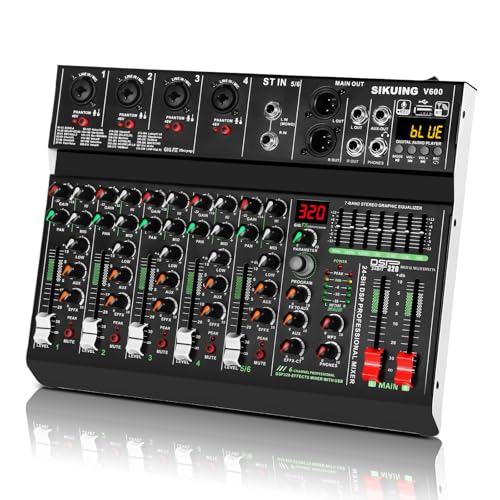
- Six-channel input flexibility
- 7-band EQ with 320 DSP effects
- USB, Bluetooth, and phantom power
Best For: Multi-source podcasts and live streaming
Visual Hi-Fi Processing

- 15-band two-channel EQ
- RCA, 3.5mm, USB, and Bluetooth inputs
- Spectrum display with color options
Best For: Stereo-based podcast and hi-fi setups
Streamer-Friendly Mixing

- XLR input with 48V phantom power
- Independent channel volume controls
- Mute, monitoring, and voice effects
Best For: Solo XLR-mic podcasting and live streaming
Best Rack-Mount Control
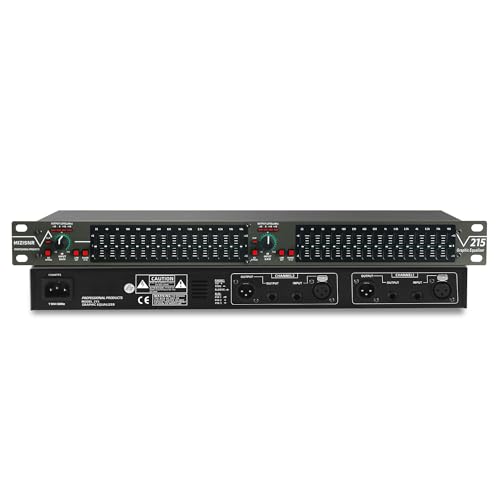
- 15 bands per channel for detailed tonal shaping
- Low-cut switch targets rumble, wind, and hum
- XLR and 1/4-inch connectivity in a 1U rack design
Best For: Rack-based podcast studios and larger stereo audio systems
Best Compact Preamp Option

- Seven bands with ±6dB adjustment
- XLR and RCA inputs and outputs
- Compact aluminum-alloy enclosure
Best For: Desktop podcast chains and home audio systems
Best Feature-Rich Digital Choice
31-Band EQ with Spectrum Display

- 31-band control with real-time LED spectrum display
- Ten presets plus bypass and noise-reduction features
- Bluetooth 5.2, USB, XLR, and TRS connectivity
Best For: Multi-purpose studios needing visual monitoring and flexible sources
Compact Voice-Tuning Pick

- Seven bands with ±12dB adjustment
- 14dB preamp gain for low-output sources
- TRS/TRRS headset support for streaming and voice chat
Best For: Compact podcasting and streaming setups
Rackmount Precision Choice
15-Band Stereo Graphic Equalizer

- 15 bands per channel for detailed tonal shaping
- Low-cut control for unwanted low-end noise
- Balanced XLR and unbalanced TRS connectivity
Best For: Rack-based podcast studios and dual-channel systems
Advanced Studio Control

- 31-band DSP with real-time spectrum display
- Ten presets and intelligent noise reduction
- Bluetooth, USB, XLR, and TRS connectivity
Best For: Feature-rich podcast studios and live production systems
Compact Analog Control – 7-Band Sound Equalizer
For shoppers comparing audio equalizers for podcasting, this compact two-channel unit offers hands-on tone shaping through seven frequency bands. Its 3.5mm connectivity, headphone support, and selectable 5V–12V DC power make it suited to simple recording and streaming setups, though it is more of a preamp/equalizer than a complete USB interface.
Best For: Podcasters who want inexpensive, physical EQ controls for a compact analog setup.
Pros:
- Seven bands cover 60Hz through 15kHz with ±12dB adjustment.
- Two-channel design includes a 3.5mm input and headphone-oriented output circuitry.
- Aluminum-alloy housing and selectable 5V–12V DC operation support flexible placement.
Cons:
- Does not provide the full mixing, USB, or phantom-power features of a modern audio interface.
- Power supply is not described as included in the supplied details.
This is a practical choice when you need direct EQ adjustment between analog devices. Confirm your cables, power source, and connection layout before buying.
Full Mixing Hub – 6-Channel DJ Audio Mixer
Among audio equalizers for podcasting, this six-channel mixer is the most expansive option for handling several microphones, instruments, and playback devices. It combines a 7-band graphic EQ with 320 DSP effects, Bluetooth 5.0, USB sound-card functionality, and 48V phantom-power capability on the stereo channels.
Best For: Multi-source podcasts, live streams, rehearsals, and creators who need mixing plus effects.
Pros:
- Six channels accommodate microphones, instruments, smartphones, computers, and other devices.
- 7-band EQ and 320 DSP effects provide substantial tone and ambience control.
- USB recording, Bluetooth playback, and zero-latency monitoring support computer-based workflows.
- 48V phantom power expands microphone compatibility.
Cons:
- Its broader mixer layout may be more equipment than a single-host podcast requires.
- It requires corded power and is larger and heavier than a small standalone equalizer.
This is the strongest all-in-one pick here for a growing production setup. Choose it if you expect multiple inputs, guests, instruments, or live-production needs.
Visual Hi-Fi Processing – TNZ SGE6 Graphic Equalizer
This Decibelvibe unit takes a home-audio approach to audio equalizers for podcasting, with 15-band EQ control across two channels and rear RCA plus 3.5mm inputs and outputs. Bluetooth, USB, a built-in microphone, and a spectrum display add playback and visual features, but its connections are oriented toward stereo systems rather than a dedicated podcast interface.
Best For: Podcasters integrating a stereo amplifier, hi-fi system, or existing RCA-based audio chain.
Pros:
- 15-band equalization offers finer control than a basic seven-band unit.
- RCA and 3.5mm inputs and outputs support common stereo-system connections.
- Bluetooth 5.0, USB, DSP processing, and a built-in microphone add flexible playback options.
- Can function as an amplifier or preamplifier with adjustable output amplitude.
Cons:
- Its rear RCA-focused layout may require adapters or additional equipment in a microphone-first podcast rig.
- The supplied details do not identify a USB recording interface or microphone preamp.
Consider this model when visual spectrum effects and hi-fi integration matter as much as EQ. For direct computer podcast recording, verify that its signal path matches your interface and microphone setup.
Streamer-Friendly Mixing – FIFINE Ampligame SC3 Mixer
The FIFINE Ampligame SC3 is not a traditional graphic equalizer, but it is a practical audio mixer for podcasting and streaming when fast channel control matters more than detailed frequency-by-frequency shaping. It provides an XLR mic input, built-in 48V phantom power, independent level controls, monitoring, mute, sound effects, and compatibility with Mac and Windows.
Best For: Solo podcasters and streamers using an XLR microphone who want quick hands-on mixing and voice effects.
Pros:
- XLR input and built-in 48V phantom power support compatible condenser microphones.
- Independent controls manage microphone, line-in, headphone, and line-out levels.
- Mute and monitor buttons make live operation straightforward.
- Four customizable sound buttons, six voice-changing modes, and 12 autotune changes add creative options.
Cons:
- It does not offer a conventional multi-band EQ in the supplied features.
- It is not compatible with USB microphones.
- XLR cable is not included.
Choose the SC3 for tactile streaming controls and quick vocal effects rather than precise EQ engineering. It is especially appealing for a single XLR-mic setup with music, game, or line-in sources.
Best Rack-Mount Control – 15-Band Stereo Graphic EQ
For podcast producers who want hands-on control over voice tone and unwanted low-end noise, this 15-band unit is a practical choice among audio equalizers for podcasting. Its dual-channel layout, adjustable bands, and balanced or unbalanced connections suit more involved studio, rack, or live audio setups.
Best For: Podcasters using rack-based mixers, interfaces, or larger stereo audio systems.
Pros:
- 15 adjustable bands per channel with up to ±12dB control.
- Low-cut switch helps attenuate wind noise, floor rumble, and electrical hum.
- XLR balanced and 1/4-inch TRS unbalanced inputs and outputs.
- Standard 1U rack-mount design with a bypass switch for troubleshooting.
Cons:
- Its 1U rack format may be excessive for a simple desktop podcast setup.
- Manual graphic controls require more setup than a preset-based equalizer.
The EQ-215 is strongest when you need detailed, physical adjustment and flexible connectivity. It makes particular sense for a podcasting chain where rumble reduction and repeatable rack installation matter more than compact size.
Best Compact Preamp Option – Douk Audio T7 7-Band EQ
The Douk Audio T7 offers a compact way to fine-tune a podcast monitoring or home audio chain. As audio equalizers for podcasting go, its seven frequency bands provide straightforward adjustment without the footprint of a full rack unit, while XLR and RCA connections broaden compatibility.
Best For: Desktop podcast setups and home stereo systems that need simple, compact EQ control.
Pros:
- Seven defined bands cover bass, midrange, and treble adjustments.
- Offers ±6dB adjustment for each band.
- Provides both XLR and RCA inputs and outputs simultaneously.
- Compact aluminum-alloy enclosure and specified SNR above 104dB.
Cons:
- No volume control knob; it outputs at the rated level.
- Seven bands provide less detailed shaping than 15- or 31-band models.
The T7 is a sensible fit when space and uncomplicated operation are priorities. Its limited band count is easier to manage, but users seeking highly precise voice correction may prefer a more extensively adjustable graphic EQ.
Best Feature-Rich Digital Choice – 31-Band EQ with Spectrum Display
This digital equalizer combines detailed frequency control with visual feedback, making it useful for podcasters who want to monitor tonal changes while adjusting a system. It stands out among audio equalizers for podcasting with 31 segments, preset modes, intelligent noise reduction, Bluetooth 5.2, and USB playback.
Best For: Studios, DJ setups, home theaters, and podcast spaces that value presets and real-time visual monitoring.
Pros:
- 31-band adjustment with real-time LED spectrum indication.
- Includes 10 preset modes, EQ bypass, and independent high, mid, and bass adjustment.
- Built-in Bluetooth 5.2 and USB playback add source flexibility.
- Supports XLR and 1/4-inch TRS connections plus an adjustable bass output.
Cons:
- Its broad feature set may be more than a basic voice-only podcast chain needs.
- Rack-mount construction and corded power are less portable than a compact desktop unit.
The EQ315 is the most versatile option here for users who want precise shaping, saved presets, and an at-a-glance frequency display. It is especially appealing when the same system serves podcasting alongside music, DJ, KTV, or home-theater use.
Compact Voice-Tuning Pick – 7-Band Stereo Equalizer
For shoppers comparing audio equalizers for podcasting, this compact 7-band model offers straightforward control over bass, vocal clarity, and treble. Its 3.5mm TRS/TRRS support also makes it suitable for headset-based recording, streaming, or voice chat setups.
Best For: Podcasters and streamers using a PC or mobile device with headphones, speakers, or a low-output audio source.
Pros:
- Seven adjustable frequencies with ±12dB control for shaping bass, mids, and treble.
- 14dB preamp gain can help strengthen low-output sources.
- Supports 3.5mm TRS and TRRS headsets, including built-in microphone functionality.
- RCA and 3.5mm outputs can operate simultaneously for headphones and desktop speakers.
Cons:
- Only one input type—RCA or 3.5mm—can be selected at a time.
- Seven bands provide less detailed shaping than larger rack-mounted equalizers.
This is a practical choice when you want simple, hands-on tone adjustment without adding a full rack unit to a podcasting desk. The compact design and headset support are especially useful for casual recording and streaming workflows.
Rackmount Precision Choice – 15-Band Stereo Graphic Equalizer
This 15-band dual-channel unit is a strong option among audio equalizers for podcasting when you need more precise control over room sound, microphones, or playback chains. Its low-cut control and balanced XLR connections are useful for more structured studio or installation setups.
Best For: Podcasters, audio professionals, and studios needing dual-channel control, balanced connectivity, and rack-mounted installation.
Pros:
- Provides 15 adjustable bands per channel with up to ±12dB control.
- Low-cut feature helps reduce unwanted low-frequency noise.
- Includes XLR balanced and 1/4-inch TRS unbalanced connections.
- Dedicated subwoofer output includes adjustable frequency control.
Cons:
- The 1U rack-mount form factor is less convenient for small desktop setups.
- Its feature set may be more than needed for basic voice recording.
Choose this model if your podcasting system is built around rack equipment or multiple audio channels. The bypass switch, low-cut control, and dual-channel design provide useful flexibility for refining speech and managing low-end buildup.
Advanced Studio Control – 31-Band Digital Equalizer
For detailed voice shaping and repeatable adjustments, this 31-band digital model gives audio equalizers for podcasting a more advanced control surface. Its spectrum display, presets, noise reduction, and balanced I/O make it suitable for studios that need consistent settings across different recording or playback situations.
Best For: Studios, live podcast productions, and audio systems that benefit from extensive EQ control, saved presets, and visual frequency monitoring.
Pros:
- 31-band DSP equalization provides highly detailed frequency adjustment.
- Four-color LED spectrum display shows frequency changes in real time.
- Ten custom presets support quick recall of different sound profiles.
- Includes intelligent noise reduction, Bluetooth 5.2, USB playback, and balanced XLR I/O.
Cons:
- The rack-mount design is relatively large for a basic desktop podcast setup.
- Its broader feature set may require more setup than a simple analog EQ.
- Bluetooth and USB playback may be unnecessary if the unit is used only for microphones.
This is the most feature-rich option of the three for users who want repeatable processing and detailed visual feedback. The bypass switch also makes it easier to compare the equalized and untreated signal during setup or troubleshooting.
How We Picked the Best Audio Equalizers for Podcasting
We focused on features that matter in spoken-word recording: usable EQ bands, practical input and output connections, noise-control features, channel flexibility, and ease of integration with microphones, mixers, computers, and amplifiers. We also included both dedicated graphic equalizers and compact audio mixers because many podcasters need gain, monitoring, effects, and EQ in one device.
Product descriptions and listed specifications were compared for connection types, adjustment range, rack-mount compatibility, channel count, and intended use. Since room acoustics and microphones affect results as much as the equalizer itself, the best choice depends on your complete signal chain.
Quick Comparison
| Best For | Look For | Typical Format |
|---|---|---|
| Simple desktop podcasting | Compact size, 3.5mm or RCA connections, straightforward controls | Small desktop unit |
| Streaming and live shows | USB, Bluetooth, microphone input, monitoring, and faders | Audio mixer |
| Detailed voice shaping | More EQ bands and independent channel control | 15- or 31-band rack unit |
| Balanced studio systems | XLR input/output and low-noise operation | Desktop or rack-mount preamp |
Key Buying Factors for Audio Equalizers for Podcasting
EQ Band Count and Control
Seven bands are often enough for broad voice adjustments, such as reducing low-end rumble or taming excessive brightness. Fifteen or 31 bands provide finer control, but they require more experience and can make poor settings easier to create. For most spoken-word work, subtle adjustments are preferable to aggressive boosts.
Connections and Signal Compatibility
Check whether the equalizer supports your microphone, interface, mixer, or amplifier. RCA and 3.5mm connections suit consumer and desktop systems, while XLR connections are more appropriate for balanced studio equipment. USB and Bluetooth may be convenient, but they do not replace a proper microphone preamp when using a professional XLR microphone.
Noise, Headroom, and Monitoring
Look for noise-reduction claims, clean gain control, and outputs that match the rest of your setup. A headphone output or dedicated monitoring control is especially useful when recording, because it lets you hear changes without relying only on the final recording.
Format and Workflow
Desktop models are easier to place beside a computer, while 1U rack-mount units suit permanent studio installations. If you need effects, faders, USB connectivity, or live-stream controls, a mixer may be more useful than a standalone equalizer.
Who Should Buy Which Audio Equalizers for Podcasting?
Choose a compact seven-band model if you want affordable, hands-on tone shaping for a simple desktop or home audio setup. Choose a mixer-style unit if you record live, stream, connect multiple sources, or need built-in effects and level controls. Choose a 15-band equalizer for more precise adjustment without the complexity of a full 31-band design. Choose a 31-band rack unit if you manage a treated studio, multiple channels, or a detailed permanent signal chain.
Before buying, map the complete path from microphone to recording software and confirm every connector, channel, and power requirement. Even the best equalizer cannot compensate for severe room echo, microphone placement problems, or clipped input levels.