If you’re looking to enhance your PC’s aesthetics and performance, ARGB fan hub controllers are essential. These devices not only improve cooling efficiency but also allow for stunning lighting customizations. With numerous options available, you might wonder which controllers truly stand out. Let’s explore the top 10 ARGB fan hub controllers that can transform your gaming rig into a visual masterpiece while ensuring reliable performance.
Thermalright ARGB Fan HUB Controller (8-Port 4 Pin PC Fan Controller)

If you’re a PC enthusiast looking to streamline your cooling setup, the Thermalright ARGB Fan HUB Controller is an excellent choice. This 8-port controller supports multiple ARGB fans, providing seamless fan management and neat cable organization. Its strong adhesive installation and magnetic suction guarantee a secure fit, while the SATA power connector simplifies setup. Keep in mind that it only recognizes the speed of the fan connected to the red interface and doesn’t support 12V 4-pin RGB devices. With a solid customer rating and robust market presence, it’s a reliable option for enhancing both aesthetics and performance in your gaming rig.
Best For: PC enthusiasts looking to enhance their cooling setup and cable management with multiple ARGB fan support.
Pros:
- Supports up to 8 ARGB fans, allowing for extensive customization and cooling options.
- Strong adhesive and magnetic installation, ensuring a secure and stable setup without the need for complicated mounting.
- Neat cable management, helping to maintain an organized interior in your PC case.
Cons:
- Limited fan speed recognition, only reading the speed of the fan connected to the red interface.
- Incompatibility with 12V 4-pin RGB devices, which could lead to potential equipment damage if misused.
- No control over fan speed or lighting adjustments, functioning only as an expansion hub for fans and lights.
ASUS TUF Gaming ARGB PWM Fan Hub

For gamers and PC enthusiasts looking to enhance their system’s cooling and lighting, the ASUS TUF Gaming ARGB PWM Fan Hub stands out with its ability to connect up to six case fans, delivering both PWM control and synchronized ARGB lighting effects. It features visible power indicators for easy status checking and mounts magnetically for simple attachment to metal surfaces. With dual SATA power connectors, it guarantees stable input even under full load, while two safety fuses provide overcurrent protection. Weighing just 5.3 ounces, it’s a lightweight yet powerful addition to any desktop or gaming console setup.
Best For: Gamers and PC enthusiasts seeking efficient cooling solutions and customizable lighting for their setups.
Pros:
- Supports up to six fans, allowing for extensive cooling options and airflow management.
- Magnetic mounting provides easy installation and repositioning on metal surfaces.
- Dual SATA power connectors ensure reliable power supply even under heavy load.
Cons:
- Limited to ARGB and PWM fans, which may not suit users with different fan types.
- Requires a desktop or gaming console, making it unsuitable for laptops or smaller systems.
- Lacks built-in fan speed monitoring, which could be a drawback for users wanting detailed performance data.
ShakingTank ARGB and PWM Fan Hub Controller for PC Fans

The ShakingTank ARGB and PWM Fan Hub Controller is perfect for PC enthusiasts looking to streamline their cooling system while enhancing aesthetics. This compact hub supports up to nine fans, featuring both PWM functions for speed synchronization and ARGB ports for vibrant lighting effects. Its magnetic back design allows easy attachment to metal surfaces without the hassle of tape, ensuring tidy wiring. With a SATA power input, it prevents voltage loss, optimizing fan performance. Made of durable metal, it combines reliability and style, making it an excellent choice for anyone wanting to elevate their PC’s look and functionality.
Best For: PC enthusiasts seeking an efficient and stylish way to manage multiple fans and enhance their system’s aesthetics.
Pros:
- Supports up to 9 fans with PWM functionality for synchronized speed control.
- Magnetic back design allows for easy installation and a tidy setup without adhesive.
- Durable metal construction ensures longevity while maintaining a compact and organized interior.
Cons:
- Requires a connection to a 12V 4-pin motherboard interface for PWM functionality, which may limit compatibility.
- Only designed for ARGB fans and light bars, not compatible with other RGB types.
- Maximum rotational speed of 1620 RPM may not meet the needs of high-performance cooling setups.
upHere PWM & 5V Addressable ARGB Magnetic Fan Hub (1 to 9-Port PC Case Splitter)

Designed for PC enthusiasts seeking customization and efficiency, the upHere PWM & 5V Addressable ARGB Magnetic Fan Hub simplifies managing multiple fans and lighting. This compact hub supports up to nine PWM fans and 5V ARGB devices, powered reliably via SATA. With built-in magnets, you can easily mount it in your case. The front-facing RGB panel allows you to synchronize lighting effects and colors using the included remote. Weighing just 4.2 ounces, it’s a lightweight solution for your setup. Backed by a solid 4.5-star rating, it’s a top choice for enhancing your PC’s aesthetics and performance.
Best For: PC enthusiasts looking for an efficient way to manage multiple fans and customize RGB lighting in their setups.
Pros:
- Dual-Control Hub: Supports up to 9 PWM fans and 5V ARGB devices, allowing for comprehensive management of cooling and lighting.
- SATA-Powered Design: Ensures stable performance even when all devices are connected at full load.
- Magnetic Mounting: Facilitates flexible placement within the PC case or on iron surfaces for easy installation.
Cons:
- Limited to 9 Ports: Users with more than 9 fans or ARGB devices will need additional hubs.
- Weight: At 4.2 ounces, it may be considered slightly heavier compared to other fan hubs on the market.
- Remote Control Dependency: Customization relies on the included remote, which could be misplaced or require batteries.
ShakingTank ARGB and PWM Case Fan Hub with Controller
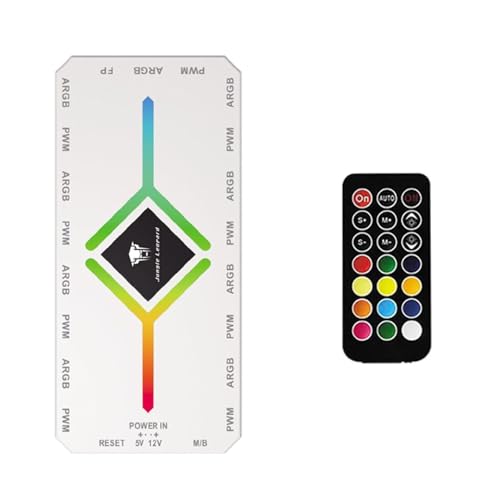
If you’re looking to streamline your PC cooling setup while adding vibrant RGB flair, the ShakingTank ARGB and PWM Case Fan Hub is an excellent choice. With 9 ports for both ARGB and PWM fans, it supports efficient cooling and aesthetic enhancements. The magnetic backplane guarantees easy installation on metal surfaces without messy tape. Powering it via SATA guarantees smooth operation with no voltage loss. At just 4.64 x 2.2 x 0.67 inches and weighing 2.82 ounces, it keeps internal wiring tidy. Plus, you can sync fan speeds for optimized performance, making it a must-have for any PC enthusiast.
Best For: PC enthusiasts looking to enhance their cooling efficiency while adding customizable RGB lighting to their setups.
Pros:
- Supports up to 9 fans with both ARGB and PWM connections for versatile cooling and lighting options.
- Magnetic back design allows for easy installation on metal surfaces without the need for adhesive tape.
- Compact size keeps internal wiring organized and tidy, contributing to a clean build aesthetic.
Cons:
- Controller is limited to light switching only, requiring a motherboard connection for PWM functionality.
- Plastic material may not be as durable as other materials used in fan hubs.
- Dependent on SATA power connection, which may limit compatibility with some power supply setups.
Airgoo Magnetic 16-Port RGB Controller
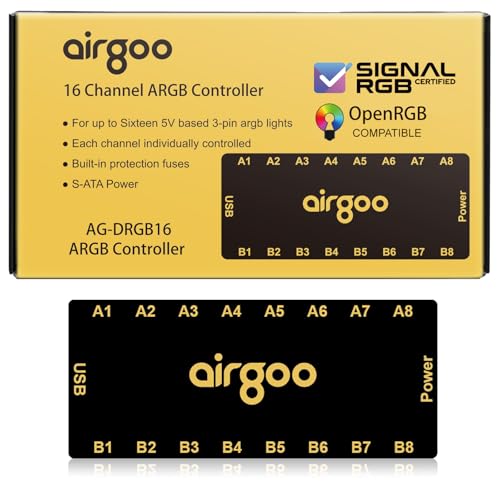
For PC enthusiasts looking to take their RGB lighting to the next level, the Airgoo Magnetic 16-Port RGB Controller stands out with its impressive capability to control up to 16 devices simultaneously. This SATA-powered controller supports both SignalRGB and OpenRGB software, giving you endless customization options. With independent channel control, you can create complex lighting setups without being limited by motherboard headers. Thanks to its plug-and-play magnetic design, installation is a breeze. Plus, the auto-resetting fuse guarantees safety against overloads. Rated 4.6 out of 5 stars, it’s a top choice for those seeking vibrant and synchronized lighting experiences.
Best For: PC enthusiasts who want to enhance their RGB lighting with customizable and synchronized effects.
Pros:
- 16 ports allow for extensive RGB device control, enabling complex lighting setups.
- Independent channel control offers flexibility beyond motherboard limitations.
- User-friendly software integration with SignalRGB and OpenRGB allows for easy customization of lighting patterns.
Cons:
- Limited compatibility with operating systems, as it only supports Windows 10 and 11.
- Installation may require additional space in the PC case for optimal placement of the magnetic fixture.
- Potential restocking fees for returns could be a disadvantage for customers unsure about their purchase.
Thermalright ARGB and Fan HUB X12 IR Black Hub Controller

The Thermalright ARGB and Fan HUB X12 IR Black Hub Controller stands out as the ideal choice for PC enthusiasts looking to streamline their cooling setup. With the ability to connect up to 12 CPU fans using both 3Pin ARGB and 4Pin PWM interfaces, it enhances your system’s efficiency. Its compact design (108x50x21mm) and lightweight build (3.84 ounces) make installation a breeze. You’ll appreciate the effective cable management that keeps everything tidy, while the included remote control allows for easy lighting adjustments. Plus, it supports synchronization of ARGB lighting effects and PWM speeds, elevating your PC’s aesthetics and performance seamlessly.
Best For: PC enthusiasts looking to enhance their cooling setup with efficient fan control and ARGB lighting synchronization.
Pros:
- Supports multiple fan connections: Connects up to 12 CPU fans with both 3Pin ARGB and 4Pin PWM interfaces.
- Easy cable management: Designed to keep fan cables organized and neat, improving overall system aesthetics.
- Remote control included: Allows for convenient adjustments of lighting effects without needing to access the PC case.
Cons:
- Limited fan speed recognition: Only recognizes single fan speed through the PWM interface, which may limit performance monitoring.
- No support for 12V 4Pin RGB devices: This limits compatibility with certain RGB fan models.
- Mixed customer reviews: With a rating of 3.8 out of 5 stars, some users may experience issues that affect overall satisfaction.
Thermalright ARGB Fan Hub Controller (Supports 8 Fans)
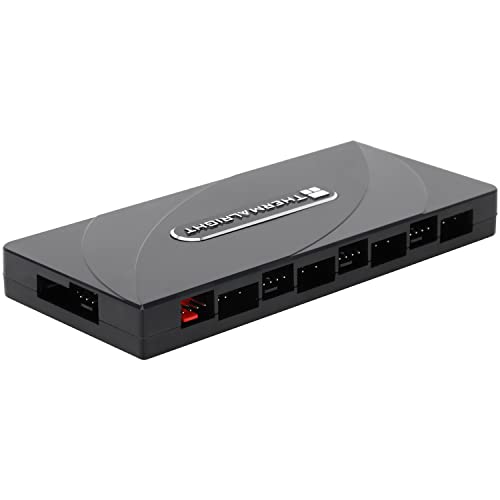
Designed for PC enthusiasts looking to enhance their cooling systems, the Thermalright ARGB Fan Hub Controller supports up to eight fans, making it an ideal choice for those wanting to optimize airflow and aesthetics. This hub connects via a SATA power supply, ensuring stable output under high loads. It accommodates both ARGB fans and PWM fans for synchronized speeds, though it doesn’t control fan speed or lighting colors. Installation is simple, thanks to strong double-sided stickers and a guided manual. Just remember to connect the appropriate power interfaces to avoid damage, ensuring your setup runs smoothly and efficiently.
Best For: PC enthusiasts looking to enhance airflow and aesthetics with a reliable fan and ARGB hub that supports multiple fans.
Pros:
- Supports up to 8 fans, allowing for extensive cooling and customization options.
- Stable output under high load due to direct SATA power supply connection.
- Easy installation with strong double-sided stickers and a guided manual.
Cons:
- Does not control fan speed or lighting colors, limiting customization options.
- Requires careful connection to avoid damage, which may be challenging for beginners.
- SATA cable not included, which may necessitate an additional purchase.
ARGB Controller PWM Fan Hub with RF Remote
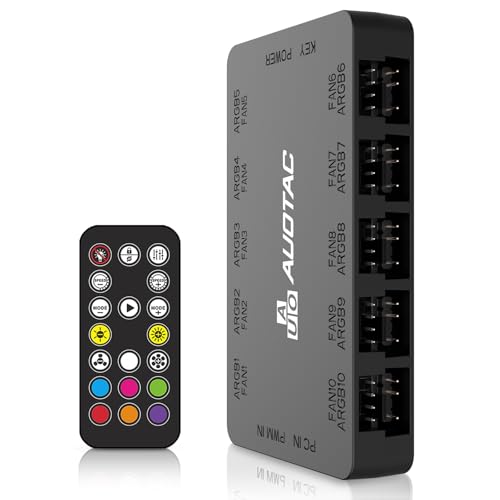
Looking for a way to streamline your PC cooling system? The ARGB Controller PWM Fan Hub with RF Remote by Auotac is your solution. This sleek black hub connects up to ten case fans, supporting both 5V 3Pin ARGB and 12V 4Pin PWM connectors. With its magnetic mounting design, installation is a breeze. You can easily control fan speeds and RGB lighting using the included RF remote, ensuring peak cooling. Plus, it features dual SATA power connectors for stable input under load and 10-channel surge protection. With a solid 4.2-star rating, this hub enhances both performance and aesthetics.
Best For: PC enthusiasts looking to enhance their cooling system with customizable fan control and RGB lighting.
Pros:
- Supports multiple fans: Connects up to ten case fans for efficient airflow.
- Easy installation: Magnetic mounting design allows for quick and secure attachment to metal surfaces.
- Remote control functionality: PWM temperature control and RGB lighting adjustments via RF remote for user convenience.
Cons:
- Limited weight capacity: At only 0.1 grams, it may not support heavier fans effectively.
- Requires compatible connectors: Only supports 5V 3Pin ARGB and 12V 4Pin PWM connectors, limiting usage with other fan types.
- Potential for interference: RF remote operation may be susceptible to interference from other wireless devices.
ARGB Fan HUB 5V-3Pin LED Hub with RF Remote

For PC enthusiasts seeking seamless lighting synchronization, the ARGB Fan HUB 5V-3Pin LED Hub with RF Remote is an excellent choice. Manufactured by TUMMASTER, this compact hub measures just 3.83 x 2.33 x 0.6 inches and weighs 3.52 ounces. It supports ARGB fans and light bars via a 5V 3-pin interface, ensuring your setup looks stunning. However, remember it’s not compatible with 12V 4-pin RGB devices. The hub comes with everything you need—HUB, SATA power cable, ARGB and PWM cables, and a remote control. With a rating of 4.4 stars from 351 reviews, it’s a solid option for your build.
Best For: PC enthusiasts looking to enhance their builds with synchronized ARGB lighting effects.
Pros:
- Supports multiple ARGB fans and light bars for a cohesive lighting experience.
- Compact design allows for easy integration into various PC setups.
- Comes with a remote control for convenient lighting adjustments.
Cons:
- Not compatible with 12V 4-pin RGB devices, limiting compatibility with some products.
- Requires an unknown battery for the remote, which could be inconvenient for users.
- Some users may find the installation guide insufficient for setup assistance.
Factors to Consider When Choosing an Argb Fan Hub Controller
When you’re choosing an ARGB fan hub controller, there are several key factors to take into account. You’ll want to evaluate the number of ports, how it connects to power, and whether it’s compatible with your devices. Also, look at the installation method and any additional features that might enhance your setup.
Number of Ports
Choosing the right number of ports on an ARGB fan hub controller can greatly impact your system’s expandability and performance. You’ll find options ranging from 6 to 16 ports, so consider how many fans and lighting devices you want to connect. A hub with more ports, like 9 or 12, allows for easier management of additional cooling and lighting components as your needs evolve. Some controllers offer both ARGB and PWM connections, enabling you to customize lighting and regulate fan speeds seamlessly. Confirm the hub supports the specific 5V 3-pin ARGB connectors and PWM connections for your fans to avoid compatibility issues. Finally, organized port layouts can make cable management a breeze, keeping your setup tidy.
Power Connection Type
The power connection type is a key factor in selecting an ARGB fan hub controller. Most models utilize a SATA power connector, ensuring stable input under full load. You need to confirm if the hub supports 5V 3-pin ARGB fans or 12V 4-pin RGB devices, as incorrect connections can damage your equipment. Many hubs come with dual SATA power connectors, enhancing power stability, especially when multiple fans are connected. Some controllers require direct input from the power supply, preventing stray currents and voltage loss for smoother fan speed operation. Always check the hub’s specifications for its power input requirements to guarantee peak performance with your existing hardware. Making the right choice here can greatly impact your setup’s overall efficiency.
Compatibility With Devices
Ensuring your ARGB fan hub controller is compatible with your fans and other devices is essential for a smooth setup. First, check that the controller matches the type of fans you’re using, whether they’re 5V 3-pin ARGB or 12V 4-pin PWM. This prevents any potential damage. Next, consider the number of ports; some controllers support 9 or more fans, which is crucial for larger setups. Additionally, verify the power connection type; many require SATA power for stable operation. It’s also worth looking for controllers that sync with specific lighting software or hardware for cohesive RGB effects. Finally, confirm if the hub can manage extra devices like ARGB light bars if you plan to expand your lighting setup.
Installation Method
After confirming compatibility with your devices, the installation method becomes a key factor in selecting an ARGB fan hub controller. Consider options like strong adhesive, magnetic mounting, or screws, as these affect your setup’s ease and placement flexibility. Some hubs feature strong double-sided tape or magnetic backing, allowing for a tool-free installation in various locations within your PC case. Make sure the hub’s design supports convenient cable management, keeping your system tidy after installation. Check if the hub requires a SATA power connection, which could limit your installation options based on available power supply connections. Finally, evaluate whether the installation process is straightforward and includes a manual, as this can greatly enhance your overall experience.
Features and Functionality
When you’re choosing an ARGB fan hub controller, it’s vital to take into account key features that can greatly enhance your setup. First, consider the number of ports; options can range from 6 to 16 devices, affecting your ability to expand with additional fans and lighting. Compatibility with both PWM and ARGB devices is important, as it guarantees full functionality for fan speed control and lighting effects. A magnetic mounting design simplifies installation by allowing direct attachment to metal surfaces. Also, confirm stable power input options like dual SATA connectors to prevent instability. Finally, look for features such as independent channel control and software integration, which enable complex lighting setups and synchronization with your gaming or music applications.