A docking station with detachable cable makes it easier to replace a worn connection, switch between devices, or pack your desk setup for travel. The models in this roundup range from compact hubs to multi-display docks with extensive connectivity.
We compare port selection, display support, charging capability, portability, and everyday compatibility so you can choose a dock that fits your laptop and workspace.
Best 10 Docking Station with Detachable Cable Picks for 2026
Best Detachable Desktop-and-Travel Dock

- Detachable 6-in-1 hub for travel
- Supports up to three displays
- 100W PD and 10Gbps USB-C
Best For: Multi-monitor home offices and mobile work
Best Compact Dual-Display Travel Dock
Lenovo USB-C Dual Display Dock

- Dual 4K display support
- Compact 4.8-ounce design
- Gigabit Ethernet and 10Gbps USB
Best For: Portable dual-monitor workstations
Best High-Port-Count Triple-Display Hub

- 14 ports for broad connectivity
- Triple-display support with dual HDMI
- 80W pass-through charging
Best For: Multitaskers with multiple displays and peripherals
Best Simple Detachable-Cable Hub

- 19.6-inch detachable braided cable
- 4K HDMI at 60Hz
- 100W PD input with 80W laptop output
Best For: Compact desks, tablets, and single-monitor setups
Best Triple-Display Workstation Dock
Plugable 15-in-1 Triple Display Dock

- Three HDMI outputs for dual 4K or triple-display setups
- 100W host charging and 2.5Gbps Ethernet
- 15-port expansion for USB, cards, audio, and networking
Best For: Windows and ChromeOS multitasking workstations
Best Detachable-Cable Value
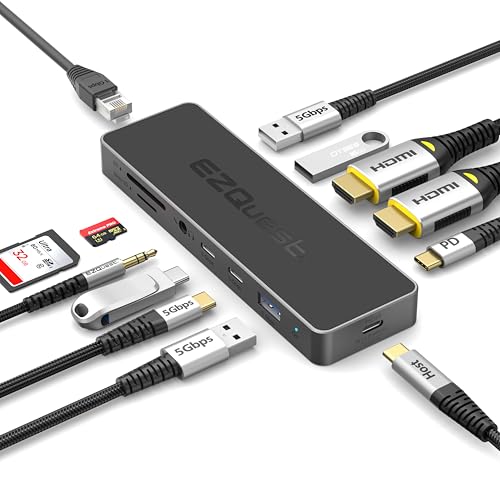
- 19.6-inch detachable nylon-braided USB-C cable
- 4K 60Hz HDMI and up to 100W PD input
- Five USB ports plus Ethernet, card readers, and audio
Best For: Flexible single-monitor laptop and MacBook setups
Best Power-Packed Triple-Display Dock

- Two HDMI ports plus DisplayPort 1.4 for triple displays
- 110W adapter enables up to 100W laptop charging
- Adds USB, Ethernet, audio, SD, and microSD connectivity
Best For: Windows triple-monitor workstations with demanding workloads
Best for Dual 4K Windows Setups

- Dual 4K@60Hz HDMI output for compatible Windows laptops
- Four USB-A/C data ports rated up to 10Gbps
- 100W PD pass-through; charger and cable sold separately
Best For: Windows users building a dual-monitor 4K workstation
Best for Versatile Everyday Expansion

- Dual HDMI, Ethernet, SD, and microSD connectivity
- Single 4K@60Hz or dual 4K@30Hz display support
- Up to 85W pass-through charging with required accessories
Best For: Windows or ChromeOS users needing broad peripheral expansion
Best for Maximum Port Variety
MOKiN 14-in-1 Triple-Display Dock

- 14 ports with HDMI, DisplayPort, Ethernet, USB, and card readers
- Flexible multi-monitor combinations using HDMI and DisplayPort
- 1000Mbps Ethernet and up to 100W USB-C charging
Best For: Multi-monitor workstations with many wired peripherals
Best Detachable Desktop-and-Travel Dock – Anker Nano 13-in-1 Dock
If you need a docking station with detachable cable for both a permanent workstation and mobile use, the Anker Nano stands out for its detachable 6-in-1 hub. It supports up to three displays, provides broad peripheral connectivity, and includes a 140W adapter for up to 100W laptop Power Delivery.
Best For: Users who want one dock for a multi-monitor home office and portable work setup.
Pros:
- Detachable hub supports both desktop and travel use.
- Up to three displays through two HDMI ports and one DisplayPort.
- Includes Gigabit Ethernet, audio, SD/TF card slots, and 10Gbps USB-C data.
- Includes a 140W power adapter and supports up to 100W laptop charging.
Cons:
- macOS mirrors the image across multiple external displays rather than extending them independently.
- Requires an upstream laptop connection for the dock and ports to activate.
This is the most versatile choice here for users who regularly switch between a full desk and travel mode. Its large port selection and triple-display support are particularly useful for analysts, traders, and creators.
Best Compact Dual-Display Travel Dock – Lenovo USB-C Dual Display Dock
The Lenovo USB-C Dual Display Travel Dock is a compact docking station with detachable cable alternative for professionals who prioritize portability and dual-screen support. It offers seven ports, dual 4K display connectivity, Gigabit Ethernet, and an integrated cable for quick setup.
Best For: Remote professionals who need a small dock for dual 4K monitors and wired networking.
Pros:
- Supports two 4K displays through DisplayPort 1.4 and HDMI 2.0.
- Compact 4.8-ounce design is suited to travel.
- Includes USB 3.2, dual USB-C 10Gbps ports, and Gigabit Ethernet.
- Always-on USB port can charge a device even when the laptop is disconnected.
Cons:
- The cable is integrated rather than detachable.
- Up to 100W laptop delivery requires the optional 135W USB-C adapter; the included adapter provides 65W.
- Provides fewer ports than the larger desktop-oriented docks in this roundup.
Choose this Lenovo when a streamlined travel design matters more than maximum port count. It is a practical fit for a two-monitor office setup that also needs fast USB and Ethernet connections.
Best High-Port-Count Triple-Display Hub – Anker 14-in-1 USB-C Dock
For shoppers seeking a docking station with detachable cable and extensive connectivity, this Anker 14-in-1 hub combines two 4K HDMI outputs with VGA, five USB-A ports, USB-C data, Ethernet, card slots, and audio. It can power a laptop with up to 80W pass-through charging, though a wall charger is not included.
Best For: Multitaskers who need triple-display output and many peripheral ports from one USB-C connection.
Pros:
- Offers 14 connectivity options, including dual HDMI, VGA, Ethernet, audio, and card slots.
- Supports three simultaneous displays, with up to 4K through the HDMI outputs.
- Compatible with USB-C, USB4, and Thunderbolt connections on supported systems.
- Provides 5Gbps USB-A and USB-C data transfer.
Cons:
- The wall charger is not included.
- Linux is not supported.
- macOS mirrors the same image on external monitors.
This Anker is a strong desk-centered option when port variety is the priority. Its VGA output adds flexibility for older displays, while the triple-monitor design suits busy multitasking setups.
Best Simple Detachable-Cable Hub – EZQuest 5-in-1 USB-C Hub
This EZQuest hub is a straightforward docking station with detachable cable for users who need essential expansion without a bulky desktop dock. Its 19.6-inch braided USB-C cable improves reach, while HDMI supports 4K at 60Hz and the USB-C PD port accepts up to 100W input.
Best For: Laptop and tablet users who want a flexible cable, one external display, and everyday USB connectivity.
Pros:
- Detachable 19.6-inch nylon-braided cable helps reduce desk clutter.
- Supports 4K HDMI output at 60Hz.
- Provides up to 100W PD input and delivers up to 80W to the laptop.
- Includes 5Gbps USB-A plus two USB-A 2.0 ports.
Cons:
- Only one HDMI output is available.
- USB-A 2.0 ports are limited to 480Mbps.
- It is a five-port hub rather than a full desktop dock with Ethernet, card readers, or multiple display outputs.
The EZQuest is best when cable flexibility and basic expansion matter more than maximum connectivity. It is particularly convenient for stand-mounted laptops, iPads, presentations, and compact workspaces.
Best Triple-Display Workstation Dock – Plugable 15-in-1 Triple Display Dock
If you need a docking station with detachable cable for a Windows or ChromeOS workstation, this Plugable model focuses on high port capacity and three-monitor productivity. It supports up to dual 4K 60Hz or a triple-display arrangement of one 4K 60Hz and two 1080p 60Hz screens, along with 100W host charging and 2.5Gbps Ethernet.
Best For: Windows and ChromeOS users who need multiple monitors, fast networking, media-card access, and extensive USB connectivity.
Pros:
- Three HDMI outputs with dual 4K or triple-display support on compatible systems
- 15-port design includes USB, Ethernet, SD, microSD, and 3.5mm audio connections
- Provides 100W laptop charging plus a dedicated 30W USB-C charging port
- Can sit horizontally or vertically and includes lifetime support
Cons:
- Not recommended for Mac or ARM-based systems
- Requires a compatible full-featured USB-C, USB4, or Thunderbolt port for the advertised display features
This is the strongest choice here for a high-output Windows or ChromeOS desk setup. However, shoppers specifically requiring a detachable host cable should confirm the included cable arrangement, since the supplied notes emphasize the dock’s ports and compatibility rather than detachable-cable construction.
Best Detachable-Cable Value – EZQuest 12-in-1 USB-C Hub
The EZQuest Pro Series is a practical docking station with detachable cable for users who want flexible desk placement without giving up core connectivity. Its 19.6-inch nylon-braided USB-C cable can be replaced or repositioned more easily than a short fixed lead, while the dock adds 4K 60Hz HDMI, 100W PD input, Ethernet, storage-card readers, and five USB ports.
Best For: Laptop, MacBook, Chromebook, and iPad users who prioritize a longer detachable connection and everyday expansion.
Pros:
- Includes a 19.6-inch detachable nylon-braided cable for flexible placement
- Supports HDMI output up to 4K at 60Hz
- 100W PD input delivers up to 80W to the laptop while allocating power to peripherals
- Adds five USB ports, SD and microSD access, Ethernet, and an audio jack
Cons:
- Only one HDMI display output is listed
- Two USB-A ports are USB 2.0 and limited to 480Mbps
For the target feature, this is the clearest match in the group: the detachable, extended cable improves reach and helps reduce desk clutter. It is better suited to a streamlined single-monitor setup than to a multi-display workstation.
Best Power-Packed Triple-Display Dock – Acer 13-in-1 USB-C Dock
This Acer 13-in-1 docking station with detachable cable is designed for a substantial desktop setup, pairing two HDMI outputs with DisplayPort 1.4 and an included 110W power adapter. It can deliver up to 100W to a compatible laptop and supports triple-display expansion on Windows systems, subject to host and GPU capabilities.
Best For: Windows users building a three-screen workstation who also want high-power charging, card readers, Ethernet, and mixed display outputs.
Pros:
- Offers two HDMI ports and one DisplayPort 1.4 for three independent screens on compatible Windows laptops
- Includes a 110W adapter and supports up to 100W laptop power delivery
- Provides USB-C, three USB-A ports, Gigabit Ethernet, audio, and simultaneous SD/microSD reading
- Aluminum housing is designed to dissipate heat and includes a security slot
Cons:
- Mac systems support mirroring rather than extended desktop mode across multiple displays
- Triple 4K output requires a compatible Windows laptop and GPU with DSC, and is limited to 30Hz
- The supplied notes do not clearly specify whether the host cable is detachable
Acer’s dock stands out for combining three display outputs with a powerful included adapter and broad workstation connectivity. If a detachable cable is essential, verify that detail before buying; the documented strengths are its power system, display flexibility, and 13-in-1 expansion.
Best for Dual 4K Windows Setups – UGREEN 7-in-1 Dual HDMI Dock
If you need a docking station with detachable cable for a streamlined desk setup, the UGREEN 7-in-1 dock provides dual HDMI outputs, fast USB data ports, and USB-C Power Delivery in a compact aluminum design. It is designed for full-function USB-C or Thunderbolt 3/4 laptops.
Best For: Windows users who want two external 4K displays and high-speed USB connectivity.
Pros:
- Supports two HDMI displays at up to 4K@60Hz when the laptop supports DP 1.4.
- Includes two USB-A and two USB-C 10Gbps data ports.
- Offers up to 100W USB-C Power Delivery pass-through.
- Compatible with many Lenovo, HP, Dell, ThinkPad, ZenBook, Chromebook, and Surface laptops.
Cons:
- Charging adapter and cable are not included.
- macOS mirrors the same image across both external monitors rather than extending independently.
- The 10Gbps ports do not support charging, video, or audio.
This UGREEN dock is a strong choice for a Windows workstation that prioritizes dual 4K output and fast peripheral connections. Check your laptop port and cables for full-function USB-C, DP 1.4, and 10Gbps support before buying.
Best for Versatile Everyday Expansion – Anker 8-in-1 USB-C Media Hub
The Anker 8-in-1 is a practical docking station with detachable cable for adding displays, wired networking, storage-card access, and USB accessories through one USB-C connection. It supports one 4K display at 60Hz or two displays at 4K@30Hz.
Best For: Windows and ChromeOS laptop users who need display, Ethernet, card-reader, and USB expansion in one compact hub.
Pros:
- Combines dual HDMI, USB-A data, Ethernet, SD, microSD, and USB-C PD input.
- Supports a single 4K@60Hz display or two 4K@30Hz displays.
- Provides up to 85W pass-through charging with a compatible USB-C Power Delivery setup.
- Includes an 18-month warranty and supports USB-C, USB4, and Thunderbolt connections.
Cons:
- 100W wall charger and USB-C-to-C cable are required but not included.
- macOS mirrors the same content on both external monitors.
- Not compatible with Linux.
Choose this Anker hub if your setup benefits from Ethernet and SD or microSD access as much as it does from monitor support. Its dual-display mode is useful, though users seeking 4K@60Hz on two screens should consider another option.
Best for Maximum Port Variety – MOKiN 14-in-1 Triple-Display Dock
For users who want a docking station with detachable cable and extensive connectivity, the MOKiN 14-in-1 dock combines HDMI, DisplayPort, Ethernet, USB, card readers, and charging in one unit. It is built for multi-monitor laptop workstations and supports several HDMI and DisplayPort combinations.
Best For: Windows and macOS laptop users who need numerous ports, wired networking, and flexible multi-display connections.
Pros:
- Provides 14 ports, including two HDMI, two DisplayPort, Ethernet, USB-C, USB-A, SD, and microSD.
- Supports display combinations such as two HDMI plus DisplayPort or two DisplayPort plus HDMI.
- Includes a screen-lock button for quickly turning off connected displays.
- Offers a 1000Mbps Ethernet port and up to 100W USB-C charging input.
Cons:
- Charging adapter is not included.
- USB data ports are rated up to 5Gbps, rather than 10Gbps.
- Display capabilities depend on the laptop, operating system, and supported monitor configuration.
The MOKiN is the most connectivity-focused option in this group, making it suitable for a busy desk with several peripherals and displays. Verify your laptop’s video-output compatibility and the required monitor arrangement before purchasing.
How We Picked the Best Docking Station with Detachable Cable
We focused on the features that matter most in daily use: host-device compatibility, available USB ports, display outputs, power delivery, Ethernet, memory-card support, and overall portability. We also considered whether each dock suits a simple single-monitor setup, a dual-display workstation, or a more demanding triple-monitor arrangement.
A detachable host cable was another priority. It allows easier replacement and can make the dock more convenient when switching between laptops with different USB-C layouts. Because specifications can vary by computer, operating system, and connected charger, buyers should verify compatibility before ordering.
Quick Comparison
| Best For | Look For | Most Relevant Features |
|---|---|---|
| Travel | Compact hubs and short setups | Lightweight design, essential ports, detachable cable |
| Home office | One or two external displays | HDMI, DisplayPort, USB data, power delivery |
| Multi-monitor desks | Three-display productivity | Multiple video outputs, sufficient bandwidth, compatible graphics support |
| Creative or data-heavy work | Fast peripherals and storage | USB 3.x, SD or microSD, Gigabit Ethernet, reliable power input |
Key Buying Factors for a Docking Station with Detachable Cable
Port and Display Selection
Count the connections you actually need, including HDMI, DisplayPort, USB-A, USB-C, Ethernet, audio, and card readers. Check the advertised resolution and refresh rate for each output. “Dual 4K” or “triple display” support may depend on the laptop’s USB-C capabilities, DisplayLink software, or operating-system limitations.
Power Delivery and Bandwidth
Power delivery lets one cable charge the laptop while peripherals remain connected, but the dock’s maximum wattage is not always the same as the charger’s output. High-resolution displays, storage drives, and wired networking also share available bandwidth, so a dock with more ports is not automatically faster.
Cable Design and Compatibility
Confirm that the detachable cable supports the required USB data, video, and charging standards rather than power or charging alone. Verify USB-C compatibility, Thunderbolt or USB4 requirements, Windows or macOS support, and whether your laptop can drive the desired number of monitors.
Who Should Buy Which Docking Station with Detachable Cable?
Choose a compact 5-in-1 or 7-in-1 model if you travel frequently or mainly need HDMI, USB, and charging. A dual-monitor dock is a better fit for home-office users who want separate workspaces without a bulky desktop hub. Users running several monitors should prioritize a dedicated triple-display model and confirm graphics compatibility before purchase.
For photographers and content creators, prioritize fast USB ports and SD or microSD readers. For wired-office networks, choose a model with Gigabit Ethernet. If flexibility and long-term serviceability matter most, a Docking Station with Detachable Cable is generally preferable to a permanently attached design.