The best programmable robot building kits turn coding concepts into moving, testable projects. This lineup includes approachable building sets for younger learners, Arduino and MicroPython platforms, robotic arms, tracked vehicles, and advanced Raspberry Pi robots.
Use the guide below to compare programming support, age fit, control methods, hardware, and project potential before choosing a kit.
Best 10 Programmable Robot Building Kits Picks for 2026
Best App-Controlled Pick
Programmable Robot Building Kit for Kids
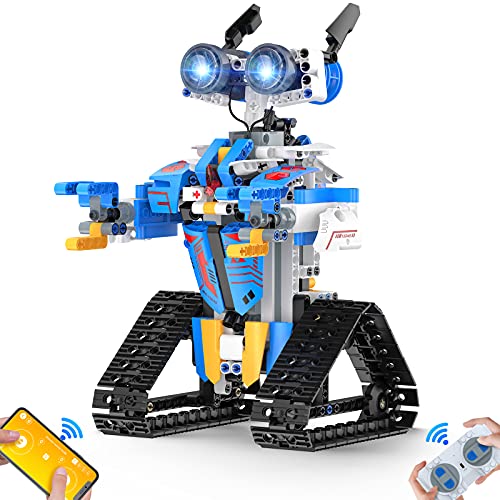
- 468+ pieces with step-by-step assembly instructions
- App, remote, voice, path, and STEM programming modes
- Directional movement, lights, rotating joints, and stunts
Best For: Kids ages 8 and up beginning with app-controlled robot building
Best Robotic Arm Project
5DOF Arduino Programmable Robot Kit
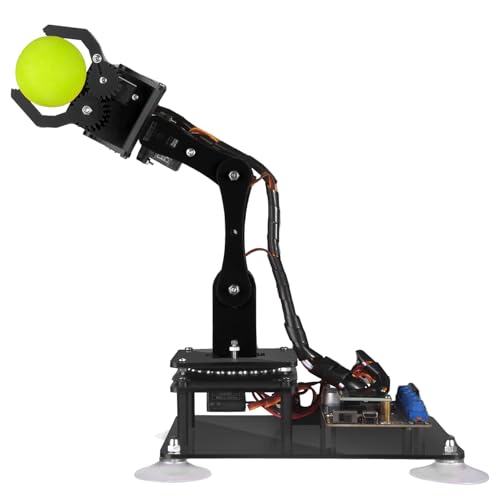
- Five-axis arm compatible with Arduino IDE
- Manual and PC control options with code routines
- Supports drawing, imitation, and self-learning functions
Best For: Teens and adults developing Arduino and robotics skills
Best Advanced Raspberry Pi Build
Big Hexapod Programmable Robot Kit

- Six legs with three motors per leg
- Camera, ultrasonic sensor, and rotating head
- Python code with phone and computer control
Best For: Makers with a compatible Raspberry Pi seeking an advanced project
Best Mechanical Coding Starter
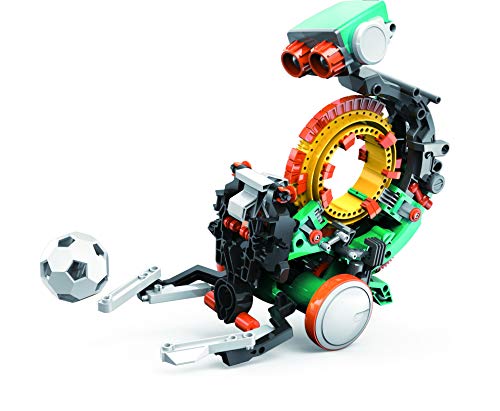
- Mechanical coding wheel programs robot actions
- Can throw, lift, kick, draw, and perform more tasks
- Multi-hour hands-on build for ages 10 and up
Best For: Young beginners learning mechanical coding and engineering concepts
Best for Open-Source Arm Projects
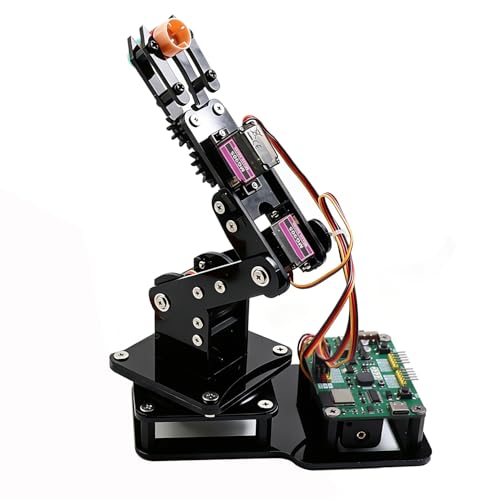
- 4DOF arm with four MG90S servos
- Arduino and MicroPython support
- Joystick, web control, and motion playback
Best For: Teens and makers building an expandable tabletop coding project
Best for Younger Builders

- 603 pieces for five buildable models
- App, remote, gesture, path, and programming modes
- Designed for ages 6–16
Best For: Children who want varied beginner STEM building and interactive play
Best for Advanced Mobile Builds

- 5DOF arm mounted on a 4WD Mecanum car
- Arduino, Python, and Blockly support
- Sensors enable cruising and obstacle avoidance
Best For: Teens and adults seeking a multifunctional mobile robotics project
Interactive Build

- 588-piece construction with remote and app control
- Five app modes include programming and voice control
- Rechargeable design with LED light-up eyes
Best For: Teens and adults who want an interactive RC building project
Learn-to-Code Choice

- Supports Scratch, Arduino, and Python
- Includes 16 story-based tutorials and HD videos
- Works with computers, tablets, and mobile devices
Best For: Kids and teens building foundational coding and robotics skills
Advanced Modular Build

- Builds four configurations with a 5DOF robotic arm
- Supports Scratch and Arduino programming
- Tank treads handle multiple indoor and outdoor surfaces
Best For: Older learners seeking hands-on mechanics and modular robotics
Best App-Controlled Pick – Programmable Robot Building Kit for Kids
This 468-piece kit is a practical entry point for kids exploring programmable robot building kits. Children assemble the robot from labeled bags and a step-by-step manual, then control it through a Bluetooth app, included remote, or several programming and sensor-based modes.
Best For: Kids ages 8 and up who want a buildable robot with remote control, app connectivity, lights, and introductory STEM programming.
Pros:
- Includes more than 468 building pieces, stickers, a remote, and USB charging cable.
- Offers app, remote, path, voice, gravity-sensor, and STEM programming modes.
- Moves in multiple directions and includes rotating joints, glowing eyes, and 360-degree stunts.
- Labeled packaging and illustrated instructions help simplify assembly.
Cons:
- The manufacturer lists a recommended age of 8, so younger children may need help.
- Requires one included lithium-ion battery and charging before use.
Choose this model if you want a feature-rich, kid-friendly building experience rather than a more advanced coding platform. Its multiple control options make it flexible for play, while the block-based construction supports hands-on STEM learning.
Best Robotic Arm Project – 5DOF Arduino Programmable Robot Kit
The Adeept 5DOF arm is one of the more technical programmable robot building kits in this roundup. Designed for Arduino IDE compatibility, it combines hands-on assembly with code routines, manual potentiometer control, and PC-based remote control.
Best For: Older teens and adults learning Arduino programming, robotics, mechanical movement, and problem-solving.
Pros:
- Five degrees of freedom provide a practical introduction to robotic-arm movement.
- Compatible with Arduino IDE and includes code routines plus a detailed PDF manual.
- Supports manual control, graphical PC control, self-learning, drawing, and imitation features.
- Includes technical support and a one-year parts warranty.
Cons:
- The recommended age is 16 and up, making it unsuitable as a young-child kit.
- Tutorials are digital rather than paper-based and require access to the supplied PDF materials.
This is a strong choice for a learner who wants to move beyond simple remote-controlled toys. Its Arduino compatibility and multiple control methods offer more programming depth, but the project demands greater technical interest and patience.
Best Advanced Raspberry Pi Build – Big Hexapod Programmable Robot Kit
For experienced makers, the Freenove Big Hexapod is an ambitious option among programmable robot building kits. It requires assembly and a compatible Raspberry Pi, then supports Python-based projects involving walking, self-balancing, camera control, face recognition, ultrasonic ranging, and wireless operation.
Best For: Makers and older learners who already have a compatible Raspberry Pi and want a substantial robotics programming project.
Pros:
- Six legs with three motors per leg create a complex walking platform.
- Includes a camera-equipped rotating head and ultrasonic distance sensor.
- Provides complete Python code and a step-by-step digital assembly tutorial.
- Supports Android, iPhone, computer, and Raspberry Pi OS control methods.
Cons:
- Raspberry Pi and battery are not included.
- Assembly and setup are more demanding than a basic educational robot.
- Some older Raspberry Pi models require extra parts for compatibility.
This kit offers the broadest maker-oriented feature set here, but it is not a ready-to-run purchase. Confirm that you have a supported Raspberry Pi, battery, and the time for a detailed build before choosing it.
Best Mechanical Coding Starter – Mech-5 Robot Building Kit
The TEACH TECH Mech-5 takes a hands-on approach to programmable robot building kits. Instead of relying on an app, children snap coding buttons onto a mechanical coding wheel to program actions such as throwing, lifting, kicking, and drawing.
Best For: Kids ages 10 and up who learn best through a structured, mechanical introduction to coding and engineering.
Pros:
- Mechanical coding wheel makes programming tangible and easy to observe.
- Can be programmed for throwing, lifting, kicking, drawing, and other actions.
- Provides a substantial, multi-hour building project with detailed instructions.
- Supports coding, problem-solving, programming, and STEM learning objectives.
Cons:
- Assembly takes multiple hours and requires careful attention to the instructions.
- It uses a mechanical coding system rather than app or computer programming.
- Requires two AAA batteries, which are listed separately from the included assembly parts.
Mech-5 is a good fit when the goal is to make coding visible and physical. It offers less digital flexibility than Arduino or Raspberry Pi kits, but its mission-based activities can make mechanical engineering concepts approachable for younger beginners.
Best for Open-Source Arm Projects – ESP32 4DOF Robot Arm
For makers looking for programmable robot building kits, this ESP32 robotic arm offers a focused introduction to assembling, controlling, and modifying a tabletop robot. It supports Arduino and MicroPython, with joystick, web-app, motion-recording, and loop-playback features.
Best For: Teens, students, and DIY enthusiasts who want an expandable robotic arm for coding practice, demonstrations, or classroom projects.
Pros:
- Includes hardware for building a 4DOF robotic arm with four MG90S servos.
- Supports both Arduino and MicroPython programming.
- Offers joystick and browser-based web-app control without requiring app installation.
- Can record motion sequences and play them back in a loop.
Cons:
- Batteries are not included.
- The claw is intended for lightweight objects.
- Its recommended age is 12 and up, so younger children may need substantial help.
This is a strong choice when learning and customization matter more than a ready-to-play toy experience. The open-source ESP32 platform and expandable design give it room to grow with the builder’s coding skills.
Best for Younger Builders – 5-in-1 STEM Robot Kit
Among programmable robot building kits, this 603-piece set emphasizes variety and accessible hands-on construction. Children can assemble five different models, then use remote, app, gesture, path, or programming-oriented controls for interactive play.
Best For: Kids ages 6–16 who enjoy rebuilding projects, screen-connected control, and beginner-friendly STEM activities.
Pros:
- 603 pieces can be used to build five different robot models.
- Provides remote-control, app, path, gravity-sensor, and programming control modes.
- Includes a step-by-step instruction manual for assembly and rebuilding.
- Rechargeable lithium-ion batteries are included.
Cons:
- The kit is primarily designed for indoor or smooth-surface operation.
- Rebuilding between models requires disassembly and reassembly.
- The supplied notes do not specify the programming platform or language.
This kit is a practical pick for families seeking repeatable build-and-play value rather than a single advanced robotics platform. Its multiple models and control modes can keep beginners engaged while they develop assembly and problem-solving skills.
Best for Advanced Mobile Builds – 5DOF Robot Arm Car
This ACEBOTT kit is one of the more ambitious programmable robot building kits, combining a 5DOF robotic arm with an ESP32-powered 4WD car. It is designed for teens and adults who want to assemble a mobile robot, experiment with Arduino, Python, or Blockly, and explore sensors and autonomous behaviors.
Best For: Builders ages 12 and up who want a larger programming project with an articulated arm, Mecanum-wheel movement, obstacle avoidance, and expansion potential.
Pros:
- Combines a 5DOF arm with a 4WD Mecanum-wheel robot car.
- Supports Arduino, Python, and Blockly programming.
- Includes ultrasonic and infrared sensors for cruising and obstacle-avoidance functions.
- Offers remote and app control, with a pre-burned program for post-assembly use.
Cons:
- Batteries are not included.
- The more complex vehicle-and-arm design may be demanding for beginners.
- The supplied details do not confirm every component included beyond the smart robot car with arm kit.
This is the best fit for learners who have outgrown simple wheeled robots and want a multifunctional project. Its combination of arm articulation, omnidirectional driving, sensors, and several programming options supports extended experimentation.
Interactive Build – Programmable RC Robot
This programmable robot building kit combines 588 interlocking pieces with remote, app, and basic programming controls. It is a practical choice for older builders who want a construction project that also delivers hands-on robot play.
Best For: Teens, adults, and beginners who want a visually distinctive RC robot with app-based programming.
Pros:
- Supports remote control and five app modes, including programming.
- Includes replaceable LED light-up eyes for a futuristic display.
- Rechargeable motor system provides up to 30 minutes of play per charge.
- Includes 588 ABS building pieces and an engineered structure.
Cons:
- Manufacturer recommends the kit for ages 14 and up.
- Requires a nonstandard battery.
- The notes do not specify compatibility with a particular mobile operating system beyond app control.
This kit leans toward interactive building and entertainment rather than advanced coding. Choose it if remote driving, app modes, and the light-up design matter as much as the construction experience.
Learn-to-Code Choice – ACEBOTT Smart Robot Car
This programmable robot building kit is designed as a guided learning platform, pairing an ESP32 controller with 16 story-based tutorials. Support for Scratch, Arduino, and Python gives it a broader coding path than a simple app-controlled toy.
Best For: Kids and teens ages 8–16, classrooms, and families seeking a beginner-friendly robot car that can grow with coding skills.
Pros:
- Supports Scratch, Arduino, and Python for different experience levels.
- Offers mobile, tablet, and computer coding support.
- Includes illustrated instructions, HD videos, and 16 guided tutorials.
- Provides both smartphone app and IR remote control.
Cons:
- Batteries are not included.
- Assembly and programming may require adult or instructor support for younger beginners.
- The supplied details identify it primarily as an indoor tabletop learning kit.
For buyers prioritizing programming progression, this is the most education-focused option in the group. Its multi-language support and guided content make it suitable for structured home or classroom learning.
Advanced Modular Build – ACEBOTT 4-in-1 Robot Arm
This programmable robot building kit expands beyond a standard car with a 5DOF robotic arm, tank-track components, and four possible configurations. It suits learners who want to explore mechanics, movement, object handling, and coding in one modular project.
Best For: Kids and teens ages 12 and up who want a more advanced, reconfigurable robotics and programming challenge.
Pros:
- Combines a robot car, tank tracks, and a programmable 5DOF robotic arm.
- Supports Arduino and Scratch through an ESP32 controller.
- Includes 16 guided tutorials and HD assembly videos.
- Rubber treads are designed for grass, gravel, slopes, and carpet.
Cons:
- Its modular design may be more involved to assemble than a basic robot car.
- Manufacturer recommends the kit for ages 12 and up.
- The supplied notes do not state whether batteries are included.
This is the strongest pick for variety and mechanical experimentation. Buyers should choose it when the robotic arm and all-terrain tank configurations justify a larger learning curve than a simpler programmable car.
How We Picked These Programmable Robot Building Kits
We focused on kits that combine physical construction with meaningful programming rather than simple remote-control play. The selection covers a broad range of learners, from children starting with app-based commands to older students working with Arduino, Scratch, Python, MicroPython, or Raspberry Pi. We also considered build complexity, available control methods, expandability, included components, and the types of projects each platform can support.
Because specifications and included parts can vary by seller or revision, check the current listing for software compatibility, board version, battery requirements, assembly instructions, and supported operating systems before ordering.
Quick Comparison
| Best For | Look For | Typical Platform |
|---|---|---|
| Young beginners | Visual apps, guided builds, simple controls | Proprietary app or remote |
| First coding projects | Scratch or Blockly support and modular parts | Arduino-compatible board |
| Older students | Python, MicroPython, sensors, and more challenging builds | Arduino, ESP32, or Raspberry Pi |
| Mechanical experimentation | Multiple degrees of freedom and grippers | Programmable robotic arm |
| Advanced robotics | Balancing, vision, mapping, and Linux support | Raspberry Pi |
Key Buying Factors for Programmable Robot Building Kits
Age, Patience, and Build Difficulty
Age ratings are useful starting points, but construction tolerance and troubleshooting ability matter just as much. Younger children generally benefit from larger parts, clear instructions, and app or remote operation. Teens and adult beginners may prefer kits that require wiring, calibration, and code editing.
Programming Languages and Learning Path
Scratch and Blockly make it easier to understand logic without typing syntax. Arduino IDE is a strong next step for C/C++-style programming, while Python and MicroPython offer a gentler text-based route. Raspberry Pi kits can provide a broader software environment but usually demand more setup and troubleshooting.
Robot Type and Project Variety
Cars and tracked robots are typically easier to assemble and modify. Robotic arms teach positioning, motor control, and sequencing, while hexapods and self-balancing robots introduce more advanced mechanics and sensor feedback. Choose the format that matches the learner’s interests.
Controls, Power, and Support
App, joystick, web, and remote controls are useful for immediate feedback, but programming access determines long-term value. Confirm whether batteries, chargers, a controller, or a compatible Raspberry Pi board are included. Favor products with downloadable documentation, example code, replacement parts, and active community support.
Who Should Buy Which Programmable Robot Building Kits?
Choose an app- or remote-friendly building kit for younger children or families seeking guided STEM play. Select a Scratch- or Blockly-compatible ACEBOTT or similar platform for learners ready to connect visual programming with physical movement. Arduino and ESP32 arm kits suit teens and hobbyists interested in servos, grippers, and custom code. For advanced builders, the Freenove Raspberry Pi hexapod offers the richest path into sensors, computer vision, balancing, and Linux-based robotics.