The best audio mixers for studio work should make recording easier without forcing you to compromise on sound quality, routing, or workflow. This roundup includes compact interfaces, analog mixers, digital consoles, and all-in-one production systems for different studio setups.
Whether you record vocals, produce bands, stream, or need flexible monitoring, compare channel counts, connectivity, preamp quality, effects, and software support before you buy.
Best 10 Audio Mixers for Studio Picks for 2026
Flexible Digital Control

- 18-channel digital mixer with 12 buses
- 16 programmable Midas mic preamps
- 18x18 USB interface and built-in Wi-Fi
Best For: Multichannel studio and live recording with tablet control
Hybrid Recording Hub

- 18-channel analog mixer with 12 mic inputs
- USB-C records channels and main mix
- Includes SD recording and Studio One Artist
Best For: Hands-on studio mixing with flexible recording options
Compact Two-Channel Interface
Focusrite Scarlett Solo 3rd Gen

- Mic preamp and Hi-Z instrument input
- Records up to 24-bit/192kHz
- Compact USB-C interface with Air mode
Best For: Solo vocals, guitar, podcasts, and compact recording rigs
Practical Analog Mixer

- 10 inputs with USB and SPX effects
- Three-band EQ and high-pass filters
- One-knob compressors and rugged chassis
Best For: Small studios wanting simple analog control and effects
Best All-in-One Pick

- Four XLR inputs with APHEX processing
- Multitrack recording to computer, microSD, or USB
- Eight customizable SMART pads
Best For: Podcasts, streams, and compact studios
Best for Multitrack Mixing

- 16-channel analog mixer layout
- 96kHz/24-bit multitrack USB recording
- Onyx preamps and built-in digital effects
Best For: Bands, larger sessions, and computer-based recording
Best Budget Feature Set

- Four XLR inputs with 48V phantom power
- Bluetooth and USB playback support
- Three-band EQ with 16 DSP effects
Best For: Small studios, karaoke, streaming, and live use
Compact Studio Control

- Eight-channel analog layout
- Phantom power for condenser mics
- Three-band EQ on every channel
Best For: Small studios needing simple, clean analog mixing
Connected Value Pick

- Bluetooth and USB connectivity
- Built-in MP3 playback controls
- 16-bit DSP effects and phantom power
Best For: Studios and streams needing wireless and USB features
Feature-Rich 12-Channel Option
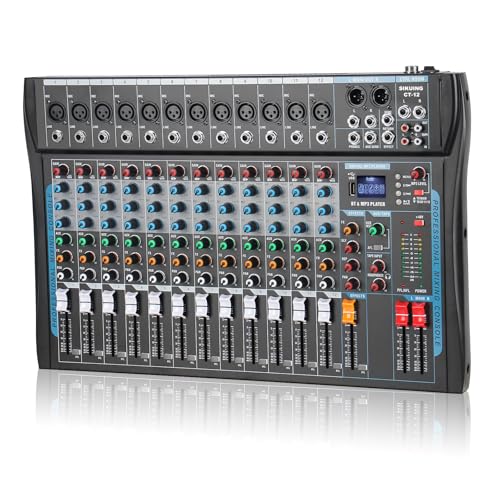
- Twelve-channel input capacity
- USB, Bluetooth, and DSP effects
- Headphone output and 48V phantom power
Best For: Studios and creators needing flexible multichannel connectivity
Flexible Digital Control – Behringer X AIR XR18
For studio setups that need extensive routing and remote control, the Behringer X AIR XR18 is one of the more capable audio mixers for studio and live use. It combines 18 channels, tablet control, programmable Midas preamps, built-in Wi-Fi, and an 18×18 USB interface for recording.
Best For: Studios and live applications needing many inputs, remote operation, and multichannel USB recording.
Pros:
- 18-channel, 12-bus digital mixing architecture
- 16 programmable Midas-designed mic preamps
- Built-in tri-mode Wi-Fi router for tablet control
- 18×18 bidirectional USB audio interface
Cons:
- Requires a tablet-based workflow for remote operation
- Provides two main XLR outputs, which may limit some output configurations
The XR18 is a strong choice when flexible digital mixing and computer-based recording matter more than traditional hands-on controls. Its high channel count and remote workflow make it especially suitable for complex studio or live sessions.
Hybrid Recording Hub – PreSonus StudioLive AR16c
The PreSonus StudioLive AR16c suits buyers who want a traditional analog mixer alongside modern recording features. Among audio mixers for studio work, it stands out with 18 channels, USB-C multitrack recording, an SD recorder, built-in effects, Bluetooth, and included recording software.
Best For: Home and project studios that want analog controls plus USB, SD, Bluetooth, and bundled software.
Pros:
- 18-channel analog mixer with 12 balanced microphone inputs
- USB-C interface records every channel plus the main mix
- Two-channel SD recorder supports SD and SDHC cards up to 32 GB
- Includes Capture and Studio One Artist software
Cons:
- Its 18-channel layout may be more than a small setup requires
- Analog operation does not offer the same remote digital workflow as the XR18
The AR16c is a versatile centerpiece for a studio that values tactile mixing but still needs direct computer and standalone recording. Its software bundle and multiple playback options add useful flexibility for getting started.
Compact Two-Channel Interface – Focusrite Scarlett Solo 3rd Gen
The Focusrite Scarlett Solo 3rd Gen is a compact alternative for creators who do not need a multi-channel mixer. For simple audio mixers for studio-style recording, it offers one XLR mic preamp, a Hi-Z instrument input, Air mode, 24-bit/192kHz conversion, and low-noise monitor outputs.
Best For: Solo musicians, vocalists, guitarists, podcasters, and compact computer-based recording setups.
Pros:
- One mic input and one high-headroom instrument input
- 24-bit/192kHz recording capability
- Switchable Air mode adds clarity to acoustic instruments
- Includes a useful recording software and plug-in bundle
Cons:
- Only two input channels, limiting ensemble recording
- It is an audio interface rather than a full channel-strip mixer
The Scarlett Solo is best viewed as a streamlined recording interface rather than a conventional mixer. Its small footprint, simple controls, and included software make it a practical starting point for one- or two-source studio sessions.
Practical Analog Mixer – Yamaha MG10XU
The Yamaha MG10XU is a practical choice for buyers who want familiar analog controls, onboard effects, and USB connectivity. As audio mixers for studio applications go, its 10-input format is well suited to smaller setups, while the EQ, high-pass filters, compressors, and rugged chassis support everyday use.
Best For: Small studios and creators needing straightforward analog mixing, basic USB connectivity, and built-in effects.
Pros:
- 10-input design fits smaller recording and mixing setups
- USB connectivity and SPX digital effects
- Three-band EQ and high-pass filters aid mix shaping
- One-knob compressors simplify control of vocals and instruments
Cons:
- Its 10-input capacity is less suited to large multitrack sessions
- USB operation is specified at up to 48 kHz
The MG10XU focuses on dependable hands-on operation rather than extensive digital routing. It is a sensible fit when you want quick access to EQ, compression, and effects in a compact, impact-resistant mixer.
Best All-in-One Pick – RØDECaster Pro II
For creators who want audio mixers for studio work without assembling multiple devices, the RØDECaster Pro II combines four XLR inputs, headphone outputs, effects, and recording features in one desk unit. APHEX presets, multitrack recording, and standalone operation make it practical for podcasts, streams, and voice-focused production.
Best For: Podcasting, streaming, and compact studio setups that need integrated processing and recording.
Pros:
- Four studio preamps with APHEX voice-processing presets
- Records multitrack to a computer, microSD card, or USB drive
- Eight customizable SMART pads support live music and sound effects
- Works standalone without a computer
Cons:
- Only four XLR microphone inputs are provided
- Additional microphones must be purchased separately
The RØDECaster Pro II is a strong choice when streamlined control matters more than a large channel count. Its built-in processing and standalone recording reduce the need for extra studio hardware.
Best for Multitrack Mixing – Mackie Onyx16
The Mackie Onyx16 is a capable option among audio mixers for studio setups that need more channels and computer recording. It supports 16-channel operation, 96kHz/24-bit multitrack recording over USB, direct stereo recording to an SD card, and hands-on analog-style controls.
Best For: Larger studio sessions, bands, and creators who need multitrack USB recording with analog mixer controls.
Pros:
- 16-channel layout supports more connected sources
- 96kHz/24-bit multitrack recording to Mac or PC via USB
- Onyx mic preamps provide up to 60dB of gain
- Built-in effects, Bluetooth streaming, and SD stereo recording
Cons:
- At 19.5 pounds, it is less portable than compact mixers
- Its feature set may be more than a small voice-only setup requires
Choose the Onyx16 when channel capacity and recording flexibility are priorities. Its USB multitrack support and SD recording make it suitable for more involved studio workflows.
Best Budget Feature Set – 6-Channel Bluetooth Mixer
This six-channel console offers a straightforward entry point for buyers comparing audio mixers for studio, karaoke, streaming, or small live-use applications. It combines four XLR inputs with 48V phantom power, Bluetooth playback, USB functionality, three-band EQ, and 16 DSP effects.
Best For: Budget-conscious users needing basic microphone mixing, wireless playback, and onboard reverb or delay.
Pros:
- Four XLR inputs support condenser microphones with switchable 48V phantom power
- Bluetooth and USB support music playback and mixing
- Three-band EQ and 16 DSP effects provide hands-on tonal control
- Supports microphones, guitars, DI boxes, and other instruments
Cons:
- It is a traditional analog mixer rather than a computer-focused digital system
- The supplied warranty is limited to 90 days
- Operational errors may result in no sound, according to the product notes
This mixer is best suited to simple, small-scale setups where connectivity and built-in effects matter more than advanced multitrack production. Its six-channel design keeps the controls accessible while covering common microphone and playback needs.
Compact Studio Control – Mackie Mix8
The Mackie Mix8 is a straightforward choice among audio mixers for studio setups that need reliable analog control without excessive complexity. Its eight-channel layout combines two mic/line inputs, two stereo line inputs, phantom power, and three-band EQ in a compact chassis.
Best For: Home studios, small recording setups, and users who want clean analog mixing with essential channel controls.
Pros:
- Eight-channel design with two mic/line inputs and two stereo line inputs.
- Phantom power supports studio condenser microphones.
- Three-band EQ is included on all channels.
- Compact 9.6-by-7.8-by-2.1-inch design with one aux send and stereo returns.
Cons:
- Wired, corded operation without Bluetooth or USB connectivity.
- Only two channels provide mic/line inputs.
- Includes basic analog routing rather than built-in digital effects or recording features.
The Mix8 focuses on dependable, low-noise analog mixing and useful studio essentials. It is a strong fit when hands-on EQ and straightforward inputs matter more than wireless streaming or computer integration.
Connected Value Pick – Pyle PMXU63BT
The Pyle PMXU63BT adds wireless and computer-friendly features to the audio mixers for studio category. This six-channel board combines XLR and quarter-inch inputs with Bluetooth, USB, a built-in MP3 player, phantom power, and DSP effects.
Best For: Budget-conscious studios, streaming setups, karaoke, and live users who want Bluetooth and USB playback or recording options.
Pros:
- Bluetooth supports wireless streaming from compatible phones and tablets.
- USB, flash-reader, and MP3 compatibility enable playback and mixing from external devices.
- +48V phantom power and three-band EQ are available for microphone channels.
- Rugged steel chassis with sealed rotary controls.
Cons:
- Six-channel capacity is smaller than the other mixers in this roundup.
- Its feature-rich design may be more than needed for a basic analog-only studio.
- Uses a supplied power adapter rather than a simple internal corded design.
With Bluetooth, USB functionality, and 16-bit DSP effects, the PMXU63BT offers broad connectivity in a compact format. It is particularly practical for hybrid studio and performance use where playback and streaming are part of the workflow.
Feature-Rich 12-Channel Option – CT-12 12-Channel Audio Mixer
The CT-12 is a versatile option among audio mixers for studio recording, streaming, and live applications. Its 12-channel design offers multiple mic inputs, USB and Bluetooth connectivity, three-band EQ, headphone monitoring, 16-bit DSP effects, and +48V phantom power.
Best For: Larger home studios, content creators, live streamers, and performers who need more inputs and integrated connectivity.
Pros:
- Twelve-channel configuration provides more input capacity than the smaller boards.
- USB and Bluetooth support mixing and recording with computers and mobile devices.
- Built-in 16-bit DSP effects and three-band EQ expand sound-shaping options.
- Headphone output enables private monitoring, while phantom power supports condenser microphones.
Cons:
- Its larger feature set may be unnecessary for simple two-microphone setups.
- The supplied notes do not specify item dimensions or weight.
- Bluetooth and USB features add complexity compared with a basic analog mixer.
The CT-12 is the most expansive choice here for users who expect their mixer to handle studio work, streaming, and live duties. Its additional channels and integrated digital features make it flexible, provided you are comfortable with a more feature-dense control surface.
How We Picked the Best Audio Mixers for Studio Use
We selected these models to cover the main ways people build a studio: direct USB recording, multitrack production, live tracking, podcasting, streaming, and hybrid analog-digital workflows. We considered input and output counts, microphone preamps, phantom power, computer connectivity, monitoring options, onboard processing, portability, and ease of use.
The list includes both full mixers and compact audio interfaces because the right choice depends on how many sources you record at once. A solo vocalist may need only one or two inputs, while a band, rehearsal room, or project studio may benefit from several microphone channels and independent routing.
Quick Comparison
| Best For | Recommended Type | What to Prioritize |
|---|---|---|
| Solo recording | Compact USB interface | Clean preamps, low latency, simple monitoring |
| Small bands | Multichannel USB mixer | Mic inputs, multitrack recording, headphone mixes |
| Live recording and mixing | Digital mixer | Remote control, routing, scenes, effects |
| Podcasting and streaming | Production console | Voice processing, mix-minus, pads, easy controls |
| Budget playback or DJ use | Compact analog mixer | Usable inputs, Bluetooth or USB playback, basic EQ |
Key Buying Factors for Audio Mixers for Studio Recording
Inputs, Outputs, and Recording Channels
Count the microphones, instruments, stereo sources, and headphones you expect to use at the same time. A mixer’s advertised channel count may include stereo line channels, so check how many inputs accept microphones and how many tracks it can send to recording software.
USB and Computer Integration
USB connectivity varies widely. Some products send only a stereo mix to a computer, while others provide separate tracks for each channel. Choose multitrack USB if you plan to edit individual drums, vocals, or instruments after recording.
Preamps, Phantom Power, and Monitoring
Look for quiet microphone preamps with enough gain for your microphones. Phantom power is necessary for most condenser microphones, but it may be global or independently switchable. Direct monitoring helps prevent distracting latency while recording.
Analog Versus Digital Control
Analog mixers offer immediate hands-on control and straightforward signal flow. Digital models can provide deeper routing, stored scenes, dynamics, effects, and remote operation, but they may require more setup and app familiarity.
Effects and Workflow
Built-in reverb, compression, EQ, and voice-processing tools can reduce the need for extra hardware. For critical music production, however, confirm that onboard effects do not limit dry recording or later editing.
Who Should Buy Which Audio Mixers for Studio?
Choose a compact USB interface if you mainly record one or two performers and want the simplest path into a computer. Choose a multichannel USB mixer for bands, drum setups, or projects that need several simultaneous sources.
Choose a digital mixer when flexible routing, remote control, saved settings, and live production matter. Choose an all-in-one production console for podcasting, streaming, or spoken-word workflows that benefit from fast controls and integrated processing.
Choose a small analog mixer if you need affordable level control for playback, rehearsals, basic recording, or a compact desktop setup. Before ordering, verify the connector layout, USB track configuration, software compatibility, and whether the mixer’s channel count matches your actual recording plan.