The best MIDI interfaces for recording make it easier to connect keyboards, controllers, synths, drum machines, and other hardware to a computer. Some picks focus on MIDI connectivity, while others combine MIDI with microphone and instrument inputs for a complete recording setup.
This roundup compares ten options across connection types, I/O, portability, and recording flexibility so you can choose the right fit for your studio and workflow.
Best 10 Midi Interfaces for Recording Picks for 2026
Best All-Around Audio Hub

- 5-pin MIDI input and output
- Two combo inputs with phantom power
- 5-year warranty and included software
Best For: Home studios recording audio and MIDI together
Best for MIDI Routing

- Standalone 3-in/3-out MIDI routing
- Merge, split, filter, and map functions
- Supports major operating systems
Best For: Complex hardware MIDI rigs
Best for Audio Recording
Focusrite Scarlett 2i2 4th Gen

- Two mic preamps and Hi-Z inputs
- 120 dB dynamic range
- Auto Gain, Clip Safe, and Air mode
Best For: Vocal and guitar recording with software MIDI
Best Budget MIDI Cable
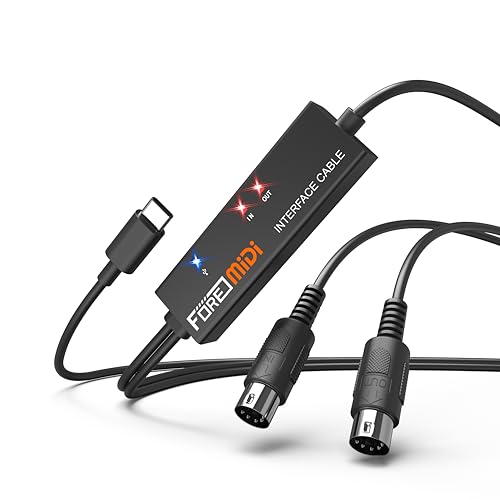
- One MIDI input and one output
- Plug-and-play USB-C connection
- Works with computers and mobile devices
Best For: Connecting one 5-pin MIDI device
Best Expandable Studio Hub

- MIDI I/O with four line inputs and outputs
- Two mic preamps and two Hi-Z inputs
- Auto Gain, Clip Safe, and Air modes
Best For: Multi-device home studios and expanding producers
Best Compact MIDI Starter

- 5-pin MIDI input and output
- Compact single-input recording interface
- Includes creative software and loopback
Best For: Beginners, solo musicians, and portable setups
Best Simple Vocal-and-Guitar Pick

- One XLR mic input and one Hi-Z input
- Air mode and Gain Halos for easier recording
- Includes a broad starter software bundle
Best For: Solo vocalists, guitarists, and simple recording setups
Versatile Two-Input Pick

- Two combo mic, line, and instrument inputs
- Zero-latency USB/direct monitoring
- Includes MPC Beats and Ableton Live Lite
Best For: Home recording, podcasting, and live streaming with two sources
Complete Studio Bundle
Focusrite Scarlett 2i2 Studio 4th Gen

- Includes interface, microphone, and headphones
- Supports 24-bit/192 kHz recording
- Auto Gain and Clip Safe help prevent level problems
Best For: Beginners building a complete home recording setup
Compact Solo Setup

- Combo mic/line input plus line/instrument input
- Portable 10.6-ounce design
- Direct monitoring and MPC Beats included
Best For: Solo recording, podcasting, and lightweight mobile setups
Best All-Around Audio Hub – Arturia MiniFuse 2
If you want midi interfaces for recording that can also handle microphones, instruments, and synths, the Arturia MiniFuse 2 is a versatile home-studio choice. It combines two combo inputs, 5-pin MIDI I/O, balanced outputs, headphone monitoring, and a USB hub in a compact interface.
Best For: Home-studio musicians recording vocals, guitar, synths, and MIDI hardware.
Pros:
- Includes 5-pin MIDI input and output for synths, controllers, and drum machines.
- Two combo mic/instrument/line inputs with 48V phantom power support flexible recording.
- Offers up to 192 kHz operation, loopback, and a generous included software bundle.
- Backed by a 5-year warranty and extensive reliability testing.
Cons:
- It is a broader audio interface rather than a dedicated multi-port MIDI router.
- The USB hub is limited to 250 mA.
The MiniFuse 2 is a strong fit when MIDI is only part of your recording setup. Its audio connectivity, beginner-friendly software, and long warranty make it especially practical for growing home studios.
Best for MIDI Routing – CME U6MIDI Pro
For complex setups needing midi interfaces for recording, the CME U6MIDI Pro focuses on reliable MIDI distribution rather than audio capture. Its 3-in/3-out design, standalone operation, and routing tools suit musicians working with multiple keyboards, synths, drum machines, or digital pianos.
Best For: Multi-device MIDI rigs that need routing, merging, splitting, filtering, and synchronization.
Pros:
- Provides three MIDI inputs and three MIDI outputs, including standalone operation.
- Software supports MIDI routing, split/thru, merge, filtering, and mapping.
- Supports broad MIDI data, including clock, SysEx, MIDI timecode, and MPE.
- Works with macOS, Windows, iOS, Android, Linux, and Chrome OS.
Cons:
- It handles MIDI only and does not provide microphone or instrument audio inputs.
- Advanced routing features require the UxMIDI Tools software.
The U6MIDI Pro is the most specialized option here for expanding a hardware MIDI network. Its low-latency transmission and standalone routing make it better suited to elaborate rigs than simple one-keyboard setups.
Best for Audio Recording – Focusrite Scarlett 2i2 4th Gen
The Focusrite Scarlett 2i2 4th Gen is a practical choice for recording vocals, guitar, and other audio alongside MIDI instruments. While it does not list dedicated MIDI ports, its two mic preamps, Hi-Z inputs, USB-C connectivity, and recording-focused features make it a capable centerpiece for a computer-based setup using MIDI through software or another interface.
Best For: Singers, guitarists, and producers prioritizing high-quality audio recording with computer-based MIDI workflows.
Pros:
- Two mic preamps and two Hi-Z instrument inputs support common recording needs.
- 120 dB dynamic range and up to 24-bit/192 kHz operation provide strong audio specifications.
- Auto Gain and Clip Safe help maintain usable recording levels.
- Includes Air mode and a substantial software bundle with Ableton Live Lite and other tools.
Cons:
- Dedicated 5-pin MIDI input and output are not listed in the supplied specifications.
- It has two audio channels, which may be limiting for larger recording sessions.
Choose the Scarlett 2i2 when audio quality and simple level management matter more than built-in hardware MIDI connectivity. Producers with external MIDI gear may need a separate MIDI interface or controller connection.
Best Budget MIDI Cable – FORE T1 USB-C MIDI Interface
The FORE T1 is a straightforward option for midi interfaces for recording when you need to connect one traditional 5-pin MIDI device to a computer, phone, or tablet. Its USB-C connection, built-in driver, LED status indicators, and bus-powered design keep setup simple for keyboards, synthesizers, and electronic drums.
Best For: Solo musicians connecting one MIDI keyboard or hardware instrument to a modern USB-C device.
Pros:
- Provides one MIDI input and one MIDI output with 16 channels each.
- Plug-and-play operation requires no separate driver installation.
- Compatible with Windows, macOS, iOS, and Android systems.
- LED indicators show power and signal-transfer status.
Cons:
- It offers only one MIDI input and one MIDI output, limiting multi-device setups.
- The USB A-C adapter is not included.
- It transmits MIDI data but is not an audio interface for microphones or instruments.
The FORE T1 makes sense for basic MIDI recording and editing with a single hardware device. Its low-complexity design is convenient, but larger rigs will need a multi-port interface such as the CME U6MIDI Pro.
Best Expandable Studio Hub – Scarlett 4i4 4th Gen
The Focusrite Scarlett 4i4 4th Gen is a versatile choice among MIDI interfaces for recording when your setup includes microphones, instruments, synths, and drum machines. Its MIDI I/O, four line inputs, four outputs, and two mic preamps support a flexible home-studio workflow.
Best For: Musicians building a multi-device home studio that needs MIDI and ample analog connectivity.
Pros:
- MIDI input and output pair well with synths, controllers, and drum machines.
- Two mic preamps, two Hi-Z inputs, four line inputs, and four line outputs provide room to expand.
- Auto Gain, Clip Safe, Air modes, and 24-bit/192kHz recording simplify capture.
- Includes several recording, production, and mastering tools.
Cons:
- Its larger feature set may be more than a solo vocalist or guitarist needs.
- Requires USB connectivity and included USB-C power support for operation.
Choose the 4i4 when you want MIDI integration without giving up flexible audio routing. It is especially practical for producers who expect their collection of external gear to grow.
Best Compact MIDI Starter – Arturia MiniFuse 1
The Arturia MiniFuse 1 is a compact option among MIDI interfaces for recording, combining 5-pin MIDI I/O with a single combo input for a microphone, instrument, or line source. Its small footprint and plug-and-play workflow suit portable recording setups.
Best For: Beginners, mobile creators, and solo musicians recording one primary source alongside MIDI gear.
Pros:
- Includes 5-pin MIDI input and output for synths, controllers, and drum machines.
- Compact design offers a combo mic/instrument/line input with 48V phantom power.
- Loopback supports capturing voiceovers alongside in-app or in-game audio.
- Includes Ableton Live Lite, Analog Lab Intro, effects, guitar tools, and other software.
Cons:
- One input limits simultaneous audio recording compared with larger interfaces.
- Provides two line outputs and one headphone output, which may be restrictive for complex monitoring setups.
The MiniFuse 1 makes sense when portability and simplicity matter more than multiple recording channels. Its MIDI connections and included software give new producers a straightforward starting point.
Best Simple Vocal-and-Guitar Pick – Scarlett Solo 3rd Gen
The Focusrite Scarlett Solo 3rd Gen is a straightforward choice for recording vocals or guitar, with one XLR mic preamp, one Hi-Z instrument input, and 24-bit/192kHz support. For shoppers comparing MIDI interfaces for recording, note that the supplied specifications focus on audio inputs and do not list MIDI I/O.
Best For: Solo vocalists, guitarists, podcasters, and simple computer-based recording setups.
Pros:
- Dedicated XLR mic input and Hi-Z instrument input cover common solo recording needs.
- Air mode can add clarity to acoustic instruments and vocal recordings.
- Gain Halos help monitor levels and reduce unwanted clipping or distortion.
- Includes Ableton Live Lite, Pro Tools Intro+, Cubase LE, and Hitmaker Expansion.
Cons:
- Does not list MIDI input or output in the supplied product details.
- Single mic preamp limits simultaneous microphone recording.
- Its two balanced outputs are less suited to larger multi-output studio configurations.
The Solo 3rd Gen is best viewed as a focused audio interface rather than a full MIDI hub. It is a sensible fit if your priority is capturing one voice or instrument with minimal setup.
Versatile Two-Input Pick – M-Audio M-Track Duo
The M-Audio M-Track Duo is a practical choice for anyone comparing midi interfaces for recording and also needs flexible audio inputs. Its two combo inputs accept microphones, instruments, or line-level sources, while the compact design suits home recording, podcasting, and live streaming.
Best For: Home musicians, podcasters, and streamers who need two simultaneous inputs.
Pros:
- Two combo XLR/line/instrument inputs with phantom power
- USB/direct monitoring helps provide zero-latency monitoring
- Includes MPC Beats and supports Ableton Live Lite
- Compact, lightweight design for portable setups
Cons:
- Maximum sample rate is 48 kHz
- Only two input channels are available
The M-Track Duo covers the essentials without adding unnecessary complexity. It is especially well suited to straightforward two-source recording, though users seeking higher-resolution recording may prefer a more advanced interface.
Complete Studio Bundle – Focusrite Scarlett 2i2 Studio 4th Gen
The Focusrite Scarlett 2i2 Studio 4th Gen is a complete starting point for recording setups, including the interface, condenser microphone, headphones, and essential software. For shoppers researching midi interfaces for recording, its two inputs and 24-bit/192 kHz support provide a capable foundation for vocals, instruments, and production.
Best For: Beginners and home producers who want an all-in-one recording bundle.
Pros:
- Two mic preamps and two Hi-Z inputs
- 24-bit/192 kHz recording with a 120 dB dynamic range
- Auto Gain and Clip Safe simplify level setting
- Includes CM25 MkIII microphone, SH-450 headphones, and software suite
Cons:
- Higher-cost bundle than a standalone entry-level interface
- Limited to two input channels
This bundle removes several setup decisions by providing the core hardware and software in one package. Air mode adds a tone-shaping option for vocals and guitars, while the automatic level tools can make early recording sessions easier to manage.
Compact Solo Setup – M-Audio M-Track Solo
The M-Audio M-Track Solo is a small, affordable option for simple recording workflows. Among midi interfaces for recording, it stands out for combining one combo microphone input, a separate line/instrument input, and direct monitoring in a lightweight format.
Best For: Solo musicians, podcasters, and mobile recording setups using one primary microphone or instrument.
Pros:
- One combo XLR/line input plus a separate line/instrument input
- Phantom power supports condenser microphones
- USB/direct monitoring helps reduce monitoring latency
- Weighs only 10.6 ounces and includes MPC Beats
Cons:
- Maximum sample rate is 48 kHz
- RCA main outputs and a compact 1/8-inch headphone output may be less versatile for studio setups
- Only one combo microphone input is provided
The M-Track Solo keeps the setup focused and portable. It is a sensible fit for one-person recording and streaming, but creators who regularly record two microphones may benefit from the M-Track Duo instead.
How We Picked the Best Midi Interfaces for Recording
We focused on the features that matter most in real recording setups: reliable computer connectivity, useful MIDI I/O, audio quality, input and output flexibility, ease of use, and overall value. The selection includes dedicated MIDI interfaces such as the CME U6MIDI Pro and compact adapters such as the FORE T1, alongside USB audio interfaces with MIDI support from Arturia, Focusrite, and M-AUDIO.
Because “MIDI interface” can describe several types of equipment, we considered how each model fits a practical workflow. A dedicated unit may be ideal for controlling several hardware instruments, while an audio interface with MIDI can connect a keyboard and also handle microphones, guitars, headphones, or studio monitors.
Quick Comparison
| Best For | Recommended Type | What to Look For |
|---|---|---|
| Basic keyboard connection | Compact MIDI adapter | USB compatibility, simple setup, dependable transmission |
| Several hardware MIDI devices | Dedicated multi-port interface | Independent MIDI inputs and outputs, routing flexibility |
| Solo recording | Single-input audio interface | Instrument or microphone input, headphone monitoring |
| Vocals and instruments | Two-input audio interface | Two preamps, phantom power, direct monitoring |
| Small production studio | Four-input audio interface | More simultaneous inputs, expanded outputs, MIDI I/O |
Key Buying Factors for Midi Interfaces for Recording
MIDI I/O and Routing
Check whether you need one MIDI input and output or multiple ports for several keyboards, synthesizers, and drum machines. Dedicated multi-port models are better when you need to route hardware independently or avoid constantly swapping cables.
Audio Inputs and Outputs
If you also record vocals, guitars, or microphones, choose an audio interface with the appropriate number of inputs. Two inputs support stereo recording or two sources at once, while four inputs provide more room for ensembles and hardware setups.
Computer Connection and Compatibility
USB-C is common on newer computers, but the connector does not automatically determine performance. Confirm included cables, operating-system support, driver requirements, and compatibility with your recording software before buying.
Monitoring and Recording Features
Direct monitoring, headphone volume control, phantom power, and low-latency operation can make a major difference during sessions. Bundles may also be worthwhile if they include headphones, software, or other accessories you would otherwise purchase separately.
Who Should Buy Which Midi Interfaces for Recording?
Choose a compact MIDI adapter if your main goal is connecting one keyboard or controller to a computer. Select the CME U6MIDI Pro if you work with multiple hardware MIDI devices and need dedicated routing. For recording vocals, instruments, or software instruments, the Arturia MiniFuse, Focusrite Scarlett, and M-AUDIO interfaces offer a more complete studio connection. Soloists can prioritize compact single-input models, while producers who record two sources at once should consider a two-input interface. If you expect your setup to grow, a four-input model provides more flexibility and reduces the need for an immediate upgrade.