If you need quick access to bare 2.5-inch or 3.5-inch SATA drives, the right dock can save time, simplify backups, and make cloning far less tedious. The best options balance speed, stability, and broad drive compatibility.
Our picks for 2026 focus on real-world usability: clear power delivery, easy drive insertion, offline cloning support, and the flexibility to handle SSDs and HDDs without hassle.
Best 10 USB C Hard Drive Docking Stations Picks for 2026
Everyday Single-Bay Pick
SABRENT USB-C 2.5/3.5in SATA Dock

- 10Gbps USB-C SATA docking
- Supports 2.5-inch and 3.5-inch drives
- Includes USB-A and USB-C cables
Best For: Simple backup and drive swapping on multiple operating systems
Dual-Bay Power User Choice

- Two-bay SATA dock with USB-C
- Independent power switches for each drive
- Up to 522MB/s and Mac/PC support
Best For: Working with two bare SATA drives at once
High-Capacity Cloning Station

- Five-bay SATA dock with offline cloning
- Up to 100TB total capacity
- Aluminum alloy body with USB-C/C and A support
Best For: Large SATA storage expansion and computer-free cloning
Budget-Friendly Dual-Bay Cloner
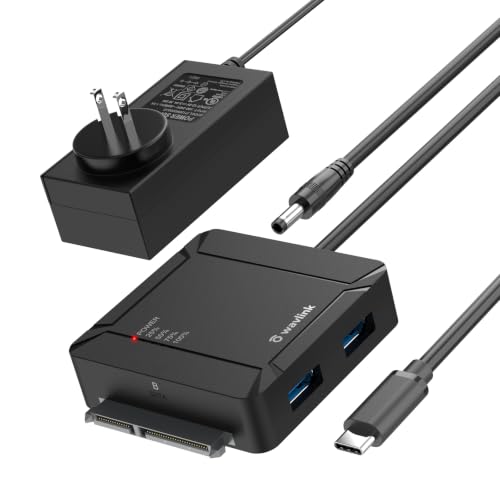
- Dual-bay SATA dock with A-to-B cloning
- Built-in 2-port USB 3.0 hub
- 5Gbps USB-C with UASP and TRIM
Best For: Cloning and desk setups that need extra USB ports
Single-Bay Everyday Dock
ORICO USB C 2.5”/3.5” SATA Reader
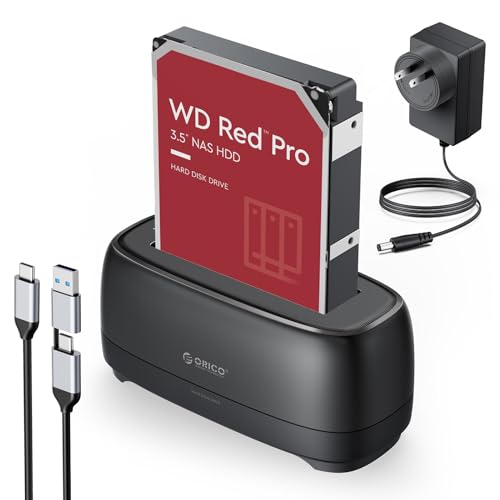
- Single-bay dock for 2.5-inch/3.5-inch SATA SSDs and HDDs
- USB-C and USB-A 2-in-1 cable included
- Tool-free design with LED indicator and auto sleep
Best For: simple one-drive access with broad compatibility
Dual-Bay Clone Dock
UGREEN 2-Bay SSD/HDD Docking Station

- Offline cloning lets you duplicate two drives without a computer
- Supports two 2.5-inch or 3.5-inch SATA drives
- USB 3.0 transfers up to 5Gbps with included power adapter
Best For: offline cloning and dual-drive management
Dual-Bay Duplicator Dock
ORICO USB-C SATA Clone Station

- Dual-bay dock with offline clone mode
- Supports two 2.5-inch/3.5-inch SATA drives
- USB-C/USB-A cable, LED lights, and auto sleep
Best For: straightforward offline drive duplication
Straightforward dual-bay dock
USB 3.0/USB C SATA Dual-Bay Dock

- Supports 2.5-inch and 3.5-inch SATA HDD/SSD
- UASP transfer speeds up to 6Gbps
- Offline cloning works without a computer
Best For: Users who want a simple dock for SATA drives and offline cloning
Modern USB-C cloning dock
USB C 5Gbps Dual Bay Cloner Dock

- USB 3.2 Gen1 connection with 5Gbps transfers
- One-key offline cloning with progress LEDs
- Supports up to 40TB total capacity
Best For: Users who want fast USB-C transfers and standalone cloning
Simple no-drivers dock
USB 3.0 Dual Bay Dock & Cloner

- Supports 2.5-inch and 3.5-inch SATA drives
- Plug-and-play with no drivers needed
- Offline cloning up to 60Mbps
Best For: Users who want a compact dual-bay dock for simple cloning and drive access
Everyday Single-Bay Pick – SABRENT USB-C 2.5/3.5in SATA Dock
If you want a straightforward option in usb c hard drive docking stations, this SABRENT model covers the basics well. It handles both 2.5-inch and 3.5-inch SATA SSDs and HDDs, supports 10Gbps transfers, and includes the cables and power adapter needed to get started.
Best For: Simple backup, drive swapping, and everyday SATA access on Windows, Mac, or Linux.
Pros:
- Supports both 2.5-inch and 3.5-inch SATA SSDs and HDDs
- 10Gbps USB-C connection with plug-and-play, hot-swappable use
- Includes both USB-A and USB-C to USB-C cables plus power adapter
- Tool-less bay with retractable dust cover for quicker swaps
Cons:
- Only supports one drive at a time
- Plastic enclosure instead of metal
- Made for SATA drives, not NVMe
Overall, this is a practical single-bay dock for users who want a simple, reliable way to access SATA drives without extra setup. Its broad compatibility and 20TB support make it a sensible long-term utility dock.
Dual-Bay Power User Choice – OWC Drive Dock Dual Bay
For usb c hard drive docking stations that need faster workflows, the OWC Drive Dock stands out with two SATA bays and simultaneous access. It is designed for reading multiple 2.5-inch or 3.5-inch drives at once, and it adds independent power switches plus Mac and PC support.
Best For: Users who regularly work with two bare SATA drives at the same time.
Pros:
- Dual-bay design for simultaneous access to two drives
- USB-C connectivity with up to 522MB/s speeds
- Independent power switches for each bay
- Includes USB-C to USB-C and USB-C to USB-A cables
Cons:
- Bulkier than single-bay docks
- Focused on bare SATA drive access, not portable use
- Higher upfront complexity than a basic dock
This is a strong fit when you need a more capable desktop dock for disk maintenance, copying, or working across two drives. The internal power supply and dual-bay layout make it a solid workstation-style option.
High-Capacity Cloning Station – ORICO 5-Bay USB-C Dock
If your priority is storage expansion or duplication, this ORICO option pushes usb c hard drive docking stations into much larger territory. It supports up to five 2.5-inch or 3.5-inch SATA drives, offers offline cloning, and is built in aluminum alloy for better heat dissipation.
Best For: Users who need multi-drive capacity and one-button offline cloning without a PC.
Pros:
- Five-bay dock with support for up to 100TB total capacity
- Offline cloning lets you duplicate drives without connecting to a computer
- Aluminum-alloy body with vertical design for heat dissipation
- Includes USB-C to C and USB-C to A cable for broad compatibility
Cons:
- Only one-to-four cloning workflow is supported
- Requires careful setup so the target drive is not overwritten
- More specialized than a simple everyday dock
For photographers, power users, or anyone managing multiple SATA drives, this dock offers serious capacity and cloning convenience. It is best viewed as a storage hub and duplication tool rather than a compact travel accessory.
Budget-Friendly Dual-Bay Cloner – WAVLINK USB-C HDD Dock
This WAVLINK model is a practical choice if you want usb c hard drive docking stations with cloning and extra connectivity in one unit. It supports two SATA drives, offers one-button offline cloning from A to B, and adds two USB 3.0 ports for peripherals.
Best For: Users who want a dual-bay dock with cloning, a built-in USB hub, and broad compatibility.
Pros:
- Dual-bay design supports two 2.5-inch or 3.5-inch SATA drives
- One-button offline cloning from drive A to drive B
- Built-in two-port USB 3.0 hub for keyboard, mouse, or other devices
- 5Gbps USB-C connection with UASP and TRIM support
Cons:
- Cloning only works from A to B
- Target drive must be at least as large as the source drive
- Top speed is 5Gbps, below faster 10Gbps docks
With power included, hot-swap support, and broad OS compatibility, this is a flexible dock for general storage work. The extra USB ports make it especially useful on crowded desks where every port matters.
Single-Bay Everyday Dock – ORICO USB C 2.5”/3.5” SATA Reader
If you want a straightforward option in usb c hard drive docking stations, this ORICO single-bay dock covers the basics well: it supports 2.5-inch and 3.5-inch SATA SSDs/HDDs, offers 5Gbps USB 3.0 transfer, and includes both USB-C and USB-A connectivity in one 1m cable. It’s a practical pick for simple drive access, backups, and recovery work across common desktop and device setups.
Best For: users who want a simple one-drive dock with broad device compatibility and tool-free setup.
Pros:
- Supports 2.5-inch and 3.5-inch SATA SSD/HDD use with UASP and TRIM support.
- Includes a 2-in-1 USB-C/USB-A cable for flexible connection options.
- Tool-free design, non-slip base, and dust-proof silicone help with everyday use.
- LED indicator and 10-minute auto sleep add basic convenience and efficiency.
Cons:
- Single-bay design means it is not built for dual-drive cloning.
- 5Gbps speed is solid, but not aimed at the fastest modern transfer class.
- Listed capacity tops out at 22TB in the notes, so it is not the largest-capacity option here.
Overall, this is a sensible no-fuss dock for users who mainly need reliable access to one SATA drive at a time. It emphasizes compatibility, stability, and easy handling rather than advanced copying features.
Dual-Bay Clone Dock – UGREEN 2-Bay SSD/HDD Docking Station
Among usb c hard drive docking stations, this UGREEN dual-bay model stands out for its offline cloning support and two-drive layout. It handles two 2.5-inch or 3.5-inch SATA drives at once, supports up to 32TB x 2 by the notes, and uses USB 3.0 for up to 5Gbps transfers, making it useful for copying, swapping, and managing storage without constant computer dependence.
Best For: people who want a dual-bay dock with offline cloning and a simple tool-free workflow.
Pros:
- Offline cloning works without connecting to a computer.
- Supports two SATA drives at once, including 2.5-inch and 3.5-inch sizes.
- USB 3.0/5Gbps transfer speed is suitable for everyday file movement.
- Includes a 1m USB-B to USB-C cable plus a 12V/3A power adapter.
Cons:
- Clone mode requires the source disk capacity to be smaller than or equal to the target disk.
- Its plastic-and-silicone build is functional, but not the most premium on paper.
- Compatibility notes are listed for older Windows, macOS, and Linux versions, so buyers should check their setup carefully.
This is a strong choice if cloning is your priority and you want a dock that can handle two drives at once. It balances practical speed, cooling features, and offline duplication in a very storage-focused design.
Dual-Bay Duplicator Dock – ORICO USB-C SATA Clone Station
If you need usb c hard drive docking stations with cloning built in, this ORICO dual-bay dock is aimed squarely at that use case. It supports two 2.5-inch or 3.5-inch SATA drives, offers offline clone mode, and uses a 5Gbps USB 3.0 connection for standard file transfers when connected to a computer.
Best For: users who want a dual-bay dock with straightforward offline drive duplication.
Pros:
- Offline clone function works without a computer once powered correctly.
- Supports simultaneous use of two drives and up to 22TB per bay in the notes.
- USB-C and USB-A 2-in-1 cable adds flexible connectivity.
- Tool-free design, LED status lights, and auto sleep improve day-to-day convenience.
Cons:
- Clone process depends on the target drive being larger than the source drive.
- 5Gbps transfer speed is practical, but not especially high for larger workloads.
- The notes emphasize broad compatibility, but users should still confirm their OS and device support.
For buyers who care most about duplicating drives, this ORICO dock offers a useful mix of cloning, dual-bay handling, and easy setup. It is less about premium extras and more about getting the job done reliably.
Straightforward dual-bay dock – USB 3.0/USB C SATA Dual-Bay Dock
If you want a practical usb c hard drive docking station for everyday drive access, cloning, and simple plug-and-play use, the WAVLINK dual-bay dock keeps things straightforward. It supports 2.5-inch and 3.5-inch SATA HDDs/SSDs, offers UASP-assisted transfers up to 6Gbps, and includes offline cloning for disk duplication without a computer.
Best For: Users who need a simple dual-bay dock for SATA drives, offline cloning, and mixed Windows/Mac/Linux compatibility.
Pros:
- Supports both 2.5-inch and 3.5-inch SATA HDDs/SSDs.
- UASP transfer support is rated up to 6Gbps for faster transfers.
- Offline clone function works without drivers or a connected computer.
- Built-in power switch and automatic sleep mode add convenience.
Cons:
- Offline cloning requires the target drive to be the same size or larger than the source.
- Not compatible with M1/M2-based Mac systems.
- Offline clone is supported, but online clone is not.
Overall, this is a solid choice if you want a basic dual-bay dock with cloning and broad legacy OS support. It focuses on dependable SATA drive handling rather than extra features, which makes it easy to use for backup and storage workflows.
Modern USB-C cloning dock – USB C 5Gbps Dual Bay Cloner Dock
For buyers comparing usb c hard drive docking stations, this SUITOK dual-bay model stands out for its 5Gbps USB 3.2 Gen1 connection and one-key offline cloning. It supports 2.5-inch and 3.5-inch SATA drives, includes a progress indicator for cloning, and is aimed at users who want quick drive swaps and large-capacity storage expansion.
Best For: Home users, IT workflows, and console storage setups that need fast USB-C connectivity and standalone cloning.
Pros:
- USB 3.2 Gen1 connection supports 5Gbps transfers.
- One-key offline clone works without a computer.
- Each bay supports up to 20TB, for 40TB total capacity.
- Tool-free vertical design makes drive swapping easy.
Cons:
- Bulky dual-bay design may be more than some casual users need.
- The feature set is focused on cloning and storage, not portability.
- RGB lighting may be unnecessary if you want a plain dock.
This dock makes sense if you want a modern USB-C-friendly duplicator with broad device support and clear cloning feedback. It blends speed, capacity, and tool-free convenience in a setup that suits backups and drive migration.
Simple no-drivers dock – USB 3.0 Dual Bay Dock & Cloner
If you need a dependable usb c hard drive docking station-style dual-bay dock for SATA drives, the SABRENT EC-HD2B keeps the formula simple: plug in, clone offline, and access drives at up to 5Gbps over USB 3.0. It supports standard 2.5-inch and 3.5-inch SATA HDDs or SSDs and is aimed at users who want a compact, no-fuss duplicator.
Best For: Users who want a compact dual-bay dock for basic SATA drive access and offline cloning.
Pros:
- Supports standard 2.5-inch and 3.5-inch SATA HDDs/SSDs.
- Plug-and-play setup with no drivers needed.
- Offline cloning is supported up to 60Mbps.
- USB 3.0 transfer speeds reach up to 5Gbps.
Cons:
- Drive capacity support is listed up to 10TB per drive in the notes.
- It uses USB 3.0 rather than newer USB-C hardware in the supplied details.
- Focus is on basics, so it lacks extra advanced features.
As a straightforward dual-bay dock, this SABRENT model is best when reliability and simplicity matter more than extras. It covers the core tasks well: accessing SATA drives, duplicating disks offline, and working without driver setup.
How We Picked the Best USB C Hard Drive Docking Stations
We focused on USB C Hard Drive Docking Stations that offer dependable performance with common SATA drives, sensible power support, and features buyers actually use. Priority went to models with dual-bay or multi-bay layouts, strong compatibility with 2.5-inch and 3.5-inch drives, and useful extras like offline cloning, UASP support, or additional USB ports.
We also weighed ease of setup, thermal design, build quality, and whether the dock is better suited to occasional home use, frequent backup workflows, or larger storage libraries.
Quick Comparison
If you want the simplest all-around option, a dual-bay dock is usually the sweet spot for backups and drive swaps. Need to clone drives without a computer? Choose a dock with offline cloning. Working with multiple disks at once or a larger archive? A 5-bay unit may be worth the extra desk space.
Key Buying Factors for USB-C Hard Drive Docking Stations
Drive Support
Check whether the dock supports both 2.5-inch SSDs and 3.5-inch HDDs, plus the SATA generation you plan to use. Most buyers should look for SATA I/II/III compatibility and broad capacity support, especially if older archive drives are part of the plan.
Speed and Connectivity
USB-C does not guarantee the same performance across every device. Look for 5Gbps or 10Gbps support, and pay attention to whether the dock includes UASP for better transfer efficiency. If you move large video, photo, or backup files, these details matter.
Power and Stability
3.5-inch drives need external power, and multi-bay units often benefit from a stronger adapter. A stable power supply helps avoid disconnects during transfers and cloning sessions.
Extra Functions
Offline cloning, dual-bay operation, and integrated USB hub ports can be useful depending on your workflow. If you regularly duplicate drives, cloning support is a major convenience. If you just need fast swaps, simplicity may be better.
Who Should Buy Which USB C Hard Drive Docking Stations?
Choose a compact single- or dual-bay dock if you want a straightforward tool for backups, file recovery, or occasional drive access. Pick a dual-bay cloning model if you want a no-computer workflow for migration or duplication. Choose a multi-bay dock if you manage several drives, maintain media libraries, or need a small desktop storage hub.
For most shoppers, the best USB C Hard Drive Docking Stations are the ones that match the way you work, not just the highest spec sheet number. Start with your drive type, then narrow by speed, bay count, and cloning features.