If you want cleaner results without giving up safety, enclosed laser engravers are the smart place to start. They help contain light, smoke, and debris while making desktop laser work feel more manageable.
Below, we’ve narrowed the field to 10 standout options for makers, hobbyists, and small businesses, with an eye toward usability, enclosed safety, and real-world workflow.
Best 10 Enclosed Laser Engravers Picks for 2026
Fast-start enclosed engraver

- Ready to use with preset settings
- HD camera simplifies positioning
- Enclosed Class 1 design with safety features
Best For: Beginners who want quick setup and guided engraving
Mid-size enclosed workhorse
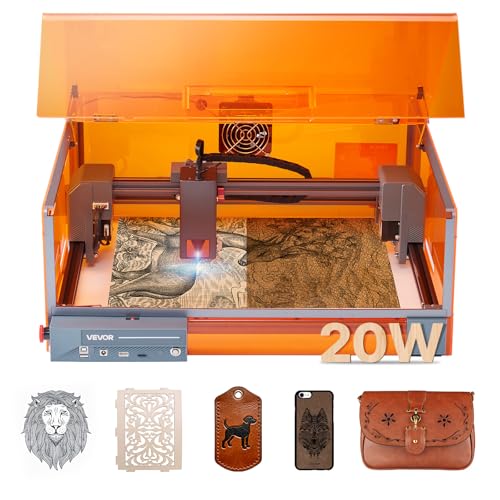
- Large 11.8 x 11.8 in working area
- Class 1 enclosure with emergency protections
- Supports LightBurn, LaserGRBL, and CutLabX
Best For: Makers needing a roomy enclosed engraver for everyday use
Camera-guided enclosed engraver

- Pre-assembled with no setup required
- Auto-recognizing camera simplifies workflow
- Class 1 enclosure reduces light, smoke, and noise
Best For: Users who want smart automation and easy startup
Premium All-in-One Enclosed Creator
xTool M2 20W Enclosed Dual-Camera

- Fully enclosed Class 1 safety with real-time monitoring
- Built-in dual cameras for accurate preview and placement
- Expandable with separate CMYK Inkjet and IR modules
Best For: Home crafters who want a safe, expandable enclosed engraver
Fast Compact Safety Pick
Creality Falcon A1C 10W Smart Camera

- Class 1 enclosed design with multiple safety features
- HD smart camera plus auto focus for easier setup
- Quick-swap modular system for future expansion
Best For: Beginners and small-space users who want safe, simple operation
Starter Enclosed Dual-Camera Machine

- Class 1 enclosed build with real-time monitoring
- Dual cameras help preview and place designs accurately
- Upgradeable later with separate CMYK and IR add-ons
Best For: Users who want a safer starter engraver with room to grow
Beginner-Friendly Enclosed Pick
BlazeX M3 10W Laser Engraver Machine

- 0.01mm precision with 10W engraving power
- Includes enclosure, honeycomb bed, and starter materials
- Class 1 safety with fan exhaust and auto-stop sensors
Best For: Beginners and hobbyists who want a ready-to-use enclosed setup
WiFi-Controlled Compact Choice

- WiFi, USB, TF card, and app control
- 0.01mm precision with a 300 x 200 mm area
- Upgradeable with camera, air pump, and purifier options
Best For: Users who want wireless control and a compact enclosed desktop machine
High-Power Batch Production Pick
20W Enclosed Laser Cutter with 300 x 300 Area

- 20W output for thicker wood and faster workflows
- 300 x 300 mm work area for larger or batch projects
- Full enclosure with flame, tilt, and shutdown protection
Best For: Small businesses and makers needing faster enclosed cutting
Fast-start enclosed engraver – CREALITY FALCON A1 10W
If you want enclosed laser engravers that are easy to start using right away, the CREALITY FALCON A1 10W is built around speed, safety, and guided setup. It arrives ready to use, includes pre-set parameter settings, and uses a pre-calibrated HD camera to help lock onto your workpiece with less fuss.
Best For: Beginners and hobbyists who want a fast, fully enclosed machine with smart setup features.
Pros:
- Ready to use out of the box with preset engraving settings
- Pre-calibrated HD camera helps with full-frame positioning
- CoreXY system reaches up to 600mm/s for faster jobs
- Dual-door enclosed design filters 99% of laser radiation and helps reduce noise and smoke
Cons:
- Not compatible with the 500 × 500mm honeycomb panel
- Cannot engrave highly reflective materials like mirror-finished metals
- Acrylic engraving requires a coated surface, and acrylic cutting is not supported
The FALCON A1 stands out if you want an enclosed machine that reduces setup time and keeps the workflow straightforward. It leans more toward convenience and guided operation than material flexibility, so it makes the most sense for users who fit its supported materials and limits.
Compact app-controlled engraver – Twotrees TS1 Mini
Among enclosed laser engravers, the Twotrees TS1 Mini is aimed at small, controlled projects where space and safety matter most. Its fully enclosed acrylic cover, plug-and-play setup, and smartphone app control make it a simple option for desks, classrooms, and home craft areas.
Best For: Small projects, tight workspaces, and users who want app-based control.
Pros:
- Fully enclosed acrylic cover helps contain light and debris
- Plug-and-play setup with included safety goggles
- Bluetooth app control works on iOS and Android
- Compact, lightweight design fits easily on a desk or shelf
Cons:
- Small 80 x 80mm work area limits project size
- Designed for fine detail and light cutting, not heavy-duty work
- Best suited to thin materials and smaller items
The TS1 Mini makes sense if you value portability and simplicity over workspace size. It is a practical enclosed choice for light engraving jobs, but the compact bed means you should expect to work small.
Mid-size enclosed workhorse – VEVOR 20W Class 1
If you need enclosed laser engravers for larger everyday jobs, the VEVOR 20W model offers a stronger mix of speed, workspace, and safety features. It combines a Class 1 protective enclosure with a 11.8 x 11.8 in working area, making it a versatile pick for wood, leather, paper, acrylic, and more.
Best For: Makers who want a larger enclosed machine for regular engraving and light cutting.
Pros:
- Class 1 enclosure helps block laser light, smoke, and noise
- 11.8 x 11.8 in work area gives room for bigger projects
- Up to 7,000 mm/min speed supports efficient production
- Compatible with LaserGRBL, LightBurn, and CutLabX
Cons:
- Not suitable for gold, silver, copper, or aluminum engraving
- Transparent and reflective materials require black coating
- Cannot cut metals or transparent/reflective acrylic
The VEVOR 20W is a solid middle-ground option if you want an enclosed machine with more room than a mini unit and broader software support than many basic models. Its material limits are important, but within its intended range it looks well balanced for home workshops.
Camera-guided enclosed engraver – Creality Falcon A1 10W
For buyers comparing enclosed laser engravers that emphasize automation, the Creality Falcon A1 10W focuses on camera-based positioning, pre-assembled convenience, and fast engraving. Its built-in camera recognizes material and applies settings automatically, which can reduce trial-and-error for new and experienced users alike.
Best For: Users who want a fully enclosed, pre-assembled engraver with smart camera assistance.
Pros:
- Pre-assembled and ready to use with no setup required
- Built-in camera auto-recognizes material and applies settings
- Up to 600mm/s speed and 0.05mm engraving accuracy
- Fully enclosed Class 1 design helps block 99% of laser light and reduce smoke and noise
Cons:
- Not compatible with highly reflective materials
- Only works with the specified 460 × 346mm honeycomb panels
- Acrylic and other restricted materials are excluded under the stated limitations
This Falcon A1 model is a strong fit if you want smart automation wrapped in a safety-focused enclosure. It is especially appealing when you want to move quickly from unboxing to engraving without spending time on manual calibration.
Premium All-in-One Enclosed Creator – xTool M2 20W Enclosed Dual-Camera
If you want enclosed laser engravers that lean into flexibility, the xTool M2 20W stands out with its fully enclosed Class 1 design, dual cameras, and support for add-on workflows. It is built to handle wood, leather, felt, fabric, paper, and more, while also giving you room to expand into CMYK printing or IR engraving later.
Best For: Home crafters and DIY makers who want a safe, enclosed machine with strong creative expandability.
Pros:
- Fully enclosed Class 1 safety design with real-time monitoring
- Built-in dual cameras for workspace preview and accurate placement
- Supports 300+ materials and can expand with separate CMYK Inkjet and IR modules
- Beginner-friendly xTool Studio with templates and AI image generation
Cons:
- CMYK Inkjet module is sold separately, not included in the standalone unit
- RA3 Lite Rotary is also sold separately
- Heavier desktop unit may be less convenient if you need frequent moving
The M2 is a strong pick if you want one enclosed machine that can start simple and grow with your projects. Its main appeal is the mix of safety, dual-camera guidance, and upgrade paths that make it easy to use now and expand later.
Fast Compact Safety Pick – Creality Falcon A1C 10W Smart Camera
The Creality Falcon A1C fits well in roundups of enclosed laser engravers because it combines a fully enclosed Class 1 body with smart camera guidance, auto focus, and quick module swapping. It is aimed at users who want a compact desktop machine that can handle a wide range of materials while staying easy to set up.
Best For: Beginners and small-space makers who want a safe, fast, and easy-to-use enclosed engraver.
Pros:
- Class 1 enclosed design with flame detection, tilt protection, and USB safety lock
- Built-in HD smart camera and auto focus for easier alignment
- Quick-swap modular design supports compatible 5W diode, 10W diode, and 1.2W IR modules
- Up to 15,000 mm/min engraving speed and support for 300+ materials
Cons:
- Additional laser modules are sold separately
- IR capability is not included with the base 10W module
- Best suited to desktop use rather than larger-format projects
Overall, the Falcon A1C is a practical enclosed option if you value safety features and a smoother beginner experience. Its combination of camera preview, auto focus, and modular flexibility makes it a versatile pick for everyday crafting.
Starter Enclosed Dual-Camera Machine – xTool M2 10W Compact Enclosed
For shoppers comparing enclosed laser engravers on a tighter budget or with lighter-duty needs, the xTool M2 10W keeps the same enclosed Class 1 concept and dual-camera workflow as the higher-power version. It is designed for wood, leather, felt, fabric, paper, and similar materials, while still leaving room to add separate modules later.
Best For: Makers who want a safer enclosed starter machine with camera-guided placement and upgrade options.
Pros:
- Fully enclosed Class 1 safety design with real-time monitoring
- Built-in dual cameras for real-time workspace preview
- Beginner-friendly xTool Studio with templates and AI image generation
- Upgradeable with separate CMYK Inkjet and 3W IR modules
Cons:
- 10W output is lower than the 20W version
- CMYK Inkjet module and RA3 Lite Rotary are not included
- IR and full-color printing require separately sold add-ons
This 10W M2 makes sense if you want the safety and workflow benefits of an enclosed machine without stepping up to the more powerful model. It is especially appealing for straightforward crafts and users who expect to build out capabilities over time.
Beginner-Friendly Enclosed Pick – BlazeX M3 10W Laser Engraver Machine
If you’re shopping for enclosed laser engravers that are easy to start with but still capable of detailed work, the BlazeX M3 is built around a 10W module with 0.01mm accuracy. It is designed for wood, leather, glass, and coated metal, and the included enclosure, honeycomb bed, and starter materials make it a practical all-in-one setup for home creators.
Best For: Beginners, hobbyists, and small DIY makers who want a Class 1 enclosed machine with starter accessories.
Pros:
- 0.01mm ultra-fine precision for detailed engraving and clean cuts
- Includes protective enclosure, honeycomb bed, tools, goggles, and 13 materials
- Class 1 safety design with fan exhaust and lid/tilt protection
- Works with LightBurn, LaserGRBL, and CutLabX on multiple platforms
Cons:
- 10W output is better suited to light-to-moderate cutting than heavy-duty production
- Smaller 8-pound desktop unit may not fit larger batch workflows
Overall, the BlazeX M3 is a strong pick if you want an enclosed laser engraver that prioritizes safety, beginner-friendly setup, and broad material support without adding too much complexity.
WiFi-Controlled Compact Choice – K15 Pro 10W Enclosed Engraver
The K15 Pro is a compact option in enclosed laser engravers, combining a full enclosure with WiFi, USB, and TF card control for flexible use. It supports 300+ materials and offers 0.01mm precision, making it a solid fit for detailed DIY work, custom gifts, and small production jobs where convenience matters.
Best For: Makers who want wireless control, broad software compatibility, and a fully enclosed desktop machine.
Pros:
- WiFi, USB, TF card, and app control for flexible operation
- Supports LightBurn, LaserGRBL, CutLabX, and multiple operating systems
- 0.01mm precision with a 300 x 200 mm work area
- Expandable with accessories like camera, honeycomb plate, air pump, and purifier
Cons:
- 10W standard head is less powerful than higher-wattage models for tougher cutting
- Some advanced features depend on optional upgrades such as the infrared head
For users who want an enclosed laser engraver that balances beginner-friendly setup with flexible connectivity, the K15 Pro stands out for its wireless control options and upgrade potential.
High-Power Batch Production Pick – 20W Enclosed Laser Cutter with 300 x 300 Area
If you need enclosed laser engravers with more cutting power, this 20W model is aimed at bigger projects, faster turnaround, and small-batch production. It combines a 300 x 300 mm work area, 0.01mm precision, and up to 20,000mm/min speed, while the full enclosure helps shield users and contain fumes, dust, and noise.
Best For: Small businesses and DIY users who need a larger enclosed machine with faster cutting and engraving.
Pros:
- 20W power handles thicker wood and denser materials more effectively
- Large 300 x 300 mm work area suits signs, ornaments, and batch projects
- 0.01mm focus and up to 20,000mm/min speed for detailed, efficient output
- Fully enclosed design with flame detection, tilt protection, auto shutdown, and emergency stop
Cons:
- Larger and heavier than the smaller desktop options in this roundup
- Best suited to users who actually need the extra power and work area
As an enclosed laser engraver, the L2 MAX is the most production-oriented option here, giving you more speed, more workspace, and stronger cutting performance for larger creative workloads.
How We Picked These Enclosed Laser Engravers
We focused on enclosure quality, safety class, cutting and engraving capability, speed, setup convenience, camera or autofocus features, and overall value. We also considered whether each machine is a better fit for beginners, crafters, or higher-volume users.
Quick Comparison
The biggest differences usually come down to power, workspace size, and smart features. Lower-power Enclosed Laser Engravers are often best for detail work, leather, paper, and light materials, while 10W to 20W models are more versatile for wood, acrylic, and thicker cuts. Larger beds matter if you work on signs, batches, or bigger panels.
Key Buying Factors for Enclosed Laser Engravers
Laser Power
Power affects cut depth, speed, and the range of materials you can handle. For most buyers, 10W is a strong all-around choice. If you plan to cut thicker stock or want faster throughput, 20W options usually offer more headroom.
Enclosure and Safety Class
Look for Class 1 or fully enclosed designs if safety and indoor use matter most. An enclosure can reduce exposure to direct laser light and help manage smoke, but you should still pair it with proper ventilation.
Work Area Size
Match the bed size to what you actually make. Smaller Enclosed Laser Engravers are easier to place on a desktop and suit ornaments, tags, and small crafts. Larger work areas are better for signage, production runs, and multi-piece layouts.
Ease of Use
Features like auto focus, camera positioning, smart previews, and pre-assembled construction can save a lot of setup time. These are especially helpful if you are new to laser machines or want to reduce trial and error.
Materials and Workflow
Choose based on your main materials. Some models are ideal for wood, leather, felt, and coated surfaces, while others offer stronger cutting support for acrylic and denser stock. Software compatibility and connectivity also matter if you want a smoother workflow.
Who Should Buy Which Enclosed Laser Engravers?
Beginners should prioritize a fully enclosed, easy-to-set-up model with smart alignment tools. Crafters and Etsy sellers may prefer a balanced 10W machine with camera support for repeatable results. Small businesses and higher-volume users should lean toward 20W machines or larger-bed Enclosed Laser Engravers for better speed and flexibility.
If safety, precision, and convenience are your top priorities, an enclosed design is often the best way to get desktop laser performance without the hassle of a more exposed setup.