Choosing the right 3d printer for crafting depends on what you want to make, how much setup you want to handle, and whether speed or detail matters more.
In this roundup, we focus on models that fit real creative workflows, including beginner-friendly options, high-speed printers, and multi-color systems for more ambitious projects.
Best 10 3d Printer for Crafting Picks for 2026
Starter-Friendly Mini Pick
TINA2S Fully Assembled Mini 3D Printer

- Fully assembled right out of the box
- Includes filament, designs, and software
- Auto-leveling and one-touch loading simplify use
Best For: Beginners, kids, and compact crafting setups
Creative AI Crafting Pick

- AI tools turn sketches, text, and photos into models
- Fully enclosed and child-safe design
- 8,000+ models with one-tap printing
Best For: Families and kids who want guided creative making
Speedy Auto-Calibrating Pick

- One-click auto leveling reduces setup work
- CoreXY structure supports fast, stable printing
- Quick-swap nozzle and app controls add convenience
Best For: Makers who want speed and low-maintenance operation
3D Pen Craft Starter Pick
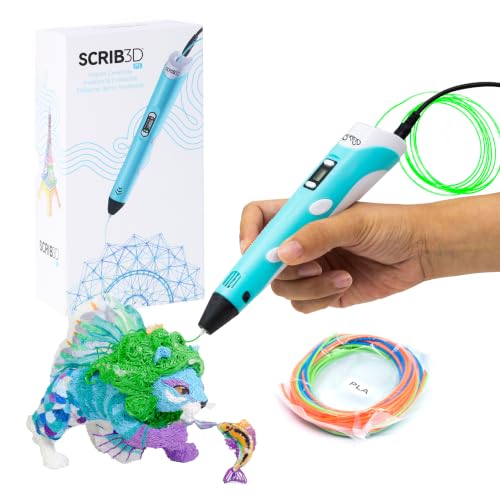
- Ready-to-use kit with PLA, stencil guide, and project manual
- Stepless speed slider for detailed or faster crafting
- Temperature adjustable for PLA or ABS
Best For: Beginners and families making handmade 3D doodles, gifts, and decor
Beginner Mini Classroom Pick

- Fully assembled and quick to start with guided app setup
- Auto leveling and power-loss recovery improve reliability
- Quiet, compact design works well at home or in class
Best For: Kids and beginners doing small STEM and DIY craft projects
Multi-Color Power Pick
FLASHFORGE AD5X 4-Color 3D Printer

- Prints in up to 4 colors with automatic filament handling
- High-speed CoreXY design with stable output
- Auto leveling, resume printing, and filament detection
Best For: Makers and small teams needing multi-color, high-speed printing
Multicolor Crafting Power
Anycubic Kobra X 4-Color Maker Printer

- Native 4-color printing, expandable to 19 colors
- Claims 81.25% less purging and travel path
- 600mm/s speed with auto leveling and app monitoring
Best For: crafters who want colorful prints and fast, large-format output
Fast Setup Pick
Flashforge Adventurer 5M Rapid Printer

- One-click printing with fully auto leveling
- 600mm/s travel speed and CoreXY design
- Quick nozzle swaps and fast warm-up
Best For: makers who want quick setup and fast, reliable craft prints
Colorful Creator Choice
Flashforge AD5X 4-Color Craft Printer

- Up to 4-color simultaneous printing
- Intelligent Filament System reduces interruptions
- 600mm/s speed with Core XY stability
Best For: makers who want vibrant multicolor prints and fast, stable operation
Starter-Friendly Mini Pick – TINA2S Fully Assembled Mini 3D Printer
If you want a 3D printer for crafting that feels approachable from day one, the TINA2S is built around simplicity. It arrives fully assembled, includes starter materials and software, and adds auto-leveling plus one-touch filament loading to reduce setup friction for beginners, kids, and small creative spaces.
Best For: Beginners, kids, classrooms, and crafters who want an easy, compact first printer.
Pros:
- Fully assembled, so there is no build process to slow you down.
- Includes a starter kit with PLA filament, model designs, and splicing software.
- Auto-leveling, dual Z-axis rail, and flexible magnetic build plate support easier printing and removal.
- Compact size works well for home, dorm, or classroom use.
Cons:
- Build size is small, so it is better for mini projects than larger craft pieces.
- Uses a metal magnetic platform plate requirement that limits plate choices.
For crafting users who value a low-stress start, this model focuses on convenience over complexity. The open-source compatibility and pause/resume features add some flexibility as your projects grow.
Balanced Workhorse – ELEGOO Neptune 3 Pro 3D Printer
The ELEGOO Neptune 3 Pro is a practical 3D printer for crafting if you want a bigger work area and more material flexibility. With quick assembly, 36-point auto bed leveling, and a direct drive extruder that supports PLA, TPU, PETG, and ABS, it is designed for reliable everyday creative projects.
Best For: Crafters who want a dependable printer for larger or more varied projects.
Pros:
- Standard 225 x 225 x 280 mm build volume suits daily craft projects.
- 36-point auto bed leveling helps make setup easier.
- Direct drive extruder supports PLA, TPU, PETG, and ABS.
- Silent stepper motors keep operation relatively quiet.
Cons:
- It is larger and heavier than mini beginner printers.
- Not as compact for desks, dorms, or very small spaces.
For makers who want a dependable all-around machine, this model leans toward consistency and material versatility. The runout sensor, power-loss resume, and upgraded nozzle system make it a strong fit for longer print sessions.
Creative AI Crafting Pick – AI-Powered Kids 3D Printer
This 3D printer for crafting is built to turn drawing and customizing into a simple creative flow for kids. AI-powered tools like AI Craft, AI Doodle, and AI MiniMe let users turn sketches, text, or photos into printable models, while the enclosed design and one-tap printing keep the experience approachable.
Best For: Kids and families who want an interactive, guided creative printer.
Pros:
- AI tools can turn sketches, text, and photos into 3D models.
- Fully enclosed, cool-touch design adds child-safe protection.
- Fully assembled and WiFi-ready for quick setup.
- Large library of 8,000+ toy models with STL import support.
Cons:
- Uses non-toxic PLA filament only.
- Smaller creative print jobs are the best fit for the intended audience.
If your priority is making crafting feel playful and guided, this printer is focused on creativity tools more than manual tuning. Built-in camera recording and fast print speeds add extra appeal for repeat projects and gift-ready use.
Speedy Auto-Calibrating Pick – FLASHFORGE AD5M 3D Printer
For a 3D printer for crafting that emphasizes fast setup and smooth printing, the FLASHFORGE AD5M brings fully automatic calibration and a CoreXY all-metal motion structure. It is aimed at users who want easy first-layer accuracy, quick nozzle changes, and app-based control without giving up speed.
Best For: Beginners and experienced makers who want fast, low-maintenance printing.
Pros:
- Fully automatic one-click leveling simplifies setup.
- Core XY all-metal structure supports high-speed, stable printing.
- Quick-release nozzle swaps in as little as 3 seconds.
- App and slicer features support remote monitoring and batch control.
Cons:
- Smaller 220 x 220 x 220 mm build size may limit larger craft pieces.
- High-speed features may be more than casual users need.
This is a strong match for makers who care about efficient turnaround and reduced maintenance. The resume-after-outage feature and flexible PEI steel plate further support repeat crafting sessions.
3D Pen Craft Starter Pick – SCRIB3D P1 3D Printing Pen
If you want a 3d printer for crafting without committing to a full desktop machine, the SCRIB3D P1 is a simple way to draw and build in 3D. It comes ready to use with PLA filament, a power adapter, and a stencil guide, so you can start making decorations, handmade gifts, and quick repairs right away.
Best For: Beginners, families, and hobby crafters who want an affordable way to make 3D doodles and small handmade projects.
Pros:
- Includes 3 starter colors of PLA, a stencil book, and a project guide.
- Beginner-friendly setup with simple feed and retract controls.
- Stepless speed control helps with both detailed work and faster infill.
- Temperature adjustable for PLA or ABS use.
Cons:
- Best suited for handheld crafting rather than full printed models.
- Requires a short warm-up time before use.
Overall, this is a practical pick for creative users who care more about hands-on making than machine complexity. Its safety features, simple controls, and included supplies make it an easy entry point into 3D crafting.
Beginner Mini Classroom Pick – Entina Tina2C Mini 3D Printer
The Entina Tina2C is a compact 3d printer for crafting that keeps the learning curve low for kids and first-time users. With guided app setup, auto leveling, and a tiny footprint, it is built to make small DIY prints, school projects, and STEM activities easier to manage at home or in the classroom.
Best For: Kids, beginners, and families who want a small, easy-start printer for creative learning and light-duty projects.
Pros:
- Fully assembled and designed to start in as fast as 8 minutes.
- Auto leveling and power-loss recovery help improve print success.
- App support includes AI search, photo-to-print, and 20+ creative modules.
- Compact, quiet design fits home, classroom, or office use.
Cons:
- Small 3.9 × 3.9 × 3.9 inch build volume limits larger projects.
- Best for simple learning builds rather than high-output production.
This is a strong choice if you want a friendly starter machine that prioritizes ease of use over size. Its app-based workflow, quiet operation, and maintenance-minded design make it a low-stress option for creative beginners.
Multi-Color Power Pick – FLASHFORGE AD5X 4-Color 3D Printer
If your 3d printer for crafting needs to handle more ambitious color work, the FLASHFORGE AD5X is built for multi-color printing and faster output. Its Intelligent Filament System supports up to 4 colors, while the high-temp nozzle, large-flow hotend, and CoreXY design aim to keep printing stable during more demanding projects.
Best For: Makers and small operations that want multi-color printing, higher speed, and more automated material handling.
Pros:
- Supports 4-color printing with automatic filament loading and unloading.
- High-speed design with up to 600mm/s travel speed and strong acceleration.
- 300°C nozzle and large-flow hotend support PLA, PETG, TPU, and carbon fiber filament.
- Includes auto leveling, vibration compensation, resume printing, and filament detection.
Cons:
- Larger and heavier than compact beginner models.
- Multi-device management features are geared toward more advanced workflows.
For crafters who want color variety and efficient output, the AD5X offers a more serious production setup. It stands out for reducing manual filament swaps while adding the automation and speed needed for bigger creative workloads.
Multicolor Crafting Power – Anycubic Kobra X 4-Color Maker Printer
If you want a 3d printer for crafting that can handle colorful projects without a lot of wasted time, the Anycubic Kobra X is built around speed and multicolor output. It starts with 4 colors built in and can expand up to 19 colors with 4 ACE 2 Pro units, while also aiming to cut purging and filament waste for faster, cleaner jobs.
Best For: crafters who want native multicolor printing, fast turnaround, and a large build area for bigger creative projects.
Pros:
- Native 4-color printing, expandable up to 19 colors with 4 ACE 2 Pro units
- Claims reduced filament and travel path by 81.25% for less waste and faster output
- High-speed printing up to 600mm/s with a hardened steel nozzle and vibration compensation
- LeviQ 3.0 auto leveling with 49-point calibration for reliable first layers
Cons:
- ACE 2 Pro and ACE Pro are incompatible, so expansion needs the right accessory
- Filament is not included
- Large feature set may be more than casual users need for simple craft prints
This is a strong choice if your crafting projects depend on color variety and quick print cycles. The large 260mm x 260mm x 260mm build volume and app monitoring also make it practical for home, school, or makerspace use.
Fast Setup Pick – Flashforge Adventurer 5M Rapid Printer
For anyone shopping for a 3d printer for crafting and wants less tinkering, the Flashforge Adventurer 5M focuses on automatic setup and quick print turnaround. Its one-click automatic printing, fully auto leveling, and 600mm/s travel speed make it a practical option for makers who value speed and straightforward operation.
Best For: crafters who want an easy-start printer for rapid prototyping, props, and everyday creative projects.
Pros:
- One-click automatic printing with fully auto leveling
- CoreXY structure and 600mm/s travel speed for fast output
- Quick 3-second nozzle changes and a 35-second warm-up to 200°C
- 280°C direct drive extruder with dual-fan cooling and vibration compensation
Cons:
- Single-color printing only
- Build volume is 220 x 220 x 220mm, which may be limiting for larger craft pieces
- Advanced nozzle options are optional, not included out of the box
The Adventurer 5M is a good fit if you want speed without a complicated setup process. Its app monitoring and easy-maintenance hardware make it especially appealing for frequent, practical crafting use.
Colorful Creator Choice – Flashforge AD5X 4-Color Craft Printer
If your 3d printer for crafting needs to produce eye-catching multi-color models, the Flashforge AD5X is designed around up to four colors at once. It combines that color capability with an Intelligent Filament System, auto leveling, and 600mm/s speed, making it a strong fit for creative users who want both visual impact and efficiency.
Best For: hobbyists and makers who want multicolor prints with fast, stable performance.
Pros:
- Prints with up to 4 colors simultaneously
- Intelligent Filament System helps detect and refill filament automatically
- 600mm/s max speed with 20,000mm/s acceleration for quick turnaround
- All-metal Core XY structure and supports flexible TPU printing
Cons:
- Build size is 220 x 220 x 220mm, so it is not for extra-large projects
- Multicolor setup adds complexity compared with basic single-material printers
- Specific filament and accessory needs may increase total project cost
The AD5X stands out for crafters who want color variety without giving up speed. Its stability, filament management, and flexible material support make it a versatile creative machine for detailed projects.
How We Picked the Best 3d Printer for Crafting
We prioritized machines that are practical for hobby use, classroom projects, and home studios. That means easy setup, dependable calibration, stable print quality, and features that reduce frustration for new users. We also looked for options that support common crafting materials and sizes suitable for cosplay props, models, organizers, décor, and custom gifts.
Quick Comparison: What Matters Most
For crafting, the best printer is not always the fastest or the largest. Beginners often benefit from fully assembled mini printers and auto-leveling systems. Makers who want larger decorative pieces may prefer a standard-bed FDM printer. If you want colorful figures, signs, or decorative accents, a multi-color model can save time compared with painting every print by hand.
Key Buying Factors for a 3d Printer for Crafting
Ease of Setup
Fully assembled printers are ideal if you want to start creating quickly. Quick assembly can still be a good choice if you are comfortable following a short setup process and want more features for the price.
Print Quality and Calibration
Auto-leveling and auto calibration help produce cleaner first layers, which matters a lot for detailed craft pieces, small parts, and decorative prints. These features are especially helpful if you are new to 3D printing.
Build Volume
Smaller build volumes work well for miniatures, accessories, and simple craft items. Larger build areas are better for storage bins, costume components, signs, and larger art pieces.
Speed and Reliability
High-speed printers can be useful for repeat projects, classroom use, or anyone who wants to iterate quickly. For intricate craft items, though, consistent extrusion and dependable motion control matter more than raw speed alone.
Multi-Color Capability
If your projects benefit from multiple colors or materials, a multi-color machine can significantly streamline production. This is useful for decorative items, lettering, character parts, and gift pieces where visual impact matters.
Who Should Buy Which 3d Printer for Crafting?
Beginners and kids: Choose a fully assembled mini printer or starter kit if you want the simplest path to your first successful prints.
Hobby crafters: A well-balanced single-color FDM printer is usually the best value for learning, prototyping, and everyday projects.
Advanced makers: If you want more visual complexity, consider a multi-color system. If you want faster turnaround on larger batches, a high-speed model is the smarter pick.
For most buyers, the best 3d Printer for Crafting is the one that matches your project size, skill level, and tolerance for setup. Prioritize ease of use first, then add speed, color, or capacity based on the kind of crafts you make most often.