A good dock can turn your Steam Deck into a much more flexible living-room or desk setup. The right model makes TV play, charging, Ethernet, and accessory support far easier.
We focused on docks that balance video output, power delivery, port selection, and compatibility, so you can choose the best fit without overspending on features you may not use.
Best 10 Steam Deck Dock Picks for 2026
Reliable 6-in-1 Setup

- 4K@60Hz HDMI output
- 100W PD-IN fast charging
- 1Gbps Ethernet and 3 data ports
Best For: Players who want a simple, dependable dock for Steam Deck basics
High-Refresh Dock

- HDMI 2.1 up to 4K@120Hz
- 100W PD with up to 85W to host
- Foldable stand with Gigabit Ethernet
Best For: Players who want a high-refresh external display setup
Cooling-Focused Dock
YCE 12-in-1 Dual Fan Steam Deck Dock

- Dual fans for added cooling
- 4K60 HDMI plus Gigabit Ethernet
- 100W PD and 3 USB 3.0 ports
Best For: Handheld gamers who want built-in cooling and extra expansion
Compact 5-in-1 Pick

- HDMI 2.1 with 4K@120Hz output
- 100W PD charging support
- Compact design with Ethernet
Best For: Users who want a smaller dock with high-refresh output
Foldable all-in-one dock
UGREEN Steam Deck Dock 9-in-1 USB C Docking Station

- 4K@60Hz HDMI with Ethernet and 9 total ports
- Two 10Gbps USB 3.2 Gen 2 ports for fast transfers
- Foldable stand design with 100W PD support
Best For: Users who want a flexible, feature-rich dock for Steam Deck and other handhelds
Dock and charger bundle
JSAUX 6-in-1 Docking Station & 65W Charger

- 4K@120Hz HDMI 2.1 with gigabit Ethernet
- Includes 65W charger and USB-C cable
- Three USB 3.0 ports for accessories
Best For: Shoppers who want a simple dock-and-charger combo for Steam Deck
High-refresh display dock

- 4K@144Hz HDMI 2.1 output for high-refresh gaming
- 100W charging with Ethernet and 3 USB-A ports
- Includes joystick caps and wide handheld compatibility
Best For: Gamers who want a monitor-friendly dock with the highest display refresh option
Premium 4K120 Upgrade

- 4K@120Hz HDMI 2.1 output
- 100W PD charging support
- Gigabit Ethernet plus 3 USB 3.0 ports
Best For: High-refresh external gaming and wired docked play
Fast 4K144 Travel Pick
WAVLINK 6-in-1 Steam Deck Dock

- 4K@144Hz HDMI 2.1 output
- Three 10Gbps USB 3.2 ports
- Compact build with Gigabit Ethernet
Best For: Portable high-speed docking with strong display support
Budget 4K60 Essential
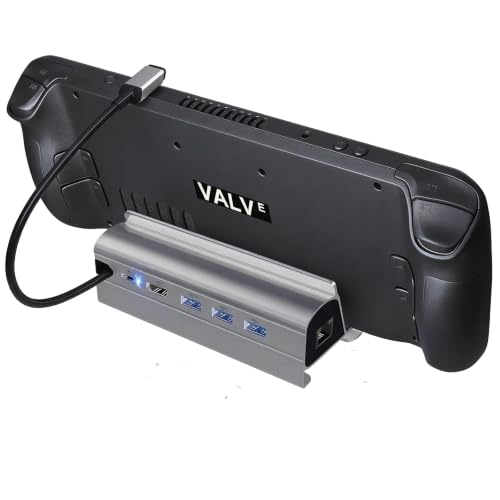
- 4K@60Hz HDMI 2.0 output
- 100W max power delivery
- Gigabit Ethernet and 3 USB 3.0 ports
Best For: Basic docked gaming and everyday peripheral use
Reliable 6-in-1 Setup – Anker 6-in-1 Steam Deck Dock
If you want a straightforward steam deck dock that covers the essentials without extra bulk, this Anker 6-in-1 option is built for practical everyday use. It gives you 4K@60Hz HDMI output, 100W PD-IN charging, gigabit Ethernet, and enough USB ports for a controller, keyboard, or mouse.
Best For: Steam Deck players who want a simple, dependable dock for charging, wired internet, and external display output.
Pros:
- 4K@60Hz HDMI output for external display gaming
- 100W PD-IN supports fast charging while you play
- 1Gbps Ethernet for stable online sessions
- Two 5Gbps USB-A ports plus one 5Gbps USB-C data port
Cons:
- USB-C data port does not support screen mirroring
- Not designed for ROG Ally X
This is a balanced pick if you care more about core dock features than extras. It should suit players who want a clean, reliable station for handheld gaming and don’t need higher refresh HDMI output.
High-Refresh Dock – UGREEN 6-in-1 4K@120Hz Dock
This steam deck dock is aimed at users who want the biggest visual upgrade, with HDMI 2.1 output that supports up to 4K@120Hz on compatible displays. It also combines 100W PD charging, Gigabit Ethernet, and multiple 5Gbps data ports in a compact foldable design.
Best For: Gamers who want a high-refresh external display setup for Steam Deck or other compatible handhelds.
Pros:
- HDMI 2.1 supports up to 4K@120Hz on compatible screens
- VRR, FreeSync, and G-Sync support for smoother gameplay
- 100W PD 3.0 charging with up to 85W to the host device
- 2 USB-A 3.0 ports, 1 USB-C 3.0 port, and Gigabit Ethernet
Cons:
- Best features depend on a compatible display
- Not compatible with Nintendo Switch 2
If you care about smooth output and a more premium docking experience, this UGREEN model stands out. The foldable stand and broad device support also make it a flexible option beyond Steam Deck use.
Cooling-Focused Dock – YCE 12-in-1 Dual Fan Steam Deck Dock
If heat management matters as much as connectivity, this steam deck dock adds dual fans to a 12-in-1 layout. It supports 4K60 output, Gigabit Ethernet, 100W PD, and three USB 3.0 ports, making it a feature-heavy station for longer play sessions.
Best For: Handheld gamers who want a dock with built-in cooling and lots of expansion options.
Pros:
- Dual fans for added cooling during extended sessions
- 4K60 HDMI output and Gigabit Ethernet
- 100W PD support for charging while docked
- Three USB 3.0 ports for peripherals and accessories
Cons:
- Bulkier than simpler dock-only designs
- Feature set may be more than casual users need
This is the most specialized option in the group because it combines docking and cooling in one unit. It makes the most sense if you want extra airflow and don’t mind the larger footprint.
Compact 5-in-1 Pick – JSAUX 5-in-1 4K@120Hz Dock
This steam deck dock keeps things compact while still offering a strong feature set for big-screen play. You get HDMI 2.1 with 4K@120Hz output, 100W PD charging, two USB 2.0 ports, and Ethernet in a small dock that works with a wide range of handhelds.
Best For: Users who want a smaller dock with high-refresh HDMI support and broad handheld compatibility.
Pros:
- HDMI 2.1 supports 4K@120Hz output
- 100W PD charging helps power handhelds in Turbo Mode
- Built-in Ethernet for stable wired networking
- Compact 5-in-1 design with wide SteamOS and Windows support
Cons:
- Only two USB 2.0 ports, so accessory speeds are limited
- Not compatible with ROG XBOX Ally or XBOX Ally X
For buyers who want a simpler dock footprint without giving up 4K@120Hz output, this JSAUX model is easy to justify. It’s a good fit if your priority is display performance and basic expansion rather than lots of USB bandwidth.
Foldable all-in-one dock – UGREEN Steam Deck Dock 9-in-1 USB C Docking Station
If you want a steam deck dock that doubles as a compact desktop hub, this UGREEN 9-in-1 model covers the basics well. It combines HDMI output, Ethernet, fast USB expansion, and a foldable stand design that keeps the handheld angled for play while helping leave the rear ventilation area less obstructed.
Best For: Players who want a foldable, all-in-one dock with strong charging, wired networking, and broad handheld compatibility.
Pros:
- 4K@60Hz HDMI output for external display use, with support for higher refresh rates at lower resolutions.
- Two 10Gbps USB 3.2 Gen 2 ports for faster file transfers and external storage.
- 100W PD support for charging Steam Deck, ROG Ally, and other USB-C handhelds.
- Foldable stand design adds a more adjustable setup and keeps the dock compact.
Cons:
- The Steam Deck itself maxes out at 45W charging, so the 100W rating is not the handheld’s real limit.
- Not compatible with Switch 2.
Overall, this is a practical steam deck dock if you value a flexible stand, wired Ethernet, and faster USB expansion in one unit. It is especially appealing for users who switch between Steam Deck and other compatible handhelds.
Dock and charger bundle – JSAUX 6-in-1 Docking Station & 65W Charger
This steam deck dock is a straightforward choice if you want a dock and charger bundle that is easy to set up for TV play. The JSAUX 6-in-1 combines HDMI 2.1 video, Ethernet, three USB-A ports, and a 65W charger, making it a compact option for handheld gaming setups.
Best For: Buyers who want a simple dock-plus-charger package for Steam Deck and compatible Windows handhelds.
Pros:
- 4K@120Hz HDMI 2.1 output for smoother external display gaming.
- Includes a 65W charger in the box, which is useful for a cleaner starter setup.
- Three USB 3.0 ports and gigabit Ethernet for peripherals and wired play.
- Compatible with Steam Deck LCD/OLED, ROG Ally/Ally X, Legion Go/Go S, and MSI Claw.
Cons:
- The included 65W charger is stable for many uses, but JSAUX recommends 100W for extended 30W Turbo Mode with multiple peripherals.
- Not compatible with ROG Xbox Ally / Xbox Ally X.
As a steam deck dock, this one stands out for convenience rather than maximum expansion. If you want a bundled charger and a strong HDMI spec without extra clutter, it is an easy pick.
High-refresh display dock – iVANKY 8-in-1 Steam Deck Dock
If you are shopping for a steam deck dock with a stronger display spec, the iVANKY 8-in-1 is built around 4K@144Hz HDMI 2.1 output. It also adds Ethernet, three USB-A ports, and 100W power delivery, making it a well-rounded hub for a TV or monitor-based handheld gaming setup.
Best For: Players who want a high-refresh dock for external monitors and broad handheld compatibility.
Pros:
- 4K@144Hz HDMI 2.1 support for a smoother, high-refresh external display experience.
- 100W PD charging to keep compatible devices powered during play.
- Three 5Gbps USB-A 3.0 ports for controllers, accessories, and other peripherals.
- Includes two joystick caps and offers a wide compatibility list for Steam Deck, Ally, Legion Go, and MSI Claw.
Cons:
- Some ROG Ally X support depends on BIOS version 323 and dock firmware updates.
- The listing notes it can help avoid HDMI mirroring issues when firmware is updated, so setup may require extra steps.
This steam deck dock is best suited to users who care most about display performance and broad device support. The 4K@144Hz spec makes it the most ambitious of the three for monitor-first gaming.
Premium 4K120 Upgrade – JSAUX 6-in-1 Steam Deck Dock
If you want a steam deck dock that feels ready for bigger displays and faster networking, this JSAUX 6-in-1 model is built around those basics. It adds HDMI 2.1 output, full-speed charging, multiple USB ports, and Gigabit Ethernet, making it a practical hub for docked handheld play across SteamOS and Windows devices.
Best For: Players who want 4K@120Hz output, wired internet, and broad handheld compatibility.
Pros:
- HDMI 2.1 supports up to 4K@120Hz for smoother external display gaming.
- 100W PD charging helps keep handhelds powered in Turbo Mode.
- Gigabit Ethernet supports stable online play, updates, and transfers.
- Three USB 3.0 ports add room for controllers and other accessories.
Cons:
- Not compatible with ROG XBOX Ally / XBOX Ally X.
- Its feature set may be more than needed if you only want basic TV output.
Overall, this is a strong pick if you want a steam deck dock that prioritizes refresh rate, charging headroom, and wired connectivity in one compact setup. The compatibility list is wide, but the standout is clearly the 4K@120Hz HDMI upgrade.
Fast 4K144 Travel Pick – WAVLINK 6-in-1 Steam Deck Dock
This steam deck dock is aimed at users who want maximum display and data speed in a compact package. The WAVLINK 6-in-1 combines 4K@144Hz HDMI 2.1, 100W charging input, three 10Gbps USB 3.2 ports, and Gigabit Ethernet for a flexible docked setup.
Best For: Users who want a compact dock with 4K@144Hz support and fast 10Gbps USB connectivity.
Pros:
- HDMI 2.1 supports up to 4K@144Hz under DP1.4 and DSC.
- Three USB 3.2 Gen 2 ports offer 10Gbps data transfer.
- Gigabit RJ45 adds stable wired networking for gaming and downloads.
- Small size and light weight make it easier to carry than many docks.
Cons:
- Charger and charging cable are not included.
- The USB-C charging port is charging-only, not for data.
- Not compatible with Nintendo Switch.
For buyers comparing a steam deck dock on speed and portability, this WAVLINK model stands out with its 144Hz HDMI support and 10Gbps ports. It is especially appealing if you move accessories and files often, but you will need to supply your own charger.
Budget 4K60 Essential – B3 Steam Deck Dock 6-in-1
If you need a straightforward steam deck dock for TV play, charging, and basic peripherals, this B3 model covers the essentials. It combines HDMI 2.0 4K@60Hz output, Gigabit Ethernet, three USB 3.0 ports, and 100W max power delivery in a simple plug-and-play design.
Best For: Buyers who want a simple, affordable-style dock focused on 4K@60Hz output and core connectivity.
Pros:
- 4K@60Hz HDMI 2.0 output works for mirrored or extended display use.
- 100W max power delivery supports full-speed Steam Deck charging with the original charger.
- Gigabit Ethernet helps provide stable wired networking.
- Three USB 3.0 ports support common accessories like keyboards, mice, and drives.
Cons:
- Does not support Steam Deck OLED 90Hz.
- Only offers 5Gbps USB 3.0 speeds, which are slower than newer 10Gbps docks.
- Requires at least a 65W power adapter for optimal performance.
This is a practical pick if you want a no-frills steam deck dock and do not need higher refresh-rate HDMI or newer USB speeds. It keeps the feature set focused on the basics, which may be enough for casual docked gaming and everyday use.
How We Picked These Steam Deck Dock Options
We prioritized docks that cover the essentials first: stable USB-C power delivery, dependable video output, wired networking, and enough USB ports for controllers, keyboards, or storage. We also looked at build design, compatibility with other handheld PCs, and whether the feature set matched the price.
For a Steam Deck Dock, the most useful upgrades are not always the flashiest ones. A strong dock should stay steady on a desk, support your preferred display resolution and refresh rate, and deliver enough charging power to play without battery drain.
Quick Comparison: What Matters Most
If you mainly want TV gaming, prioritize HDMI output and power delivery. If you use the Deck as a mini-PC, Ethernet and multiple USB ports matter more. If you move between handhelds, choose a dock with broad device compatibility and a design that is easy to pack or reposition.
Resolution and Refresh Rate
Many buyers will be fine with 4K at 60Hz, but players using high-refresh monitors should look for 4K at 120Hz or 144Hz support if their display and games can take advantage of it.
Charging and Power Delivery
Look for at least 65W to keep the Steam Deck comfortably charged during gameplay. If you plan to connect multiple accessories or use a more power-hungry handheld, 100W PD gives you more headroom.
Ports and Connectivity
USB-A ports are still important for controllers and external drives, while USB-C data ports can help with modern accessories. Gigabit Ethernet is a big plus for downloads, cloud saves, and lower-latency online play.
Key Buying Factors for a Steam Deck Dock
Start with compatibility. Some docks are built specifically for the Steam Deck, while others are better described as multi-device hubs for the Steam Deck, ROG Ally, Legion Go, or similar systems. That can be useful, but only if the dock remains stable with your chosen handheld.
Next, check the physical design. Foldable stands, wider bases, and built-in cooling fans can improve convenience, especially on crowded desks or entertainment centers. If you use an external SSD, capture card, or multiple controllers, make sure the port layout leaves room for everything at once.
Also consider whether the extra features are actually useful. A 10Gbps port, SD card slot, or dual-fan cooling system can be worthwhile for some users, but simple gamers may be better served by a reliable 6-in-1 model with strong charging and clean HDMI output.
Who Should Buy Which Steam Deck Dock?
Choose a basic Steam Deck Dock if you mainly want a simple TV setup with charging and one or two accessories. Go for a more advanced 8-in-1 or 9-in-1 option if you want desktop-style flexibility, faster data ports, or card-reader support.
High-refresh monitor users should focus on docks with 4K at 120Hz or higher, while couch gamers can usually save money with a solid 4K at 60Hz model. If you own multiple handhelds, pick a dock with broad compatibility so it can serve as your main charging and display hub across devices.