Choosing the right fight stick for Xbox can make a huge difference in comfort, accuracy, and consistency, especially in fast-paced fighting games.
Below, we’ve rounded up 10 standout options for Xbox Series X|S and Xbox One players, with choices for casual play, competitive use, and cross-platform flexibility.
Best 10 Fight Stick for Xbox Picks for 2026
Premium Customizable Pick
HORI Fighting Stick alpha for Xbox Series X|S

- Officially licensed for Xbox Series X|S, Xbox One, and Windows 10
- Chassis opens for easier maintenance and customization
- Swappable top housing artwork and assignable buttons
Best For: Players who want a customizable, officially licensed Xbox fight stick
Budget Multi-Platform Pick
SUBSONIC Arcade Stick for Xbox Series X/S

- Works with Xbox Series X/S, Xbox One, PC, PS4, and PS3
- Steel joystick and microswitch buttons for precise input
- AUTO and COMBO functions for fast repeated actions
Best For: Players who want a simple, multi-platform arcade stick
Pro-Grade Licensed Option
Nacon Daija Arcade Fight Stick for Xbox

- Officially licensed for Xbox Series X|S, Xbox One, and Windows 10/11
- Sanwa joystick and action buttons
- Configurable mapping, button lock, and customizable front plate
Best For: Competitive players who want a premium, customizable Xbox fight stick
Versatile Cross-Platform Pick
MAYFLASH F500 Arcade FightStick Bundle
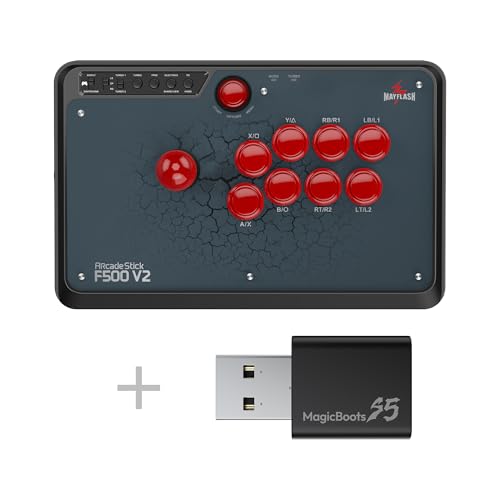
- Works with Xbox Series X/S, Xbox One, Xbox 360, and more
- Turbo functions plus headset support on supported platforms
- Requires a wired Xbox controller for Xbox 360 and Xbox One use
Best For: Players who want one arcade stick for Xbox and many other platforms
Wireless Pick

- First Xbox-licensed wireless arcade stick
- 2.4G wireless or wired USB support
- 3.5mm audio jack and custom profiles
Best For: Xbox players who want wireless freedom and easy remapping
Multi-Platform Value
MAYFLASH F500 FLAT All Button Stick

- Works with Xbox, PlayStation, Switch, PC, and more
- Xbox use requires a wired controller pass-through
- Supports headset audio, turbo, and modding
Best For: Gamers who want one highly compatible arcade controller
Premium Wireless
8BitDo 2.4g Arcade Fight Stick

- Official Xbox-licensed wireless stick
- Fast-mapping, profiles, and Ultimate Software support
- Audio jack, mic mute, and dedicated LSB/RSB
Best For: Xbox and Windows players who want deep customization
Premium multi-platform pick
MAYFLASH F300 Elite for Xbox and More

- Sanwa buttons and joystick
- Supports Xbox Series X|S, One, 360
- Mod-friendly internal design
Best For: multi-platform players who want premium arcade parts
Leverless tournament pick
Victrix Pro KO Xbox Leverless Fight Stick

- 16-button leverless layout
- Hot-swappable Cherry MX switches
- Slim wired USB-C design
Best For: competitive players who prefer all-button controls
Wireless flexibility pick
MAYFLASH F700X Wireless Xbox Fight Stick

- Bluetooth, 2.4G, and wired USB
- Xbox Series X|S plus broad platform support
- Hidden receiver storage compartment
Best For: players who want wireless freedom and multi-system compatibility
Premium Customizable Pick – HORI Fighting Stick alpha for Xbox Series X|S
HORI Fighting Stick alpha Designed for Xbox Series X|S - Officially Licensed by Microsoft
Check Price On AmazonIf you want a fight stick for xbox that feels ready for serious use, the HORI Fighting Stick alpha stands out for its maintenance-friendly design and deep customization options. It’s officially licensed for Xbox Series X|S, Xbox One, and Windows 10, and it’s built so you can swap out the top housing artwork and access the internals more easily than on many standard arcade sticks.
Best For: Players who want a customizable, officially licensed Xbox fight stick with easy maintenance.
Pros:
- Chassis opens for easier maintenance and customization
- Swappable top housing artwork lets you personalize the look
- Assignable buttons plus Share Button, Profile Button, and Key Lock Mode
- Compatible with Xbox Series X|S, Xbox One, and Windows 10
Cons:
- Battery-powered spec may not appeal to everyone
- Large arcade-style chassis takes up plenty of space
Overall, this is a strong choice if you care about mod-friendly construction and official Xbox support. It focuses on control, personalization, and practical upkeep rather than extras.
Budget Multi-Platform Pick – SUBSONIC Arcade Stick for Xbox Series X/S
This fight stick for xbox is aimed at players who want a straightforward arcade layout with useful built-in functions. The SUBSONIC stick supports Xbox Series X/S, Xbox One, PC, PS4, and PS3, and its steel joystick, microswitch buttons, and programmable combo features make it a practical option for a wide range of fighting games.
Best For: Players who want a simple, multi-platform arcade stick with built-in macro-style functions.
Pros:
- Compatible with Xbox Series X/S, Xbox One, PC, PS4, and PS3
- Heavy-duty steel joystick with microswitch contact buttons
- 8 action buttons and AUTO/COMBO functions for rapid inputs
- Rubberized wrist rest and 3-meter cable add everyday convenience
Cons:
- Only 8 action buttons, so it’s less feature-rich than premium models
- Best suited to players who are comfortable with a corded setup
It’s a solid pick if you want broad compatibility and useful shortcut features without overcomplicating the layout. The trade-off is a more basic build compared with higher-end fight sticks.
Pro-Grade Licensed Option – Nacon Daija Arcade Fight Stick for Xbox
For shoppers comparing a fight stick for xbox and looking for a more premium, tournament-style setup, the Nacon Daija is built with pro-level details in mind. It’s officially licensed for Xbox Series X|S, Xbox One, and Windows 10/11, and it uses Sanwa joystick and action buttons plus software-based button mapping for deeper control.
Best For: Competitive players who want a premium, customizable Xbox fight stick with Sanwa parts.
Pros:
- Officially licensed for Xbox Series X|S, Xbox One, and Windows 10/11 PCs
- Sanwa joystick and action buttons for premium-quality feel
- Fully configurable button mapping through Nacon Daija software
- Includes customizable front plate options and a button lock feature
Cons:
- Heavier and larger than simpler arcade sticks
- Premium feature set may be more than casual players need
This is the most feature-rich Xbox option in the group for players who want strong hardware and customization. The included accessories and pro-oriented design make it a serious pick for long sessions and structured play.
Versatile Cross-Platform Pick – MAYFLASH F500 Arcade FightStick Bundle
If you want a fight stick for xbox that can also move between a lot of other systems, the MAYFLASH F500 bundle is built for broad compatibility. It works with Xbox Series X/S, Xbox One, Xbox 360, PlayStation systems, PC, macOS, Steam Deck, Android, and more, and it adds support features like turbo functions and headset output on supported platforms.
Best For: Players who want one arcade stick for Xbox and many other platforms.
Pros:
- Wide compatibility across Xbox, PlayStation, PC, macOS, Steam Deck, Android, and more
- Plug and play support via Magic Boots for PS5 and PS4
- Supports headset output for background music and chat on PS4 and Xbox One
- Turbo functions with different speed settings
Cons:
- Xbox 360 and Xbox One use requires a wired Microsoft Xbox 360 or Xbox One controller
- Compatibility is more complex than a single-platform stick
This is a flexible choice if your setup spans multiple consoles and devices. Just be aware that its broad support comes with a few platform-specific requirements, especially on Xbox.
Wireless Pick – 8BitDo Xbox Arcade Stick
If you want a fight stick for xbox with true wireless flexibility, this 8BitDo model is built around convenience and official Xbox support. It works with Xbox Series X|S, Xbox One, and Windows 10 and above, and it gives you both 2.4G wireless and wired USB options.
Best For: Players who want an officially licensed wireless arcade stick for Xbox and PC with easy profile control.
Pros:
- First Xbox-licensed wireless arcade stick worldwide
- 2.4G wireless or wired USB connectivity
- Customizable button mapping plus fast-mapping and profile buttons
- 3.5mm audio jack with volume control
Cons:
- Wireless use depends on charging and battery management
- Focused on Xbox and Windows rather than broad console support
This is a strong pick if you value a clean wireless setup and want quick profile switching without giving up wired play. The 30-hour max battery life and 4-hour charging time make it practical for regular use, and the official licensing adds extra peace of mind.
Multi-Platform Value – MAYFLASH F500 FLAT All Button Stick
For shoppers comparing a fight stick for xbox with maximum compatibility, the MAYFLASH F500 FLAT stands out as a heavily cross-platform all-button arcade controller. It supports Xbox Series S/X, Xbox One, and even older Xbox models, but note that use on Xbox requires a wired Xbox controller to be plugged into the stick’s USB slot.
Best For: Multi-system players who want one arcade controller for Xbox, PlayStation, Switch, PC, and more.
Pros:
- Very broad compatibility across Xbox, PlayStation, Switch, PC, macOS, Android, and more
- Supports headset audio and online chat on Xbox and PS4
- Turbo functions with different speed settings
- Moddable design with support for Sanwa Denshi buttons and a removable clear acrylic top plate
Cons:
- Xbox use requires a wired Xbox controller connected to the stick
- Heavier and larger than a simple single-platform stick
If you want flexibility over simplicity, this is one of the most versatile options in the category. It’s especially appealing if you like customizing your arcade controller and need a stick that can move between several consoles and devices.
Premium Wireless – 8BitDo 2.4g Arcade Fight Stick
This fight stick for xbox focuses on wireless play plus deeper customization, making it a strong choice if you want more control over your setup. It works with Xbox Series X|S, Xbox One, and Windows 10 and above, and it includes both 2.4G wireless and wired USB connectivity.
Best For: Players who want a customizable wireless Xbox arcade stick with extra mapping tools.
Pros:
- Officially licensed wireless arcade stick for Xbox
- 2.4G wireless or wired USB connectivity
- Fast-mapping, profile buttons, and 8BitDo Ultimate Software support
- 3.5mm audio jack, volume control, and mic mute button
Cons:
- Wireless play adds battery charging to the routine
- Best suited to Xbox and Windows users rather than wider console use
The extra input tools, dedicated LSB and RSB support, and joystick direction switching make this a versatile option for players who like tuning their controls. With up to 30 hours of battery life and a moddable design, it’s built for users who want more than a basic arcade stick.
Premium multi-platform pick – MAYFLASH F300 Elite for Xbox and More
If you want a fight stick for xbox that also covers multiple systems, the MAYFLASH F300 Elite is a strong all-around option. It pairs Sanwa buttons and a Sanwa joystick with broad support for Xbox Series X|S, Xbox One, Xbox 360, PC, macOS, Steam Deck, Android, and more, making it a practical pick if you play across platforms and want responsive arcade controls.
Best For: Players who want a mod-friendly, multi-platform stick with premium Sanwa parts.
Pros:
- Uses 9 Sanwa buttons and a Sanwa 4-way joystick for responsive input.
- Supports Xbox Series X|S, Xbox One, Xbox 360, Windows, macOS, Steam Deck, and Android.
- Built for modding, with accessible internals and swappable buttons/joystick.
- Includes Turbo support for added versatility.
Cons:
- PS5 support requires a separate MAYFLASH adapter or converter.
- Wired USB-only connection may not suit players wanting wireless play.
- Warranty is limited to 90 days.
If you value premium arcade parts and easy customization, the F300 Elite stands out as a flexible fight stick for xbox users who also game on other devices. It is less about flashy extras and more about reliable controls and upgrade potential.
Leverless tournament pick – Victrix Pro KO Xbox Leverless Fight Stick
The Turtle Beach Victrix Pro KO is a leverless fight stick for xbox players who want an all-button layout and a slim tournament-ready build. With 16 moveable and mappable buttons, hot-swappable Cherry MX Speed Silver RGB switches, and a wired USB-C connection, it is aimed at competitive play on Xbox Series X|S, Xbox One, and Windows PC.
Best For: Competitive players who want a slim leverless controller for Xbox and PC.
Pros:
- 16 mappable buttons support a customizable all-button layout.
- Hot-swappable Cherry MX Speed Silver RGB switches.
- Wired 3m braided USB-C cable for fast response.
- Slim design is easy to carry for travel and events.
Cons:
- Leverless layout may not suit players who prefer a traditional joystick.
- Wired-only design means no wireless option.
- Best suited to fighting games and arcade-style titles, not general use.
If your priority is tournament performance and a modern all-button layout, the Victrix Pro KO is one of the most specialized options here. It is a focused choice for players who already know they want leverless controls on Xbox.
Wireless flexibility pick – MAYFLASH F700X Wireless Xbox Fight Stick
The MAYFLASH F700X is a fight stick for xbox players who want more connection options than a standard wired setup. It supports Xbox Series X|S plus PS4, Switch, Windows, Apple devices, Android, and more, and it can connect through Bluetooth, 2.4G, or wired USB. That flexibility makes it a useful pick if you move between console, PC, and mobile-style platforms.
Best For: Players who want wireless options and broad system support in one arcade stick.
Pros:
- Three connection modes: Bluetooth, 2.4G receiver, and wired USB.
- Supports Xbox Series X|S, PS4, Switch, Windows, Apple devices, and Android.
- Includes a hidden compartment for storing the 2.4G receiver.
- Supports wired headsets for music and chat on Xbox Series X|S, PS4, and PC Xinput.
Cons:
- Does not support PS5.
- Switch 2 Bluetooth use requires the latest firmware.
- Heavier than some competing sticks at 3.37 kg.
For Xbox players who want the freedom to go wireless without giving up a wired option, the F700X is the most adaptable choice in this group. It is especially appealing if you like cross-platform compatibility and headset support on supported systems.
How We Picked the Best Fight Stick for Xbox
We focused on Xbox compatibility, control quality, and the features that matter most in real use: reliable inputs, solid build quality, and whether the stick or leverless layout suits your play style. We also considered wired versus wireless setups, official licensing, and platform support for PC and other systems.
Quick Comparison
The best Fight Stick for Xbox depends on how you play. Traditional joystick-and-button models feel closest to arcade cabinets, while all-button and leverless designs emphasize speed and precision. Wireless models are better for living room setups, while tournament-focused sticks usually prioritize low-latency wired connections and premium parts.
Key Buying Factors for Fight Stick for Xbox
Compatibility
Make sure the controller supports your specific console, whether that’s Xbox Series X|S, Xbox One, or both. Some models also require adapters or companion hardware for full cross-platform support.
Layout and Feel
Choose between a traditional joystick layout and a leverless or all-button layout. If you grew up on arcade cabinets, a classic stick may feel more natural. If you want faster directional inputs and cleaner execution, a button-only design may be the better fit.
Buttons and Joystick Quality
Premium parts can improve durability and responsiveness, especially for competitive players. If you plan to grind ranked matches or enter locals, look for quality switches, good actuation, and a stable case that won’t slide around during play.
Wired Vs. Wireless
Wired models are usually the safer choice for tournaments and latency-sensitive play. Wireless options offer more freedom on the couch, but battery life and connection stability matter if you play for long sessions.
Customization and Upgrades
Many fight sticks for Xbox support easy modding, interchangeable artwork, remappable controls, or swappable parts. If you like fine-tuning your setup, that flexibility can be worth paying for.
Who Should Buy Which Fight Stick for Xbox?
Casual players should look for a straightforward, officially licensed model with broad compatibility and easy setup. Competitive players may prefer premium parts, a heavier case, and tournament-friendly wired performance. If you play on multiple systems, choose a cross-platform stick that can follow you between Xbox, PC, and other consoles. If speed and execution matter most, consider an all-button or leverless model rather than a traditional arcade stick.
In short, the best choice is the one that matches your games, your grip style, and how seriously you plan to compete.