Choosing a fight stick for PC can make a big difference in comfort, consistency, and control—especially if you play fighting games seriously or want a more arcade-like feel.
Our roundup focuses on PC-friendly models with solid inputs, durable construction, and the features that matter most for competitive and casual players alike.
Best 10 Fight Stick for PC Picks for 2026
Pro Tournament Pick
HORI Fight Stick Alpha for PS5, PS4, and PC
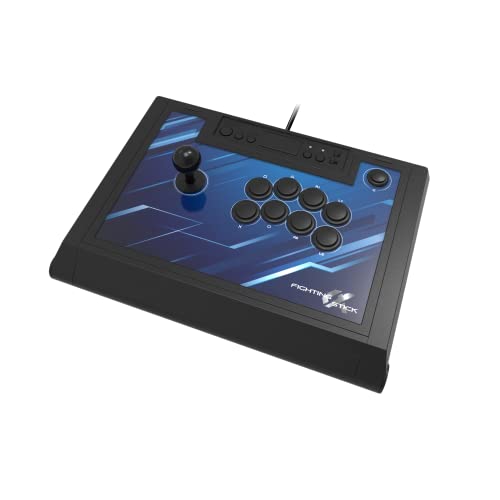
- PC, PS5, and PS4 compatibility
- Opens for easy customization and maintenance
- Hayabusa buttons and joystick
Best For: Serious players wanting a premium PC and PlayStation fight stick
Wireless Macro-Focused Choice
8Bitdo Retro Arcade Fight Stick for Switch and PC

- Bluetooth, 2.4G, and USB-C wired modes
- Dedicated macro buttons and profiles
- Ultra-moddable button and joystick design
Best For: PC players who want wireless play and easy customization
Compact Budget-Friendly Option
HORI Fighting Stick Mini for PS5, PS4, and PC

- Compact, lightweight portable design
- Works with PC, PS5, and PS4
- 8-button layout with 8-foot cable
Best For: Players who want a small portable fight stick for PC
Flexible Wireless All-Rounder
8Bitdo Arcade Stick for Switch and Windows

- Windows support with Bluetooth, 2.4G, and USB-C
- Ultimate Software for macros and mapping
- Universal mounting plate for upgrades
Best For: Windows players who want a versatile mod-friendly stick
Premium Licensed Pick
Qanba Obsidian 2 for PS5/PS4/PC

- Official Sony-licensed stick with PC support
- Mode switch for PS5, PS4, and PC
- Qanba OBSF buttons and Sanwa JLF tops
Best For: Players who want a licensed, feature-rich stick for PC and PlayStation
Most Versatile Flat Stick
MAYFLASH F500 FLAT all-button controller

- Works with PC plus many consoles and devices
- All-button layout with turbo support
- Moddable design with removable acrylic top
Best For: Multi-platform players who want a moddable all-button controller
Tournament-Ready Leverless Pick
Qanba Sapphire S1 leverless controller
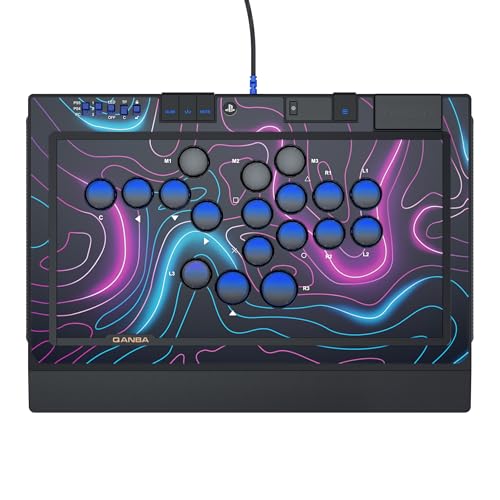
- Leverless layout with Cherry Silver switches
- 18 programmable buttons and three saved layouts
- Includes RGB lighting and wrist rest
Best For: Competitive players who want a portable leverless controller with customizable inputs
Multi-Platform Wireless Pick

- Bluetooth, 2.4G, and USB wired modes
- Works with PC, PS5, PS4, Switch, and more
- Supports Sanwa-compatible customization
Best For: PC players who want one stick for many platforms and wireless use
Xbox-Ready Custom Stick

- Works with Windows 10/11 PC and Xbox consoles
- Sanwa joystick and buttons included
- Software mapping plus 3.5mm headset jack
Best For: PC and Xbox fighting-game players who want customization and premium parts
PlayStation Custom Stick
Nacon Daija PlayStation Fight Stick

- Works with PS5, PS4, and Windows 10/11 PC
- Sanwa parts and button mapping software
- Custom faceplates and headset jack
Best For: PC and PlayStation players who want a wired, customizable fight stick
Pro Tournament Pick – HORI Fight Stick Alpha for PS5, PS4, and PC
If you want a fight stick for pc that feels built for serious play, the HORI Fighting Stick Alpha is aimed squarely at that role. It supports PC along with PS5 and PS4, uses a full-size tournament-style layout, and opens for easy customization and maintenance.
Best For: Players who want a premium, officially licensed fight stick for PC and PlayStation use.
Pros:
- Works with PC, PS5, and PS4
- Opens for easier customization and maintenance
- Replaceable top-panel artwork
- Hayabusa buttons and joystick
Cons:
- Larger, heavier design is less portable
- Wired USB connection only
This is the most pro-focused option in the group, especially if you value official Sony licensing and a stick designed for long-term tweaking. It makes the most sense for players who want a committed desktop setup rather than a travel-friendly controller.
Wireless Macro-Focused Choice – 8Bitdo Retro Arcade Fight Stick for Switch and PC
This fight stick for pc is a strong pick if you want wireless flexibility plus plenty of customization. The 8Bitdo Retro Arcade Fight Stick supports Windows, adds macro features through Ultimate Software, and gives you three connection modes for different setups.
Best For: PC players who want wireless play, macro support, and mod-friendly hardware.
Pros:
- Works with Windows and Switch
- Bluetooth, 2.4G, and wired USB-C connections
- Dedicated macro buttons and software profiles
- Ultra-moddable with swappable buttons and universal joystick mount
Cons:
- Heavier than compact travel sticks
- Best feature set leans toward PC and Switch rather than broad console support
For PC users who like to tweak mappings, save profiles, and switch between wireless and wired play, this model stands out. Its mod-friendly design also makes it a good long-term choice if you plan to customize the stick over time.
Compact Budget-Friendly Option – HORI Fighting Stick Mini for PS5, PS4, and PC
If you need a fight stick for pc that is small and easy to carry, the HORI Fighting Stick Mini keeps things simple. It supports PC, PS5, and PS4, uses a compact 8-button layout, and comes with an 8-foot cable for a straightforward wired setup.
Best For: Players who want a compact, portable fight stick for PC and PlayStation games.
Pros:
- Compact and lightweight design
- Works with PC, PS5, and PS4
- 8-button layout with HORI original joystick
- 8-foot cable for flexible placement
Cons:
- Smaller layout may feel cramped for some players
- Battery-powered note may be less relevant than a full-size wired stick
This is the easiest option to recommend if portability matters more than a full arcade-sized footprint. It is best suited to casual play, travel, or smaller desk setups where a compact controller makes more sense.
Flexible Wireless All-Rounder – 8Bitdo Arcade Stick for Switch and Windows
For anyone shopping for a fight stick for pc with strong connection flexibility, the 8Bitdo Arcade Stick is an easy contender. It supports Windows, offers Bluetooth, 2.4G, and wired USB-C connections, and includes customization tools for button mapping and macros.
Best For: Windows users who want a versatile, mod-friendly fight stick with multiple connection options.
Pros:
- Compatible with Switch and Windows
- Bluetooth, 2.4G, and wired USB-C support
- Ultimate Software for button mapping and macros
- Universal mounting plate supports Sanwa-style upgrades
Cons:
- Not built for broad console compatibility beyond Switch
- Focus is on flexibility rather than a pro tournament-style shell
This model is a smart pick if you want a PC fight stick that can adapt to different play styles and setups. The mix of wireless options, software features, and upgrade-friendly hardware makes it especially practical for tinkerers.
Premium Licensed Pick – Qanba Obsidian 2 for PS5/PS4/PC
If you want a fight stick for pc that also stays ready for PlayStation use, the Qanba Q7 Obsidian 2 is built around broad compatibility and a classic joystick layout. It includes a full control panel, touch pad, Qanba 30-mm OBSF buttons, and swappable Sanwa JLF joystick tops, making it a strong pick for players who want a premium wired stick with familiar arcade hardware.
Best For: Players who want a licensed, feature-rich stick for PC and PS5/PS4 gaming.
Pros:
- Compatible with PlayStation 5, PlayStation 4, and PC with a mode switch.
- Officially licensed Sony peripheral.
- Includes touch pad, 16 buttons, and 3.5-mm microphone input with mute control.
- Uses Qanba 30-mm OBSF buttons and swappable Sanwa JLF joystick tops.
Cons:
- Wired-only design may not suit players who want wireless use.
- Larger and heavier than compact alternatives at 7.4 pounds.
Overall, this is a strong option if you want a fight stick for pc with official Sony licensing and arcade-style parts. Its PC support and built-in PS5/PS4 switching make it versatile, while the premium controls should appeal to players who care about feel as much as compatibility.
Most Versatile Flat Stick – MAYFLASH F500 FLAT all-button controller
The MAYFLASH F500 FLAT is a flexible fight stick for pc users who also play across many other systems, including PS4, Xbox, Switch, macOS, Android, and Steam Deck. Its all-button arcade controller layout, turbo support, and removable clear acrylic top plate make it especially appealing if you want a customizable setup that can grow with your preferences.
Best For: Multi-platform players who want a moddable all-button controller.
Pros:
- Wide compatibility with PC, consoles, macOS, Android, Steam Deck, and more.
- Supports Sanwa Denshi buttons for customization.
- Includes turbo functions with different speed settings.
- Removable clear acrylic top plate for a personalized look.
Cons:
- Some console use requires a wired controller plugged into the USB slot.
- PS5 compatibility depends on a separate MAYFLASH adapter or converter.
This is a practical pick if your priority is flexibility rather than a traditional single-system stick. The broad device support and moddable design make it one of the most adaptable options for a fight stick for pc setup.
Tournament-Ready Leverless Pick – Qanba Sapphire S1 leverless controller
The Qanba Sapphire S1 is a leverless fight stick for pc players who want fast inputs, portability, and a more modern layout. It is officially licensed for PlayStation 5, PlayStation 4, and PC, and it adds Cherry Silver switches, 18 programmable buttons, RGB lighting, and a detachable Type-C USB cable for a clean tournament-focused setup.
Best For: Competitive players who want a portable leverless controller with customizable inputs.
Pros:
- Officially licensed for PS5, PS4, and PC.
- Cherry Silver switches support fast, precise input.
- 18 programmable buttons with remapping and three saved layouts.
- Includes RGB lighting, wrist rest, extra micro switches, and lockable keycaps.
Cons:
- Leverless layout may not suit players who prefer a joystick.
- PC and PS4 compatibility is listed; PS5 support is described in the feature notes.
If you want a compact, performance-first fight stick for pc, this model is aimed squarely at responsiveness and customization. The detachable cable, layout presets, and included wrist rest make it a solid choice for long sessions and competitive play.
Multi-Platform Wireless Pick – MAYFLASH F700 Fight Stick
If you want a fight stick for pc that can also move between consoles and mobile devices, the MAYFLASH F700 is built for wide compatibility. It supports Windows, PS5 for fighting games, PS4, PS3, Switch, Switch 2 via updated firmware, Apple devices, Android, Steam Deck, and more, with Bluetooth, 2.4G, and wired USB connection options.
Best For: Players who want one fight stick for PC plus multiple platforms and wireless flexibility.
Pros:
- Three connection modes: Bluetooth, 2.4G, and wired USB.
- Broad support across PC, PlayStation, Switch, Apple, Android, and Steam Deck.
- Supports Turbo functions with multiple speed settings.
- Compatible with Sanwa Denshi buttons and joystick for customization.
Cons:
- Only supports fighting games on PS5, not general game genres.
- Not compatible with Xbox Series S/X or Xbox One.
- Switch 2 Bluetooth support requires the latest firmware update.
The F700 makes the most sense if your priority is flexibility and future-proofing across devices. It is a practical choice for a fight stick for pc users who also want wireless play and easy mod potential.
Xbox-Ready Custom Stick – Nacon Daija XBOX Fight Stick
The Nacon Daija is a strong fight stick for pc if you also use Xbox, since it is officially licensed for Xbox Series X|S, Xbox One, and Windows 10/11. It leans into competitive fighting-game use with Sanwa joystick and action buttons, full button mapping software, and a detachable 3-meter cable for a clean setup.
Best For: PC and Xbox players who want a tournament-style stick with deep customization.
Pros:
- Officially licensed for Xbox Series X|S, Xbox One, and Windows 10/11 PC.
- Sanwa joystick and action buttons for premium feel and durability.
- Fully configurable button mapping with Nacon software.
- Includes a 3.5mm audio jack for headset use.
Cons:
- Wired only via the included USB-A to USB-C cable.
- Heavier build may be less portable than smaller sticks.
- Focused on fighting games rather than broad game compatibility.
If you want a serious PC fight stick with Xbox support and hardware you can tune to your preferences, the Daija is built for that role. Its combination of Sanwa parts, software mapping, and comfort features gives it a more premium competitive feel.
PlayStation Custom Stick – Nacon Daija PlayStation Fight Stick
The PlayStation version of the Nacon Daija is a good fight stick for pc users who mainly play on PS5, PS4, and Windows 10/11. It uses Sanwa joystick and action buttons, includes button-mapping software on PC and Mac, and comes with a customizable front plate plus a 3-meter detachable cable.
Best For: PC and PlayStation players who want a customizable wired stick with quality arcade parts.
Pros:
- Officially licensed for PS5, PS4, and Windows 10/11 PC.
- Sanwa joystick and action buttons for responsive control.
- Customizable front plate with three faceplate options.
- Includes a 3.5mm audio jack for headset connection.
Cons:
- Wired-only design with a 3-meter cable.
- Primarily aimed at fighting games rather than general use.
- Customization software is limited to PC and Mac.
This model is a sensible pick if your PC setup is tied closely to PlayStation gaming. It offers the same customization-first Daija formula, but with platform support focused on PS5, PS4, and PC.
How We Picked These Fight Stick for PC Options
We focused on PC compatibility, control quality, build materials, and real-world usability. That means looking at stick and button quality, wiring options, layout comfort, and whether each model is easy to use with modern Windows systems. We also weighed portability, platform support, and whether a controller offers a traditional joystick layout or leverless design.
Quick Comparison
Not every Fight Stick for PC serves the same kind of player. Traditional arcade sticks are best if you want the classic joystick feel, while leverless controllers prioritize fast directional inputs and a keyboard-like control style. Some models are better for desk use, others for tournament travel, and some are built for multi-platform flexibility.
Key Buying Factors for Fight Stick for PC
Compatibility and Connection Type
Check whether the stick supports native PC play over USB, and whether wireless, 2.4 GHz, or Bluetooth modes are stable enough for your setup. For most players, wired connection remains the simplest choice for low-latency play.
Layout: Traditional Vs Leverless
A traditional arcade stick is familiar and great for motion inputs, while leverless controllers can help with speed and precision. Your preferred games and control style should guide this choice more than any spec sheet.
Build Quality and Parts
Higher-quality buttons, joysticks, and case construction usually translate to better long-term reliability. If you play often, prioritize replaceable parts and a sturdy chassis over cosmetic extras.
Size, Portability, and Comfort
Large tournament-style units offer more wrist room and stability, while compact models are easier to carry. Make sure the palm rest, button spacing, and overall footprint fit your desk or lap setup.
Extra Features
Macro buttons, turbo functions, and multi-platform support can be useful, but they should not come at the expense of input consistency or comfort.
Who Should Buy Which Fight Stick for PC?
If you want a premium, tournament-ready option, choose a full-size model with strong parts and a proven layout. If you need something travel-friendly or budget-conscious, a compact stick may be enough. If you care most about speed and precision, a leverless controller may be the better fit. For players who switch between PC and consoles, multi-platform support can add real value.
In short, the best Fight Stick for PC is the one that matches your game plan, desk space, and comfort level—not just the one with the most features.