If you’re tired of dead Joy-Cons and cluttered cables, a good charging dock can make everyday Switch gaming a lot easier. The right station keeps controllers powered, organized, and ready to play.
Below, we’ve narrowed the field to 10 standout options for different setups, from simple Joy-Con docks to multi-controller stations with extra device support.
Best 10 Controller Charging Station for Switch Controllers Picks for 2026
Best 6-in-1 Charging Hub
Switch Controller Charger Dock

- Charges 4 Joy-Cons plus 2 Pro/PS5 controllers
- LED indicators show charging status at a glance
- Built-in protection helps prevent overcharge and short circuits
Best For: Families or multiplayer setups that need one dock for several Switch controllers.
Best for RGB Displays
Switch Joycon Charger with 9 RGB Light Modes

- Charges 4 Joy-Cons at once
- 2.5-hour claimed full charge time
- 9 RGB lighting modes with touch control
Best For: Switch players who want a stylish 4-slot Joy-Con dock with clear charging indicators.
Best for Multi-Controller Setups
Switch 2 Charging Dock for 4 Joy-Con & 2 Pro Controllers
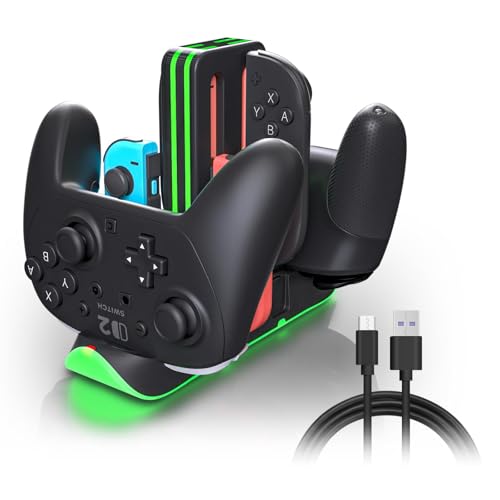
- Charges 6 controllers at once
- Fast 2.5-hour USB-C charging
- RGB ring with touch control
Best For: Families, multiplayer groups, and players who keep multiple Switch controllers charged in one place.
Best for Multi-Controller Charging

- Charges up to 6 Joy-Cons at once
- Works with original Switch and OLED models
- Adds organized storage plus charging in one dock
Best For: Switch owners who need a tidy, multi-controller charging and storage dock.
Best Multi-Platform Dock
Switch Pro & PS5/Xbox 2-Port Charger

- Charges 2 controllers simultaneously
- Includes removable USB-C charging adapters
- LED lights and smart protection simplify daily use
Best For: Multi-console gamers who want one compact dock for Switch Pro and major console controllers.
Best for Everyday Use
NEWDERY Switch Pro & Joy-Con Dock

- Charges up to 6 devices at once
- LED indicators show charge status clearly
- Works as a space-saving storage stand
Best For: Switch owners who need a simple multi-controller dock for Joy-Cons and Pro controllers.
Best for Dual Controller Docking
Switch 2 Pro Dual USB-C Charging Dock
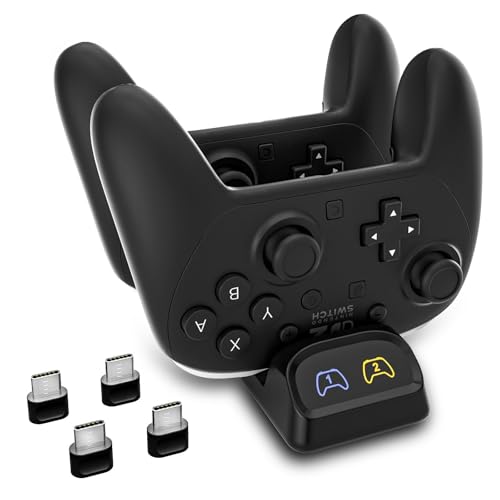
- Charges two controllers simultaneously
- Includes USB-C adapters for easy dock charging
- LED status lights and compact design
Best For: Gamers who want a tidy dual-controller dock for Switch Pro-style pads and other USB-C controllers.
Best for Joy-Con Organization
FastSnail Joy-Con Charging Dock
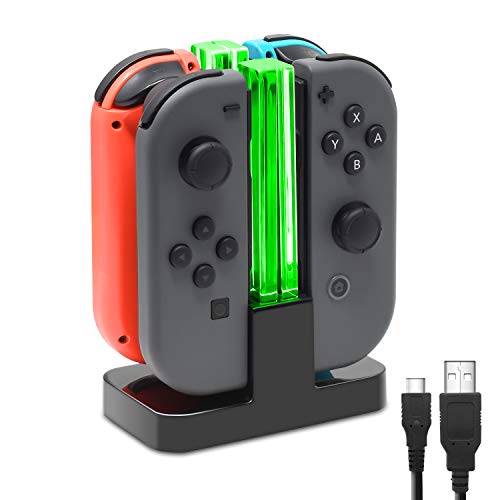
- Charges up to 4 Joy-Cons simultaneously
- LED indicators show individual charge status
- Doubles as a storage and display stand
Best For: Switch players who want a simple, tidy charging dock for Joy-Cons.
Best Heavy-Duty Pick

- Charges 4 Joy-Cons and 2 Pro Controllers
- LED lights show charge status clearly
- Keeps multiple controllers organized in one dock
Best For: Gamers who need one dock to charge several original Switch controllers at once.
Best for 4 Joy-Cons at Once
4-in-1 Switch Joy-Con Charging Dock

- Charges up to 4 Joy-Cons simultaneously
- LED lights show charging progress
- USB-C powered with safety protections
Best For: Switch players who want a simple dock for charging and storing multiple Joy-Cons.
Best 6-in-1 Charging Hub – Switch Controller Charger Dock
If you want a practical controller charging station for switch controllers, this dock keeps Joy-Cons and pro-style pads in one place while adding support for PS5 controllers too. It’s a simple plug-and-play option with LED charging indicators and enough capacity to handle a busy game setup.
Best For: Households or groups that need one dock to charge multiple Switch controllers and a couple of extra gamepads.
Pros:
- Charges up to 4 Joy-Cons plus 2 Pro controllers or 2 PS5 controllers
- Easy track-style placement makes docking and removal straightforward
- LED indicators and built-in protection features add convenience and safety
Cons:
- Does not include Joy-Cons or controllers
- Bulkier than a basic single-controller charger
- May be more capacity than solo players need
For buyers who want a flexible controller charging station for switch controllers, this one stands out for its multi-device capacity and easy everyday use. It is a good fit if you regularly swap between Joy-Cons, a Pro controller, and other compatible pads.
Best for RGB Displays – Switch Joycon Charger with 9 RGB Light Modes
If you want a controller charging station for switch controllers that also doubles as a desk display piece, this Joy-Con dock is a strong fit. It charges up to four Switch/OLED Joy-Cons at once, uses clear LED indicators for quick status checks, and adds a customizable RGB light bar for extra flair.
Best For: Switch owners who want a tidy 4-slot charging dock with visual charging indicators and a more decorative setup.
Pros:
- Charges 4 Joy-Cons simultaneously with a claimed 2.5-hour full charge time
- LED indicators and translucent light bar make charging status easy to see
- 9 RGB lighting modes with touch control for switching effects on or off
- Slide-in design also works well as a storage stand when not charging
Cons:
- Not compatible with Switch 2 Joy-Cons
- Focused on Joy-Cons only, not Pro Controllers
- RGB styling may be unnecessary for buyers who want a plain dock
This is a practical controller charging station for switch controllers if your main priority is charging multiple Joy-Cons cleanly while adding some personality to your gaming area. The combination of status lights, fast charging, and a compact stand makes it easy to live with day to day.
Best for Multi-Controller Setups – Switch 2 Charging Dock for 4 Joy-Con & 2 Pro Controllers
If you want a controller charging station for switch controllers that can handle a full family or multiplayer setup, this 6-in-1 dock is built to keep multiple Joy-Con and Pro Controllers ready at once. It supports Switch 2, Switch 1, and OLED systems, adds fast USB-C charging, and includes RGB lighting for a cleaner gaming setup.
Best For: Households, couch co-op players, and anyone who needs to charge several Switch controllers in one organized station.
Pros:
- Charges up to 4 Joy-Con and 2 Pro Controllers together
- Fast 2.5-hour charging with USB-C power input
- RGB light ring with touch controls and memory function
- Individual LED indicators make charge status easy to track
Cons:
- Requires a stable USB-C power source and compatible adapter
- RGB lighting may be unnecessary for buyers who want a basic dock
This is a strong fit if you want a controller charging station for switch controllers that prioritizes capacity, clear status indicators, and quick turnaround between gaming sessions. It is especially useful when multiple controllers are in rotation and you want one dock to manage them all.
Best for Multi-Controller Charging – Switch Joycon Charging Dock
If you want a controller charging station for switch controllers that keeps multiple Joy-Cons powered and neatly stored, this dock is a practical pick. It supports both the original Switch and OLED models, charges up to 6 controllers at once, and adds simple organization without taking up much space around your TV setup.
Best For: Switch players who want a compact charging and storage solution for several Joy-Cons at once.
Pros:
- Charges up to 6 Joy-Cons simultaneously
- Compatible with Switch OLED and original Switch models
- Built-in light guide makes charge status easy to read
- Includes safety protection against overcurrent, overheating, and short-circuits
Cons:
- Joy-Cons, console, and main dock are not included
- Depends on adhesive mounting for the most secure fit
This is a strong choice if you want a controller charging station for switch controllers that does more than just charge. It works best for players who keep multiple Joy-Cons in rotation and want a tidy, low-fuss dock that blends charging, storage, and basic status feedback.
Best Multi-Platform Dock – Switch Pro & PS5/Xbox 2-Port Charger
If you want a flexible controller charging station for switch controllers and also use PS5 or Xbox pads, this 2-port dock is a practical all-in-one option. It uses removable USB-C adapters for easy drop-in charging, includes LED status lights, and is built for a stable desktop setup.
Best For: Multi-console households that want one compact dock for Switch Pro, Switch 2 Pro, PS5, and Xbox controllers.
Pros:
- Charges two compatible controllers at once
- USB-C adapters make dock-and-drop charging simple
- LED indicators clearly show charging status
- Smart protection and compact base suit desk or TV areas
Cons:
- Not compatible with PowerA, Luna, or other third-party pro controllers
- 5V/2A adapter recommended for reliable performance, but not included
- Thick cases may prevent proper contact with the dock
For buyers who need a controller charging station for switch controllers but also want cross-platform support, this dock stands out for convenience and clean setup more than raw speed. Just confirm controller compatibility before buying, and it should handle everyday charging well.
Best for Everyday Use – NEWDERY Switch Pro & Joy-Con Dock
If you want a controller charging station for switch controllers that can handle multiple pads at once, this NEWDERY dock is built for that job. It charges Joy-Cons and Pro controllers together, adds simple LED status lights, and doubles as a tidy stand when the controllers are not in use.
Best For: Switch owners who want an all-in-one dock for charging multiple Joy-Cons and Pro controllers with minimal setup.
Pros:
- Charges up to 6 devices at once, including Joy-Cons and Pro controllers
- Individual LED indicators make it easy to see charging status at a glance
- Easy slide-in design keeps charging simple and desktop clutter down
- Built-in protection features help support safer everyday charging
Cons:
- Ac adapter is not included
- Designed for original Switch controllers, so some third-party pads may not work
- Not compatible with Switch 2 Joy-Con controllers
This is a practical pick if you need a controller charging station for switch controllers and care more about multi-device convenience than extra features. It’s especially useful for households with several Joy-Cons, or for players who want a single dock to keep their Pro controllers ready to go.
Best for Dual Controller Docking – Switch 2 Pro Dual USB-C Charging Dock
If you want a controller charging station for switch controllers that keeps two pads ready at once, this dual USB-C dock is a practical pick. It supports Switch Pro and Switch 2 Pro controllers, adds LED charge indicators, and includes USB-C adapters for easy drop-in charging.
Best For: Players who want a tidy, dual-controller charging dock for Switch Pro-style controllers, with added compatibility for PS5, Xbox Series X|S, and Elite Series 2 pads.
Pros:
- Charges two controllers at the same time to cut downtime
- USB-C adapters included for simpler dock-and-charge use
- LED indicators make it easy to check charging status quickly
- Compact footprint works well on desks, TV stands, and gaming shelves
Cons:
- Not compatible with some third-party controllers like PowerA or Luna
- Performs best with a 5V/2A power adapter, not low-power USB ports
- Bulky controller cases may need to be removed for proper fit
This is a solid controller charging station for switch controllers if you want a simple, organized way to keep two USB-C gamepads topped off between sessions. Its broad support and included adapters make it especially handy for mixed-controller households.
Best for Joy-Con Organization – FastSnail Joy-Con Charging Dock
If you want a compact controller charging station for switch controllers, this FastSnail dock is a simple way to keep up to four Joy-Cons charged and lined up neatly. The slide-in design makes daily use easy, and the individual LED indicators help you see each controller’s charge status at a glance.
Best For: Switch owners who mainly use Joy-Cons and want an easy, space-saving charging and display stand.
Pros:
- Charges up to 4 Joy-Cons at once
- Individual LED lamppost indicators show charge progress
- Simple plug-and-play setup with USB power
- Also works as a tidy storage and display stand
Cons:
- Joy-Cons are not included
- Designed for Joy-Cons, not full-size Switch controllers
Overall, this is a practical controller charging station for switch controllers if your setup centers on Joy-Cons and you value straightforward charging with clean desk organization.
Best Heavy-Duty Pick – 6-in-1 Switch Controller Dock
If you want a controller charging station for switch controllers that can keep multiple pads ready at once, this 6-in-1 dock is built for exactly that job. It charges 4 Joy-Cons and 2 Pro Controllers together, uses clear LED status lights, and helps cut down on cable clutter around your setup.
Best For: Households or gaming setups that need to charge several original Switch controllers in one compact station.
Pros:
- Charges up to 6 controllers at the same time
- LED indicators make charging status easy to see at a glance
- Compact dock helps keep accessories organized and off the desk
- Simple USB setup with stable charging for official Nintendo controllers
Cons:
- Not compatible with Switch 2 Joy-Cons
- Does not support third-party controllers like PowerA
- Requires original Nintendo Joy-Cons and Pro Controllers to use properly
This is a practical pick if your priority is charging capacity and organization over extra features. For buyers who need a straightforward controller charging station for switch controllers, it offers a clean all-in-one solution with enough slots to keep everyone’s gear ready.
Best for 4 Joy-Cons at Once – 4-in-1 Switch Joy-Con Charging Dock
If you want a practical controller charging station for switch controllers, this 4-in-1 dock keeps up to four Joy-Cons powered and organized in one compact spot. It uses a simple slide-in design, LED charging indicators, and a USB-C input, making it easy to place near your console, TV setup, or gaming desk.
Best For: Switch owners who want a simple, space-saving dock for charging multiple Joy-Cons together and keeping spare controllers neatly stored.
Pros:
- Charges up to 4 Joy-Cons at the same time
- LED indicators make charging status easy to check
- USB-C powered with multiple convenient power options
- Built-in protection features help support safer charging
Cons:
- Joy-Cons are not included
- Made specifically for Joy-Cons, not other Switch controller types
- Basic design focuses on function over premium styling
This is a straightforward controller charging station for switch controllers if your main goal is to keep several Joy-Cons ready without extra clutter. It’s a good fit for households that rotate controllers often and want an easy plug-and-play dock rather than a more advanced charging solution.
How We Picked the Best Controller Charging Station for Switch Controllers
We focused on Controller Charging Station for Switch Controllers options that balance charging speed, controller compatibility, build quality, and convenience. We also looked for clear LED status indicators, stable docking, and designs that fit common Nintendo Switch setups without wasting space.
Quick Comparison
If you mainly use Joy-Cons, a compact 4-slot dock may be the best fit. If you regularly rotate between Joy-Cons and Pro Controllers, choose a 6-in-1 station. For households with multiple consoles or extra gamepads, a dual-purpose charger with broader compatibility can be the most practical choice.
Key Buying Factors for a Controller Charging Station for Switch Controllers
Controller Type and Capacity
Check whether the dock supports Joy-Cons, Switch Pro Controllers, or both. Capacity matters if you play local multiplayer often or keep spare controllers charged for guests.
Charging Speed and Power Input
Fast charging is useful, but only if the dock is paired with a reliable power source. Look for stations that clearly state charging time and power requirements so you know what to expect.
Indicator Lights and Ease of Use
LED indicators make it easier to see when controllers are charging or fully powered. Simple drop-in placement and secure alignment are especially helpful for daily use.
Desk Space and Cable Management
A compact dock can reduce clutter and keep your setup cleaner. If your gaming area is small, prioritize vertical or low-profile designs with built-in organization.
Compatibility and Future-Proofing
Some models are made for Switch OLED or Switch 2 accessories, while others support additional controllers like PS5 or Xbox pads. Broader compatibility can be a plus if you want one charging hub for multiple systems.
Who Should Buy Which Controller Charging Station for Switch Controllers?
Choose a small Joy-Con dock if you want a simple, affordable way to keep handheld controls ready. Pick a larger multi-controller station if you own a Pro Controller, often play with others, or want one tidy hub for several pads. If you’re shopping for a newer setup, look closely at Switch 2 compatibility and USB-C support before you buy.
In short, the best Controller Charging Station for Switch Controllers is the one that matches your controller mix, your available space, and how often you actually need everything charged at once.