Keeping several game controllers charged shouldn’t mean dealing with cable clutter, dead batteries, or a messy desk. The right charging station makes everyday gaming simpler by giving each controller a dedicated place to power up.
In this roundup, we focus on practical options for different setups, from Nintendo Switch families to PlayStation households and multi-device charging docks.
Best 10 Controller Charging Station for Multiple Controllers Picks for 2026
Best for Multi-Controller Charging

- Charges 4 Joy-Cons and 2 Pro Controllers
- LED indicators show charge status clearly
- Compact dock helps keep setups organized
Best For: Nintendo Switch players who need one dock for several official controllers.
Best Officially Licensed
PowerA Twin Charging Station for PS5 DualSense

- Charges 2 DualSense controllers at once
- Officially licensed PS5 accessory
- Simple dock design with AC adapter power
Best For: PS5 owners who want a tidy, licensed dual-controller charging dock.
Best for Multi-Controller Setups
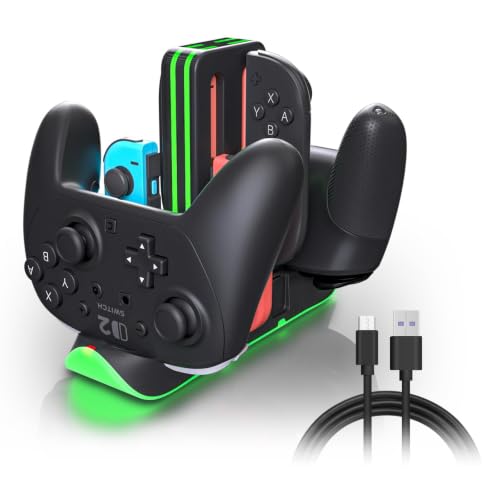
- Charges 4 Joy-Con and 2 Pro Controllers at once
- 2.5-hour fast charging with USB-C input
- RGB ring and per-slot LED status indicators
Best For: Families and multiplayer setups that need one dock for several Switch controllers.
Best Multi-Device Dock

- Charges controllers plus phones and tablets
- Includes a headset holder and controller stand
- Sturdy, organized design for gaming desks
Best For: Gamers who want a single organized dock for controllers, audio gear, and USB devices.
Best Multi-Controller Dock
6-in-1 Switch & PS5 Charging Dock

- Charges 4 Joy-Cons plus 2 Pro or PS5 controllers
- LED indicators make charge status easy to see
- Built-in safety protection for everyday charging
Best For: Mixed Nintendo and PlayStation setups that need one compact charging hub.
Best Multi-Accessory Organizer
NEWDERY PS5/Slim/Pro Stand with Dual Charging
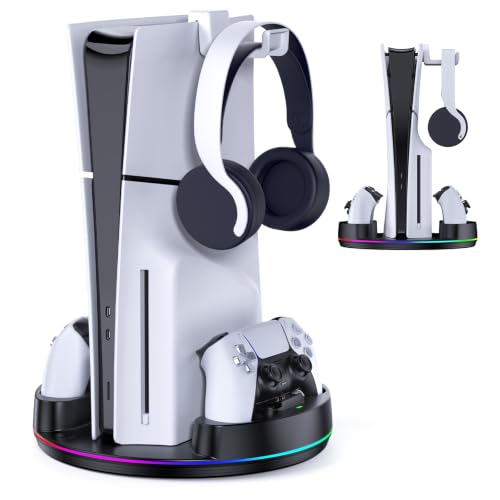
- Dual charges two PS5 controllers in about 2.5 hours
- Supports PS5 Original, Slim, and Pro consoles
- Adds RGB lighting, anti-slip mats, and headset storage
Best For: PS5 owners who want a charging dock and console stand that also organizes accessories.
Best for Easy Setup
Switch 4-in-1 Joycon Charging Dock

- Charges up to 4 Joy-Cons simultaneously
- LED indicators show charging status
- Built-in safety protection and USB-C power
Best For: Switch players who want a simple, compact dock for charging and storing multiple Joy-Cons.
Best for Fast Drop-and-Charge
NEWDERY PS5 Controller Charger

- Fast 1.5-hour charging for quick turnarounds
- Drop-and-charge dock makes placement effortless
- LED light clearly shows charging status
Best For: PS5 owners who want a simple, fast single-controller charging dock.
Best for Dual Controllers
PS5 Charger Station for DualSense & Edge

- Charges two PS5 controllers at once
- Works with DualSense and Edge controllers
- LED indicators and RGB lighting included
Best For: PS5 players who want a compact dual-controller charging dock with status lights.
Best for Simple Dual-Charging

- Charges two controllers at once
- Works without the PS5 console being on
- Built-in safety protection for charging
Best For: PS5 players who want a no-fuss dock for keeping two DualSense controllers charged.
Best for Multi-Controller Charging – 6-in-1 Switch Controller Dock
If you want a controller charging station for multiple controllers without cluttering your desk, this 6-in-1 dock is a practical choice. It charges 4 Joy-Cons and 2 Pro Controllers at the same time, with simple LED indicators that make it easy to see charging status at a glance.
Best For: Nintendo Switch owners who want one compact dock to keep several official controllers charged and organized.
Pros:
- Charges up to 6 controllers at once: 4 Joy-Cons plus 2 Pro Controllers
- Clear red/green LED lights show charging progress easily
- Helps reduce cable clutter and keeps controllers stored in one place
- Easy USB-powered setup with official Switch accessories
Cons:
- Not compatible with Switch 2 Joy-Cons
- Won’t work with third-party controllers like PowerA
- Requires a 5V/2A power adapter for proper use
As a controller charging station for multiple controllers, this dock is strongest when you only need to manage official Nintendo accessories and want a tidy, all-in-one charging spot. It’s a straightforward pick for households or players who rotate between Joy-Cons and Pro Controllers often.
Best Officially Licensed – PowerA Twin Charging Station for PS5 DualSense
If you want a controller charging station for multiple controllers that keeps things simple, this PowerA Twin Charging Station is a clean fit for PS5 owners. It charges two DualSense wireless controllers at once, acts as a tidy display stand, and plugs into AC power for a straightforward dock-and-go setup.
Best For: PS5 players who want an officially licensed, no-fuss dock for charging and storing two DualSense controllers.
Pros:
- Charges two DualSense controllers at the same time
- Simple dock design makes storage and charging easy
- Officially licensed for PlayStation 5
- Includes a two-year limited warranty
Cons:
- Only works with DualSense wireless controllers
- Requires AC adapter power
- No extra features beyond basic charging and display
This is a practical pick if you mainly need a controller charging station for multiple controllers without extra clutter or setup hassle. It focuses on reliable dual charging and a neat PS5-friendly look rather than advanced bells and whistles.
Best for Multi-Controller Setups – Switch 2 6-in-1 Charging Dock
If you want a controller charging station for multiple controllers that can handle a busy Nintendo setup, this 6-in-1 dock is built for exactly that job. It charges up to 4 Joy-Con and 2 Pro Controllers at the same time, adds clear LED status lights, and keeps everything organized on one compact base.
Best For: Families, multiplayer households, and Switch players who need one dock to keep several controllers charged and ready.
Pros:
- Charges 4 Joy-Con and 2 Pro Controllers at once for all-in-one convenience
- Fast 2.5-hour charging helps keep controllers ready between sessions
- RGB light ring with touch control adds useful style and easy mode switching
- Individual red/green indicators make charge status easy to check at a glance
Cons:
- RGB lighting may be unnecessary for buyers who want a plain dock
- Works best for users already invested in Nintendo Switch controllers
- Requires USB-C power input, so adapter selection still matters
This is a strong pick if your priority is a controller charging station for multiple controllers without clutter or guesswork. The mix of simultaneous charging, clear indicators, and broad Switch compatibility makes it especially practical for shared gaming spaces.
Best Multi-Device Dock – KDD 4-Port Charging Station
If you want a controller charging station for multiple controllers that also tidies up headphones and everyday devices, this KDD dock is built for the job. It combines charging and storage in one compact setup, helping keep gaming desks cleaner while giving you extra USB ports for phones, tablets, and accessories.
Best For: Gamers who want one organized dock for controllers, a headset, and a few extra USB-powered devices.
Pros:
- 4 USB ports plus controller and headset storage in one unit
- Detachable controller holder and 360° rotatable headset hanger add flexibility
- Auto-detect charging up to 2.4A per port with an on/off power button
- Sturdy base and protective pads help keep gear and desk surfaces safe
Cons:
- Not a dedicated fast-charging station for power-hungry devices
- Designed more for organization than for minimal tabletop footprint
Overall, this is a practical controller charging station for multiple controllers if you care as much about desk organization as charging. It’s especially appealing for mixed gaming setups where you also want a reliable spot for a headset and a few daily-use electronics.
Best Multi-Controller Dock – 6-in-1 Switch & PS5 Charging Dock
If you want a controller charging station for multiple controllers that keeps both Nintendo and PlayStation gear in one place, this 6-in-1 dock is a practical pick. It charges up to 4 Joy-Cons plus 2 Pro controllers or 2 PS5 controllers, with a simple drop-in design and LED status lights for easy use.
Best For: Households or gaming setups that need one compact dock for several Switch controllers and a couple of extra pads.
Pros:
- Charges 4 Joy-Cons and 2 Pro controllers or 2 PS5 controllers
- Simple plug-and-play track-style design for easy docking
- LED indicators help you check charging status at a glance
- Built-in protection against overcharge, overvoltage, and short circuits
Cons:
- Does not include controllers or Joy-Cons
- Best suited to charging accessories, not a full console dock replacement
- Compatibility focus is mainly Switch Joy-Cons, Pro controllers, and PS5 controllers
This is a strong choice if you need a controller charging station for multiple controllers without juggling separate chargers. It’s especially useful for mixed-controller homes that want a single, tidy charging spot with built-in safety features.
Best Multi-Accessory Organizer – NEWDERY PS5/Slim/Pro Stand with Dual Charging
If you want a controller charging station for multiple controllers that also helps clean up your setup, this NEWDERY PS5 stand is built around convenience. It supports PS5 Original, Slim, and Pro consoles, adds dual controller charging, and includes RGB lighting plus a headset hook to keep your desk organized.
Best For: PS5 owners who want a vertical console stand that doubles as a charging dock and all-in-one accessory organizer.
Pros:
- Charges two PS5 controllers and is rated to fully charge them in about 2.5 hours with the right adapter
- Fits PS5 Original, Slim, and Pro Disc/Digital consoles with a safety screw for a more secure vertical setup
- Includes RGB lighting, anti-slip mats, and a headset stand for a neater gaming area
Cons:
- Requires a 5V/3A adapter for optimal charging performance
- Designed specifically for PS5 systems, so it is not a universal controller dock
Overall, this is a practical controller charging station for multiple controllers if you want more than just a dock: it combines charging, console support, and accessory storage in one compact base. The result is a tidy, desk-friendly setup that suits PS5 players who value function and presentation.
Best for Easy Setup – Switch 4-in-1 Joycon Charging Dock
If you want a controller charging station for multiple controllers without a complicated setup, this 4-in-1 Joy-Con dock is a practical pick. It supports charging up to four Nintendo Switch Joy-Cons at once, uses a simple plug-and-play design, and includes LED indicators so you can check charging status at a glance.
Best For: Switch owners who want a compact, no-fuss charging dock for multiple Joy-Cons and easy storage between gaming sessions.
Pros:
- Charges up to 4 Joy-Cons at the same time
- LED charging indicators make status easy to see
- Built-in protection helps guard against overcharging and short circuits
- USB-C power input keeps setup flexible
Cons:
- Joy-Cons are not included
- Designed for Switch 1 Joy-Cons, not full-size controllers
This is a straightforward controller charging station for multiple controllers if your main priority is keeping Joy-Cons organized, charged, and ready to go. It’s especially useful for households with several Switch users or anyone who prefers a simple dock over a more complex charging solution.
Best for Fast Drop-and-Charge – NEWDERY PS5 Controller Charger
If you want a controller charging station for multiple controllers that keeps a PS5 pad ready quickly and with minimal fuss, this NEWDERY dock is a simple pick. It charges a single DualSense-style controller in about 1.5 hours, and the drop-and-go design makes placement easy without lining up cables.
Best For: PS5 players who want a compact, easy-to-use single-controller dock for fast everyday top-ups.
Pros:
- Fast 1.5-hour charging helps reduce downtime between sessions
- Drop-and-charge design is easy to use with no cable plugging
- LED indicator clearly shows charging and standby status
Cons:
- Charges only one controller at a time
- 5V/1A adapter is not included
- Best suited to PS5 controllers rather than a broader multi-controller setup
For gamers who mainly need a controller charging station for multiple controllers in the sense of keeping a rotation ready, this works well as a clean, low-effort dock for one pad at a time. It’s less about charging a full set at once and more about making single-controller charging fast and convenient.
Best for Dual Controllers – PS5 Charger Station for DualSense & Edge
If you want a controller charging station for multiple controllers that keeps a PS5 setup tidy, this dock is built for charging two DualSense or Edge controllers at once. It offers fast 2-hour charging, LED status lights, and RGB accents, making it a practical pick for gamers who want convenience without clutter.
Best For: PS5 owners who need a compact dual-controller charging dock with helpful charging indicators and extra lighting.
Pros:
- Charges two PS5 controllers simultaneously in about 2 hours
- Compatible with DualSense and Edge controllers
- LED charge indicators plus an on/off switch for easier use
- Built-in protection against over-current, over-voltage, and short-circuit issues
Cons:
- Designed specifically for PS5 controllers, not universal gamepads
- RGB lighting may be more style than necessity for some buyers
Overall, this is a solid controller charging station for multiple controllers if you want a tidy dock with quick top-ups and clear charging feedback. It’s especially appealing for PS5 players who value compact storage and a little extra desk flair.
Best for Simple Dual-Charging – PS5 DualSense Charging Dock
If you want a controller charging station for multiple controllers without relying on the PS5 console being on, this dock keeps two DualSense pads ready to go from a normal wall outlet or power strip. It’s a straightforward pick for players who want a drop-in charging setup with built-in protection and an included USB-C cable.
Best For: PS5 owners who want an easy, dedicated charging base for two DualSense controllers.
Pros:
- Charges two PS5 DualSense controllers at once
- Can run from a regular outlet, even when the console is off
- Built-in protection against overcurrent, overvoltage, and short circuit
- Drop-and-charge design makes docking simple and secure
Cons:
- Not compatible with DualSense Edge controllers
- Limited to PS5 DualSense pads, so it’s less flexible than universal docks
This is a practical controller charging station for multiple controllers if your main goal is keeping two PS5 pads charged, protected, and easy to grab. It’s not the most versatile option, but it covers the essentials well for a simple dual-controller setup.
How We Picked the Best Controller Charging Station for Multiple Controllers
We looked for stations that make charging easier without adding frustration. Priority factors included supported controller count, charging speed, stability, indicator lights, device compatibility, and how well each design fits a gaming setup. For a Controller Charging Station for Multiple Controllers, reliable alignment and clear status indicators matter just as much as raw charging speed.
Quick Comparison
Think about your setup first: Nintendo Switch users usually need docks that handle Joy-Cons, Pro Controllers, or both; PlayStation users often want a DualSense-focused dock with compact footprint and strong contact points; mixed-device users may benefit more from a charging hub with extra USB ports and accessory storage. Matching the station to your console ecosystem is the fastest way to avoid wasted space and incompatible features.
Key Buying Factors for a Controller Charging Station for Multiple Controllers
Compatibility
Confirm support for your exact controller models before buying. Some stations are built specifically for Switch Joy-Cons or DualSense controllers, while others handle a broader mix. If you own multiple console types, choose carefully rather than assuming universal fit.
Capacity and Layout
Count how many controllers you actually need to charge at once, then leave a little room for future additions. A good layout should let you dock controllers without forcing cables or crowding adjacent slots.
Charging Type
Fast charging can be useful, but only if the dock stays cool and consistent. Look for stations with dependable power delivery and indicators that show when each controller is charging or full.
Desk Space and Organization
Many buyers want more than charging alone. Integrated stands, headset hooks, or a compact vertical footprint can help keep a gaming area cleaner and easier to use.
Build Quality and Safety
A stable base, secure connectors, and overcharge protection are important for daily use. A solid Controller Charging Station for Multiple Controllers should feel like a permanent part of your setup, not a temporary accessory.
Who Should Buy Which Controller Charging Station for Multiple Controllers?
Choose a Switch-oriented dock if your household mostly uses Joy-Cons and Pro Controllers. Go with a PlayStation-specific station if you want a neat DualSense solution for PS5 or Edge controllers. If you juggle controllers plus accessories or want extra USB charging flexibility, a multi-device station is the smarter pick. The best choice is the one that matches your controller mix, available space, and charging habits—not just the highest number on the box.