A good monitor stand can make a gaming setup feel cleaner, more comfortable, and easier to fine-tune. If you want more desk space, better viewing angles, and a sturdier screen position, the right choice matters.
This roundup covers 10 options for different needs, from RGB desk risers to fully adjustable monitor arms and heavy-duty mounts.
Best 10 Premium Gaming Monitor Stand Picks for 2026
Best for RGB Setup
MSI MPG MT161R RGB Monitor Stand Arm
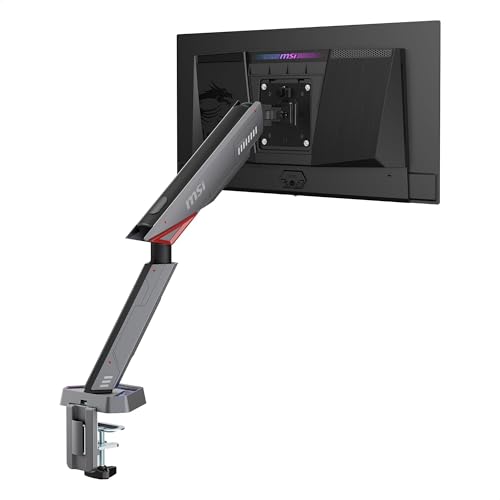
- Holds 17-45" monitors up to 35.2 lbs
- RGB lighting gives it a gaming-focused look
- Clamp/grommet install with quick-release VESA plate
Best For: Gamers and creators who want a sturdy single-monitor arm with RGB styling and flexible mounting.
Best for RGB Gaming Setups
Thickened Acrylic RGB Monitor Stand

- 3.5-inch lift helps improve viewing height and posture
- 23.6-inch shelf adds practical under-monitor storage
- RGB lighting with app control and music sync boosts ambiance
Best For: Gamers and desk setup users who want a sturdy riser with customizable RGB lighting.
Best for Ultrawide Setups
HUANUO Dual Monitor Stand with USB

- Supports two monitors up to 26.4 lbs per arm
- Full-motion adjustment with tilt, swivel, and rotation
- Clamp or grommet install with USB charging ports
Best For: Dual-monitor users with large or ultrawide screens who want a sturdy, adjustable mount.
Best RGB Pick
Heymaster RGB Foldable Monitor Stand

- RGB lights with memory mode for a gaming-focused look
- Adjustable, foldable width suits different desk sizes
- Drawer and accessory slots help keep the desk tidy
Best For: Gamers and desk users who want lighting flair plus practical storage.
Best for Easy Setup

- Tool-free VESA installation
- Height, tilt, swivel, and rotation adjustments
- Supports 13"–34" monitors up to 19.8 lbs
Best For: Gamers and desk users who want a sturdy, easy-to-install single monitor arm.
Best for Adjustable Height
VIVO 17-32" Pneumatic Monitor Stand

- Pneumatic height adjustment from 3" to 12"
- Tilt, swivel, and 360° rotation support
- Freestanding base with VESA 75x75/100x100 fit
Best For: Gamers and desktop users who need a highly adjustable freestanding monitor stand.
Best for Ultrawide Screens
VIVO Heavy Duty Ultrawide Monitor Arm

- Supports up to 40" ultrawide monitors and 26.4 lbs
- Spring-assist arm offers easy height and angle adjustments
- Cable management keeps gaming desks cleaner
Best For: Gamers with ultrawide displays who want a sturdy, highly adjustable desk mount.
Best for Fast Setup
HUANUO FlowLift Single Monitor Arm

- Supports 13-32 inch monitors up to 19.8 lbs
- Broad tilt, swivel, and 360° rotation adjustability
- 3-minute install with clamp or grommet mount
Best For: Gamers and desk users who want a sturdy single-monitor arm with quick setup and flexible positioning.
Best for Heavy-Duty Single Monitors
WALI Single Monitor Arm, 13-34"

- Supports up to 34" monitors with wide VESA compatibility
- Full-motion arm for height, tilt, swivel, and rotation
- Built-in cable management and two mounting options
Best For: Gamers and desk users who want a sturdy single-monitor arm for a clean, ergonomic setup.
Best for Dual-Arm Stability
HUANUO FlowLift Dual Monitor Stand

- Stable dual-arm clamp and grommet mounting
- Full-motion adjustment for ergonomic viewing
- Helps clear desk space with cable management
Best For: Dual-monitor gamers and productivity users who want a secure, adjustable mount.
Best for RGB Setup – MSI MPG MT161R RGB Monitor Stand Arm
If you want a premium gaming monitor stand that adds both support and style, the MSI MPG MT161R is built for heavier displays and clean desk setups. It handles 17-45 inch monitors up to 35.2 lbs, uses a spring-assisted arm for easier positioning, and includes RGB lighting for a more gaming-focused look.
Best For: Gamers and creators who want a sturdy, adjustable single-monitor arm with RGB flair and flexible mounting options.
Pros:
- Supports large monitors up to 45 inches and 35.2 lbs
- RGB lighting adds a standout gaming aesthetic
- Clamp and grommet mounting options improve compatibility
- Quick-release VESA plate makes setup and removal easier
Cons:
- Single-arm design won’t suit dual-monitor setups
- RGB styling may be unnecessary for minimalist desks
- Heavier build may be more than needed for smaller monitors
This is a strong pick if you want a premium gaming monitor stand that balances durability, adjustability, and a more eye-catching finish. It’s especially appealing for larger VESA-compatible screens where stable support matters as much as the lighting.
Best for RGB Gaming Setups – Thickened Acrylic RGB Monitor Stand
If you want a premium gaming monitor stand that adds both height and atmosphere, this acrylic desk riser is a strong fit. It lifts your screen to a more comfortable viewing level, adds under-desk storage, and layers in customizable RGB lighting for a cleaner, more immersive setup.
Best For: Gamers and home office users who want a sturdy monitor stand with ambient RGB lighting, app controls, and a modern clear design.
Pros:
- Raises the monitor 3.5 inches to support better posture during long sessions
- Wide 23.6-inch shelf provides space for a keyboard, mouse, or accessories
- RGB lighting includes 60,000+ colors, music sync, and app/button control
- Reinforced acrylic and steel legs support up to 66 lbs with wobble-resistant stability
Cons:
- Acrylic surface can show fingerprints and needs occasional wiping
- Lighting features add appeal, but may be unnecessary for minimalist setups
This is a smart choice if you want a premium gaming monitor stand that doubles as desk decor and a functional riser. It stands out most for buyers who care about both ergonomics and RGB presentation without giving up usable surface space.
Best for Ultrawide Setups – HUANUO Dual Monitor Stand with USB
If you want a premium gaming monitor stand that can handle two large screens without wobble, the HUANUO HNDS7 is built for the job. Its reinforced aluminum arms, larger base, and dual C-clamp design are aimed at heavier setups, while the full-motion joints make it easy to dial in a comfortable viewing angle for gaming, streaming, or work.
Best For: Gamers and multitaskers with dual 13″–40″ monitors who need strong support, broad adjustment, and extra desk organization.
Pros:
- Supports two monitors up to 26.4 lbs per arm, including larger ultrawide displays
- Wide motion range with tilt, swivel, and 360° rotation for precise positioning
- Clamp and grommet mounting options fit a variety of desk setups
- Built-in USB ports and cable management help keep the desk clean and functional
Cons:
- Heavier-duty design may be more than needed for smaller or lighter monitors
- Setup can take longer than a basic single-arm stand
As a premium gaming monitor stand, this model stands out most for stability and range of adjustment rather than flashy extras. If you run dual displays and want a mount that feels secure, looks tidy, and gives you plenty of positioning flexibility, it is an easy one to shortlist.
Best RGB Pick – Heymaster RGB Foldable Monitor Stand
If you want a premium gaming monitor stand that does more than just lift your screen, this Heymaster riser is built for style and organization. The adjustable height and foldable width make it easy to fit different desk setups, while the RGB lighting adds a more immersive gaming feel without giving up practical storage.
Best For: Gamers and desk users who want a monitor stand with RGB flair, extra storage, and flexible sizing.
Pros:
- RGB lighting with memory function for a consistent gaming look
- Foldable, width-adjustable design fits multiple desk layouts
- Built-in drawer, phone/tablet holder, and pen slots help reduce clutter
- Supports up to 66 lbs for monitors, printers, and other gear
Cons:
- RGB styling may not suit minimalist workspaces
- ABS build is practical, but not as premium as solid wood or metal tops
- Storage is helpful, but still limited compared with a full desk organizer
This is a smart pick if you want a premium gaming monitor stand that balances visual flair with everyday desk utility. It stands out most for users who want an organized setup and an easy way to add lighting personality to a gaming station.
Best for Easy Setup – ErGear Single Monitor Arm
If you want a premium gaming monitor stand that’s easy to install and flexible enough for everyday use, the ErGear Single Monitor Arm is a strong pick. It supports most 13″–34″ monitors, offers smooth motion control, and includes tool-free VESA mounting plus simple cable management to keep a gaming desk clean.
Best For: Gamers and home office users who want a sturdy, adjustable monitor arm with quick setup and tidy cable routing.
Pros:
- Tool-free VESA mount speeds up installation in just a few steps
- Wide adjustment range with height, extension, tilt, swivel, and rotation
- Supports heavier displays up to 19.8 lbs with 75x75mm and 100x100mm VESA
- Cable clips help keep a gaming or productivity setup organized
Cons:
- Single-arm design only works for one monitor
- Not a fit for monitors outside the 13″–34″ size range
- Desk thickness and VESA compatibility need to be checked before buying
For shoppers prioritizing convenience, this ErGear arm delivers the core features you’d want from a premium gaming monitor stand without adding much setup hassle. It’s especially appealing if you want a stable, adjustable mount that saves desk space and makes positioning your display feel effortless.
Best for Adjustable Height – VIVO 17-32" Pneumatic Monitor Stand
If you want a premium gaming monitor stand that does more than simply hold a screen, this VIVO desk stand is built for flexible positioning. The pneumatic arm, rotating base, and broad tilt/swivel range make it easy to dial in a comfortable viewing angle for gaming, streaming, or a mixed work-and-play setup.
Best For: Gamers and desktop users who want a freestanding monitor stand with strong adjustability, a rotating base, and support for 17″ to 32″ displays.
Pros:
- Pneumatic arm offers smooth height adjustment from 3″ to 12″.
- Wide articulation includes tilt, swivel, and 360° rotation for portrait or landscape use.
- Freestanding design and rotating base add flexibility without clamping to the desk.
- Supports VESA 75×75 and 100×100 mounting patterns on compatible monitors.
Cons:
- Not ideal for very large monitors over 32″ or heavy displays above 22 lbs.
- Portrait orientation is limited to smaller screens up to 22″.
- Freestanding footprint may take more desk space than a clamp mount.
Overall, this is a strong premium gaming monitor stand if you value easy repositioning and a stable, polished setup. It’s especially appealing for users who switch between gaming, productivity, and collaborative use throughout the day.
Best for Ultrawide Screens – VIVO Heavy Duty Ultrawide Monitor Arm
If you want a premium gaming monitor stand that can support a large ultrawide display without sagging, this VIVO tension arm is built for the job. It handles screens up to 40 inches and 26.4 lbs, while giving you the flexibility to fine-tune height, tilt, and swivel for a more ergonomic setup.
Best For: Gamers and power users with ultrawide monitors who want a sturdy, adjustable desk mount with a clean desk footprint.
Pros:
- Supports ultrawide monitors up to 40″ and 26.4 lbs with 75x75mm or 100x100mm VESA compatibility
- Spring-assist tension arm makes large-screen repositioning smooth and easy
- Strong articulation: +90°/-90° tilt, 180° swivel, 360° rotation, and 10.8″ height adjustment
- Integrated cable management helps keep gaming setups tidy
Cons:
- Only supports one monitor
- Best suited to desks that can accommodate a clamp or grommet mount
For an ultrawide-focused setup, this premium gaming monitor stand stands out for its load capacity, easy adjustability, and polished cable management. It is a strong pick if you want a more ergonomic display position without giving up desk space.
Best for Fast Setup – HUANUO FlowLift Single Monitor Arm
If you want a premium gaming monitor stand that’s easy to install and simple to fine-tune, this HUANUO arm is a strong pick. It supports 13-32 inch monitors, offers broad ergonomic adjustment, and gives you the flexibility to dial in a cleaner, more comfortable gaming or work setup.
Best For: Gamers and desk users who want a sturdy, adjustable single-monitor arm with quick installation and flexible positioning.
Pros:
- Fits most 13-32 inch monitors and supports 4.4-19.8 lbs
- Wide range of movement: -50° tilt, ±90° swivel, and 360° rotation
- Quick 3-minute setup with C-clamp or grommet mounting
- Sturdy build backed by extensive motion testing for long-term use
Cons:
- Single-monitor design only
- Requires a compatible desk surface for the clamp or grommet mount
- Heavier or oversized displays outside the spec range won’t fit
Overall, this is a practical premium gaming monitor stand for buyers who care about stability, ergonomic flexibility, and a fast, low-friction setup. It’s not the flashiest option, but it delivers the core benefits most people want from a quality monitor arm.
Best for Heavy-Duty Single Monitors – WALI Single Monitor Arm, 13-34"
If you want a premium gaming monitor stand that also works well for everyday productivity, this WALI arm is a practical pick. It lifts your screen off the desk, adds flexible positioning, and supports larger flat or curved monitors with a sturdy, no-fuss setup.
Best For: Gamers and desk users who want a solid single-monitor arm with strong weight support, wide VESA compatibility, and clean cable management.
Pros:
- Supports monitors up to 34" with 75x75mm and 100x100mm VESA patterns
- Full-motion adjustment helps you dial in height, tilt, swivel, and rotation
- Built-in cable management keeps a gaming or work desk looking neat
- Two mounting options make it more flexible for different desk setups
Cons:
- Works best on wooden desks, ideally without an obstructing crossbeam
- Large curved monitors have a lower max weight limit than flat screens
- Single-arm design is great for one display, but not multi-monitor setups
Overall, this is a strong value choice if you want a premium gaming monitor stand feel without overcomplicating the setup. It delivers the adjustability and desk cleanup most buyers want, especially for a main monitor that needs to stay comfortable through long sessions.
Best for Dual-Arm Stability – HUANUO FlowLift Dual Monitor Stand
If you want a premium gaming monitor stand that can also handle work, the HUANUO FlowLift is built for dual-screen setups with strong clamp security, broad adjustability, and a clean desk footprint. It supports 13–32 inch VESA monitors and gives you enough motion to dial in a more comfortable gaming or productivity layout.
Best For: Gamers and multitaskers who want a stable dual monitor arm with full-motion positioning and a tidier desk.
Pros:
- Dual C-clamp and grommet mounting options help keep both arms locked in place
- Full-motion adjustment with tilt, swivel, rotation, and height range for better ergonomics
- Frees up desk space and includes cable management to reduce clutter
Cons:
- Only works with wooden desks in the specified thickness range
- Each monitor must meet strict size, weight, and VESA compatibility limits
Overall, this is a solid premium gaming monitor stand if you need a secure dual-arm setup rather than a flashy single-monitor design. Just verify your desk and displays first, because compatibility matters here more than on simpler mounts.
How We Picked the Best Premium Gaming Monitor Stand
We focused on build quality, weight capacity, VESA compatibility, adjustability, and ease of installation. For a Premium Gaming Monitor Stand, the best models should feel stable under daily use, offer smooth positioning, and match common screen sizes without forcing compromises.
We also looked for practical extras that matter in a gaming setup, such as cable management, USB pass-through, RGB lighting, tool-free setup, and support for single or dual monitors.
Quick Comparison
If you want the most flexibility, a monitor arm is usually the best pick. If your desk is shallow or you prefer a fixed screen position, a freestanding or riser-style stand may be a better fit. Dual-monitor users should prioritize load range and arm reach, while ultrawide owners need stronger support and enough clearance for the panel size.
Key Buying Factors for a Premium Gaming Monitor Stand
Screen Size and Weight
Always match the stand to both your monitor size and weight. Bigger does not automatically mean better; many stands are size-limited by weight or arm tension before they are limited by inches.
Mount Type
Clamp and grommet mounts are ideal if you want a more permanent setup and maximum desk space. Freestanding bases are easier to move and may suit renters or shared desks. Riser stands work well when you want elevation without mounting hardware.
Adjustability
Look for height, tilt, swivel, and rotation adjustments if you switch between gaming, work, and content creation. A Premium Gaming Monitor Stand should make it easy to dial in an ergonomic viewing angle without feeling loose or unstable.
Desk Compatibility
Check desk thickness, edge shape, and available rear clearance before buying. RGB risers and freestanding bases can be less demanding, while clamp arms usually need a solid desk edge.
Extra Features
USB ports, cable routing, lighting, and tool-free assembly can improve the user experience, but they should not outweigh the basics of stability and support.
Who Should Buy Which Premium Gaming Monitor Stand?
Choose a single-arm model if you use one main display and want the cleanest possible desk. Pick a dual-arm stand if you multitask, stream, or want a balanced two-monitor layout. Go with an RGB riser if you mainly want style and simple elevation. If you have an ultrawide or heavier screen, prioritize a heavy-duty mount over cosmetic features.
In short, the best choice is the stand that fits your screen, desk, and usage pattern—not just the one with the most features.