The Kisnt KN104 Wireless Mechanical Keyboard review starts with a simple truth: this is a board built for people who still want a number pad, real wireless flexibility, and a typing feel that is more refined than basic office keyboards.
It aims to deliver a full-size mechanical experience without giving up modern convenience.
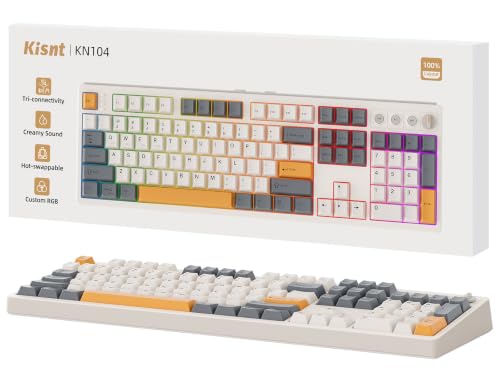
Kisnt KN104 Review Summary
Buy the Kisnt KN104 Wireless Mechanical Keyboard if you want a full-size mechanical board that feels practical for work and satisfying for daily typing.
It is especially strong for spreadsheet users, accountants, coders, hybrid workers, and gamers who want a traditional 104-key layout with a knob, RGB lighting, and multi-device wireless support.
Quick Verdict Scorecard
| Category | Score | Why it stands out |
|---|---|---|
| Typing feel | 9.0/10 | Pre-lubed linear switches, gasket mounting, and layered foam damping create a smooth, cushioned, thocky feel. |
| Connectivity | 9.0/10 | USB-C, 2.4GHz wireless, and Bluetooth 5.0 cover desk, laptop, tablet, phone, and console use. |
| Productivity layout | 10/10 | The 104-key full-size layout with number pad is ideal for data entry and office workflows. |
| Customization | 9.0/10 | Hot-swap support, macros, programmable keys, and RGB effects make it easy to tailor. |
| Build and acoustics | 8.0/10 | Sound tuning is clearly a priority, though the page does not suggest a premium metal chassis. |
| Battery and portability | 8.0/10 | The 4000mAh battery is useful for wireless desk use, but the full-size footprint is not compact. |
From a buyer’s perspective, the biggest reason to consider this keyboard is balance.
The Kisnt KN104 Wireless Mechanical Keyboard gives you a sensible layout for productivity, enough customization to satisfy enthusiasts, and a sound profile that is tuned for comfort rather than harshness.
If you want one keyboard that can live on a main desk and still move between devices, this is a strong fit.
Bottom line: it is not the smallest or most premium-looking mechanical keyboard, but it is one of the more well-rounded options for people who want a full-size wireless mechanical keyboard with a knob, hot-swap support, and a quieter, more polished typing sound.
Key Features and Specifications of Kisnt KN104
The specifications tell you a lot about the intent behind the Kisnt KN104 Wireless Mechanical Keyboard.
This is not a minimalist board.
It is a full-featured 100% mechanical keyboard designed to do a lot of jobs well.
| Spec | Details |
|---|---|
| Brand / Model | Kisnt KN104 |
| Keyboard type | Full-sized mechanical keyboard with number pad |
| Key count | 104 keys |
| Layout | 100% ANSI US / QWERTY |
| Connectivity | USB-C wired, 2.4GHz wireless, Bluetooth 5.0 |
| Bluetooth channels | 3-device support |
| Switch type | Pre-lubed linear switches |
| Hot-swap support | 3-pin and 5-pin compatible |
| Mounting | Gasket-mounted |
| Dampening | Base dampener, silicone pad, 5 layers of foam |
| Backlighting | RGB with 20 preset dynamic effects |
| Controls | Dedicated knob for volume and lighting |
| Battery | 4000mAh rechargeable battery |
| Dimensions | 17.52 x 5.55 x 1.65 inches |
| Color / style | Retro beige, nostalgia-modern design |
| Compatibility | Gaming console, laptop, MacBook, smartphone, tablet |
| OS support | Windows family; some software features are Windows-only |
| Warranty/support | 2-year warranty and support |
Those specs point to a clear buyer profile: someone who wants a work-friendly mechanical keyboard with enthusiast touches.
The tri-mode setup makes it easy to use across a PC, laptop, and mobile devices, while the hot-swap design keeps upgrade paths open.
One practical note: the keyboard is not water resistant, so it is best kept away from drinks and messy desk conditions.
Also, fast chargers are discouraged; use a standard 5V 1A charger or a computer USB port.
Pros and Cons of Kisnt KN104
If you are researching the Kisnt KN104 Wireless Mechanical Keyboard pros and cons, the list is refreshingly straightforward.
Its strengths are easy to understand, and its compromises mostly come from the choice to build a full-size board with rich features.
Pros
- Full-size 104-key layout with number pad for office work, finance, and data entry.
- Tri-mode connectivity for wired, 2.4GHz, and Bluetooth use.
- Pre-lubed linear switches plus gasket mounting for smoother typing.
- Layered sound dampening that targets a deeper, more muted sound.
- Hot-swappable switch support for easy customization without soldering.
- Dedicated knob improves day-to-day control of volume and lighting.
- RGB lighting and macros add flexibility for both gaming and productivity.
- 4000mAh battery makes wireless use practical for long desk sessions.
Cons
- Large footprint takes up more desk space than compact keyboards.
- Windows-only software support limits some customization features for Mac users.
- Not water resistant, so desk discipline matters.
- Animated RGB can reduce battery life faster than static lighting.
- Fast chargers are not recommended, which is slightly less convenient.
The good news is that the drawbacks are predictable and manageable.
If you wanted a compact travel keyboard, this is not it.
If you wanted a feature-rich full-size mechanical board, the trade-offs are much easier to accept.
Who Should Buy Kisnt KN104?
The Kisnt KN104 Wireless Mechanical Keyboard is best for buyers who care about both productivity and typing feel.
It makes the most sense for people who use a keyboard all day and want something more satisfying than a basic membrane board.
- Spreadsheet and accounting users who rely on the number pad.
- Office and home-office workers who want wireless convenience without losing a full layout.
- Gamers who want RGB lighting, macro support, and low-latency 2.4GHz connectivity.
- Keyboard enthusiasts who like sound tuning and hot-swap switch upgrades.
- Hybrid workers who move between laptop, desktop, tablet, and phone.
Who should skip it?
If you have a tiny desk, prefer a 75% or tenkeyless keyboard, or need Mac-first software customization, you may be happier with a smaller or more platform-agnostic board.
Typing Feel and Sound Profile
This is the section that explains why the Kisnt KN104 Wireless Mechanical Keyboard feels more premium than many generic full-size boards.
The keyboard uses pre-lubed linear switches, and that matters because factory lubrication usually reduces scratchiness and helps keystrokes feel smoother out of the box.
The bigger story is the acoustic design.
With a gasket-mounted structure, a base dampener, silicone pad, and five layers of foam, the KN104 is clearly tuned for a softer landing and a deeper sound.
In practical terms, that means less hollow ping and a more muted, rounded tone that many users describe as creamy or thocky.
For everyday buyers, this is not just about sound preference.
A cushioned typing feel can make long sessions less fatiguing, especially if you spend hours writing, editing, or entering data.
It will not feel as sharp or crisp as a high-spring tactile board, but for linear-switch users, it is a very appealing setup.
Best for: people who want a quieter, smoother mechanical typing experience with a more refined sound signature.
Tri-Mode Connectivity and Device Switching
One of the main reasons to choose the Kisnt KN104 Wireless Mechanical Keyboard is its flexible connection system.
You get USB-C wired support, 2.4GHz wireless for low-latency desktop use, and Bluetooth 5.0 for mobile devices.
The board also supports three Bluetooth channels, which makes it convenient if you switch between a laptop, tablet, and phone.
That setup is especially useful for hybrid work.
You can keep it on a desktop in wireless mode, then move it to a laptop for meetings or to a tablet for note-taking.
It is also compatible with gaming consoles, which broadens its appeal beyond office use.
There is one important detail: some software functions only work on Windows and in wired or 2.4GHz mode.
That means if you plan to remap keys, create macros, or fine-tune the lighting, Windows users get the easiest experience.
Bluetooth still works well for general typing, but advanced customization is best handled on a Windows PC.
Buyer takeaway: if you want one keyboard for multiple devices, the connectivity package is a major advantage.
RGB Lighting and Software Customization
The Kisnt KN104 Wireless Mechanical Keyboard is not trying to be subtle.
It includes custom RGB backlighting with 20 preset dynamic lighting effects, adjustable brightness, and color control.
There are side light bars and RGB glow around the edges and keycaps, which gives the board a more energetic gaming-style look even though the base design is retro beige.
That contrast is part of the appeal.
The keyboard mixes nostalgia-inspired styling with a modern feature set, so it can look calm during the day and more dramatic at night.
If you like your desk setup to feel a little more expressive, this board delivers.
Functionality matters too.
Programmable keys and macros add genuine utility, especially for repetitive workflows.
For example, you can streamline app shortcuts, editing commands, or common office actions.
That said, not everyone will use the full customization suite, and Windows-only software support means Mac users may not get the same depth.
Practical tip: use static lighting when you want longer battery life, and save the animated effects for when the keyboard is plugged in or you want a more visual setup.
Full-Size Layout for Work and Data Entry
The 104-key layout is the most obvious reason to buy this keyboard.
For many users, the number pad is not optional.
If you work with spreadsheets, accounting software, inventory entries, financial data, or coding workflows that involve frequent number input, a full-size board can save time and reduce mistakes.
The dedicated knob is another smart design choice.
Default volume and backlight control are exactly the kind of frequently used functions that deserve a physical dial.
It is more convenient than hunting through function layers, and it makes the keyboard feel more premium in daily use.
Because the board is full-size, it does demand more desk real estate.
Its footprint measures 17.52 x 5.55 x 1.65 inches, so this is not the keyboard for cramped minimalist setups.
But if desk space is available, the usability benefit is significant.
Best fit: buyers who want maximum practicality and don’t want to give up the number pad.
Hot-Swap Switch Upgrades and Compatibility
Hot-swap support is one of the most valuable enthusiast-friendly features on the Kisnt KN104 Wireless Mechanical Keyboard.
It supports both 3-pin and 5-pin switches, so you can experiment with different switch types without soldering.
That lowers the barrier to customization and makes the keyboard more future-proof.
This matters because switch preference is personal.
Some users may want a lighter linear feel, while others may later try something with a different stem feel or spring weight.
Hot-swap support lets you adapt the board as your preferences evolve, instead of replacing the entire keyboard.
The KN104 is already aimed at a specific sound and feel, so most buyers will probably enjoy it as shipped.
Still, the ability to upgrade is a big plus for enthusiasts or anyone who wants to tune the board over time.
Comparable alternatives to consider:
- Keychron full-size wireless mechanical keyboard if you want a well-known alternative with broad ecosystem support.
- Kisnt KN85 compact mechanical keyboard if you prefer a smaller layout and do not need a numpad.
- Full-size hot-swappable RGB mechanical keyboard if you want to compare similar feature sets across brands.
- Tri-mode office gaming keyboard with media knob if the knob and wireless flexibility are your top priorities.
Buying Advice: What to Know Before You Order
Before buying the Kisnt KN104 Wireless Mechanical Keyboard, think about your desk setup and how you will use it most often.
If you mainly type, navigate spreadsheets, or switch between devices, this board makes a lot of sense.
If you mainly want a compact gaming keyboard for mouse space, the full-size layout may feel too large.
A few practical cautions are worth repeating.
Charge it fully before first use, avoid fast chargers, and use a regular 5V 1A adapter or a computer port.
If you want the best battery life, keep RGB on static or lower brightness.
And if you plan to customize deeply, do that on Windows for the smoothest experience.
Buying advice: choose the KN104 if you value function over minimalism, want a satisfying mechanical sound, and need a keyboard that can handle both work and play.
Is Kisnt KN104 Worth It?
Yes — the Kisnt KN104 Wireless Mechanical Keyboard is worth it for the right buyer. It combines the most important full-size keyboard benefits: a number pad, tri-mode connectivity, a usable knob, hot-swap support, and a sound-tuned typing experience.
That is a strong combination for productivity users and enthusiasts alike.
It is not the best choice for everyone.
The large footprint, Windows-centered software, and lack of water resistance are real limitations.
But if you want a full-size wireless mechanical keyboard that feels thoughtfully designed and versatile enough for work, gaming, and everyday typing, the KN104 is a compelling pick.
Final verdict: the Kisnt KN104 Wireless Mechanical Keyboard review lands firmly on the positive side.
It is a practical, flexible, and satisfying board that delivers more value than its simple retro look might suggest.
If you need a full-size mechanical keyboard with strong usability and a refined sound profile, this one deserves a spot on your shortlist.
Recommendation: buy it if you want a dependable all-rounder with personality; skip it only if compact size or Mac-first customization matters more than a numpad and wireless flexibility.