Jeecoo M20 Computer Speakers review shoppers should read if they want compact desktop audio without a complicated setup.
It blends wired USB convenience, Bluetooth 5.
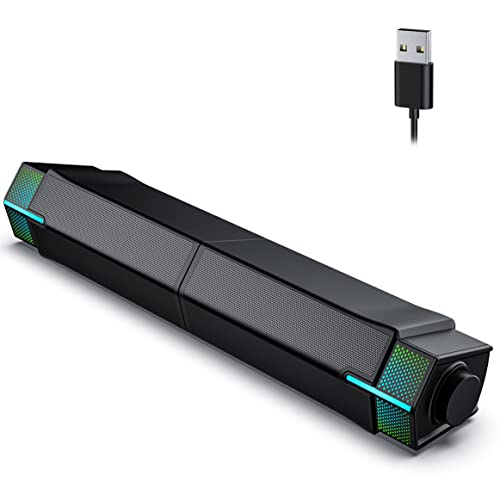
Jeecoo M20 Review Summary
Jeecoo M20 Computer Speakers make a strong case for students, office users, and casual gamers who want simple desktop sound with a little style.
The biggest appeal is not raw power; it is the way the system balances easy plug-and-play use, Bluetooth convenience, and a desk-friendly design that can sit as one bar or separate into two speakers.
If your goal is to improve laptop or monitor audio without moving into a full-size speaker setup, this model fits well.
It is especially attractive for buyers who want a clean workspace, modest gaming flair, and a speaker system that can switch between computer use and phone playback without much fuss.
Scorecard
| Category | Score | Why It Matters |
|---|---|---|
| Sound Quality | 8.0 | Dual 5W drivers and 10W total output are tuned for clear stereo playback for music, movies, and gaming. |
| Connectivity | 8.0 | USB audio and Bluetooth 5.3 make it easy to use with PCs, laptops, phones, and tablets. |
| Desk Design | 9.0 | The combine-or-separate layout is a genuinely useful space and positioning feature. |
| Controls & Ease of Use | 8.0 | Simple onboard controls and plug-and-play setup keep daily use straightforward. |
| Lighting & Aesthetics | 8.0 | Gradient RGB lighting adds appeal for gaming desks and can be turned off when needed. |
| Compatibility | 8.0 | Works well with computers in wired mode and Bluetooth devices in wireless mode. |
| Build & Practicality | 7.0 | Plastic construction is practical and lightweight, though not especially premium. |
Bottom line: this is a well-thought-out desktop speaker system for personal listening, not a room-filling audio solution.
If you want compact PC speakers with RGB lighting and flexible placement, the Jeecoo M20 is worth a close look.
Key Features and Specifications of Jeecoo M20
The Jeecoo M20 is built as a compact desktop soundbar-style speaker system with enough versatility to suit different desk layouts.
For buyers comparing computer speakers, the key is that this model is designed around convenience first and audiophile ambitions second.
| Brand | Jeecoo |
|---|---|
| Model | M20 |
| Speaker Type | Soundbar |
| Audio Output Mode | Stereo |
| Maximum Output Power | 10 watts |
| Speaker Drivers | Dual 5W drivers |
| Speaker Size | 2 inches |
| Woofer Diameter | 1.7 centimeters |
| Frequency Response | 20,000 Hz |
| Connectivity | Bluetooth, USB |
| Bluetooth Version | 5.3 |
| Bluetooth Range | 10 meters |
| Power / Audio for Wired Use | USB cable carries both power and audio |
| Mounting Type | Bar mount, tabletop |
| Material | Plastic |
| Color | Black |
| Water Resistance | Not water resistant |
| Warranty | Limited |
- Combine-or-separate design: the slideway base lets you use the Jeecoo M20 as one bar or split it into two speakers.
- Bluetooth 5.3 support: useful for phones, tablets, and other wireless devices.
- USB-powered wired mode: ideal for PCs and laptops, with no extra software required.
- Gradient RGB lighting: adds a gaming-style visual accent and can be switched off.
- One-button multi-control layout: long press for power, single click for lighting, double click for mode switching, and a rotary knob for volume.
From a buying perspective, the feature list is smartly focused.
You are not paying for complicated DSP controls, app dependency, or oversized hardware.
Instead, you get a small, practical speaker set built for everyday desktop use.
Pros and Cons of Jeecoo M20
Every good review should answer the Jeecoo M20 Computer Speakers pros and cons question directly, because the strengths here are very specific.
Pros
- Flexible split-or-combined desk design makes it easier to fit different monitor stands, laptop trays, and small desks.
- Easy wired setup with no extra software keeps installation simple.
- Bluetooth 5.3 adds convenience for phones and tablets.
- RGB lighting can be turned off, so it works in both gaming and cleaner office setups.
- Simple controls are easy to reach and do not overcomplicate everyday use.
Cons
- 10W output is best for close-range listening, not for filling a large room.
- Plastic construction is functional, not premium.
- Bluetooth mode still needs USB power, so it is not truly cable-free.
- Not water resistant, so it should stay away from drinks and moisture.
- Bass and sound depth are naturally limited versus larger speaker systems or 2.1 setups.
The most important takeaway is that the drawbacks are real, but they are also predictable for this category.
If you expect a small desktop speaker to behave like a bigger home audio system, you will be disappointed.
If you want a compact, flexible, easy-to-use computer speaker, the compromises make sense.
Who Should Buy Jeecoo M20?
Jeecoo M20 Computer Speakers are a good fit for buyers who care more about desk usability than high-end audio specs.
They are especially suitable if your setup revolves around a laptop, monitor, or compact PC workspace.
- Students who want simple speakers for streaming, class videos, and casual music.
- Office users who need clear system audio without clutter.
- Gamers who want a budget-friendly speaker with RGB styling.
- People with small desks who may benefit from the split-or-bar layout.
- Users who switch between PC and mobile playback and want both USB and Bluetooth options.
You should probably skip the Jeecoo M20 if you want a speaker system with strong bass, room-filling volume, or premium enclosure materials.
It is built for close listening at a desk, not for parties, TV replacement, or immersive home theater use.
How the Split-or-Bar Design Changes Desk Setup
This is the standout design decision in the entire product.
The Jeecoo M20 Computer Speakers can work as a single bar or be separated into two units using the slideway base, which gives you more control over how the sound and footprint feel on the desk.
For many buyers, this is more valuable than a generic soundbar shape.
If your monitor stand blocks the center of the desk, separating the speakers may improve placement and help you create a cleaner left-right soundstage.
If you want a neater look and minimal clutter, keeping them combined into a bar style makes sense.
This flexibility is a real buyer advantage because it lets the speaker system adapt to different desk widths, monitor arrangements, and aesthetic preferences.
A lot of budget desktop speakers do not offer that kind of layout control.
There is a practical limit, though.
The split-or-combined trick improves convenience and positioning, but it does not magically create bigger bass or wider output.
Think of it as a smart ergonomic feature, not an audio upgrade button.
Bluetooth vs USB Wired Mode: Which Works Best?
One of the most common purchase questions around Jeecoo M20 Computer Speakers review searches is whether Bluetooth or USB wired mode is better.
The answer depends on how you plan to use them.
USB wired mode is the best choice for most PC and laptop users.
It is simple, stable, and made for plug-and-play use.
Since the USB cable carries both power and audio, you avoid the clutter of separate audio cables and extra adapters.
This is the mode to use if you want reliable desktop sound with minimal setup effort.
Bluetooth 5.3 mode is better when you want to play audio from a phone or tablet.
The wireless range is listed at 10 meters, which is plenty for a desk environment, bedroom, or office corner.
It is convenient for switching from computer audio to music from a mobile device.
There is one important caution: Bluetooth does not eliminate the need for a power connection.
The speakers still need USB power, so “wireless” here means wireless audio, not fully untethered operation.
Buying advice: if your main source is a laptop or desktop, wired mode will likely be your everyday default.
If you regularly move between a PC and a phone, Bluetooth becomes a meaningful bonus rather than a gimmick.
RGB Lighting and Desktop Aesthetics
The gradient RGB lighting is a clear nod to gaming desks, but it is more versatile than that.
Because it can be switched off, the Jeecoo M20 can also fit into a more professional or minimalist workspace when needed.
That flexibility matters.
Some RGB speakers look flashy all the time, which limits where they belong.
Here, the lighting is more of an accent than the entire identity of the product.
If you want your desk to have a subtle glow during gaming or evening use, the lighting helps.
If you want a calm setup during work hours, you can keep it off.
Best of both worlds is the right way to think about it.
Buyers who like a little visual personality will appreciate the effect, while buyers who dislike RGB are not forced to live with it constantly.
Best Uses for Gaming, Movies, and Everyday PC Audio
The Jeecoo M20 is built for everyday desktop listening, and that is where it makes the most sense.
Its stereo output and compact driver arrangement are well suited for system sounds, YouTube, streaming, meetings, and casual background music.
For gaming, the benefit is clarity and convenience rather than competitive precision.
You can expect a cleaner and more immersive experience than laptop speakers, but you should not expect deep sub-bass or surround-style separation.
For story-driven games, indie titles, and general PC use, it is a nice upgrade.
For movies and shows, the soundbar format is a good fit on a desk or small entertainment nook.
Dialogue should come across more clearly than it would from built-in speakers, though large action scenes will still expose the limits of a compact 10W system.
For music, the best match is casual listening at moderate volume.
The dual 5W drivers and 20,000 Hz response are positioned for balanced everyday playback, not bass-heavy party audio.
If your library leans hard into low-end energy, you may want a larger setup.
In short: the Jeecoo M20 is a sensible upgrade from weak built-in audio, especially for close-range use at a desk.
What to Expect from 10W Desktop Speakers
Understanding the 10W output is essential before buying.
In the world of small desktop speakers, 10 watts is enough for personal listening, basic entertainment, and a modest gaming setup, but not enough to transform a room.
This level of power usually means the speaker can sound clear and present at a desk without taking up much space or requiring heavy amplification.
That aligns with the Jeecoo M20’s purpose.
It is not trying to be a mini studio monitor or a living-room sound system.
What you gain is simplicity, desktop balance, and practical volume for near-field listening.
What you give up is large-room projection, deep bass pressure, and the kind of dynamic headroom you get from larger bookshelf speakers or 2.1 systems.
If you are shopping with realistic expectations, the output level is appropriate.
If you are hoping for a dramatic audio upgrade for a larger space, you should move up a category.
Alternatives to Consider Before You Buy
If you are comparing the Jeecoo M20 against other likely Amazon options, it helps to look at a few broad alternatives.
The best choice depends on whether you care more about audio quality, desk footprint, or wireless convenience.
- Creative Pebble computer speakers are a popular choice for buyers who want compact desktop sound with a clean design.
- Lenrue computer speakers often appeal to shoppers looking for affordable USB desktop audio.
- Bluetooth desktop soundbar options may be better if you want a similar form factor with wider brand variety.
- Gaming PC speakers with RGB lighting are worth exploring if visual style matters as much as sound.
Compared with many alternatives, the Jeecoo M20 stands out most for its split-or-bar placement flexibility.
That is a differentiator buyers can actually use, not just a marketing detail.
Jeecoo M20 Computer Speakers Pros and Cons in Real Buying Terms
When judging whether the Jeecoo M20 Computer Speakers are right for you, the most important decision factors are desk size, expected volume, and how often you will use Bluetooth.
If you want a simple speaker system that does not demand much setup knowledge, the Jeecoo M20 is easy to recommend.
The main strengths are the layout flexibility, the dual-connection approach, and the low-friction controls.
The main weaknesses are also easy to understand: modest power, a plastic build, and limited bass authority.
In other words, the product is honest about what it is.
That honesty makes it easier to buy with confidence.
You are getting a compact desktop speaker system that solves common workspace problems, especially clutter and convenience, while staying approachable for non-audiophiles.
Is Jeecoo M20 Worth It?
Yes, Jeecoo M20 Computer Speakers are worth it for buyers who want a compact, attractive, and easy-to-use desktop speaker solution.
It makes the most sense if you need better sound than a laptop offers, want Bluetooth as a secondary option, and like the idea of a speaker that can adapt to your desk layout.
The value proposition is strongest for students, office setups, and casual gamers.
It is less compelling for people who prioritize bass-heavy playback, premium materials, or loudroom performance.
If your expectations match the category, the Jeecoo M20 delivers the right mix of features and convenience.
Final verdict: buy the Jeecoo M20 if you want practical desktop audio with flexible placement and RGB style.
Skip it only if you need bigger, richer sound than a 10W computer speaker can realistically provide.