If you’re serious about keeping your Xbox console in top shape, you know how essential proper cooling is. Overheating can lead to performance issues and shorten your console’s lifespan. That’s why exploring the best cooling fans on the market is important. With options tailored for different Xbox models and preferences, you’ll find a solution that fits your needs perfectly. Let’s look at some of the top choices that can help maintain ideal airflow and quiet operation.
G-STORY Cooling Fan for Xbox Series S

If you own an Xbox Series S, the G-STORY Cooling Fan is a must-have accessory to keep your console running smoothly. This fan features an LED temperature display and prevents overheating, ultimately extending your console’s lifespan. With intelligent control, it automatically adjusts fan speed based on temperature, stopping when it’s below 35℃. You can also choose from three manual speeds. It’s lightweight, easy to install, and operates quietly at just 17.8 decibels. With an impressive 4.7-star rating from nearly 2,000 reviews, the G-STORY Cooling Fan stands out as a top choice for Xbox enthusiasts.
Best For: Gamers looking for an effective cooling solution to enhance the performance and longevity of their Xbox Series S console.
Pros:
- Intelligent cooling technology with automatic fan speed adjustment based on temperature.
- Quiet operation at just 17.8 decibels, ensuring minimal disruption during gameplay.
- Easy installation process that requires no technical expertise, simply place and connect.
Cons:
- May not be necessary for casual gamers who do not experience overheating issues.
- Limited to Xbox Series S models, making it incompatible with other consoles.
- Manual speed settings may require adjustment based on individual gaming habits.
MENEEA Cooling Fan for Xbox Series X Console

The MENEEA Cooling Fan for Xbox Series X Console is an excellent choice for gamers who want to keep their console running smoothly and quietly. Its high-speed fan features three adjustable gears, allowing you to select the perfect cooling level. Plus, it operates quietly, so you can focus on your game. The colorful light strip adds a fun atmosphere, with six colors and a mixed option, all controlled by an independent touch switch. You’ll appreciate the dust-proof cover and included plugs that protect ports, ensuring your console lasts longer. With USB interfaces for data and charging, it’s a versatile addition to your setup.
Best For: Gamers looking to enhance their Xbox Series X experience with effective cooling, vibrant lighting, and added dust protection.
Pros:
- High-speed fan with adjustable gears for customized cooling performance.
- Colorful light strip creates an immersive gaming atmosphere with multiple color options.
- Includes USB interfaces for convenient data transfer and device charging.
Cons:
- The fan may produce noise at higher settings, potentially distracting some users.
- Some gamers might find the additional lighting unnecessary or distracting.
- Installation of dust covers and plugs may require extra effort and time.
G-STORY Cooling Fan for Xbox Series X

Looking for a reliable cooling solution for your Xbox Series X? The G-STORY Cooling Fan is a perfect choice. It automatically adjusts fan speed based on temperature, ensuring peak performance. With its LED display, you’ll easily monitor your console’s temperature. Choose from three fan speeds—1500, 1750, or 2000 RPM—while enjoying low noise operation. The lightweight design makes installation a breeze; just place it on your console and connect the cable. Plus, it stops working when temperatures drop below 35℃, helping to extend your console’s lifespan. With a 4.5-star rating from over 4,000 reviews, you can’t go wrong!
Best For: Gamers looking for an efficient and quiet cooling solution to maintain optimal performance for their Xbox Series X.
Pros:
- Automatically adjusts fan speed based on temperature for optimal cooling.
- Low noise operation ensures a quiet gaming experience.
- Lightweight and easy to install without taking up much space.
Cons:
- May not be necessary for gamers who play in cooler environments.
- Limited to Xbox Series X compatibility.
- Some users may prefer a manually adjustable fan speed option.
Auto Cooling Fan for Xbox Series X with RGB Light
![[LED Display] Auto Cooling Fan for Xbox Series X with 9 RGB Light Modes](https://m.media-amazon.com/images/I/51gkGnsvYHL._SL500_.jpg)
For gamers who demand top performance from their Xbox Series X, the Auto Cooling Fan with RGB Light offers an impressive solution. This fan features nine RGB light options, including dynamic effects that enhance your gaming setup. It boasts a smart auto-adjust cooling system, activating when temperatures hit 96.8℉, ensuring your console stays cool. You can choose from low, medium, or high fan speeds in manual mode. The compact design includes a headset mount and a 2.0 USB hub for charging. With a stellar 4.7-star rating, this fan is a reliable choice for extended gaming sessions without overheating.
Best For: Gamers looking for an efficient cooling solution to enhance performance and prevent overheating during extended gameplay sessions on their Xbox Series X.
Pros:
- Smart auto-adjust cooling system activates based on temperature, ensuring optimal performance.
- Compact design with a headset mount and a USB hub for convenient charging.
- Impressive 4.7-star rating from customers, indicating high satisfaction and reliability.
Cons:
- Limited compatibility, specifically designed for Xbox Series X only.
- May generate some noise at higher fan speeds, which could be distracting for some users.
- Additional RGB lighting features may not appeal to all gamers, especially those preferring a minimalistic setup.
AC Infinity MULTIFAN S7 Quiet Dual USB Fan for Cabinet Cooling

When it comes to keeping your gaming setup cool, the AC Infinity MULTIFAN S7 stands out as an excellent choice for Xbox enthusiasts. This ultra-quiet dual 120mm USB fan offers a powerful airflow of 104 CFM while maintaining a noise level of just 19 dBA. With a multi-speed controller, you can easily adjust the airflow to your preference. Its compact design allows you to lay it flat or stand it upright, making it versatile for any cabinet. Plus, with a lifespan of 67,000 hours, this fan is built to last, ensuring your console stays cool during intense gaming sessions.
Best For: Gamers looking to keep their consoles cool while minimizing noise levels during intense gameplay.
Pros:
- Ultra-quiet operation at just 19 dBA, perfect for maintaining a peaceful gaming environment.
- Multi-speed controller allows for customizable airflow based on individual needs.
- Long lifespan of 67,000 hours ensures durability and reliability over time.
Cons:
- Requires USB power, which may limit placement options if outlets are not nearby.
- Single unit may not provide sufficient cooling for larger cabinets without additional fans.
- Potential for higher restocking fees if returned due to customer misuse or damages.
Mviioe Cooling Fan Stand for Xbox Series X

The Mviioe Cooling Fan Stand for Xbox Series X is an ideal choice for gamers seeking an all-encompassing cooling solution that doesn’t sacrifice style. This fan features a large, adjustable speed fan with three settings (1800, 1900, and 2000 RPM) to keep your console cool while minimizing noise. You’ll appreciate the unique RGB lighting with six solid colors and one mixed option, allowing you to customize your gaming atmosphere. Plus, it includes three USB 2.0 ports for charging accessories and dust cover filters to maintain cleanliness. With a solid rating of 4.4 stars, it’s a worthy investment for any Xbox enthusiast.
Best For: Gamers looking for an efficient cooling solution for their Xbox Series X that combines functionality with aesthetic appeal.
Pros:
- Versatile Cooling: Features three adjustable fan speeds (1800, 1900, 2000 RPM) for optimal temperature regulation.
- Customizable Lighting: Unique RGB lighting with multiple color options enhances the gaming ambiance.
- Convenient Charging: Includes three USB 2.0 ports for easy accessory charging.
Cons:
- Noise Levels: Higher fan speeds may increase noise, potentially distracting during gameplay.
- Limited Compatibility: Designed exclusively for Xbox Series X, not compatible with other consoles.
- Power Restrictions: Must not connect to power over 5V 1A, limiting potential power sources.
Auto Cooling System for Xbox Series X

If you’re an Xbox Series X owner looking to enhance your gaming experience, the Auto Cooling System is a must-have accessory. This effective air cooler features a whisper-quiet, high-speed fan with three adjustable levels, automatically adjusting based on your console’s temperature to prevent overheating. With 11 customizable LED light modes, you can set the perfect gaming atmosphere. Plus, it includes two USB ports for charging controllers or other devices. Weighing just 12.63 ounces, it’s compact yet powerful, ensuring your console stays cool and performing at its best. Enjoy peace of mind and a visually stunning setup while you game!
Best For: Gamers who want to keep their Xbox Series X cool and enhance their gaming setup with customizable lighting.
Pros:
- Whisper-quiet operation ensures a distraction-free gaming experience.
- Adjustable fan speeds allow for personalized cooling based on console temperature.
- Customizable LED light modes enhance the gaming atmosphere and allow for personal expression.
Cons:
- May require additional USB ports if using multiple devices simultaneously.
- Some users may find the light modes distracting during gameplay.
- The fan’s compact design might limit airflow compared to larger cooling systems.
Auto Cooling Fan for Xbox Series X with RGB Lighting Modes
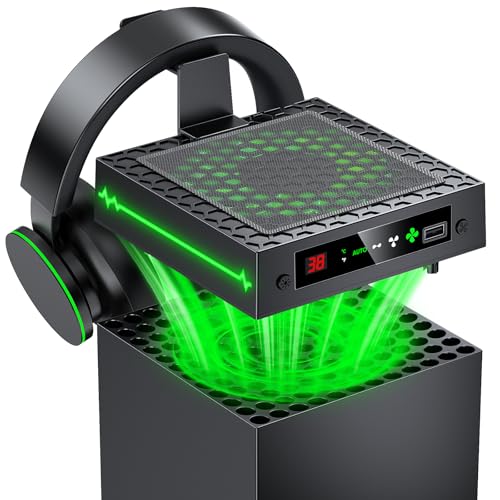
Gamers seeking ideal performance and customization will find the Auto Cooling Fan for Xbox Series X an excellent choice. This fan features a smart thermally-adjustable cooling system that monitors your console’s temperature with a real-time LED display. It automatically activates cooling when temperatures exceed 96.8℉, ensuring your system stays safe during intense gaming sessions. With 9 RGB lighting modes, you can create an immersive atmosphere tailored to your style. Plus, it operates quietly and includes a headset hook and USB port for charging controllers. Enjoy an organized setup and longer console lifespan with this efficient cooling solution.
Best For: Gamers looking for enhanced cooling performance and customizable aesthetics for their Xbox Series X.
Pros:
- Smart thermally-adjustable cooling automatically activates based on real-time temperature readings to protect the console.
- 9 RGB lighting modes allow for personalized gaming atmospheres and easy switching between preferences.
- Quiet operation combined with additional features like a headset hook and USB port enhances overall gaming convenience.
Cons:
- Limited compatibility as it is specifically designed only for the Xbox Series X.
- Potential increase in power consumption due to the fan operation, depending on usage.
- Requires additional space in your gaming setup due to its design and features.
Ipega Auto Sensing Cooling Fan for Xbox One

For Xbox One enthusiasts seeking efficient cooling solutions, the Ipega Auto Sensing Cooling Fan stands out with its automatic functionality that kicks in when the console’s temperature exceeds 35 degrees Celsius. This sleek fan, designed specifically for your Xbox One, measures 9.45 x 7.17 x 1.69 inches and weighs only 13.44 ounces. Simply place it on top of your console, connect the USB cable, and enjoy its high-speed motor that operates quietly. With an impressive rating of 4.6 out of 5 stars, this fan effectively dissipates heat, ensuring your gaming sessions remain cool and uninterrupted.
Best For: Gamers looking for an automatic cooling solution to maintain optimal performance for their Xbox One console.
Pros:
- Automatic activation: The fan turns on when the console temperature exceeds 35 degrees Celsius, ensuring efficient cooling.
- Quiet operation: The high-speed motor fan operates with mute functionality, allowing for an uninterrupted gaming experience.
- USB powered: Easy installation with no need for an AC adaptor, simply connect to the console’s USB port.
Cons:
- Limited compatibility: Specifically designed only for Xbox One, not suitable for other console models.
- Size: May take up space on top of the console, which could be an issue for those with limited room.
- Cable length: The 16.5 cm cable might be too short for some setups, potentially limiting placement options.
Cooling Fan for Xbox Series S Console

The Cooling Fan for Xbox Series S Console stands out with its high-speed RGB fan system, making it an excellent choice for those looking to enhance their gaming experience. With nine large fan blades and three adjustable speeds (1500/1700/2000 RPM), it quickly cools your console, maintaining performance and extending its lifespan. The fan features seven RGB light modes, easily adjustable via a touch switch, and an LED indicator that changes color based on speed. Plus, it offers two USB ports for charging devices, operates quietly at 16-24 dB, and installs easily with secure lock designs. Enjoy gaming without overheating!
Best For: Gamers who want to prevent overheating and enhance their Xbox Series S experience with customizable cooling and RGB lighting features.
Pros:
- Efficient cooling with three adjustable speeds to suit different gaming needs.
- Customizable RGB lighting with seven modes adds a personal touch to your setup.
- Quiet operation ensures an undisturbed gaming experience.
Cons:
- May take up additional USB ports for charging devices.
- Some users might prefer a more compact design.
- RGB lighting may not appeal to gamers who prefer a minimalist look.
Factors to Consider When Choosing an Xbox Cooling Fan
When picking an Xbox cooling fan, you should think about several key factors. Consider the cooling performance, noise level, and how easy it is to install. Also, check compatibility with your console model and any additional features that might enhance your gaming experience.
Cooling Performance Specifications
Choosing the right Xbox cooling fan hinges on several key performance specifications that can greatly impact your gaming experience. Look for fans with a maximum rotational speed of up to 2200 RPM, as this markedly enhances cooling efficiency. Effective airflow capacity is essential; some models deliver up to 1750 cubic feet per minute, ensuring your console stays cool during intense gaming sessions. Adjustable fan speeds—low, medium, and high—let you customize cooling based on your needs. Additionally, consider advanced models with intelligent control systems that automatically adjust fan speeds based on real-time temperature readings. These features activate when temperatures exceed specific thresholds, providing ideal cooling without constant manual adjustments.
Noise Level Considerations
Cooling performance is essential, but you can’t overlook noise levels when selecting an Xbox cooling fan. Noise levels can vary considerably; some fans operate as quietly as 17.8 decibels—comparable to a whisper—while others may reach 24 decibels, which can be distracting during intense gaming sessions. Look for fans that feature low noise operation to maintain efficient cooling without disrupting your gameplay. Pay attention to the maximum rotational speed, as higher RPMs, like 2000, can increase noise levels. Additionally, consider fans made with rubber or silicone components designed to minimize vibrations. Finally, check user reviews to gauge perceived noise levels, as customer experiences provide valuable insights into how quiet a fan really is during operation.
Design and Installation Ease
While maintaining ideal performance is essential, the design and installation ease of an Xbox cooling fan can greatly enhance your gaming experience. Look for a fan that offers an effortless installation process—simply place it on your console and connect a cable. This saves you time and effort. Lightweight designs are preferable since they won’t add bulk to your setup, making it easy to reposition as needed. Secure placement mechanisms, like unique lock designs, help prevent accidental dislodging during gameplay. Consider models that allow for both horizontal and vertical placement to fit your preferences. Finally, user-friendly controls, such as touch switches for adjusting settings or toggling RGB lighting, add to the overall enjoyment of your gaming sessions.
Additional Features and Functions
When considering an Xbox cooling fan, additional features and functions can greatly enhance your gaming experience. Look for fans with adjustable speeds—low, medium, and high—to tailor cooling based on your console’s temperature. Some models come with RGB lighting options, adding a personalized touch to your gaming setup. You might also appreciate extra functionalities like USB ports for charging devices or transferring data, making your environment more convenient. Dust-proof covers and plugs help keep dust out of your console’s ports, extending its lifespan. Finally, intelligent temperature management systems that automatically adjust fan speeds guarantee your console stays at ideal operating conditions without constant manual adjustments. These features make your gaming sessions cooler and more enjoyable.
Compatibility With Console Models
Choosing the right cooling fan for your Xbox is essential for maintaining peak performance and longevity. First, verify the fan is compatible with your specific console model, whether it’s the Xbox Series S or Series X. Many fans are designed exclusively for one model, so double-check the dimensions and design for a proper fit. You don’t want anything obstructing ports or vents. Some fans claim to be multipurpose, but they may not deliver maximum cooling due to variations in heat distribution and airflow needs. Always review product specifications for compatibility details, including power supply requirements and installation methods. Using an incompatible fan can lead to inadequate cooling, risking overheating and a shorter console lifespan.