When it comes to your gaming experience on the Xbox Series S, having a reliable charging station can make all the difference. You want your controllers ready to go when you are, without the hassle of downtime. With various options available, each with unique features, it’s essential to find the right fit for your setup. Let’s explore the top choices that promise to keep your gaming sessions seamless and uninterrupted.
Razer Universal Quick Charging Stand for Xbox Series X|S
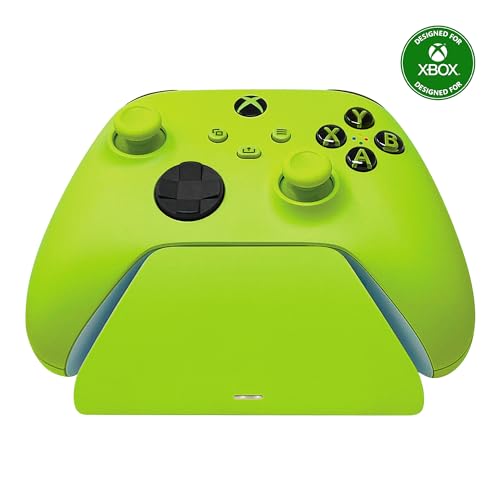
If you’re a dedicated Xbox gamer who values efficiency, the Razer Universal Quick Charging Stand for Xbox Series X|S is your ideal choice. This stand features a magnetic secure charging design that fully charges your controllers in under three hours. It’s compatible with Xbox Series X|S, Xbox One, and Elite Series 1 Wireless Controllers. You won’t have to worry about overheating thanks to its overcharge protection. Plus, it matches the color and material of your controllers, and the ergonomic design allows for easy navigation while docked. With a solid rating and reliable performance, it’s a must-have for serious gamers.
Best For: The Razer Universal Quick Charging Stand for Xbox Series X|S is best for dedicated Xbox gamers who prioritize efficient charging and seamless integration with their gaming setup.
Pros:
- Fully charges controllers in under 3 hours, ensuring minimal downtime during gaming sessions.
- Magnetic secure charging design keeps controllers safely docked while charging, preventing accidental disconnections.
- Ergonomically designed for easy one-handed navigation of the Xbox dashboard while the controller is docked.
Cons:
- Controller sold separately, which means additional costs for those who don’t already own one.
- Requires a corded electric power source, limiting placement options compared to battery-operated chargers.
- May not be compatible with third-party controllers, restricting its use to specific Xbox models only.
Upgraded Controller Charger Station for Xbox One/Series X|S

The Upgraded Controller Charger Station for Xbox One/Series X|S is perfect for gamers who want a reliable and eco-friendly charging solution. With two 6200mWh rechargeable battery packs, you’ll enjoy 18-25 hours of gameplay after just 4-5 hours of charging. The dual dock features LED indicators that tell you when your controllers are fully charged or still charging. Plus, its built-in safety system protects against overcharging and overheating. Simply drop your controllers on the dock for hassle-free charging. With a 1-year warranty and an impressive 4.6-star rating, this charger is a top choice for any Xbox gamer.
Best For: Gamers looking for an eco-friendly and reliable charging solution for their Xbox One/Series X|S controllers.
Pros:
- Dual dock with two 6200mWh rechargeable battery packs, providing 18-25 hours of gameplay.
- LED indicators for easy monitoring of charging status.
- Built-in safety features protect against overcharging and overheating.
Cons:
- Controllers are not included with the charger station.
- Charging time of 4-5 hours may be longer than some users prefer.
- Limited to Xbox One and Series X|S controllers, not compatible with other gaming systems.
Razer Universal Quick Charging Stand for Xbox Series X|S

For gamers seeking efficiency and convenience, the Razer Universal Quick Charging Stand for Xbox Series X|S is an ideal solution. It fully charges your controllers in under three hours, ensuring you’re always ready to play. With overcharge protection, you won’t have to worry about overheating or short circuits. The magnetic contact system secures your controller, allowing for uninterrupted charging. This stand is compatible with Xbox Series X|S, Xbox One, and Elite Series 1 controllers, and its design matches the Xbox Wireless controllers perfectly. Plus, it’s USB powered, connecting easily to your Xbox or compatible wall plug. Controller sold separately.
Best For: Gamers looking for a quick and efficient way to charge their Xbox controllers while ensuring safety from overheating.
Pros:
- Quick charge capability fully charges controllers in under 3 hours.
- Overcharge protection prevents overheating and short circuiting.
- Ergonomically designed for easy access to the Xbox dashboard while docked.
Cons:
- Controller sold separately, which may require additional purchase.
- USB powered, limiting charging options to compatible devices.
- Magnetic contact system may not be ideal for users who prefer traditional docking methods.
PowerA Solo Charging Stand for Xbox Controllers

Looking for a reliable charging solution for your Xbox controllers? The PowerA Solo Charging Stand is perfect for you. It’s officially licensed, compatible with Xbox One Wireless Controllers, and comes with an 1100 mAh rechargeable battery and two battery doors. You’ll enjoy up to 20 hours of gameplay per charge, eliminating the need for costly replacements. The stand displays your controllers beautifully and connects via a 3.3 ft USB cable. Weighing just 6.88 ounces, it’s easy to place on your gaming setup. Plus, with a two-year warranty, you can game confidently. Get ready for uninterrupted gaming sessions!
Best For: Gamers seeking a convenient and cost-effective charging solution for their Xbox controllers.
Pros:
- Officially licensed with compatibility for Xbox One Wireless Controllers.
- Provides up to 20 hours of gameplay per fully charged battery, reducing the need for replacement batteries.
- Comes with a two-year warranty and includes a 3.3 ft USB charging cable for easy connectivity.
Cons:
- Not compatible with Xbox Elite Wireless Controller Series 2.
- Charging stand may take up space on the gaming setup.
- Battery life can vary based on multiple usage factors.
Fosmon Fast Charging Station for Xbox Controllers

If you’re an Xbox enthusiast tired of constantly replacing disposable batteries, the Fosmon Fast Charging Station for Xbox Controllers is an ideal solution. This charging dock is compatible with Xbox Series X/S, Xbox One, and Elite controllers, excluding the Elite 2. It includes two rechargeable battery packs that deliver an impressive 40-45 hours of gameplay on a full charge. With dual slots for simultaneous charging and smart technology for safety, you can game worry-free. LED indicators keep you informed about charging status, and the limited lifetime warranty guarantees peace of mind with your purchase. Enjoy seamless gaming sessions without interruptions!
Best For: Gamers looking for a reliable and efficient charging solution for their Xbox controllers without the hassle of disposable batteries.
Pros:
- Dual slots allow for simultaneous charging of two controllers.
- Long-lasting rechargeable batteries provide 40-45 hours of gameplay on a full charge.
- Smart charging technology ensures safety with features like overheating and short circuit protection.
Cons:
- Not compatible with Xbox Elite 2 controllers.
- Only includes two battery packs, which may not be sufficient for multiple controllers.
- Requires a micro USB connector, which may not be preferred by all users.
Razer Universal Quick Charging Stand for Xbox Series X|S

The Razer Universal Quick Charging Stand for Xbox Series X|S is perfect for gamers who crave efficiency and style. With its sleek aqua blue tower design, it complements your gaming setup while ensuring your controllers are always ready for action. The stand fully charges your controller in under three hours and features a magnetic contact system, securing it firmly for uninterrupted charging. It’s compatible with Xbox Series X|S, Xbox One, and Elite Series 1 controllers, but not the Elite Controller 2. Plus, with overcharge protection, you can game worry-free, knowing your devices are safe.
Best For: Gamers looking for a stylish and efficient charging solution for their Xbox controllers.
Pros:
- Quick charging capability, fully charging controllers in under three hours.
- Magnetic contact system ensures secure and uninterrupted charging.
- Compatible with multiple Xbox controller models, enhancing versatility.
Cons:
- Does not support the Xbox Elite Controller 2.
- Limited to a specific color option (Aqua Blue), which may not suit all aesthetics.
- Requires a USB connection, which may be less convenient for some setups.
Turtle Beach Dual Controller Charging Station & Headset Stand for Xbox

For gamers who demand convenience and efficiency, the Turtle Beach Dual Controller Charging Station & Headset Stand for Xbox is an excellent choice. With two 1200mAh rechargeable battery packs, you get over 22 hours of playtime and a quick 2.5-hour recharge. The drop-and-charge design makes powering up effortless, while LED indicators let you know when your batteries are charging or fully charged. Plus, the compact design keeps your gaming space organized. While the headset stand doesn’t charge your headset, it provides easy access alongside your controllers. Enjoy seamless gaming sessions without the hassle of disposable batteries.
Best For: Gamers looking for an efficient and organized charging solution for their Xbox controllers and convenient headset storage.
Pros:
- Two rechargeable battery packs provide over 22 hours of playtime, eliminating the need for disposable batteries.
- Quick 2.5-hour recharge time allows for minimal downtime between gaming sessions.
- Compact design helps keep your gaming setup neat and organized.
Cons:
- Headset stand does not charge headsets, limiting its functionality for some users.
- Weight of 0.97 pounds may be slightly heavier than other similar products on the market.
- User reviews average 3.9 stars, indicating mixed feedback regarding performance and durability.
Upgraded Charger for Xbox One Controller Battery Pack

Looking for a reliable charging solution for your Xbox One controllers? The upgraded charger for the Xbox One Controller Battery Pack is perfect for you. It includes four 4080mWh rechargeable batteries compatible with Xbox One, One S, One X, Elite, and Series X|S controllers. You can charge up to four batteries simultaneously or individually, taking just 2.5-3 hours for a full charge. Each battery offers around 10 hours of gameplay. With LED indicators showing charge status and built-in safety features, you can enjoy peace of mind while gaming. Plus, it comes with a user manual and customer support for any inquiries.
Best For: Gamers looking for a reliable and efficient charging solution for their Xbox One controllers.
Pros:
- Includes four rechargeable batteries, allowing for extended gaming sessions without interruptions.
- Fast charging time of 2.5-3 hours provides quick turnaround for battery readiness.
- Built-in safety features protect against over-charge and overheating, ensuring safe overnight charging.
Cons:
- May be overkill for casual gamers who do not play frequently enough to require multiple batteries.
- The size and design of the charger dock may not fit well with all gaming setups.
- Limited to Xbox One series controllers, so not suitable for other gaming consoles.
Razer Universal Quick Charging Stand for Xbox Series X|S

If you’re in search of a reliable and efficient way to keep your Xbox controllers charged, the Razer Universal Quick Charging Stand for Xbox Series X|S stands out with its magnetic secure charging feature. With a 10-watt output and 2-amp charging capability, it guarantees your controllers are ready for action. The ergonomic design provides a sleek look while the tabletop mount keeps your setup organized. Compatible with various Xbox models, it’s perfect for dedicated gamers. Plus, with a solid 4.5-star rating from over 500 reviews, you can trust its performance. Keep your gaming sessions uninterrupted with this essential accessory!
Best For: Dedicated gamers looking for a reliable and efficient charging solution for their Xbox controllers.
Pros:
- Magnetic secure charging feature ensures controllers are charged safely and efficiently.
- Ergonomic design provides an appealing look while keeping your gaming setup organized.
- High customer satisfaction with a 4.5-star rating based on over 500 reviews.
Cons:
- Not portable, limiting its use to a fixed location.
- No compatibility with phones, reducing versatility compared to other charging solutions.
- Single power level may not cater to varied charging needs.
Microsoft Official Xbox One Play and Charge Kit (Xbox One)

The Microsoft Official Xbox One Play and Charge Kit is perfect for gamers who want a hassle-free charging solution for their controllers. This wireless kit features a USB Type C connector and provides 18 watts of power, ensuring your controllers are always ready for action. With an impressive average rating of 4.5 stars from nearly 7,000 reviews, it’s clear that users appreciate its reliability. The kit’s lightweight design and wall-mount capability make it easy to store. Plus, with a 30-day return guarantee, you can purchase with confidence. Upgrade your gaming experience with this essential accessory!
Best For: Gamers looking for a reliable and convenient charging solution for their Xbox One controllers.
Pros:
- Wireless charging feature eliminates the hassle of tangled cords.
- Lightweight and wall-mountable design allows for easy storage and accessibility.
- High average rating of 4.5 stars from nearly 7,000 reviews indicates strong user satisfaction.
Cons:
- Limited compatibility primarily designed for Xbox One controllers.
- Single USB port may not be sufficient for users with multiple devices.
- Plastic enclosure material might feel less durable compared to metal alternatives.
Factors to Consider When Choosing an Xbox Series S Charging Station
When choosing an Xbox Series S charging station, you’ll want to contemplate several key factors. Think about charging speed, battery capacity, and compatibility with your controllers. Also, don’t overlook safety features and how the design fits into your gaming setup.
Charging Speed Comparison
Choosing the right charging station for your Xbox Series S involves understanding how charging speed can impact your gaming experience. If you’re looking for quick recharges, the Razer Universal Quick Charging Stand is efficient, fully charging controllers in under 3 hours. On the other hand, the Upgraded Controller Charger Station takes about 4-5 hours but offers 18-25 hours of gameplay per charge. For longer play sessions, the Fosmon Fast Charging Station provides 40-45 hours of playtime with a charging time of around 2.4 hours. The Turtle Beach Dual Controller Charging Station charges in about 2.5 hours, while the PowerA Solo Charging Stand may vary but can provide around 20 hours of gameplay. Choose wisely based on your gaming habits!
Battery Capacity Considerations
Battery capacity plays an essential role in your gaming experience, as it directly affects how long you can play before needing a recharge. Look for batteries measured in milliamp hours (mAh); higher capacity options, like 6200mAh, can provide an impressive 18-25 hours of gameplay. This means you can enjoy extended sessions without interruption. Consider a charging station that supports multiple battery packs for seamless gaming; this way, you’ll always have a spare ready to go. Also, pay attention to charging times—batteries that take 3-5 hours to charge can disrupt your gaming schedule if you run low. Finally, opt for stations with built-in safety features to prevent overcharging, which can prolong battery life and maintain performance.
Compatibility With Controllers
Finding the right charging station for your Xbox Series S controllers is essential for a seamless gaming experience. Make certain the charging station is compatible with not just Xbox Series S controllers, but also with other models like the Xbox One and Elite Series 1. Look for stations that specify compatibility with both Xbox Series X and S, as some may only support one. Check if the station includes battery packs tailored for specific controllers, which can enhance charging efficiency. Consider future-proofing your investment; a versatile charging station can accommodate upcoming controller models and accessories. Finally, verify the design fits your controllers securely to prevent any charging issues. With these factors in mind, you’ll make a wise choice for your gaming setup.
Safety Features Importance
While selecting an Xbox Series S charging station, it’s vital to prioritize safety features that protect both your controllers and yourself. Look for stations with overcharge protection to prevent overheating and potential damage, making certain your controllers last longer. Many models include multi-protection systems guarding against over-current, overheating, and short circuits, minimizing risks. LED indicators are also important; they inform you of the charging status, helping avoid unnecessary battery degradation from prolonged charging. Opting for a charging station with built-in safety mechanisms can greatly extend the lifespan of your rechargeable batteries. Finally, verify the product has recognized safety certifications to confirm it meets industry standards for performance and safety, giving you peace of mind during your gaming sessions.
Design and Ergonomics
Choosing the right Xbox Series S charging station goes beyond safety features; design and ergonomics play a significant role in your overall gaming experience. Look for an ergonomically designed station that allows one-handed navigation through the Xbox dashboard while your controller is docked. This enhances convenience during gameplay. A design that matches the aesthetic of your Xbox Wireless Controllers guarantees a cohesive look in your setup. Opt for a compact and lightweight charging station to save space, reducing clutter on your gaming surface. It’s also essential to choose a station with a stable base to prevent tipping when placing or removing controllers. Finally, LED indicators can provide clear visual feedback on charging status, so you always know when your controllers are ready to go.