A good flight sim cockpit frame puts your controls where you can reach them comfortably—and keeps them there when you fly. The right choice depends as much on your room and seating as it does on your joystick, yoke, or throttle.
These 10 options range from compact stands to full cockpits with seats. Use the buying guide below to narrow them down by mounting layout, adjustability, and space requirements.
Best 10 Flight Sim Cockpit Frame Picks for 2026
Combat Sim Pick
SimFab DCS Edition Modular Cockpit
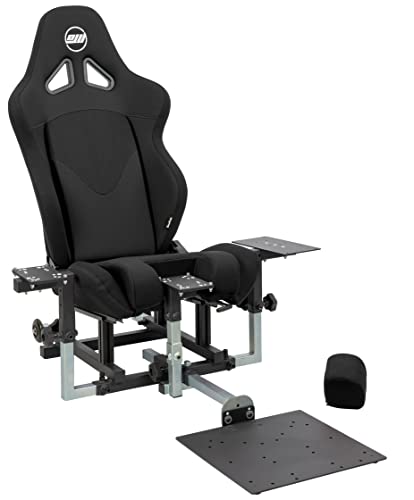
- Center-stick and cyclic mounting option
- Seat with sliders and recliner included
- Optional brackets needed for extra panels
Best For: Dedicated combat-flight setups
Office-to-Sim Pick
Marada Adjustable Flight Sim Chair Stand

- Removable bracket for office mode
- Adjustable backrest and control positions
- Controls and pedals not included
Best For: Shared work-and-flight-sim spaces
Multi-Discipline Pick
Next Level Racing MSFS Edition

- Adjustable lumbar support
- Mounts major-brand flight controls
- Listed weight: 83.4 pounds
Best For: Pilots flying multiple simulation styles
Yoke Stand Pick
Wheel Stand Pro S Flight Stand Deluxe V2

- Made for Saitek Pro Flight Yoke
- Quick-release, stepless adjustment
- Not compatible with Honeycomb
Best For: Saitek yoke users with their own chair
Best Full Cockpit
Marada Racing Flight Simulator Cockpit with Red Seat

- Seated flight-and-racing rig
- Five interchangeable mounting panels
- Adjustable joystick and pedal positions
Best For: A reconfigurable seated flight and racing setup
Best Foldable X-Frame
Anman Foldable Racing Flight Simulator Stand

- Folds for storage
- X-shaped stand for flight and racing
- Direct-drive wheels specified under 8 Nm
Best For: A foldable stand used with an existing chair
Best Adjustable Compact Stand
GTPLAYER Flight & Sim Racing Wheel Stand

- 20 cm height adjustment
- 20-degree wheel-rack adjustment
- Folds away after use
Best For: An adjustable stand for limited storage space
Best for Desk Accessories
Marada Universal Flight Racing Simulator Stand

- Four mounting boards, including mouse and keyboard placement
- Modular 40 mm square-tube stand
- Flight and racing controls sold separately
Best For: Mixed flight and racing setups needing mouse and keyboard space
Best for Chair-Based Setups
Multi-functional Racing Flight Simulator Cockpit Stand

- Three interchangeable mounting panels
- Adjustable side, center, and pedal positions
- Chair limit slots; no electronic controls included
Best For: Adjustable flight and racing setups using an existing chair
Best with Included Seat
Marada Flight Simulation Cockpit with Racing Seat

- Includes an adjustable-back black seat
- Supports flight and racing layouts
- Controls not included; listed weight is 80 pounds
Best For: A seated cockpit for owners of compatible flight or racing controls
Combat Sim Pick – SimFab DCS Edition Modular Cockpit
If your flight sim cockpit frame needs to accommodate a center stick or cyclic, the SimFab DCS Edition includes a seat with a removable foam insert and a lower center-mount bracket. The chassis also provides mounting positions for a right-side stick, left-side throttle, and rudder pedals.
Best For: Combat-flight sim users building around compatible HOTAS controls and rudder pedals.
Pros:
- Includes a full-foam seat with sliders and recliner.
- Supplied hardware supports hard-mounting compatible controls from brands including Thrustmaster, VirPil, WinWing, and VKB.
- Metal parts carry a lifetime factory warranty; the seat and other fabric-based parts carry a two-year warranty.
Cons:
- Collectives, extra control panels, and other mounts beyond the base brackets require optional brackets.
- The listed dimensions are 60 x 40 x 41 inches, so check your available space.
This is a substantial cockpit for a dedicated combat setup. Check the specific mounting requirements of any additional panels before ordering.
Office-to-Sim Pick – Marada Adjustable Flight Sim Chair Stand
The Marada combines a flight sim cockpit frame with a gaming chair for buyers who also want to use the space for desk work. Its flight bracket can be removed to switch to office mode, while the seat and control positions offer adjustment for different setups.
Best For: Users who want one chair for flight simulation and everyday desk use.
Pros:
- Backrest adjusts from 90 to 180 degrees.
- Three lever-mount positions can be adjusted for height and depth.
- Steel bracket has a stated 300-pound load capacity, and the chair has five locking rollers.
Cons:
- Gaming devices are not included; the listing also excludes pedals and a handbrake.
- The stated warranty is three months, with ongoing online technical support.
This is the flexible choice if you need to reclaim your chair for work. Before buying, confirm that your specific controls fit the mounts rather than relying only on brand-level compatibility.
Multi-Discipline Pick – Next Level Racing MSFS Edition
This Microsoft Flight Simulator–licensed flight sim cockpit frame is designed for several styles of flying, from commercial and general aviation to combat and space simulation. It pairs dedicated mounting patterns for major-brand flight controls with a padded PU-leather seat.
Best For: Pilots who switch between flight disciplines and want an integrated seat.
Pros:
- Adjustable lumbar support lets you tune lower-back comfort.
- Mounting patterns accommodate major-brand yokes, throttles, and joysticks.
- Designed to support commercial, general aviation, combat, and space simulation.
Cons:
- At a listed 83.4 pounds, it is a heavier option to handle.
- The supplied specifications do not identify individual compatible control models, so verify your hardware’s mounting pattern.
Consider this model if seat comfort and the ability to change flight styles matter more to you than a lightweight setup. Check your control fit before purchase.
Yoke Stand Pick – Wheel Stand Pro S Flight Stand Deluxe V2
If you want a flight sim cockpit frame without a dedicated seat, the Wheel Stand Pro S is a portable stand made for the Saitek Pro Flight Yoke System. Its stepless adjustment range lets you position it for use with your own chair.
Best For: Saitek Pro Flight Yoke owners who want an adjustable stand rather than a full cockpit.
Pros:
- Quick-release clamps make adjustments without turning knobs.
- Stepless adjustment helps position the stand for different seats.
- Portable stand can be moved when the flying session is over.
Cons:
- The flight system and seat are not included.
- Explicitly not compatible with Honeycomb hardware.
Choose this stand for a Saitek yoke setup when a separate chair suits your space. Honeycomb users should look elsewhere.
Best Full Cockpit – Marada Racing Flight Simulator Cockpit with Red Seat
If you want a flight sim cockpit frame with a seat rather than a standalone control stand, this Marada model supports both flight and racing layouts. Its five interchangeable mounting panels accommodate setups built around a HOTAS, yoke, or keyboard tray.
Best For: Sim enthusiasts who want a seated rig they can reconfigure for flight and racing.
Pros:
- Includes a red seat and adjustable seat, backrest, and center plate.
- Adjustable side joystick panels and rudder-pedal position and angle.
- 40 mm square-tube frame with dual hand bolts at adjustment points.
Cons:
- Joystick, yoke, pedals, wheel, and other electronics are not included.
- At 96.5 pounds, it is a substantial rig to move.
Choose this one if a dedicated seated setup matters more than easy storage. Check your intended controls against the listed mounting options before buying.
Best Foldable X-Frame – Anman Foldable Racing Flight Simulator Stand
The Anman is a flight sim cockpit frame option for buyers who already have a chair and want a stand they can fold away. Its X-shaped structure supports flight and racing controls, with wider, pre-drilled steering and pedal panels.
Best For: Players who need a foldable stand for both flight and racing controls.
Pros:
- Folds down for storage and arrives 80% pre-installed.
- Three gear-shift panels and wider mounting panels allow varied layouts.
- Includes mounting tools, nuts, and bolts.
Cons:
- No chair is listed as included.
- Direct-drive wheel compatibility is specified only for wheels under 8 Nm.
This is the more storage-conscious choice if you do not need a built-in seat. Confirm that your controls match the panel layout before ordering.
Best Adjustable Compact Stand – GTPLAYER Flight & Sim Racing Wheel Stand
The GTPLAYER flight sim cockpit frame is a foldable stand for mounting flight or racing controls without committing to a seated rig. Its wheel rack adjusts 20 degrees up or down, and the stand offers 20 cm of height adjustment.
Best For: Players who want an adjustable stand they can store after a session.
Pros:
- Folds for storage under a couch or bed or in a corner.
- Carbon-steel construction and adjustable height and wheel-rack angle.
- Includes five fixed wheels for chair positioning and two sliding wheels for the stand.
Cons:
- Wheel, shifter, pedals, and flight controls are not included.
- No integrated seat is listed.
Its folding design and adjustment range make it worth considering when space and posture are priorities. Check your specific control mounts before purchase.
Best for Desk Accessories – Marada Universal Flight Racing Simulator Stand
This flight sim cockpit frame is a flexible choice if you want to mount flight or racing controls alongside a mouse and keyboard. Its 40 mm square-tube construction and adjustable mounting boards let you tailor the layout to your equipment and seating position.
Best For: Players who want a stand for flight and racing controls with space for a mouse and keyboard.
Pros:
- Four mounting boards accommodate different controls, plus mouse and keyboard placement.
- Modular design and multiple adjustment points support varied layouts.
- Listed compatibility includes Logitech, Thrustmaster, Honeycomb, VKB, Turtle Beach, and Winwing devices.
Cons:
- Flight and racing controls are not included.
- Fit should be checked against your specific device and mounting layout.
The accessory-mounting options distinguish this stand from a basic wheel mount. It makes the most sense for buyers willing to spend time adjusting a multipurpose setup.
Best for Chair-Based Setups – Multi-functional Racing Flight Simulator Cockpit Stand
This flight sim cockpit frame suits players who want to use an existing chair while switching between flight and racing controls. The carbon-steel stand has three interchangeable mounting panels, adjustable control positions, and slots intended to help keep a chair from rolling backward.
Best For: Players building an adjustable flight-and-racing station around their existing chair.
Pros:
- Side panels adjust in multiple directions and rotate 90 degrees.
- Center and pedal panels offer position and tilt adjustments.
- Includes cable ties and anti-slip pads, with ports reserved for a future seat-bracket upgrade.
Cons:
- Electronic controls are not included.
- A seat bracket is an upgrade option, not a stated included component.
The chair limit slots and broad panel adjustments make this a practical standalone option. Choose it if positioning flexibility matters more than getting a seat in the box.
Best with Included Seat – Marada Flight Simulation Cockpit with Racing Seat
If you want a flight sim cockpit frame that comes with a seat, this Marada model combines a single-column, 40 mm square-tube structure with a black adjustable-back seat. It is designed to accommodate both flight and racing layouts without requiring you to source a separate chair.
Best For: Buyers who want a seated flight-and-racing cockpit and already have compatible controls.
Pros:
- Includes a breathable seat with an adjustable backrest.
- Supports flight and racing configurations.
- Adjustable shift-lever platform and pedal legroom help tailor the driving position.
Cons:
- Steering wheel, joystick, and pedals are not included.
- At a listed 80 pounds, it is heavier than a lightweight stand-style setup.
The included seat is its clearest advantage over the stand-only options. Check your available space and controller compatibility before choosing this larger cockpit.
How We Picked These Flight Sim Cockpit Frames
We focused on the distinctions that affect everyday use: control-mounting options, seating arrangement, adjustability, footprint, and whether a frame can serve both flight and racing setups. The selection includes dedicated flight rigs, hybrid cockpits, and simpler stands. Product names and compatibility claims are a starting point, not a substitute for checking dimensions and mounting patterns against your own hardware.
Quick Comparison: Which Style Fits Your Setup?
Dedicated seated cockpit: Look at the SimFab DCS Edition or Next Level Racing Microsoft Flight Simulator Edition frame if you want a flight-focused layout. Check whether a seat is included before budgeting.
Seated hybrid rig: The Marada cockpits with seats suit buyers who also want a racing-style position. Confirm that the included mounts support your preferred flight controls.
Stand for an existing chair: The Marada chair stand, Wheel Stand Pro S, Anman foldable stand, GTPLAYER stand, Marada universal stand, and multifunctional stand are worth comparing when you want to keep your current seat. Some are racing-first designs, so flight-control placement deserves extra scrutiny.
Key Buying Factors for a Flight Sim Cockpit Frame
Mounting and Control Placement
List every device you plan to use: yoke or center stick, side stick, throttle, pedals, keyboard, mouse, and any switch panels. Check the frame’s mounting positions, bolt-hole patterns, plate dimensions, and stated compatibility. A stand advertised for a particular control family may still need an adapter or drilling for a different model. Make sure the throttle and stick can sit on the sides you prefer.
Seat, Adjustability, and Stability
A frame-only purchase may require a separate seat; a stand may work with your office chair but let it roll away under pedal pressure. Look for a chair-wheel restraint if that is your plan. Compare height, reach, and pedal adjustments with your body size and seating position. A rigid frame matters most when using firm pedals or making frequent, forceful control inputs.
Space and Shared Use
Measure the assembled footprint, not just the storage footprint. Leave room to enter the cockpit, move the controls, and route cables safely. Folding stands can make sense in a shared room, but check what must be removed or loosened before storage. If you race as well as fly, confirm you can reposition the controls without a lengthy rebuild.
Who Should Buy Which Flight Sim Cockpit Frame?
Choose a dedicated flight cockpit if flying is your main hobby and you want a consistent, seated control layout. Pick a hybrid seated rig if you regularly switch between a wheel and flight controls and have space to leave it assembled. Choose a stand if you already like your chair, need a smaller footprint, or want to start without buying a seat. Before ordering any Flight Sim Cockpit Frame, verify what is included and confirm that your exact controls fit the mounts.