As a streamer, you’re aware that a high-quality webcam can make a significant difference in your broadcast. Choosing the right one can enhance your visuals and audio, helping you connect better with your audience. With a variety of options available, from 4K resolution to advanced autofocus, it’s essential to know what features matter most. Let’s explore the top contenders that can elevate your streaming experience to the next level.
EMEET S600 4K Webcam for Streaming

The EMEET S600 4K Webcam is the perfect choice for serious streamers and content creators who demand high-quality visuals and clear audio. With a Sony 1/2.55” sensor, it delivers stunning 4K streaming at 30FPS and 1080P at 60FPS. You’ll appreciate the advanced PDAF for quick, accurate focusing, along with auto light adjustment for crisp images, even in low light. Two noise reduction microphones guarantee your voice stands out, while the adjustable 1080P FOV lets you customize your framing. Plus, its rugged design and privacy cover make it user-friendly and secure, making it a top pick in the webcam market.
Best For: Serious streamers, gamers, and content creators who require high-quality audio and video performance.
Pros:
- Exceptional 4K streaming quality at 30FPS and 1080P at 60FPS for stunning visuals.
- Advanced PDAF technology allows for quick and precise focusing, ensuring clear images in various lighting conditions.
- Built-in noise reduction microphones provide clear audio by filtering out background noise.
Cons:
- Fixed 4K FOV at 73° may not suit all framing preferences.
- Weight of 3.52 ounces might be slightly heavier compared to some other webcams.
- Compatibility with EMEETLINK software is optional and may require additional setup for advanced features.
Logitech C920x HD Pro PC Webcam

If you’re looking for a reliable webcam that excels in low-light conditions, the Logitech C920x HD Pro PC Webcam stands out with its HD light correction and autofocus features. This webcam delivers stunning Full HD 1080p video at 30fps, making it perfect for video conferencing and streaming. With dual microphones, you’ll enjoy natural sound during your calls. Plus, the advanced capture software simplifies video content creation. Weighing just 5.7 ounces and compatible with popular platforms like Zoom and Microsoft Teams, it’s a top choice for gamers and streamers alike, earning an impressive 4.6-star rating from over 38,000 customers.
Best For: The Logitech C920x HD Pro PC Webcam is best for professionals, gamers, and content creators seeking high-quality video and audio for streaming and video conferencing.
Pros:
- Excellent low-light performance with HD light correction and autofocus.
- High-definition video quality at 1080p and 30fps for clear visuals.
- Dual microphones provide natural sound for calls and recordings.
Cons:
- Requires a nonstandard battery, which may be inconvenient.
- Some users may find the software features limited for advanced editing.
- Compatibility may vary with certain older systems or devices.
NBPOWER 1080P Streaming Camera Webcam with Microphone

Looking for a reliable webcam that enhances your streaming experience? The NBPOWER 1080P Streaming Camera is your perfect match. With Full HD 1080p resolution at 60FPS, it delivers sharp visuals for gaming, video calls, and online classes. Its built-in microphone guarantees clear audio, while the fast autofocus keeps moving subjects in focus. Plus, the noise-canceling feature improves voice clarity during remote meetings. Compatible with popular platforms like Zoom and OBS, it connects easily via USB without needing any drivers. With a customer rating of 4.3 stars, it’s a solid choice for elevating your broadcast quality.
Best For: Streamers, gamers, and professionals seeking a high-quality webcam for video calls and online classes.
Pros:
- Full HD 1080p resolution at 60FPS for sharp and smooth visuals.
- Built-in noise-canceling microphone enhances voice clarity during communications.
- Easy plug-and-play installation with no driver downloads required.
Cons:
- Limited compatibility with older operating systems (only supports Windows 9/10 and Mac).
- Braided cable length of 1.7 meters may be insufficient for some setups.
- Customer rating of 4.3 stars indicates some users may have experienced issues.
Logitech Brio 101 Full HD Webcam

For gamers and streamers seeking high-quality video calls, the Logitech Brio 101 Full HD Webcam stands out with its impressive 1080p resolution and Auto-Light Balance feature. This webcam delivers clear video, ensuring you look your best during streams. Its built-in microphone enhances audio quality, making communication seamless. Plus, it’s compatible with popular platforms like Zoom, Microsoft Teams, and even Nintendo Switch 2’s GameChat mode, so you can plug and play without hassle. With an integrated privacy cover, you can feel secure when the camera’s not in use. Elevate your streaming experience with this reliable and versatile webcam.
Best For: Gamers and streamers looking for a high-quality webcam that enhances video and audio during calls and streams.
Pros:
- Delivers Full HD 1080p resolution for clear and professional-looking video.
- Built-in microphone ensures high-quality audio for seamless communication.
- Plug-and-play functionality makes it easy to use with various platforms without additional setup.
Cons:
- Limited to 1080p resolution, which may not satisfy users looking for 4K quality.
- The built-in microphone, while good, may not match the quality of dedicated external microphones.
- The webcam cover may feel less robust compared to some competitors’ hardware privacy features.
NexiGo N60 1080P Webcam with Microphone

The NexiGo N60 1080P Webcam with Microphone stands out as an exceptional choice for gamers and streamers seeking high-quality video and audio at an affordable price. With Full HD 1080P resolution at 30fps, you’ll enjoy crisp visuals, while the built-in noise-canceling microphone guarantees clear sound by minimizing background noise. Weighing just 5.3 ounces and sized perfectly for any setup, it’s incredibly user-friendly—simply plug it in, and you’re good to go. Compatible with multiple operating systems, plus featuring a privacy cover, this webcam is ideal for streaming, video calls, or online schooling. Elevate your broadcast effortlessly!
Best For: The NexiGo N60 1080P Webcam with Microphone is best for gamers, streamers, and professionals looking for high-quality video and audio for online communication.
Pros:
- High-quality video with Full HD 1080P resolution at 30fps for clear visuals.
- Built-in noise-canceling microphone reduces background noise for enhanced audio clarity.
- User-friendly setup with plug-and-play functionality, compatible with multiple operating systems.
Cons:
- Not compatible with gaming consoles such as XBOX, PS4, and PS5.
- Limited warranty information available, requiring inquiries for details.
- Potential audio delay issues may require contacting support for firmware updates.
Acer 4K Webcam for PC/Mac

Experience unparalleled clarity in your streaming with the Acer 4K Webcam for PC/Mac. This webcam boasts UHD 4K resolution, powered by a large Sony 1/2″ sensor for exceptional image quality, even in low light. With advanced PDAF autofocus, you’ll enjoy stable and precise focusing. The dual high-sensitivity microphones capture your voice clearly while filtering out background noise, ensuring crisp audio. Plus, its all-metal unibody design not only looks sleek but is also lightweight and portable. Plug it into your device, and you’re ready to stream on platforms like Zoom and Twitch without any hassle.
Best For: Anyone seeking a high-quality webcam for professional video calls, streaming, or gaming with exceptional image and audio clarity.
Pros:
- Exceptional 4K image quality with a large Sony sensor and HDR capabilities.
- Dual noise reduction microphones provide clear audio even in noisy environments.
- Lightweight and portable design, making it easy to use anywhere with a simple USB connection.
Cons:
- Limited to USB-A connections, which may require adapters for some devices.
- Higher price point compared to standard webcams.
- May not perform as well in extremely bright lighting conditions despite low-light capabilities.
EMEET 1080P Webcam with Microphone (C960)

If you’re looking for a reliable webcam that delivers crisp video quality without breaking the bank, the EMEET 1080P Webcam (C960) stands out as an excellent choice for gamers and streamers alike. With full HD 1920 x 1080p video and a 5-layer anti-glare lens, you’ll enjoy smooth visuals. Its built-in omnidirectional microphones guarantee clear communication during your streams. Plus, automatic low-light correction keeps your image sharp in various lighting conditions. The plug-and-play setup makes it easy to connect, and it’s compatible with popular platforms like Zoom and Google Meet. Weighing just 5.6 ounces, it’s incredibly portable, too.
Best For: Gamers and streamers seeking a cost-effective webcam with high-quality video and audio features.
Pros:
- Full HD 1080p video quality for clear and vibrant visuals.
- Built-in omnidirectional microphones ensure clear communication during streams.
- Automatic low-light correction maintains image quality in various lighting conditions.
Cons:
- Not compatible with Windows Hello, TVs, tablets, and game consoles.
- Fixed focal length may not accommodate all user preferences for close-up shots.
- Limited warranty information available, requiring users to request details.
EMEET NOVA 4K Webcam for PC

For those seeking top-tier video quality, the EMEET NOVA 4K Webcam for PC stands out as an exceptional choice. With stunning 4K resolution at 30FPS, it captures every detail, perfect for gaming, meetings, or streaming. The PDAF technology guarantees fast autofocus, while automatic light adjustment enhances your image quality. You’ll appreciate the dual microphones with noise-cancelling tech for crystal-clear audio. Plus, its plug-and-play USB connectivity makes setup a breeze, and the privacy cover adds peace of mind. With flexible design options, this webcam adapts easily to your environment, delivering an unbeatable streaming experience.
Best For: Professionals and content creators looking for high-quality video and audio for meetings, streaming, or online education.
Pros:
- Exceptional 4K resolution at 30FPS, providing crystal-clear video quality.
- Fast autofocus with PDAF technology ensures sharp images within a wide range.
- Dual microphones with noise-cancelling features deliver clear audio even in noisy environments.
Cons:
- Default video resolution is 1080P, requiring a manual switch to access 4K.
- Limited manual focus options may be inconvenient for some users.
- Fixed cable length of 1.5m may restrict placement flexibility in certain setups.
Tewiky Full HD Webcam with Built-in Microphone and Tripod

The Tewiky Full HD Webcam stands out as an excellent choice for gamers and streamers who want high-quality video without the hassle of complicated setups. With a 1080p resolution and a wide-angle lens, it delivers sharp video at 30fps. You’ll appreciate its plug-and-play compatibility with various devices, including desktops and tablets, thanks to the included 5ft cable. The built-in noise-cancelling microphone guarantees clear audio, while automatic light correction adjusts your appearance in different lighting. Plus, it comes with a detachable tripod and a privacy cover, making it both convenient and secure for all your streaming needs.
Best For: Gamers, streamers, and educators looking for a high-quality webcam with easy setup and excellent audio-visual performance.
Pros:
- Plug-and-play compatibility with desktops, laptops, tablets, and Android phones for instant use.
- Built-in noise-cancelling microphone ensures clear audio even in noisy environments.
- Detachable tripod and privacy cover offer convenience and security when not in use.
Cons:
- Limited to a maximum resolution of 1080p, which may not meet the needs of professional content creators seeking higher quality.
- The 5ft cable length may not be sufficient for all setups, potentially requiring extensions.
- Caution required to avoid damage from strong sunlight and wet conditions, limiting where it can be used safely.
EMEET C60E Dual-Camera 4K Webcam for Streaming
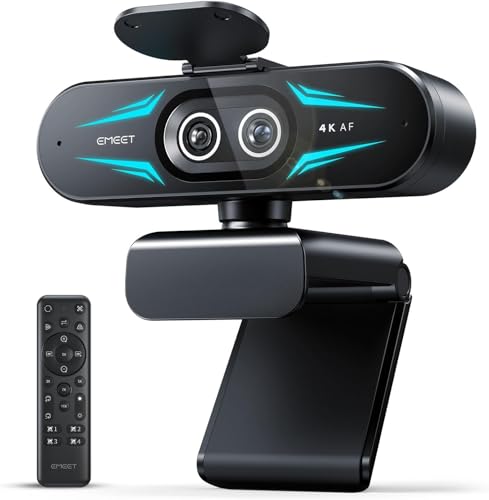
Livestreamers and online educators seeking high-quality visual quality will find the EMEET C60E Dual-Camera 4K Webcam an exceptional choice. Its dual-camera system features a wide-angle lens for panoramic views and a telephoto lens for detailed close-ups, complete with 11X hybrid zoom. You’ll appreciate the PDAF autofocus that guarantees clear images even during zooming. Adjust settings easily with the remote control or EMEET STUDIO software for ideal brightness and color. The two noise-canceling mics capture clear audio, while its vibrant RGB lighting adds flair to your stream. Compatible with multiple platforms, it’s a versatile tool for professional streaming.
Best For: Livestreamers, online educators, and professionals seeking high-quality video and audio for their streaming needs.
Pros:
- Exceptional dual-camera system with wide-angle and telephoto capabilities for versatile shooting options.
- User-friendly control options including remote control and EMEET STUDIO software for easy adjustments.
- Integrated noise-canceling microphones ensure clear audio, enhancing the overall streaming experience.
Cons:
- Limited to USB 2.0 Type-A connection, which may restrict compatibility with newer USB standards.
- The need for software installation may be cumbersome for users who prefer plug-and-play functionality.
- Some users may find the RGB lighting distracting rather than enhancing the stream’s visual appeal.
Factors to Consider When Choosing a Gaming Webcam for Streaming
When choosing a gaming webcam for streaming, you’ll want to contemplate several key factors. Resolution and frame rate can greatly impact your video quality, while autofocus technology helps keep you sharp on camera. Don’t overlook microphone quality, low-light performance, and compatibility with your streaming platforms, as these elements can make or break your streaming experience.
Resolution and Frame Rate
Choosing the right resolution and frame rate for your gaming webcam can make all the difference in your streaming quality. A higher resolution, like 4K, offers four times the detail of 1080p, making it perfect for high-quality streams. However, keep in mind that higher resolutions demand more bandwidth. Frame rate is equally crucial; 30FPS is standard for 4K, while 60FPS is preferred for 1080p to guarantee smooth visuals during intense gaming sessions. You should also consider adjustable field of view (FOV) options, which let you capture your gaming setup without distortion. Balancing resolution, frame rate, and your internet connection will lead to a more enjoyable streaming experience for both you and your audience.
Autofocus Technology
Autofocus technology plays an essential role in ensuring your gaming streams look sharp and professional, especially in fast-paced environments. Look for webcams that feature Phase Detection Autofocus (PDAF), as it provides quick and precise focusing on you while you play. This is vital when you’re moving around, allowing for consistent clarity without the hassle of manual adjustments. Advanced autofocus systems also adapt to various lighting conditions, ensuring ideal image quality even in low-light settings. Depending on your streaming style, you might prefer webcams with fixed focal lengths or adjustable fields of view (FOV). High-quality autofocus reduces unwanted blurriness, enhancing your overall appearance during live streams and recordings, making you look more polished and engaging to your audience.
Microphone Quality
While you might focus on video quality when selecting a gaming webcam, the microphone’s performance is equally essential for delivering an engaging streaming experience. High-quality microphones capture clear audio and reduce background noise, enhancing communication during your live streams. Look for webcams with built-in noise-canceling features that filter ambient sounds, ensuring your voice stands out. Dual microphones offer stereo sound, adding an immersive touch for both you and your audience. Pay attention to the microphone’s pickup range; options that capture audio clearly from several feet away allow for movement without sacrificing sound quality. Additionally, advanced features like echo cancellation and automatic gain control help maintain consistent audio levels, improving clarity in various environments.
Low-Light Performance
How well does your webcam perform in low-light conditions? If you’re streaming late at night, this factor’s essential. A good gaming webcam should provide clear visibility, even in dim environments. Look for models with automatic low-light correction; they adjust brightness and contrast to enhance image quality. Advanced optical sensors and HDR can also make a significant difference, capturing details in shadows and highlights effectively. Additionally, consider webcams with noise-canceling microphones, as they filter out background noise that can be more noticeable in quieter, darker settings. Aim for webcams that maintain video clarity at less than 100 lux, ensuring you get ideal performance for various streaming scenarios. Elevate your broadcast quality by prioritizing low-light performance.
Compatibility With Platforms
When choosing a gaming webcam for streaming, compatibility with various platforms is a key factor that can greatly impact your experience. Confirm the webcam works with popular streaming platforms like Zoom, Microsoft Teams, Twitch, and OBS to facilitate seamless broadcasting. Check for plug-and-play functionality with your operating system to simplify setup without needing extra drivers. It’s vital to verify the webcam’s resolution and frame rate compatibility to maintain high-quality video during live streams. If you plan to stream console gameplay, look for webcams that specifically mention compatibility with gaming consoles. Additionally, consider webcams that offer software integration options for enhanced customization and control over video settings within your preferred streaming applications.
Design and Portability
Choosing a gaming webcam with a thoughtful design and portability can make a notable difference in your streaming setup. Look for a compact and lightweight model that’s easy to transport, fitting seamlessly into various environments. Flexible mounting options, like tripod compatibility or adjustable angles, allow you to position the camera perfectly during gameplay. A rugged design with durable components guarantees your webcam withstands frequent movement, essential for dynamic gaming. Built-in privacy covers enhance your security, letting you block the lens easily when not streaming. Finally, consider cable length and connection type; guaranteeing flexibility in placement without sacrificing performance is critical, especially in larger setups. With these factors in mind, you’ll elevate your streaming experience remarkably.
Setup and Connectivity
To optimize your streaming experience, it’s essential to evaluate setup and connectivity when selecting a gaming webcam. Look for models that offer plug-and-play functionality, allowing you to get started without the hassle of installing drivers or software. Check USB compatibility—USB 2.0 or 3.0 guarantees easy connections to desktops, laptops, and tablets. A long cable length of around 1.5 meters or more gives you flexible placement options, making your streaming sessions more convenient. Also, confirm the webcam works seamlessly with major video conferencing platforms like Zoom, Microsoft Teams, and OBS. Finally, consider privacy features, such as a built-in cover, to protect the lens when not in use, adding an extra layer of security during your broadcasts.
Price and Warranty Options
After ensuring your gaming webcam is easy to set up and connects seamlessly, it’s time to evaluate price and warranty options. Prices can vary widely, so consider your budget. Budget-friendly models might lack some features, while high-end webcams often deliver superior performance. Check the warranty, which can range from 30 days to several years, offering peace of mind against defects. Customer reviews can also guide your decision; higher-rated products usually justify their cost with better reliability. Don’t forget to factor in potential extra costs for software or subscriptions that enhance functionality, like background removal or editing tools. Some manufacturers even offer extended warranties for a fee, a smart choice for serious streamers.