If you’re looking to enhance your workspace, choosing the right monitor stand can make a significant difference. With options that support various monitor sizes and weights, these stands can help optimize your setup for better ergonomics and productivity. From dual to quad configurations, each stand offers unique features to fit your needs. Let’s explore the top options available and see how they can transform your work environment.
Dual Monitor Stand – Vertical Stack Screen Riser (Fits Two 13 to 34 Inch Screens)

If you’re looking to maximize your workspace while accommodating two monitors, the Dual Monitor Stand – Vertical Stack Screen Riser is perfect for you. This stand fits screens ranging from 13” to 34” and supports up to 44 lbs per screen, ensuring stability. With adjustable brackets that allow for +50° to -50° swivel and +10° to -15° tilt, you can customize your viewing angle. The 12 height adjustment levels promote ergonomic placement, reducing strain on your neck and shoulders. Plus, its freestanding design saves desktop space, while the integrated cable management keeps your cords organized and tidy.
Best For: Those who need an efficient and ergonomic solution for dual monitor setups in limited desk spaces.
Pros:
- Space-saving design allows for a clutter-free workstation by eliminating large bases.
- Ergonomic features such as adjustable height, swivel, and tilt enhance user comfort and reduce strain.
- Easy installation with removable VESA plates and included hardware simplifies the setup process.
Cons:
- Limited to screens between 13” and 34”, which may not fit larger monitors.
- Weight capacity of 44 lbs per screen may restrict heavier monitor options.
- Potential for wobbling if not properly secured during installation.
HUANUO Dual Monitor Stand (17-32 Inch, Ergonomic Adjustable)

The HUANUO Dual Monitor Stand is the ideal choice for anyone looking to enhance their workspace ergonomics, especially if you use monitors between 17 and 32 inches. Its ergonomic design elevates your screens to 25.19 inches, promoting better posture and reducing strain during long hours. With full-motion flexibility, you can tilt, swivel, and rotate your monitors for customizable viewing angles, perfect for gaming or video calls. Plus, it maximizes desk space with an integrated cable management system. Installation is quick and easy, compatible with various desk thicknesses, ensuring a stable setup that’s both functional and stylish.
Best For: Anyone seeking to improve their workspace ergonomics and productivity with adjustable dual monitor setups for work, gaming, or multitasking.
Pros:
- Ergonomic design elevates monitors to reduce strain and promote better posture.
- Full-motion flexibility allows for customizable viewing angles, enhancing comfort during use.
- Integrated cable management keeps workspace organized and clutter-free.
Cons:
- Limited to monitors weighing between 4.4 lbs and 19.8 lbs, which may not accommodate heavier models.
- Installation may require tools and some time for setup, especially for those unfamiliar with mounting.
- Not compatible with glass desks, limiting options for certain users.
HUANUO Dual Monitor Stand for 13–32″ Screens

For those juggling multiple tasks or needing extra screen real estate, the HUANUO Dual Monitor Stand is a perfect fit for 13–32″ screens. Each arm can support 4.4 to 19.8 lbs and features full-motion adjustments, allowing you to tilt, swivel, and rotate your monitors for peak viewing angles. With a dual C-clamp structure, it guarantees stability on wooden desks between 0.59 to 3.54 inches thick. You’ll appreciate the built-in cable management that keeps your workspace tidy, freeing up space for essential items. This reliable setup enhances your focus and reduces fatigue during extended use, making it ideal for work or gaming.
Best For: Individuals who need to maximize desk space and improve ergonomics while using dual monitors for work or gaming.
Pros:
- Full-motion adjustments allow for optimal viewing angles with +85°/-50° tilt, ±90° swivel, and 360° rotation.
- Built-in cable management helps maintain a tidy workspace and reduces clutter.
- Stable dual C-clamp structure ensures secure fixation on wooden desks without wobbling.
Cons:
- Limited to wooden desks only, which may exclude users with different desk materials.
- Desk thickness requirement of 0.59 to 3.54 inches might not accommodate all desk types.
- Weight capacity range (4.4 to 19.8 lbs) may limit options for heavier monitors.
ARES WING Dual Monitor Stand for Ultrawide Monitors

Designed for gamers and professionals who crave an expansive view, the ARES WING Dual Monitor Stand supports ultrawide monitors ranging from 17 to 49 inches, including popular models like the Samsung Odyssey G9. Each arm holds up to 44 lbs, ensuring stability. You can adjust the height to 27.9 inches and extend the arms 22.4 inches for ideal positioning. Plus, with screen tilt, swivel, and rotation, you’ll find optimal viewing angles effortlessly. It features USB-C and USB-A ports for charging devices, and installs easily with C-clamp or grommet mounts. Enjoy one-on-one support for any installation questions along the way!
Best For: Gamers and professionals who seek an expansive and adjustable dual monitor setup for enhanced productivity and immersive gaming experiences.
Pros:
- Supports a wide range of ultrawide monitors from 17 to 49 inches, including popular models like the Samsung Odyssey G9.
- Highly adjustable with maximum height and arm extension for optimal viewing angles, along with USB charging ports for convenience.
- Stable and durable design featuring industrial-grade gas springs and extensive testing for long-lasting performance.
Cons:
- Requires VESA mount adapters for monitors that lack VESA holes, which may add extra cost.
- C-clamp and grommet mount options may not fit all desk types, limiting installation flexibility.
- May be overkill for users with smaller monitors who do not require such extensive adjustments or features.
Quad Monitor Stand for 17 to 32 Inch Screens

If you’re looking to maximize your workspace efficiency, a quad monitor stand is an excellent choice for those using 17 to 32 inch screens. This fully adjustable stand supports up to 19.8 lbs per screen and offers universal compatibility with VESA 75x75mm or 100x100mm mounts. With full motion articulation, you can tilt, swivel, or rotate your monitors for the perfect viewing angle. Plus, its freestanding base guarantees easy installation without damaging your furniture. You’ll also appreciate the built-in groove for phone storage, minimizing neck strain. Backed by a 3-Year warranty, it’s a reliable investment for your workstation.
Best For: Those seeking to enhance their productivity and workspace organization with multiple monitors ranging from 17 to 32 inches.
Pros:
- Fully adjustable with full motion articulation for optimal viewing angles.
- Easy installation with a freestanding base that requires no drilling or clamps.
- Includes phone storage groove to reduce neck strain while working.
Cons:
- May be limited by weight capacity, supporting only up to 19.8 lbs per screen.
- Stacked configuration might require more vertical space, which could be a concern in cramped workspaces.
- Compatibility restricted to monitors with VESA 75x75mm or 100x100mm mounting holes, limiting options for some monitors.
VIVO Dual Vertically Stacked Monitor Desk Mount (STAND-V002T)
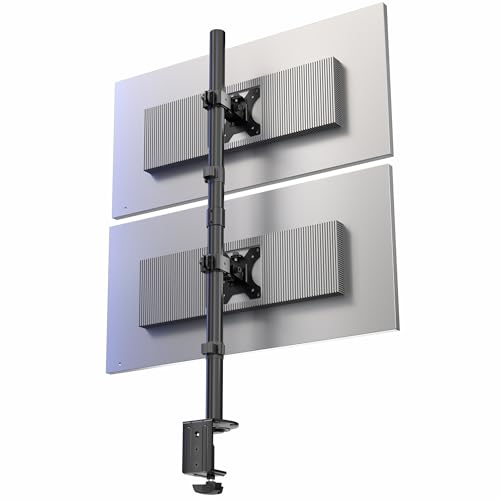
The VIVO Dual Vertically Stacked Monitor Desk Mount (STAND-V002T) is ideal for professionals who require an efficient workspace while using dual ultrawide monitors. This extra tall adjustable stand supports two screens up to 34 inches, with each holding up to 22 lbs. You can easily adjust the height, tilt, and rotation for best viewing angles, whether in portrait or landscape mode. Installation is straightforward, thanks to detachable VESA brackets and drill-free mounting options. Plus, the integrated cable management system keeps your workspace tidy, allowing you to focus on your tasks without distractions.
Best For: Professionals who require a spacious and organized workspace while using dual ultrawide monitors.
Pros:
- Supports dual ultrawide monitors up to 34 inches each, accommodating a range of display needs.
- Offers extensive adjustability features including tilt, swivel, and rotation for optimal viewing angles.
- Easy installation with drill-free mounting options and integrated cable management for a clutter-free workspace.
Cons:
- Limited to monitors with VESA 75x75mm or 100x100mm mounting holes, which may exclude some models.
- The weight capacity of 22 lbs per monitor may not support heavier ultrawide displays.
- The extra tall design may not be suitable for all desk setups, especially those with lower height constraints.
HUANUO Vertical Dual Monitor Mount for 2 Monitors

Looking for an efficient way to enhance your workspace? The HUANUO Vertical Dual Monitor Mount is perfect for stacking two monitors, saving valuable desktop space. It supports monitors ranging from 17” to 32” and holds up to 17.6 pounds each, ensuring stability. With ergonomic height adjustments, you can reduce strain on your neck and back while optimizing your viewing angles with its tilt, swivel, and rotation capabilities. Its solid construction and versatile design keep your workstation organized and clutter-free. Plus, with a 4.6-star rating from over 1,300 reviews, it’s a reliable choice for any setup.
Best For: Professionals and gamers looking to maximize their workspace efficiency and reduce physical strain with dual monitor setups.
Pros:
- Ergonomic Design: Raises monitors to optimal height, reducing neck and back strain.
- Adjustable Features: Offers tilt, swivel, and rotation capabilities for customized viewing angles.
- Space Saving: Vertical configuration saves desktop space and keeps workstations organized.
Cons:
- Weight Limit: Maximum weight capacity of 17.6lbs per monitor may not accommodate heavier models.
- Installation Required: Assembly may be needed, which can be a hassle for some users.
- Desk Compatibility: Clamp or grommet base may not fit all desk types or thicknesses.
MOUNT PRO Quad Monitor Stand for 13 to 32 inch Screens

For those who need an efficient way to manage multiple screens, the MOUNT PRO Quad Monitor Stand is an ideal choice. It accommodates four monitors from 13 to 32 inches, each supporting up to 17.6 lbs. With its ergonomic height adjustment, you can easily switch between sitting and standing positions. Enjoy the flexibility of +90° to -90° tilt, 180° swivel, and 360° rotation for optimal viewing angles. Plus, its vertical design saves desk space while cable clips keep your workspace tidy. Installation is a breeze with labeled parts and clear instructions, making it a great addition to any setup.
Best For: Professionals and gamers looking for an efficient and ergonomic solution to manage multiple monitors in a compact workspace.
Pros:
- Space-saving vertical design maximizes desk space while accommodating four monitors.
- Adjustable features including tilt, swivel, and rotation allow for customizable viewing angles.
- Easy installation with labeled parts and clear instructions ensures a quick setup process.
Cons:
- Weight limit of 17.6 lbs per monitor may not accommodate heavier screens.
- Limited to VESA standards of 75x75mm and 100x100mm, which may restrict compatibility with some monitors.
- Height adjustment range may not be sufficient for very tall users or specific desk setups.
Mount-It! Vertical Dual Monitor Stand for 13–32 Inch Screens

Ideal for compact workspaces, the Mount-It! Vertical Dual Monitor Stand supports two monitors ranging from 13 to 32 inches, each with a weight capacity of 17.6 lbs. Its height-adjustable pole and ergonomic features, including a +45°/-45° tilt and 45° swivel, let you customize your view, reducing glare and neck strain. Installation is a breeze with VESA compatibility and included hardware. The 35-inch pole offers flexible layouts, while the heavy-duty base guarantees stability without drilling. Plus, integrated cable clips keep your cords organized, maintaining a clean and efficient workspace. Elevate your setup with this durable and functional stand!
Best For: Individuals with compact workspaces who need an adjustable and stable dual monitor setup.
Pros:
- Height-adjustable pole allows for customizable viewing heights, promoting ergonomic positioning.
- Easy installation with VESA compatibility and included hardware makes setup quick and straightforward.
- Integrated cable clips help keep cords organized, contributing to a tidy workspace.
Cons:
- Weight limit of 17.6 lbs per monitor may not accommodate heavier models.
- Limited tilt and swivel range could restrict optimal positioning for some users.
- Free-standing design may take up more desk space compared to wall-mounted options.
Dual Monitor-Arm Ultrawide Heavy Duty Desk Mount

The Dual Monitor-Arm Ultrawide Heavy Duty Desk Mount is perfect for gamers and professionals who demand flexibility and space efficiency. This mount supports flat and curved screens ranging from 24 to 57 inches, accommodating a maximum load of 59.4 lbs per screen. Its design is ideal for small spaces, optimizing your workspace with an organized cable management system. With fully adjustable features for swivel, tilt, and rotation, it enhances ergonomics for users of varying heights. Installation is a breeze, fitting desk thicknesses from 0.39 to 1.97 inches, ensuring you get your setup just right.
Best For: Gamers and professionals seeking a flexible and space-efficient solution for mounting large monitors.
Pros:
- Fully adjustable for optimal ergonomics, allowing for swivel, tilt, and rotation.
- Designed for small spaces, featuring a cable management system for a tidy workspace.
- Supports a wide range of monitor sizes (24 to 57 inches) with a robust load capacity.
Cons:
- Some ultrawide monitors may require an additional steel adapter for proper VESA compatibility.
- Installation may be challenging for users unfamiliar with mounting equipment.
- Limited to desk thicknesses of 1.97 inches for clamp installation, which may not suit all desks.
Factors to Consider When Choosing a Monitor Stand for Stack Setup
When choosing a monitor stand for a stacked setup, you need to evaluate several key factors. Make sure the stand is compatible with your monitor size and meets weight capacity requirements. You’ll also want to look for ergonomic adjustability, installation ease, and effective cable management solutions.
Monitor Size Compatibility
Choosing a monitor stand for a stacked setup hinges on understanding monitor size compatibility, as mismatches can lead to instability or improper ergonomics. Most stands support monitor sizes ranging from 13 to 34 inches, so check your monitors’ dimensions to guarantee a proper fit. Additionally, VESA mounting compatibility is crucial; common patterns like 75x75mm or 100x100mm must align with your monitors’ mounting holes for secure attachment. Don’t forget to measure your desk thickness, as installation requirements can vary between 0.39 inches to 3.54 inches. Finally, consider adjustable height features, which can help you position the monitors up to 31.7 inches high, optimizing your workspace for comfort and productivity.
Weight Capacity Requirements
Ensuring your monitor stand can support the combined weight of both screens is essential for a stable stacked setup. Typically, monitors range from 17.6 lbs to 44 lbs each, depending on their design and materials. Check the weight capacity specifications of the stand to confirm it can handle the total weight without risk of failure. If you’re using a multi-monitor stand, pay attention to the individual weight limits for each arm or bracket; exceeding these limits can lead to instability or damage. Opt for stands made from sturdy materials like steel or heavy-duty aluminum, as they provide better support for heavier setups. Always verify that the stand’s weight capacity aligns with the specific models you plan to use.
Ergonomic Adjustability Features
To create a comfortable and efficient stacked monitor setup, you’ll want to prioritize ergonomic adjustability features. Look for stands that offer tilt ranges from +45° to -45°, allowing you to position your monitors for ideal viewing angles while reducing glare. Height adjustment options should also be on your list, with the ability to raise monitors up to 31.7 inches to align with your eye level, promoting better posture during long hours. Full-motion flexibility, including swivel and rotation, lets you easily switch between portrait and landscape orientations. Additionally, consider stands with multiple height adjustment levels along the pole to accommodate different user heights. Finally, integrated cable management systems help keep your workspace tidy and minimize distractions.
Installation Ease and Options
When considering a monitor stand for your stacked setup, installation ease is essential for a hassle-free experience. Look for stands that feature detachable VESA plates; they make mounting and dismounting your monitors a breeze. Check for compatibility with various mounting options, like C-clamps or grommet mounts, which cater to different desk thicknesses, ensuring versatility. Review the installation instructions carefully, as clear guidance can save you time and reduce complexity. Opt for stands that come with all necessary hardware included, so you won’t need to make additional purchases. Finally, consider designs that allow for drill-free mounting to protect your desk from damage while still providing stability and ease of use. These factors will streamline your installation process considerably.
Cable Management Solutions
While selecting a monitor stand for your stacked setup, effective cable management solutions should be a top priority. Keeping cords organized prevents tangling and contributes to a clutter-free workspace. Look for stands that feature integrated cable management systems, like built-in clips or channels, which streamline your cord organization. Proper cable management enhances safety by reducing trip hazards and protecting your cables from damage. A tidy cable setup not only improves aesthetics but also makes it easier to access ports and connections on your monitors. Some stands even offer options for routing cables through the stand itself, minimizing visual clutter and maximizing your desk space. Choose wisely to elevate both functionality and style in your workspace.