If you’re looking to optimize your workspace, monitor arms with USB hubs can make a significant difference. They not only free up valuable desk space but also enhance your overall productivity. With a range of options available to fit various monitor sizes and styles, you can find the perfect solution for your needs. Curious about which monitor arms stand out and why they’re worth considering? Let’s explore the top choices that could transform your workspace.
ARES WING Ultrawide Monitor Arm for 17 to 49 inch Screens

If you’re looking to elevate your workspace with an ARES WING Ultrawide Monitor Arm, it’s perfect for anyone using large screens from 17 to 49 inches. This robust arm supports a maximum weight of 44 lbs and is compatible with VESA mounts. You’ll appreciate its impressive adjustability—tilt it +50° to -20°, swivel 180°, and rotate 360°, all while adjusting height from 8.7 to 18.7 inches. Plus, integrated USB 3.0 ports keep your devices charged and tidy, reclaiming over 80% of your desktop space. With durable construction and easy installation, it’s a smart choice for a clutter-free workspace.
Best For: Professionals and gamers seeking an ergonomic and space-efficient solution for large ultrawide monitors ranging from 17 to 49 inches.
Pros:
- Excellent adjustability with tilt, swivel, and rotation features for optimal viewing angles.
- Integrated USB 3.0 ports enhance convenience by allowing easy charging of devices.
- Durable construction with a high weight capacity ensures long-term use.
Cons:
- Requires a VESA mount adapter for monitors without VESA holes, which may be an additional cost.
- Installation may still require some basic tools, despite the easy topside installation feature.
- Limited to desks with specific thickness ranges for mounting options, which may not fit all desks.
Single Monitor Mount for 13-49 Inch Screens

For anyone looking to maximize workspace efficiency, the Single Monitor Mount for 13-49 inch screens is an exceptional choice. Supporting displays up to 24 lbs, this ergonomic arm features a built-in USB 3.0 hub, perfect for keeping your desktop organized. With height adjustments up to 17.7 inches and 21.65 inches of extension, you’ll easily find your ideal viewing angle. Its sturdy aerospace-grade aluminum construction guarantees durability, while the integrated cable management saves 20% more desk space. Installation is a breeze with C-clamp or grommet options, making this mount a fantastic addition to your home office or gaming setup.
Best For: Individuals seeking an ergonomic and space-saving solution for mounting their monitors in home offices or gaming setups.
Pros:
- Ergonomic design allows for optimal viewing angles with extensive height and extension adjustments.
- Built-in USB 3.0 hub enables easy connectivity for peripherals while minimizing desk clutter.
- Durable aerospace-grade aluminum construction with a robust base ensures long-lasting performance.
Cons:
- May require some technical skills for installation, depending on the mounting option chosen.
- Limited to supporting monitors weighing up to 24 lbs, which may not accommodate heavier displays.
- Not suitable for desks thinner than 0.39 inches or thicker than 3.35 inches without additional adapters.
ErGear Single Monitor Mount for Ultrawide Screens

The ErGear Single Monitor Mount for Ultrawide Screens stands out for its ability to support displays up to 49 inches, making it the perfect choice for gamers and professionals who need expansive screen real estate. Crafted with aircraft-grade aluminum, it guarantees stability while allowing fluid motion with 85° tilt, 360° swivel, and 180° rotation. You can easily adjust the arm 26.5 inches forward and 21 inches in height for peak ergonomics, promoting better posture. Its built-in USB 3.0 hub and cable management clips help keep your workspace tidy. Installation is a breeze, taking just 10 minutes without any tools.
Best For: Gamers and professionals seeking expansive screen real estate with ergonomic design and easy installation.
Pros:
- Supports ultrawide displays up to 49 inches, providing ample screen space for multitasking and immersive gaming.
- Fluid motion with extensive adjustability allows for optimal viewing angles and improved posture.
- Built-in USB 3.0 hub and cable management features keep your workspace organized and clutter-free.
Cons:
- Limited to single monitor use, which may not be suitable for users wanting a multi-monitor setup.
- Maximum weight capacity of 26.5 lbs may restrict the choice of heavier monitors.
- Installation requires compatible desk thickness, which may not fit all desk types.
monTEK Dual Monitor Arm with USB (MA1011UCWH-D)

Designed for users with multiple screens, the monTEK Dual Monitor Arm with USB (MA1011UCWH-D) elevates your workspace by supporting two monitors ranging from 17 to 35 inches. It holds up to 24.2 lbs per arm and is VESA compliant, making it perfect for any setup. With a range of adjustments including tilt, swivel, and height, you can find the most comfortable viewing angles to reduce strain. Its compact design saves desk space, while integrated cable management keeps your area tidy. Plus, the dual USB ports let you charge devices easily, enhancing your productivity without the clutter.
Best For: Users looking to enhance their workspace ergonomics and efficiency with dual monitor setups, ideal for office, home, and gaming environments.
Pros:
- Ergonomic Adjustability: Offers a wide range of motion with tilt, swivel, and height adjustments to reduce neck strain and improve viewing angles.
- Space-Saving Design: Compact base and integrated cable management help keep your workspace organized and clutter-free.
- Convenient USB Ports: Dual built-in USB ports provide easy charging options for devices, enhancing productivity.
Cons:
- Weight Limitations: Each arm can only support monitors up to 24.2 lbs, which may limit compatibility with heavier screens.
- Installation Complexity: Some users may find the installation process challenging despite included hardware and instructions.
- Limited Monitor Size Range: The maximum monitor size supported is 35 inches, which may not accommodate larger screens for some users.
ErGear Dual Monitor Desk Mount (Up to 40 inches, Black)

If you’re looking to maximize your workspace and enhance productivity, the ErGear Dual Monitor Desk Mount is an excellent choice for those with dual setups. It supports monitors up to 40 inches and can hold up to 26.4 lbs each, ensuring stability. Crafted from heavy-duty aviation aluminum, this mount features a full-motion system tested over 20,000 times. You’ll appreciate its adjustable arms, allowing 25.6 inches of extension and various viewing angles. Installation is straightforward with included hardware and two mounting options. Plus, built-in USB ports and a cable management system help keep your desktop organized and clutter-free.
Best For: Individuals looking to optimize their dual monitor setups for enhanced productivity and ergonomic comfort.
Pros:
- Durable Construction: Made from heavy-duty aviation aluminum, ensuring long-lasting stability and strength.
- Versatile Adjustability: Offers extensive arm extension and multiple viewing angles for personalized comfort.
- Organized Workspace: Features built-in USB ports and a cable management system to reduce desktop clutter.
Cons:
- Weight Limit: Each monitor is limited to a maximum weight of 26.4 lbs, which may not accommodate heavier models.
- Desk Thickness Compatibility: The mounting options are only suitable for desks within a specific thickness range (0.39″–3.54″).
- Installation Requirement: Requires assembly and proper installation, which may be challenging for some users.
HUANUO NITROGLIDE™ Dual Monitor Stand (HNDS7)

For professionals who juggle multiple tasks or creatives needing extra screen real estate, the HUANUO NITROGLIDE™ Dual Monitor Stand (HNDS7) is an excellent choice. This premium mount accommodates screens from 13″ to 40″, holding up to 26.4 lbs per arm. Its solid aluminum construction and unique dual C-clamp guarantee stability, while adjustable height and motion features allow you to optimize your viewing angles. With two built-in USB ports for charging and an integrated cable management system, it keeps your workspace tidy. Rated 4.6 out of 5 stars, it’s a reliable solution for enhancing productivity and organization.
Best For: Professionals and creatives who require multiple screens for enhanced productivity and workspace organization.
Pros:
- Sturdy Construction: Made with solid aluminum arms and a unique dual C-clamp for improved stability.
- Full Motion Adjustments: Offers swivel, tilt, and rotation capabilities for optimal monitor positioning.
- Integrated Charging: Features two built-in USB ports for convenient device charging and an organized workspace.
Cons:
- Weight Limit: Each arm holds up to 26.4 lbs, which may not be sufficient for some heavy monitors.
- Desk Compatibility: Requires specific desk thickness and grommet hole size for mounting, limiting options for some users.
- Assembly Required: May take time to set up and adjust according to personal preferences.
CTA White Monitor Arm Mount for 23″ to 35″ Monitors

The CTA White Monitor Arm Mount is an excellent choice for anyone seeking a versatile and functional solution for their workspace. Designed for monitors ranging from 21″ to 32″ and up to 20 lbs, it supports a variety of setups. You can easily adjust the height between 6.8” and 17.1” to find your preferred viewing angle. Its VESA joint allows for both portrait and landscape orientations, while the 180-degree flexibility enhances your viewing experience. Plus, with two USB 3.0 ports at the base, you can charge devices conveniently. Enjoy a clutter-free workspace with this stylish and practical monitor arm!
Best For: Those looking for a flexible and stylish monitor mounting solution to optimize workspace ergonomics and streamline device charging.
Pros:
- Versatile compatibility with monitors from 21″ to 32″ and a maximum weight of 20 lbs.
- Height adjustable from 6.8” to 17.1” to suit various user preferences and enhance comfort.
- Convenient charging with two USB 3.0 ports integrated at the base.
Cons:
- Limited to monitors within the specified size range, which may not accommodate larger displays.
- Clamp mounting may not be suitable for all desk types or surfaces, depending on thickness.
- Weight capacity of 20 lbs may restrict use with heavier monitors or additional accessories.
monTEK Single Monitor Arm for 17 to 57 Inch Monitors

Looking for a versatile solution for your workspace? The monTEK Single Monitor Arm is perfect for monitors ranging from 17 to 57 inches and supports up to 59.4 lbs. Made from high-quality steel and aluminum, it features an adjustable gas spring arm for ergonomic comfort. With 360° adjustment and a cable management system, it keeps your workspace organized and clutter-free. Installation is a breeze with the quick-release VESA plate, and you can enjoy built-in USB-A 3.0 and USB-C ports for seamless charging and data transfer. Rated 4.5 stars, it’s a reliable choice for enhancing productivity.
Best For: Users looking for an adjustable and ergonomic monitor solution that accommodates a wide range of monitor sizes and provides additional USB connectivity.
Pros:
- Ergonomic Design: Adjustable gas spring arm allows for comfortable viewing angles and reduces strain.
- Versatile Compatibility: Supports a broad range of monitor sizes from 17 to 57 inches and up to 59.4 lbs.
- Integrated USB Ports: Built-in USB-A 3.0 and USB-C ports facilitate easy charging and data transfer.
Cons:
- Weight Limit: May not be suitable for larger, heavier monitors beyond the weight limit of 59.4 lbs.
- Installation Requirement: Requires assembly and installation, which may be challenging for some users.
- Limited Warranty Information: Specific warranty details are not readily available, which may cause concerns for potential buyers.
monTEK Single Monitor Arm with USB for Ultrawide Screens (MA1007UCBK)

If you’re seeking a monitor arm that effortlessly accommodates ultrawide screens, the monTEK Single Monitor Arm (MA1007UCBK) stands out with its impressive support for monitors ranging from 17 to 45 inches. It handles a maximum load of 35.27 lbs and is compatible with VESA 75x75mm and 100x100mm standards. You’ll appreciate the extensive adjustability, including tilt, swivel, and height options, ensuring ideal ergonomics. Plus, it features integrated USB 3.0 ports for charging and data transfer, keeping your workspace organized. Constructed from high-grade aluminum, this durable arm guarantees stable performance while elevating your monitor to a clutter-free position.
Best For: Those seeking a versatile and ergonomic monitor arm for ultrawide screens in both home and office setups.
Pros:
- Extensive adjustability with tilt, swivel, and height options enhances user comfort and ergonomics.
- Integrated USB 3.0 ports for convenient charging and data transfer keep your workspace organized.
- Durable construction from high-grade aluminum ensures stability and long-lasting performance.
Cons:
- Maximum weight limit of 35.27 lbs may not support heavier ultrawide monitors.
- Installation may require additional tools not included in the package for some desk types.
- Some users may find the arm’s range of motion limited depending on their desk setup.
HUANUO Single Monitor Arm for 13-49 inch Screens
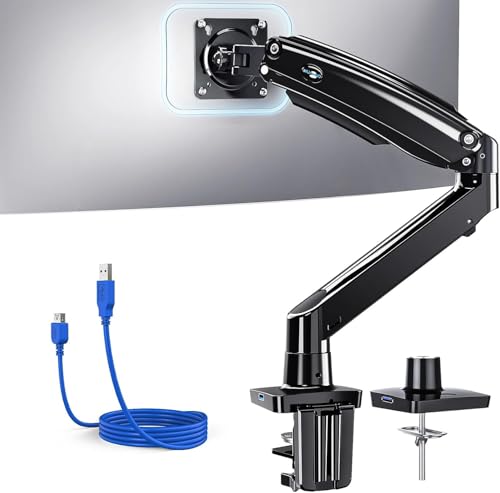
For those seeking an ergonomic and versatile solution for their workspace, the HUANUO Single Monitor Arm accommodates screens ranging from 13 to 49 inches while supporting weights between 4.4 and 26.4 lbs. You’ll appreciate its impressive tilt, swivel, and rotation capabilities, allowing you to customize your viewing angle easily. With a height adjustment of 21.1 inches and a 25.6-inch extension range, it suits various setups, including standing desks. Plus, the built-in USB 3.0 port and integrated cable management help keep your desk organized. Constructed from durable materials, this monitor arm guarantees stability and longevity for your workspace.
Best For: Those looking for an ergonomic and flexible monitor solution for home or office setups, particularly suitable for standing desks and gaming workstations.
Pros:
- Versatile Adjustability: Offers tilt, swivel, and rotation for optimal viewing angles, accommodating various user preferences.
- Space-Saving Design: Integrated cable management and a USB 3.0 port help reclaim desk space and enhance functionality.
- Durable Construction: Made from aerospace-grade aluminum alloy, ensuring stability and longevity even with daily adjustments.
Cons:
- Weight Limitations: Only supports monitors weighing between 4.4 to 26.4 lbs, which may not accommodate heavier screens.
- Installation Complexity: While tools are included, some users may still find the initial setup challenging, especially if unfamiliar with mounting hardware.
- Desk Compatibility: Recommended for solid wood desks without crossbars, which may limit installation options for some users.
Factors to Consider When Choosing a Monitor Arm With USB Hub
When choosing a monitor arm with a USB hub, you need to evaluate several key factors. Start by reviewing your monitor’s size and weight, as well as how adjustable the arm is for your workspace. Don’t forget to look at installation methods and cable management options to keep everything organized.
Monitor Size Compatibility
Choosing the right monitor arm with a USB hub involves understanding how different monitor sizes can impact your setup. Monitor arms typically support a range of sizes, accommodating screens from 13 to 49 inches, whether you’re in a home office or gaming. It’s vital to check the VESA mounting compatibility (75x75mm or 100x100mm) to guarantee your monitor attaches securely. Many arms can handle weights between 24 to 44 lbs, providing stability and safety. If you’re considering an ultrawide monitor, look for arms specifically designed for those larger screens, as they often offer enhanced adjustability. Finally, evaluate the adjustment range—some arms extend from 8.7 to 21.1 inches, allowing for ideal height to reduce neck strain and improve comfort.
Weight Capacity Considerations
Finding the right monitor arm with a USB hub involves more than just compatibility with your monitor’s size; weight capacity plays a pivotal role in ensuring stability and safety. Be sure to select an arm that can hold more than your monitor’s total weight to prevent stability issues. Options typically range from 24 lbs to 44 lbs, with ultrawide models supporting even higher capacities. Consider your specific monitor’s weight, as lightweight models may only need a lower capacity arm, while heavier ones require sturdier supports. Always check the mounting specifications to confirm support, and opt for an arm that’s been rigorously tested for durability, ensuring long-term reliability for your workspace.
Adjustability Features
Adjustability features in a monitor arm with a USB hub can greatly enhance your workspace comfort and efficiency. Look for models that offer height adjustments ranging from 8.7 to 21.1 inches to suit your desk setup. Full motion capabilities are essential, allowing for tilt angles of +85° to -30°, swivel options of ±90°, and 360° rotation for ideal viewing. A maximum arm extension of around 22.4 inches helps you achieve your preferred distance without clutter. Verify the monitor arm supports various monitor sizes, typically from 13 to 49 inches and up to 44 lbs, to confirm compatibility. Finally, integrated cable management features will keep cords organized, maximizing your desktop space and minimizing distractions.
Installation Methods Available
When enhancing your workspace with a monitor arm that includes a USB hub, considering the installation methods available is vital. Monitor arms typically offer C-clamp and grommet mounts, accommodating desk thicknesses from 0.39 to 3.54 inches. C-clamp mounting is straightforward, securing the arm to the desk edge without much tool use. In contrast, grommet mounting requires a drilled hole for a more permanent solution. Some models also feature a quick-release VESA plate, making monitor adjustments or replacements simple. Choosing the right installation method is essential, as it can maximize desk space and guarantee stability. Proper installation is important to support the weight and size of your monitor arm and monitor combination effectively.
Cable Management Solutions
Effective cable management is essential for creating a clean and organized workspace, especially when choosing a monitor arm with a USB hub. Look for monitor arms that integrate cable management solutions, as they can reclaim up to 30% more desk space by neatly routing cables through the arm. Many models feature built-in cable channels or clips, which help organize and conceal wires, preventing clutter and tangling. Some even include additional USB ports within the arm for easy connection of peripherals. This not only enhances aesthetics but also reduces the risk of cable damage and improves workplace safety. Verify the arm you choose can support various desk thicknesses, accommodating surfaces from 0.39 inches to 3.54 inches.
USB Hub Functionality
Choosing a monitor arm with a USB hub can greatly enhance your workspace’s functionality and efficiency. With an integrated USB hub, you can conveniently charge and transfer data between multiple devices without cluttering your desk. Look for models featuring USB 3.0 ports, offering impressive data transfer speeds of up to 5 Gbps, which can save you valuable time when moving files. These built-in ports accommodate a variety of devices, from smartphones to gaming peripherals, increasing your workspace’s versatility. Additionally, monitor arms with USB hubs often incorporate cable management systems, keeping cords organized and minimizing visual clutter. This combination not only maximizes your desk space but also creates a cleaner, more efficient working environment.