Optical media is still useful for installing legacy software, accessing archived files, playing DVDs, and burning music or backups. The best optical disc drives for Windows make those tasks simple without adding a bulky internal drive.
This roundup compares 10 portable external models, focusing on Windows compatibility, connection options, portability, disc-writing capability, and useful extras such as card slots, USB ports, and protective cases.
Best 10 Optical Disc Drives for Windows Picks for 2026
Best Value
Rioddas USB 3.0 External CD/DVD Drive
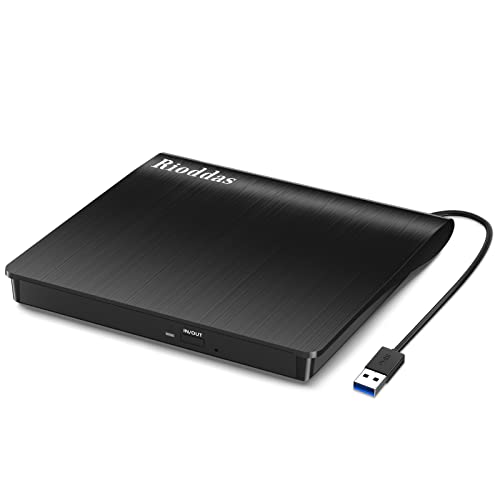
- Plug-and-play USB 3.0 connection
- Reads and writes CDs and DVDs
- Compact design with built-in cable storage
Best For: Everyday Windows disc playback and burning
Best Multifunction Hub

- Adds four USB ports and SD/TF slots
- Includes USB 3.0 and Type-C connectors
- Reads, burns, and rips common CD/DVD formats
Best For: Windows laptops needing disc access and extra connectivity
Best Dual-Interface Pick

- USB-A and USB-C connectivity
- Supports CD/DVD reading and burning
- Slim body with integrated cable
Best For: Portable use across USB-A and USB-C Windows computers
Proven Classic
ROOFULL ECD819-SU3 External Drive

- Established CD/DVD reader and burner
- USB 3.0 with included USB-C adapter
- Supports playback, ripping, and data backup
Best For: Reliable everyday CD/DVD work across older and newer computers
Best USB-C Pick
ASUS ZenDrive V1M External DVD Drive

- Built-in cable storage
- USB-C connectivity
- M-DISC support
Best For: Windows 11 laptop users seeking a portable USB-C DVD writer
Best Budget-Friendly Basic Drive

- USB 3.0 plug and play
- Slim hidden-cable design
- Supports common CD/DVD formats
Best For: Users needing a simple external CD/DVD burner for Windows or macOS
Best All-in-One Hub

- Reads and burns CDs and DVDs
- Adds USB-A, USB-C, and card-reader ports
- Supports Windows, Linux, and Mac
Best For: Windows users needing disc access and extra connectivity
Best Dual-Connector Pick
Slim USB-A and USB-C CD/DVD Drive

- Built-in USB-A and USB-C connectors
- Reads, burns, and rips CDs and DVDs
- Slim, quiet, travel-friendly design
Best For: Users with both USB-A and USB-C computers
Best Simple Portable Drive
USB 3.0 and USB-C CD/DVD Burner

- Plug-and-play CD/DVD reading and burning
- USB 3.0 and USB-C connectivity
- Slim design with error correction and noise reduction
Best For: Laptop owners wanting a basic portable disc drive
Best Value – Rioddas USB 3.0 External CD/DVD Drive
If you need optical disc drives for windows that are simple and portable, the Rioddas external drive is a practical choice. It connects through USB 3.0, supports common CD and DVD formats, and requires no separate driver or power adapter for typical use.
Best For: Windows laptop and desktop users who want straightforward disc reading and burning with a compact, travel-friendly design.
Pros:
- Plug-and-play operation with Windows 11/10/8.1/7 and other listed systems.
- Supports CD/DVD reading and writing at up to 24x CD and 8x DVD speeds.
- Built-in cable storage and a physical eject button improve portability and convenience.
Cons:
- Does not support Blu-ray, 4K discs, ChromeOS, mobile devices, TVs, or vehicles.
- Desktop users may need to connect directly to a rear motherboard USB port for best power.
The Rioddas is a sensible everyday option when you want a basic Windows-compatible optical drive without extra accessories or complicated setup.
Best Multifunction Hub – ROOFULL 8-in-1 CD/DVD Drive
For shoppers seeking optical disc drives for windows with more connectivity, the ROOFULL 8-in-1 model combines a CD/DVD burner with USB ports and SD/TF card slots. Its dual USB 3.0 and Type-C connectors help it work with both newer and older computers.
Best For: Windows users who need an optical drive plus extra ports for peripherals and memory cards.
Pros:
- Combines CD/DVD reading, burning, ripping, USB expansion, and SD/TF card access.
- Includes USB 3.0 and Type-C connectors for broad computer compatibility.
- Supports up to 24x CD and 8x DVD read/write speeds and includes supplemental power support.
Cons:
- Not compatible with Blu-ray or 4K discs, Chromebooks, mobile devices, TVs, vehicles, or consoles.
- DVD playback on Windows 11/10 requires third-party software such as VLC.
- The extra power cable provides supplemental power only, not data transfer.
This is the most versatile pick of the group, especially if your laptop has limited ports and you regularly move files from cards or connect accessories.
Best Dual-Interface Pick – Amicool External DVD Drive
The Amicool external drive is a useful option among optical disc drives for windows if you want both USB-A and USB-C connectivity. Its slim body supports common CD and DVD formats, while built-in error correction and anti-shock features are intended to promote reliable operation.
Best For: Windows users with a mix of USB-A and USB-C computers who want a lightweight drive for home, office, or travel.
Pros:
- Offers USB 3.0 and Type-C interfaces without requiring extra drivers in typical use.
- Supports CD/DVD reading, writing, and burning at up to 24x CD and 8x DVD speeds.
- Slim, portable design includes an integrated cable and pop-up eject button.
Cons:
- Does not support DVD-RAM, Blu-ray, ChromeOS, mobile devices, TVs, or game consoles.
- Direct computer connection is recommended; hubs and extension cables may cause power issues.
- Mac users may need VLC and specific connection steps for reliable playback.
The Amicool balances portability and connection flexibility, making it a strong fit for Windows households that use both traditional USB ports and USB-C laptops.
Proven Classic – ROOFULL ECD819-SU3 External Drive
The ROOFULL ECD819-SU3 is a time-tested choice for optical disc drives for windows, supporting common CD and DVD tasks such as playback, burning, ripping, software installation, and data backup. It connects through USB 3.0 and includes an adapter for USB-C computers.
Best For: Buyers who want an established, broadly compatible drive for regular CD/DVD playback, burning, and archiving.
Pros:
- Supports common CD and DVD formats with up to 24x CD and 8x DVD speeds.
- Plug-and-play operation works with Windows 11/10/8.1/7/Vista/XP and listed Mac and Linux systems.
- Includes a USB 3.0-to-USB-C adapter and built-in cable storage.
Cons:
- Does not support Blu-ray, 4K discs, Chromebooks, phones, tablets, TVs, or vehicles.
- Some Surface models may not be compatible.
- Mac users must use the system’s eject command after a disc is recognized.
With its long-running design, broad computer compatibility, and included USB-C adapter, this ROOFULL model is a dependable all-purpose choice for physical media tasks.
Best USB-C Pick – ASUS ZenDrive V1M External DVD Drive
For shoppers comparing optical disc drives for windows, the ASUS ZenDrive V1M is a compact option designed for newer laptops. Its USB-C connection, built-in cable storage, Windows compatibility, and M-DISC support make it useful for everyday disc access and longer-term data storage.
Best For: Windows 11 laptop users who want a portable USB-C DVD writer with M-DISC support.
Pros:
- Built-in 24 cm cable storage helps prevent cable loss.
- USB-C interface suits many current ultraslim laptops.
- Supports M-DISC for long-term storage of photos, videos, and data.
- Supports Windows and macOS, with Windows-only drag-and-burn software.
Cons:
- DVD write speed is listed at up to 6x.
- Does not offer Blu-ray support according to the supplied specifications.
The ZenDrive V1M stands out when convenient storage and USB-C connectivity matter more than maximum writing speed. A one-year warranty adds useful coverage for a portable everyday drive.
Best All-Around Value – ROOFULL External CD DVD Drive
The ROOFULL ECD829-Y is a practical choice among optical disc drives for windows, combining plug-and-play operation with both USB-A and USB-C connectors. It can read, burn, and rip common CDs and DVDs, while its included case makes transport easier.
Best For: Users who need broad Windows and macOS compatibility, dual connectors, and a protective carrying case.
Pros:
- Built-in USB 3.0 Type-A and Type-C cable supports many computers without an adapter.
- Offers up to 8x DVD and 24x CD read/write speeds as specified.
- Supports disc playback, burning, ripping, software installation, and backups.
- Includes a protective sleeve and a two-year service warranty.
Cons:
- Not compatible with Blu-ray or 4K discs.
- Not designed for Chromebooks, tablets, smartphones, TVs, cars, or gaming consoles.
- Desktop users may need a rear motherboard USB port if power is unstable.
With dual connectors and a broad operating-system range, the ROOFULL is a flexible pick for mixed-device households. Its restrictions are worth checking if you need ChromeOS, Blu-ray, or 4K compatibility.
Best Budget-Friendly Basic Drive – Antika External CD DVD Drive
For straightforward optical disc drives for windows, the Antika external CD/DVD drive focuses on simple USB 3.0 plug-and-play use. Its slim design, hidden cable, and support for common Windows and macOS versions make it suitable for basic playback, burning, and software installation.
Best For: Budget-conscious laptop and desktop users who need a simple external CD/DVD burner.
Pros:
- USB 3.0 provides transfer speeds up to 5 Gbps and works with USB 2.0 and 1.0.
- Plug-and-play operation requires no driver installation or separate power supply in typical use.
- Slim, lightweight, shock-resistant design includes hidden cable storage.
- Supports common CD and DVD formats, including DVD+R, DVD-R, CD-ROM, DVD-ROM, CD-R, and CD-RW.
Cons:
- Not compatible with TVs, tablets, or car audio players.
- A low-power USB port may require an external power source.
- The supplied notes list a shorter 30-day refund/replacement period alongside a one-year warranty description.
The Antika is a sensible basic drive when portability and straightforward disc functions are the priority. Confirm that your computer provides sufficient USB power, especially with older or lightly powered ports.
Best All-in-One Hub – 8-in-1 USB 3.0 Optical Drive
For shoppers comparing optical disc drives for windows, this model stands out by combining CD/DVD reading and burning with extra connectivity. It includes USB-A and USB-C support, a USB 3.0 hub, three USB 2.0 ports, and SD/TF card readers in a portable design.
Best For: Windows laptop users who want an optical drive plus convenient ports for cards and USB accessories.
Pros:
- Reads and writes CDs and DVDs at up to 24x CD and 8x DVD speeds.
- Includes USB 3.0, USB-C, three USB 2.0 ports, and SD/TF card reading.
- Supports Windows 11/10/8/7, Linux, and Mac OS 10.6 or later.
- Portable, plug-and-play design with error correction and anti-slip features.
Cons:
- May need the included extra power cable if a Windows laptop does not provide enough power.
- SD and TF cards cannot be used at the same time.
- Does not support Blu-ray, cars, TVs, tablets, smartphones, or projectors.
This is the most versatile pick of the group if you need more than disc access. Its built-in ports add practical value, though buyers should be prepared to use the extra power connection if recognition problems occur.
Best Dual-Connector Pick – Slim USB-A and USB-C CD/DVD Drive
This external drive is a straightforward choice among optical disc drives for windows, with built-in USB 3.0 and Type-C connectors. It supports reading, burning, and ripping CDs and DVDs while keeping the design slim enough for travel.
Best For: Users who switch between newer USB-C laptops and older USB-A computers without wanting a separate adapter.
Pros:
- Built-in USB-A and USB-C connectors provide up to 5Gbps data transfer.
- Reads, writes, and rips CDs and DVDs at up to 24x CD and 8x DVD speeds.
- Compatible with Windows 11/10/8/7/XP, Linux, and Mac OS, including M1/M2/M3 Macs.
- Ultra-slim design includes an integrated cable, anti-shock construction, and noise reduction.
Cons:
- Does not support Blu-ray or 4K discs.
- Not compatible with TVs, car stereos, projectors, consoles, tablets, or Chromebooks.
- The listing notes that Windows may require driver installation.
Choose this model when connector flexibility is more important than extra hub ports. Its integrated dual-connector design simplifies setup across different computers, while the stated limitations keep it focused on standard CD/DVD use.
Best Simple Portable Drive – USB 3.0 and USB-C CD/DVD Burner
For a compact solution among optical disc drives for windows, this portable CD/DVD drive offers USB 3.0 and USB-C connectivity without requiring drivers for typical plug-and-play use. It handles playback, software installation, backups, and disc burning in a slim enclosure.
Best For: Windows and Mac laptop owners who want a basic, portable CD/DVD reader and burner.
Pros:
- Supports USB 3.0 and USB-C, with backward compatibility to USB 2.0 and earlier USB standards.
- Offers plug-and-play use for playback, burning, installation, and backups.
- Reads and writes supported CDs and DVDs at up to 24x CD and 8x DVD speeds.
- Lightweight design includes an integrated cable, error correction, noise reduction, and a non-slip base.
Cons:
- Does not support Chrome OS, iPads, phones, TVs, cars, projectors, consoles, or Blu-ray/3D/4K discs.
- Windows 11 requires a media player for playback.
- Warranty coverage is listed as six months.
This is a practical everyday option when you want standard optical functionality in a small package. It lacks the extra ports of the first model, but its dual connectivity and simple operating setup make it easy to carry and use.
How We Picked the Best Optical Disc Drives for Windows
We focused on external CD/DVD drives that connect easily to modern Windows laptops and desktops, especially systems without built-in optical hardware. Selection criteria included USB 3.0 support, USB-C compatibility, CD and DVD read/write capability, portability, cable convenience, and the practicality of included features.
Because product names and bundled software can vary by seller, check the current listing for supported operating systems, included cables, region compatibility, and whether writing software is supplied before buying.
Quick Comparison
- Best for basic everyday use: Choose a compact USB 3.0 CD/DVD reader and burner with broad Windows compatibility.
- Best for newer laptops: Pick a model with a USB-C connector or both USB-A and USB-C connections.
- Best for expansion: A hub-style drive with extra USB ports and SD/TF card slots can reduce adapter clutter.
- Best for portability: Look for a slim enclosure, built-in cable storage, or an included protective case.
- Best for media archiving: Confirm that the drive supports DVD±RW writing and the blank-disc formats you plan to use.
Key Buying Factors for Optical Disc Drives for Windows
Connection and Power
USB 3.0 is a dependable choice for Windows computers and usually provides enough bandwidth for external CD/DVD use. USB-C is more convenient on newer laptops, but a USB-C-shaped connector does not guarantee every cable or port configuration will work. If your computer has only USB-C ports, choose a drive with native USB-C support or include a suitable adapter.
Read and Write Support
Most models read CDs and DVDs, but verify the writing specifications if you need to burn discs. DVD±RW support is useful for recording data, music, video, or backups. These drives generally do not read or write Blu-ray discs unless explicitly labeled for Blu-ray.
Compatibility and Software
Windows may recognize the hardware automatically, but DVD playback and disc burning can require compatible software. Check support for your Windows version, particularly Windows 11, and make sure your preferred media application supports the format you use.
Design and Extras
A slim drive is easier to carry, while built-in cable storage helps prevent lost accessories. Hubs with extra USB ports or SD/TF slots are useful at a desk, but they can add size and power demands. A case is worthwhile if the drive will travel frequently.
Who Should Buy Which Optical Disc Drives for Windows?
Students, home users, and occasional disc readers should choose a simple, affordable USB 3.0 model. Owners of USB-C-only laptops should prioritize a native USB-C drive or a dual-connector design. Photographers and users transferring files from memory cards may prefer a hub model with SD/TF slots. Anyone archiving important media should select a reliable DVD writer, use quality blank discs, and keep an additional digital backup rather than relying on one disc copy.