A desk converter can turn a fixed workstation into a more flexible sit-stand setup without replacing your entire desk. The right model gives your laptop a stable, comfortable platform while fitting your available surface and daily workflow.
Our selection includes compact laptop risers, manually adjustable converters, rotating stands, and larger dual-tier designs. Use the guide below to compare sizes, adjustment styles, ergonomics, and value before choosing one.
Best 10 Desk Converters for Laptops Picks for 2026
Compact Pick
VIVO Single Top Standing Desk Converter

- 26.4-inch surface for laptop or single-monitor setups
- Five lockable manual height settings
- Pre-assembled steel design supports 17.6 pounds
Best For: Compact desks and simple laptop workstations
Most Flexible
tounee Telescopic Swivel Laptop Stand

- 2.1- to 18-inch telescoping height range
- 360-degree rotating base for screen sharing
- Foldable aluminum design supports up to 22 pounds
Best For: Portable laptop setups and collaborative work
Best for Dual Displays
VIVO Dual Tier Standing Desk Converter

- 36-inch surface supports single or dual monitors
- Keyboard tray raises with the desktop
- Pneumatic lift adjusts from 6.5 to 17 inches
Best For: Large laptop and multi-monitor workstations
Cooling-Focused Pick
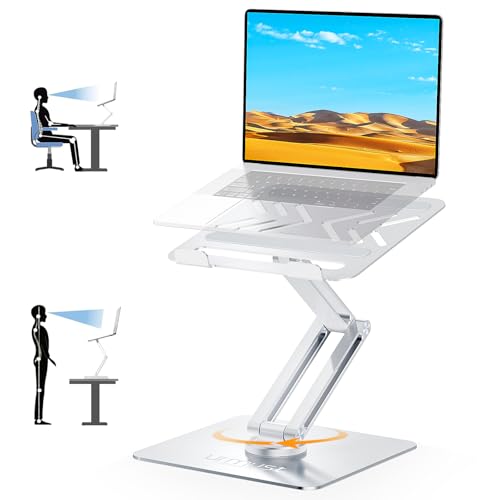
- Fits 10- to 17-inch laptops
- 360-degree rotation supports screen sharing
- Metal dual-pivot base supports up to 22 pounds
Best For: Stable, ventilated laptop use and collaboration
Compact Manual Pick
VIVO 29-inch Standing Desk Converter

- 29.3-by-17.8-inch work surface
- 1.8- to 16.2-inch adjustment range
- Preassembled, 22-pound capacity
Best For: Laptop users with limited desk space
Small-Space Upgrade
Ergotron WorkFit-Z Mini Converter

- 31-by-21-inch work surface
- 12.5-inch straight-up lift
- Keyboard tray and device slot included
Best For: Compact home-office laptop setups
Dual-Monitor Manual Pick
VIVO 32-inch Standing Desk Converter

- 31.5-inch surface for dual monitors
- 33-pound maximum load
- Synchronized keyboard tray
Best For: Larger laptop and dual-monitor workstations
Best with Extra Features
FLEXISPOT 28-Inch Laptop Desk Converter

- Compact 28-inch platform for small desks
- Mechanical spring lift adjusts from 4.9 to 19.6 inches
- Holds up to 33 pounds on the main surface
Best For: Small spaces and single-monitor laptop setups
Best Spacious Pick
VIVO 36-Inch Standing Desk Converter

- 36-inch surface fits a laptop and dual monitors
- Height adjusts from 4.5 to 20 inches
- Main desktop supports up to 33 pounds
Best For: Large multi-device workstations
Best Simple Design
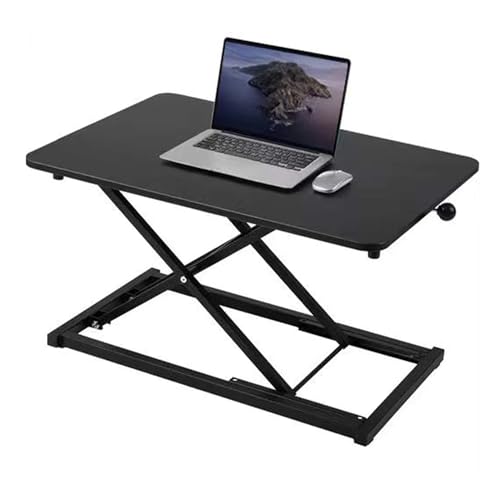
- No-assembly design is ready to use immediately
- Compact 23.6-inch surface for smaller desks
- Manual height range of 2.3 to 16 inches
Best For: Simple laptop-and-keyboard workstations
Compact Pick – VIVO Single Top Standing Desk Converter
For shoppers comparing desk converters for laptops in a smaller workspace, the VIVO Single Top offers a straightforward sit-to-stand setup. Its 26.4-by-18.5-inch surface accommodates a laptop or a single monitor with a full-size keyboard, while five manual height settings make quick adjustments easy.
Best For: Compact laptop workstations and buyers who want a no-assembly converter.
Pros:
- Space-efficient surface suits smaller desks.
- Five lockable height settings adjust from 8.5 to 15.9 inches.
- Steel frame supports up to 17.6 pounds.
- Arrives pre-assembled and includes a three-year warranty.
Cons:
- Single-tier design provides less room than larger dual-tier models.
- Manual adjustment is less convenient than pneumatic lift systems.
The VIVO is a practical choice when desk space and simplicity matter most. It provides a compact laptop standing option without requiring assembly, though its single surface is best suited to focused, relatively light setups.
Most Flexible – tounee Telescopic Swivel Laptop Stand
The tounee telescopic stand is one of the more flexible desk converters for laptops, combining sit-to-stand height adjustment with a 360-degree rotating base. Its compact, foldable design fits 10- to 17-inch laptops and can reposition the screen for collaboration or face-to-face conversations.
Best For: Laptop users who need portability, broad height adjustment, and easy screen sharing.
Pros:
- Adjusts from 2.1 to 18 inches for seated or standing use.
- 360-degree swivel supports convenient screen positioning.
- Heavy aluminum base supports up to 22 pounds.
- Folds for storage and fits laptops from 10 to 17 inches.
Cons:
- It is designed for a laptop rather than a wider keyboard-and-monitor workstation.
- The listing provides a one-year warranty, shorter than some alternatives.
Choose this model if adjustability and movement are more important than a large work surface. The telescoping mechanism and rotating base make it particularly useful for shared desks, meetings, and changing between sitting and standing.
Best for Dual Displays – VIVO Dual Tier Standing Desk Converter
For larger workstations, the VIVO Dual Tier is a strong option among desk converters for laptops. Its 36-by-22-inch surface supports single- or dual-monitor setups, while the separate keyboard tray raises with the main platform to keep the workstation organized during sit-to-stand transitions.
Best For: Dual-monitor laptop workstations and users who want a dedicated keyboard tray.
Pros:
- Spacious 36-inch desktop accommodates laptop and monitor combinations.
- Integrated keyboard tray raises in sync with the top surface.
- Pneumatic lift adjusts from 6.5 to 17 inches.
- Steel construction and a three-year manufacturer warranty add support.
Cons:
- Its 33-pound weight and 36-inch width require substantial desk space.
- Some assembly is required for the keyboard tray and feet.
This converter is better suited to a permanent home-office setup than a compact desk. The broad two-tier layout is its main advantage, especially for users who need room for multiple displays and a full-size keyboard.
Cooling-Focused Pick – 360° Rotating Laptop Stand
This Urmust rotating stand combines height adjustment, 360-degree screen rotation, and an all-metal build for laptop users comparing desk converters for laptops. It fits 10- to 17-inch devices, supports up to 22 pounds, and uses vents to promote airflow around the computer.
Best For: Laptop users who prioritize screen sharing, stability, and ventilation.
Pros:
- Compatible with laptops from 10 to 17 inches.
- 360-degree rotation makes collaborative viewing easier.
- Large metal base and dual pivot joints support up to 22 pounds.
- Vented all-metal construction is designed to improve airflow.
Cons:
- Height and angle adjustments should be made with the device removed.
- Its compact holder format offers less workspace than a full desktop converter.
- The supplied warranty is 12 months.
The Urmust is a focused laptop riser rather than a complete replacement desktop. It makes sense for users who frequently share screens or want a sturdy, ventilated stand, but anyone needing room for peripherals may prefer a larger converter.
Compact Manual Pick – VIVO 29-inch Standing Desk Converter
If you want a straightforward option among desk converters for laptops, this VIVO riser provides a compact 29.3-by-17.8-inch work surface with room for a laptop, monitor, and full-size keyboard. Its manual height adjustment moves from 1.8 to 16.2 inches and requires no assembly.
Best For: Laptop users who want a space-conscious sit-stand converter with a simple manual lift.
Pros:
- Supports up to 22 pounds.
- Adjusts smoothly in one motion with a straight-up lift.
- Compact surface fits varied desk layouts.
- Arrives preassembled and ready to use.
Cons:
- The single top does not include a separate keyboard tray.
- Its 22-pound capacity may be limiting for heavier multi-device setups.
This is a practical choice when desk space and setup simplicity matter most. It offers useful sit-stand flexibility without the footprint or installation work of a larger workstation.
Small-Space Upgrade – Ergotron WorkFit-Z Mini Converter
The Ergotron WorkFit-Z Mini is a compact choice among desk converters for laptops, pairing a 31-by-21-inch work surface with a dedicated keyboard tray. It raises 12.5 inches straight up and down, while the hand-brake lever supports quick, stable adjustments without assembly or clamping.
Best For: Home-office users who want a compact converter with an integrated keyboard tray and device slot.
Pros:
- Supports up to 25 pounds for a laptop or single monitor setup.
- Includes a 24-by-9-inch keyboard and mouse tray.
- Offers no-sway movement with a hand-brake lever.
- Includes an integrated phone and tablet slot.
Cons:
- The 12.5-inch lift range is shorter than some competing converters.
- Its compact design is intended for one monitor or a laptop rather than larger setups.
With its coordinated keyboard tray and stable vertical movement, the WorkFit-Z Mini is well suited to smaller work areas. The two-year warranty and no-assembly design add practical convenience.
Dual-Monitor Manual Pick – VIVO 32-inch Standing Desk Converter
For shoppers comparing desk converters for laptops with more room for accessories, this VIVO model offers a 31.5-by-15.7-inch surface designed to accommodate dual monitors. Its keyboard tray rises with the top, and the manual lift adjusts from about 4.5 to 20 inches with a 33-pound capacity.
Best For: Laptop or monitor users who need a wider workstation and an integrated keyboard tray.
Pros:
- Provides space for dual monitors on its 31.5-inch surface.
- Supports up to 33 pounds.
- Keyboard tray raises in sync with the work surface.
- Backed by a three-year manufacturer warranty.
Cons:
- Requires minimal assembly to attach the keyboard tray.
- The larger footprint needs more desk depth and width.
This model is the stronger fit for a more expansive workstation, especially when a laptop is used alongside multiple displays. Its synchronized tray and broad height range support a more complete sit-stand setup.
Best with Extra Features – FLEXISPOT 28-Inch Laptop Desk Converter
If you need desk converters for laptops in a smaller workspace, this FLEXISPOT riser offers a compact 28-inch platform with a smooth mechanical spring lift. It arrives almost assembled, includes a keyboard tray, and supports up to 33 pounds on the main surface.
Best For: Small home offices, apartments, dorms, and single-monitor or laptop setups.
Pros:
- Compact design suits limited desk space.
- Mechanical spring system provides smooth height adjustment without gas springs.
- Supports up to 33 pounds on the desktop and 11 pounds on the keyboard tray.
- Includes an ergonomic keyboard tray and requires minimal setup.
Cons:
- The 28-inch surface is less spacious than larger converters.
- Its 31-pound weight may make repositioning less convenient.
With a 4.9- to 19.6-inch height range and a reinforced steel frame, this is a practical choice when stability and space efficiency matter more than a large workstation.
Best Spacious Pick – VIVO 36-Inch Standing Desk Converter
Among desk converters for laptops, the VIVO 36-inch model stands out for its broad work surface. Its 36-by-15.7-inch top accommodates a laptop and dual monitors, while the keyboard tray rises with the platform for a coordinated sit-stand setup.
Best For: Users who need room for a laptop, dual monitors, and a wide keyboard area.
Pros:
- Spacious 36-inch surface supports laptop and dual-monitor layouts.
- Adjusts from 4.5 to 20 inches with a smooth lift-assist mechanism.
- Steel frame and 33-pound desktop capacity provide sturdy support.
- Requires only minimal assembly and includes a wide keyboard tray.
Cons:
- Its 36-inch width requires substantial desk space.
- The keyboard tray is rated for 4.4 pounds, less than the main desktop capacity.
This VIVO converter is a strong fit for a full workstation rather than a minimalist desk. The generous surface and three-year warranty add practicality for regular home or office use.
Best Simple Design – 23.6-Inch Manual Laptop Riser
This 23.6-inch converter is a straightforward option for shoppers comparing desk converters for laptops. It needs no assembly, has a scratch- and oil-resistant surface, and uses a manual lift rod with a scissor mechanism to move between seated and standing heights.
Best For: Basic laptop, keyboard, and mouse setups in home offices or writing spaces.
Pros:
- No assembly is required, so it is ready to use out of the box.
- Compact 23.6-by-13.3-inch work surface fits smaller desks.
- Manual lift adjusts from 2.3 to 16 inches.
- Non-slip base and scissor-lift structure are designed for stability.
Cons:
- The smaller surface is not intended for expansive multi-monitor arrangements.
- Manual adjustment may be less convenient than a powered system.
For buyers who want a compact, uncomplicated riser, this model covers the basics without installation. Its modest footprint makes it easier to add standing capability to an existing desk.
How We Picked the Best Desk Converters for Laptops
We focused on the factors that matter most in everyday laptop use: usable surface area, height-adjustment range, stability, portability, keyboard space, and compatibility with different desks and devices. The lineup includes compact models for small home offices, larger converters for full workstation setups, and portable stands for users who move between rooms or locations.
We also considered how easily each design can support a healthier posture. A riser should let you position the screen near eye level while leaving enough room for a separate keyboard and mouse when needed. Manual adjustment, footprint, and weight are especially important because they affect how often you will actually switch between sitting and standing.
Quick Comparison
| Best for | Look for | Ideal design |
|---|---|---|
| Small desks | Compact footprint and low-profile platform | Mini or 23.6- to 28-inch converter |
| Full laptop workstation | Wide surface and keyboard room | 32- to 36-inch converter |
| Frequent repositioning | Light weight and simple adjustment | Portable laptop stand |
| Better viewing angles | Swivel or rotating base | 360-degree rotating stand |
Key Buying Factors for Desk Converters for Laptops
Platform Size and Desk Space
Measure the desk depth and width before buying. A larger top can hold a laptop, keyboard, mouse, and accessories, but it also takes up more room and may leave less space for other work. Compact converters are easier to fit into narrow desks, though they may require the keyboard to sit elsewhere.
Height Range and Adjustment
Choose a converter that raises the laptop high enough to keep your neck neutral while standing. Check the lowest position too, particularly if you alternate frequently between seated and standing work. Manual models are generally straightforward and do not require power, but heavier platforms may take more effort to reposition.
Stability and Weight Capacity
A stable base matters for typing, video calls, and connecting peripherals. Look for a broad footprint, solid construction, and a stated weight capacity that exceeds your laptop and accessories. A dedicated laptop stand may be convenient, but it usually offers less workspace than a full desk riser.
Keyboard Ergonomics and Portability
If you type for long periods, plan to use a separate keyboard and mouse so the screen and input devices can sit at comfortable heights. For mobile work, prioritize a lighter design, a secure device platform, and a compact folded or stored profile.
Who Should Buy Which Desk Converters for Laptops?
Choose a compact converter if you work at a small desk or need to preserve room for writing and other equipment. Choose a wide or dual-tier model if you want a complete laptop workstation with a keyboard, mouse, and monitor or accessories. Choose a rotating laptop stand if you frequently share your screen, change viewing angles, or move between seated and standing positions. Choose a simple manual riser if you want reliable height adjustment without motors, cables, or complicated controls.
Before ordering, compare the converter’s dimensions with your desk, confirm that its platform supports your laptop size, and check whether the adjustment range matches your chair and standing height. The best Desk Converters for Laptops are the ones you can position comfortably and adjust consistently throughout the workday.