Adjustable desk converters make it easier to alternate between sitting and standing without replacing your existing desk. The right model can add useful height range, workspace, monitor support, and stability while fitting your available surface.
We’ve selected 10 desk risers for different needs, from compact home-office setups to corner desks, dual-monitor workstations, and users who prefer electric height adjustment.
Best 10 Adjustable Desk Converters Picks for 2026
Compact Lift
VIVO Manual Height Adjustable Standing Desk Converter

- 31.5-inch surface supports dual monitors
- Adjusts from about 4.5 to 20 inches
- Includes keyboard tray and 3-year warranty
Best For: Compact dual-monitor workstations
Easy Sit-Stand
FITUEYES 32-Inch Standing Desk Converter
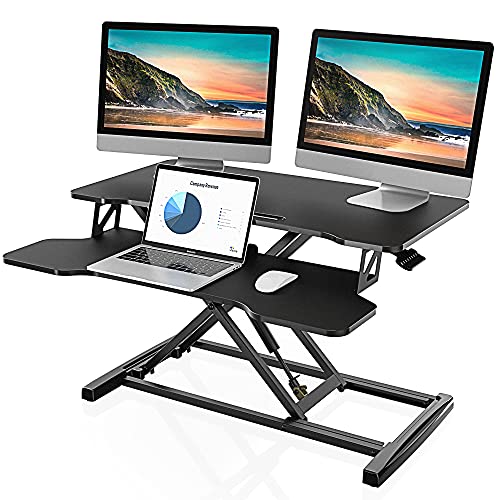
- Fits single, dual-monitor, or laptop setups
- Dual gas springs adjust from 4.3 to 19.8 inches
- Supports up to 33 pounds with keyboard tray
Best For: Flexible home-office monitor setups
Corner Workspace
VIVO Dual Tier Corner Standing Desk Converter

- 43-inch-class surface suits larger setups
- Works on corner or regular desks
- Dual pneumatic lift adjusts from 6 to 17 inches
Best For: Large corner workstations
Stable Spring Lift

- 36-inch surface fits dual monitors
- Mechanical spring lift avoids gas springs
- Top supports 33 pounds; tray supports 11
Best For: Stable dual-monitor home offices
Electric Lift Pick
VIVO 36" White Standing Desk Converter

- Quiet electric height adjustment from 5.7 to 19.5 inches
- 36-inch surface supports dual monitors and a laptop
- 50-pound capacity with minimal assembly
Best For: Users seeking a spacious, motorized workstation
Manual Value Pick
TechOrbits Rise-X Pro 36" Converter

- Manual sit-to-stand workstation design
- 36-inch desktop with keyboard tray
- 35-pound capacity and two-year warranty
Best For: Office or study setups needing a wide manual riser
Dual-Monitor Pick
VIVO 32" Converter with Monitor Stand
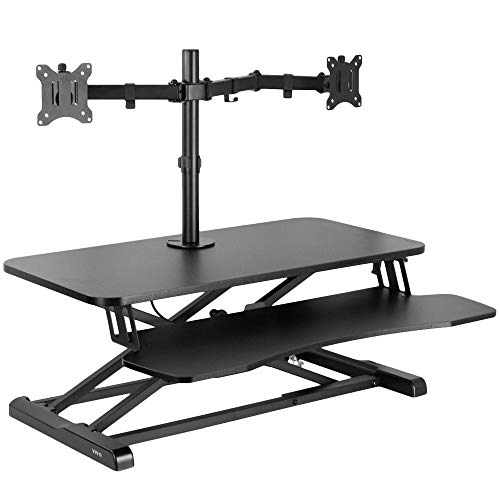
- Integrated mount fits two 13- to 30-inch monitors
- Adjustable tilt, swivel, rotation, and height
- Desktop adjusts from 4.5 to 20 inches
Best For: Dual-monitor workstations needing integrated screen support
Compact White Pick
VIVO 29-inch Manual Desk Converter

- Compact 29.3-inch work surface
- 1.8- to 16.2-inch height range
- Preassembled, 22-pound capacity
Best For: Small desks and minimalist workstations
Flexible Dual-Monitor Pick
VIVO 28-inch Black Desk Converter

- Pneumatic 4.9- to 17.2-inch adjustment
- Synchronized keyboard tray
- Supports up to 28.6 pounds
Best For: Lift-assisted office setups and monitor arrangements
Best Simple Pick
VIVO 38-inch Manual Desk Converter

- 37.5-inch-wide work surface
- 4.3- to 20-inch height range
- 33-pound desktop capacity
Best For: Corner desks and dual-monitor workstations
Compact Lift – VIVO Manual Height Adjustable Standing Desk Converter
If you want a straightforward way to add standing to an existing desk, this VIVO converter is a practical option among adjustable desk converters. Its 31.5-inch surface accommodates dual monitors, while the synchronized keyboard tray helps keep your controls at a comfortable height.
Best For: Users who need a compact dual-monitor riser with simple manual height adjustment.
Pros:
- 31.5-by-15.7-inch work surface fits dual-monitor setups.
- Height adjusts from approximately 4.5 to 20 inches with lift assistance.
- Includes a wide keyboard tray and requires minimal assembly.
- Steel construction supports up to 33 pounds and includes a 3-year manufacturer warranty.
Cons:
- The 33-pound capacity may limit heavier equipment arrangements.
- Its manual lift design requires user adjustment rather than powered operation.
This is a balanced choice when you want a relatively compact workstation that can move between sitting and standing without replacing your desk. Check your desk depth and monitor setup before buying.
Easy Sit-Stand – FITUEYES 32-Inch Standing Desk Converter
The FITUEYES 32-inch converter gives an existing desk a broad sit-stand workspace without a complicated installation. As adjustable desk converters go, it offers a useful combination of dual gas-spring assistance, a keyboard tray, and room for either a single monitor, dual monitors, or a laptop-and-monitor setup.
Best For: Home-office users seeking a spacious, easy-to-adjust converter for flexible monitor configurations.
Pros:
- 31.5-by-15.7-inch top supports single- or dual-monitor setups.
- Dual gas springs provide smooth height adjustment from about 4.3 to 19.8 inches.
- Supports up to 33 pounds and includes a keyboard tray.
- Powder-coated metal construction gives the base a sturdy finish.
Cons:
- The 33-pound load capacity may not suit especially heavy equipment.
- Its listed dimensions require a desk with sufficient depth and clearance.
Choose this model if you value a generous working surface and assisted manual adjustment. It is particularly suited to users who regularly switch between different monitor and laptop arrangements.
Corner Workspace – VIVO Dual Tier Corner Standing Desk Converter
Designed for more expansive workstations, this VIVO model brings a dual-tier layout and corner-friendly shape to the adjustable desk converters category. Its 43.3-by-28.3-inch surface leaves room for monitors, a laptop, and accessories, while the raised keyboard tray moves with the main platform.
Best For: Users who need a large corner or regular-desk workstation for monitor-heavy setups.
Pros:
- Large 43-inch-class surface accommodates single- or dual-monitor and laptop setups.
- Works on both corner desks and regular desk arrangements.
- Dual pneumatic spring assistance adjusts from 6 to 17 inches.
- Includes a wide keyboard tray and requires minimal assembly.
Cons:
- The larger footprint and 39.2-pound weight require substantial desk space.
- Its 33-pound capacity may be restrictive for unusually heavy equipment.
- The adjustment range is narrower than some smaller converters.
This is the strongest fit for buyers prioritizing workspace over compactness. Its corner-compatible design can make better use of a large desk, but measure carefully before committing to its substantial footprint.
Stable Spring Lift – FLEXISPOT 36-Inch Desk Riser
The FLEXISPOT 36-inch riser is built for users who want a roomy dual-monitor workstation with a mechanical spring lift system. Among adjustable desk converters, it stands out for its reinforced steel frame, a separate keyboard tray, and a design intended to avoid the air-leakage concerns associated with gas springs.
Best For: Professionals who want a stable 36-inch converter for dual monitors and accessories.
Pros:
- 36-inch surface provides room for dual monitors and accessories.
- Mechanical spring system is designed for smooth, stable adjustment without gas springs.
- Reinforced steel frame supports up to 33 pounds on top.
- Keyboard tray supports up to 11 pounds and setup requires only limited assembly.
Cons:
- The 34.5-pound unit is heavier than many compact risers.
- Its broad 36-inch design needs adequate desk width and depth.
- The supplied notes do not specify a numerical height-adjustment range.
Consider this model if stability and a larger dual-monitor surface matter more than portability. Its mechanical spring approach and reinforced frame make it a practical candidate for frequent home-office use.
Electric Lift Pick – VIVO 36" White Standing Desk Converter
Among adjustable desk converters, the VIVO Electric Standing Desk Converter stands out for effortless sit-to-stand transitions. Its spacious 36-inch surface accommodates a dual-monitor and laptop setup, while the synchronized keyboard tray keeps the workstation together as it rises.
Best For: Users who want motorized height adjustment, a wide work surface, and substantial weight capacity.
Pros:
- Quiet electric lift adjusts from 5.7 to 19.5 inches.
- Supports up to 50 pounds.
- 36-inch desktop provides room for dual monitors and a laptop.
- Requires very minimal assembly.
Cons:
- At 34.6 pounds, it is relatively heavy to reposition.
- The electric design requires access to power.
This is a practical choice if convenience matters more than portability. The electric lift and generous capacity make it well suited to a fully equipped office workstation.
Manual Value Pick – TechOrbits Rise-X Pro 36" Converter
The TechOrbits Rise-X Pro is one of the adjustable desk converters to consider when you want a broad work area without an electric motor. Its manual sit-to-stand design doubles as a workstation and is suited to offices, study rooms, and other space-conscious setups.
Best For: Shoppers who prefer a manual converter with a large desktop and dual-monitor support.
Pros:
- 36-inch desktop offers room for a dual-monitor setup.
- Manual height adjustment supports sitting and standing.
- Can serve as both a desk riser and workstation.
- Includes a keyboard tray and has a two-year manufacturer warranty.
Cons:
- Supports up to 35 pounds, less than the electric VIVO model.
- Simple assembly is required.
- Manual adjustment is less convenient than a motorized lift.
The Rise-X Pro is a straightforward option for buyers who do not need powered adjustment. Its wide engineered-wood surface makes it useful for expanding an existing desk or creating a flexible study workstation.
Dual-Monitor Pick – VIVO 32" Converter with Monitor Stand
For adjustable desk converters with built-in screen support, the VIVO 32-inch model combines a height-adjustable desktop with a dual-monitor stand. The arms fit two 13- to 30-inch monitors and offer tilt, swivel, rotation, and height adjustment for more flexible positioning.
Best For: Dual-monitor users who want integrated screen mounting and flexible viewing angles.
Pros:
- Dual monitor mount supports two screens up to 17.6 pounds each.
- Monitor arms provide tilt, swivel, rotation, and height adjustment.
- Desktop height adjusts from 4.5 to 20 inches.
- Includes a wide keyboard tray and sturdy steel frame.
Cons:
- The 31.5-inch surface is smaller than the 36-inch alternatives.
- Monitor compatibility depends on VESA 75x75mm or 100x100mm patterns.
- Assembly is still required for the tray, arms, and screens.
This model is particularly compelling for a two-screen office setup. Its integrated monitor mount saves the need for a separate stand while allowing portrait or landscape monitor orientation.
Compact White Pick – VIVO 29-inch Manual Desk Converter
This compact option is a practical choice among adjustable desk converters for smaller workspaces. Its single 29.3-inch surface supports a laptop or monitor setup, while the manual lift moves from 1.8 to 16.2 inches without requiring assembly.
Best For: Small desks, minimalist workstations, and users who want a ready-to-use white riser.
Pros:
- Preassembled and ready to use out of the box.
- Compact 29.3-by-17.8-inch surface still accommodates a full-sized keyboard.
- Simple-touch height locking mechanism lifts straight upward with minimal wobbling.
- Supports up to 22 pounds and includes a three-year warranty.
Cons:
- Its 22-pound capacity is lower than the other converters in this roundup.
- The single-top design does not include a separate keyboard tray.
This VIVO riser emphasizes a low-profile footprint and simple setup. It is a sensible fit when desk space and a clean white appearance matter more than maximum load capacity or expanded surface area.
Flexible Dual-Monitor Pick – VIVO 28-inch Black Desk Converter
For shoppers comparing adjustable desk converters, this 28-inch VIVO model adds a pneumatic lift and synchronized keyboard tray. Its steel frame supports up to 28.6 pounds, making it suitable for a laptop-and-monitor arrangement or a compatible dual-monitor setup.
Best For: Users who want lift assistance, a raised keyboard tray, and more capacity in a moderately sized converter.
Pros:
- Pneumatic spring lift adjusts from 4.9 to 17.2 inches.
- Keyboard tray raises in sync with the desktop.
- Steel frame supports up to 28.6 pounds.
- Requires only minimal assembly: attach the keyboard tray and place it on the desk.
Cons:
- The 27.6-by-15.8-inch surface is smaller than the corner model’s work area.
- It is not completely assembly-free.
The lift-assist design makes frequent sitting-to-standing transitions easier, while the integrated tray keeps the keyboard aligned with the desktop. Consider it a balanced middle option for everyday office setups.
Best Simple Pick – VIVO 38-inch Manual Desk Converter
This wide VIVO model stands out among adjustable desk converters for corner desks and equipment-heavy setups. Its 37.5-by-18-inch top provides room for dual monitors, a laptop, and office supplies, while the pneumatic lift adjusts from 4.3 to 20 inches.
Best For: Corner desks, dual-monitor users, and anyone needing a large standing workstation surface.
Pros:
- Spacious 38-inch desktop accommodates dual monitors, laptops, and accessories.
- Wide 37-by-12-inch keyboard tray raises with the desktop.
- Desktop supports up to 33 pounds, with an additional 4.4-pound keyboard-tray capacity.
- Three-year warranty and minimal assembly.
Cons:
- Its wide footprint requires more desk space than the other models.
- The larger design is specifically suited to corner or spacious work areas.
This is the strongest choice when workspace capacity is the priority. The broad surface and higher maximum height offer flexibility, but measure your existing desk carefully before choosing this larger converter.
How We Picked These Adjustable Desk Converters
We focused on practical differences that matter during everyday work: desktop width and depth, lifting method, stated height adjustability, monitor capacity, footprint, and overall workspace compatibility. The selection includes manual and electric models, single- and dual-tier designs, corner converters, and options with built-in monitor stands.
Because desk layouts and equipment vary, no single converter is best for everyone. A compact 28- or 29-inch model may suit a small desk, while a 36-inch or wider surface offers more room for a keyboard, mouse, laptop, and monitor. Corner models can use otherwise wasted space, but they require a compatible desk shape.
Quick Comparison
| Best For | Recommended Type | What to Look For |
|---|---|---|
| Small workspaces | 28- or 29-inch converter | Compact footprint and sufficient keyboard space |
| Single-monitor setups | 32-inch standard riser | Stable platform and comfortable standing height |
| Multiple monitors | Dual-monitor model | Monitor support, weight capacity, and cable clearance |
| Corner desks | Corner converter | Compatible shape and adequate rear clearance |
| Large workstations | 36-inch or wider converter | Room for peripherals and a larger desktop surface |
| Convenient height changes | Electric converter | Powered adjustment and accessible controls |
Key Buying Factors for Adjustable Desk Converters
Size and Usable Surface
Measure the desk before buying, including rear wall clearance and the space needed for cables. Check the usable top dimensions rather than relying only on the advertised width. Your keyboard should sit comfortably without forcing your wrists against the front edge.
Height Range and Ergonomics
The converter should raise the monitor so the top of the screen is near eye level and let your elbows remain around a relaxed 90-degree angle. Consider your seated desk height, standing height, and monitor size. A converter that reaches high enough for one user may be too low or too tall for another.
Manual Versus Electric Adjustment
Manual models generally avoid power requirements and can be cost-effective, but they may require more effort to reposition. Electric converters are easier to adjust frequently, although they need an outlet and may add motor noise, weight, and cost.
Stability, Capacity, and Monitor Support
Look for a sturdy base, smooth movement, and a rated load capacity that exceeds the combined weight of your monitor, laptop, keyboard, and accessories. If you use monitor arms or a built-in stand, verify compatibility and keep heavy equipment centered.
Who Should Buy Which Adjustable Desk Converters?
Choose a compact VIVO model if desk space is limited. Pick a 32-inch standard converter for a balanced single-monitor home office. A 36-inch FLEXISPOT, VIVO, or TechOrbits model is better when you need room for larger peripherals. For convenience, the electric VIVO is the most natural fit for frequent sit-to-stand changes. Dual-monitor users should prioritize the VIVO model with a monitor stand, while corner-desk owners should choose a compatible VIVO corner design. Before ordering, confirm dimensions, height range, weight limits, and return coverage against your equipment and desk.