Remote access is easier when you can control a desktop’s keyboard, video, and mouse before the operating system loads. The best KVM over IP switches for desktops provide that level of access through a local network or secure remote connection.
We compare 10 standout options for home labs, small offices, IT administration, and workstation support, with attention to video resolution, BIOS access, port count, networking, and installation requirements.
Best 10 Kvm Over Ip Switches for Desktops Picks for 2026
Best Wireless Desktop Pick
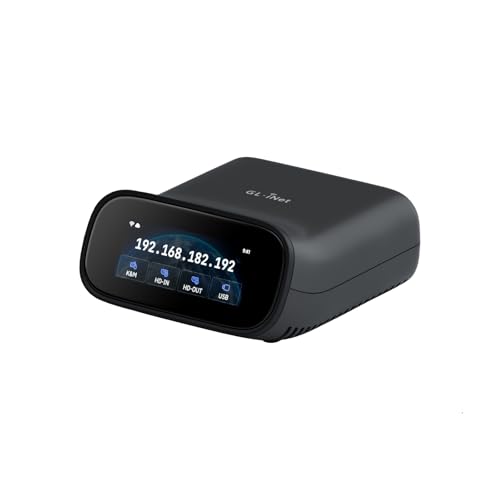
- Wi-Fi 6 and wired connectivity
- 4K@30Hz passthrough with two-way audio
- Browser, app, and self-hosted access
Best For: Home labs and offices needing flexible remote desktop access
Best Open-Source Option

- 1080p@60FPS with 30–60ms latency
- Browser, cloud, and Wake on LAN access
- Linux-based open-source platform
Best For: Developers and IT users needing customizable remote recovery
Best Multi-Computer Rack Unit

- Controls up to four host systems
- PoE with USB-C backup power
- 4K@30Hz loop-out and rack brackets
Best For: Home labs and IT racks managing multiple computers
Best Long-Distance Extender

- Up to 120m over Cat5e
- 4K@30Hz HDMI and USB extension
- Supports up to 16 paired sets
Best For: Remote workstations and control rooms needing long cable runs
Best Overall Remote Access
GL.iNet Comet GL-RM1 Remote KVM

- BIOS-level remote control without host software
- 4K video at 30Hz with hardware encoding
- File transfer, audio, and remote power features
Best For: IT support, remote work, and smart-home desktop management
Best for Everyday Use

- 1080p60 streaming with 30–60ms stated latency
- LAN, WebRTC, and Wake-on-LAN access
- Open-source firmware with SSH customization
Best For: Home labs and technical users seeking customizable remote KVM access
Best for 4K Network Extension
OREI 4K HDMI KVM Extender Over IP

- Extends 4K60 HDMI and USB up to 400 feet
- Supports point-to-point or one-to-many setups
- Includes keyboard/mouse KVM and HDMI loop-out
Best For: Offices and control rooms needing high-resolution Cat6 extension
Rack-Ready Remote Management
NetCommander 8-Port KVM Over IP

- Simultaneous local and remote access
- 1U CAT5 rackmount design
- Cascades to control up to 128 servers
Best For: Expandable small-business and server-room management
Open-Source Desktop Access

- Open-source software
- HDMI and USB connectivity
- Compact 12-ounce design with included microSD card
Best For: DIY desktop and lightweight remote-management setups
4K DisplayPort Control
ATEN CN9950 4K DisplayPort KVM

- 4K DCI video at 30Hz
- FPGA graphics processor
- Dual LAN and dual power for backup
Best For: Single-PC or server 4K remote management
Best Wireless Desktop Pick – Comet Pro Remote KVM
The GL.iNet GL-RM10 Comet Pro is a flexible choice among kvm over ip switches for desktops when you want wireless connectivity without giving up wired networking. It supports 4K passthrough at 30Hz, two-way audio, browser-based access, and remote BIOS or operating-system recovery.
Best For: Home labs, offices, and desktop users who want Wi-Fi 6 access with optional wired, app, or self-hosted control.
Pros:
- Dual-band Wi-Fi 6 plus wired connectivity provides flexible installation options.
- 4K@30Hz passthrough and two-way audio support remote work and troubleshooting.
- Built-in Tailscale and self-hosted cloud options support privacy-conscious deployments.
- Remote recovery features can provide BIOS access and OS reinstallation capabilities.
Cons:
- ATX power control and Fingerbot functionality require separately sold extensions.
- Its 4K passthrough is limited to 30Hz.
The Comet Pro is a compact, feature-rich desktop KVM for users who value flexible network access and recovery tools. Its touchscreen and broad client support make setup approachable, while the optional self-hosted approach suits more technical environments.
Best Open-Source Option – JetKVM IP KVM
JetKVM is a practical pick among kvm over ip switches for desktops, connecting through HDMI and USB-C before presenting a browser-based remote console over Ethernet. It combines 1080p at 60FPS, low-latency H.264 streaming, Wake on LAN, and optional cloud access.
Best For: Developers, IT users, and desktop owners who want an open-source KVM with remote recovery and expansion options.
Pros:
- Simple HDMI and USB-C installation with browser-based local access.
- 1080p@60FPS video and stated 30–60ms latency support responsive control.
- Open-source Linux foundation allows customization and SSH-based software updates.
- Expansion support includes ATX power, DC power, RS-232, and other potential add-ons.
Cons:
- Video output is specified at 1080p@60FPS rather than 4K.
- Cloud access is optional and depends on enabling the JetKVM Cloud service.
JetKVM stands out for its approachable setup and tinkerer-friendly design. It is especially useful when remote access must extend beyond normal desktop software, such as recovering a crashed or non-booting computer.
Best Multi-Computer Rack Unit – Comet X Quad-Port KVM
The GL.iNet Comet X is a strong multi-system choice among kvm over ip switches for desktops, with four HDMI inputs and four dedicated USB-C device ports. PoE, 4K@30Hz HDMI loop-out, touchscreen control, HTTPS browser access, and included rack brackets make it suited to organized lab or IT installations.
Best For: Home labs, IT professionals, and rack environments managing up to four host systems.
Pros:
- Four-host switching supports centralized control of multiple computers.
- PoE reduces cabling, with 5V USB-C available as a backup power input.
- 4K@30Hz HDMI loop-out enables local display and remote access simultaneously.
- Included 10-inch and 19-inch rack brackets simplify installation.
Cons:
- 4K loop-out is limited to 30Hz.
- The feature set and rack-oriented design may be more than needed for a single desktop.
Comet X is the most scalable option in this group for users who need to switch between several computers. Its touchscreen, local controls, onboard 64GB eMMC, and rack hardware make it particularly practical for permanent technical installations.
Best Long-Distance Extender – AV Access 4K IP KVM
The AV Access 4K HDMI USB KVM Extender is designed for situations where a desktop, server, or console must be controlled from a distant display. It sends HDMI, audio, and USB signals over Cat5e or better cabling, while its TCP/IP setup can use an existing Ethernet network.
Best For: Distributed workstations, control rooms, server rooms, and desktop setups requiring long cable runs.
Pros:
- Extends 4K@30Hz signals up to 120m over Cat5e and up to 150m over Cat6/6A/7.
- USB 2.0 KVM support provides keyboard, mouse, and peripheral control at the receiver.
- Works without drivers on Windows, macOS, and Linux.
- Up to 16 extender sets can be paired using the DIP-switch design.
Cons:
- This is an extender system with transmitter and receiver requirements, not a compact single-box remote KVM.
- 4K operation is limited to 30Hz.
- Installation requires suitable Ethernet cabling and network infrastructure for longer runs.
Choose this AV Access system when distance and physical separation matter more than app-based remote administration. Its high-resolution support, USB peripherals, and compatibility with existing IP infrastructure make it a practical fit for centralized equipment rooms and remote desktop stations.
Best Overall Remote Access – GL.iNet Comet GL-RM1 Remote KVM
For shoppers comparing kvm over ip switches for desktops, the GL.iNet Comet GL-RM1 is a compact hardware KVM built for remote access beyond the operating system. It provides browser/app-based control with BIOS-level access, 4K video at 30Hz, file transfer, and remote audio without requiring software on the controlled computer.
Best For: IT professionals, remote workers, and smart-home users who need BIOS-level access to desktops, laptops, or servers.
Pros:
- Supports remote rebooting, OS installation through BIOS, and power-on control.
- Delivers up to 3840×2160 at 30Hz with low-latency hardware H.264 encoding.
- Works without additional software on the host computer and includes file transfer.
- Supports remote audio and Ethernet connectivity.
Cons:
- Video is limited to 30Hz at 4K.
- PD adapters cannot be used.
- The supplied details list one USB port.
The GL-RM1 is a strong choice when desktop remote management matters more than multi-machine switching. Its BIOS access and software-free host setup make it especially useful for maintenance and troubleshooting, while the small enclosure suits space-constrained setups.
Best for Everyday Use – JetKVM IP KVM
The JetKVM is a practical pick among kvm over ip switches for desktops when you want browser-based access, open-source firmware, and straightforward installation. It streams 1080p at 60fps, supports keyboard and mouse control, and offers LAN, WebRTC cloud, and Wake-on-LAN access options.
Best For: Home labs, small businesses, and technical users who want open-source remote KVM access for PCs and servers.
Pros:
- Sets up through HDMI, USB-C, and Ethernet without drivers or extra host software.
- Provides 1080p at 60fps H.264 streaming with stated 30–60ms latency.
- Offers LAN browser access, optional WebRTC cloud access, and Wake-on-LAN.
- Open-source Linux/Golang firmware supports SSH customization.
Cons:
- The non-PoE version cannot control a fully powered-off host by itself.
- ATX or DC power-control modules are sold separately for full power control.
- HDMI carries video only; audio is not transferred.
JetKVM balances responsive remote control with customization potential. It is well suited to troubleshooting and BIOS-level rescue, but buyers needing dependable off-state power management should budget for the optional hardware modules.
Best for 4K Network Extension – OREI 4K HDMI KVM Extender Over IP
The OREI EX-500-KVM takes a different approach to kvm over ip switches for desktops by extending HDMI and USB over Cat6 rather than providing internet-focused remote management. It supports 4K at 60Hz over distances up to 400 feet and can operate point-to-point or across a 1G network switch for one-to-many distribution.
Best For: Offices, control rooms, and installations that need high-resolution desktop access from a remote location over Cat6.
Pros:
- Supports 4K 4:4:4 at 60Hz over up to 400 feet using Cat6.
- Includes two USB 1.1 ports for keyboard and mouse KVM control.
- Supports point-to-point and one-to-many configurations through a 1G network switch.
- Provides HDMI loop-out, IR control, automatic EDID/DDC management, and HDCP 2.2.
Cons:
- A 1G network switch is required for one-to-many operation and is sold separately.
- High-quality shielded Cat6 cable is required; flat cables should not be used.
- This is an extender kit, not a standalone internet-access KVM appliance.
The EX-500-KVM is the better fit for reliable, high-bandwidth local or campus-style extension rather than cloud-based desktop administration. Its 4K60 support and USB control are compelling, provided the installation can accommodate dedicated cabling and network hardware.
Rack-Ready Remote Management – NetCommander 8-Port KVM Over IP
For buyers comparing kvm over ip switches for desktops, the Tripp Lite NetCommander is a rackmount-focused option for managing up to eight connected PCs or servers. Its CAT5 cabling, local and remote access, IPv4/IPv6 support, and multiple control methods make it suited to organized server-room deployments.
Best For: Small server rooms and businesses that need simultaneous local and remote access with room to expand.
Pros:
- Supports one local and one remote user simultaneously.
- CAT5 connectivity helps reduce cable clutter, while the 1U design saves rack space.
- Can cascade a second KVM level to control up to 128 servers.
- Includes remote authentication support through RADIUS and LDAP/S, plus IPv4 and IPv6 compatibility.
Cons:
- Its 8-port rackmount design may be more equipment than a simple desktop setup requires.
- Remote control uses a Java-based web application.
- The supplied warranty description specifies two years, despite a three-year availability reference in the product title.
This is a practical choice when centralized rack management, expansion, and layered access controls matter more than a compact standalone form factor.
Open-Source Desktop Access – JetKVM HDMI KVM Over IP
For a lightweight approach to kvm over ip switches for desktops, this open-source device provides HDMI and USB connectivity in a compact package. It supports free and optional remote access, includes a microSD card, and is designed around ultra-low-latency remote server management.
Best For: DIY users and desktop-focused setups that value open-source software and a small footprint.
Pros:
- Uses open-source software.
- Offers free and optional remote access.
- Provides HDMI and USB connectivity with ultra-low latency.
- Includes a microSD card and supports optional PoE.
Cons:
- This version is identified as non-PoE, so PoE is not included as standard.
- The supplied notes do not specify the supported video resolution or number of managed ports.
- Its compact feature set may be less suited to larger rack deployments.
JetKVM stands out as a small, flexible option for users who want open-source control and remote access without committing to a larger multi-port rack appliance.
4K DisplayPort Control – ATEN CN9950 4K DisplayPort KVM
ATEN 1-Local/Remote Share Access Single Port 4K DisplayPort KVM Over IP Switch
Check Price On AmazonFor buyers seeking kvm over ip switches for desktops with higher-resolution video, the ATEN CN9950 combines DisplayPort connectivity with local and remote sharing. It supports 4K DCI at 30Hz, uses an FPGA graphics processor, and adds redundant power and network connections for more resilient deployments.
Best For: Professional PC or server control where 4K DisplayPort video and connection redundancy are priorities.
Pros:
- Supports DisplayPort resolutions up to 4096 × 2160 at 30Hz at both consoles.
- FPGA graphics processing is intended to improve image quality and frame throughput.
- Dual power supply and dual LAN connections provide backup options.
- Includes a 5-pin relay/DI terminal for environmental monitoring and reboot control.
Cons:
- It is a single-port KVM, limiting direct expansion compared with multi-port switches.
- 4K operation is specified at 30Hz.
- Its 3.4-pound, 12.75-inch-long enclosure may require more space than compact desktop units.
The CN9950 is a strong fit for single-system environments that need detailed DisplayPort video, remote access, and hardware redundancy rather than high port density.
How We Picked the Best Kvm Over Ip Switches for Desktops
We evaluated these systems by looking at the features that matter during real remote-management tasks: reliable keyboard and mouse control, video quality, BIOS-level access, network connectivity, setup complexity, and compatibility with common desktop hardware. We also considered whether each product is designed for one computer, several computers, or longer-distance extension over structured cabling.
The selection includes compact devices for individual PCs and home labs, multi-port rackmount hardware for administrators, and KVM extenders that use Cat5e or better cable. Open-source and Tailscale-compatible options are included for buyers who prioritize flexibility and remote networking.
Quick Comparison
| Best For | What to Look For |
|---|---|
| One desktop or home lab | Compact IP KVM with HDMI, USB, and simple network setup |
| Multiple computers | Multi-port KVM with user permissions and centralized switching |
| High-resolution displays | 4K support at the refresh rate your workflow requires |
| Long cable runs | Cat5e/6/6a/7 extension support and stated distance limits |
| Advanced remote access | BIOS control, secure tunneling, IPv6, or open-source software |
Key Buying Factors for Kvm Over Ip Switches for Desktops
Video Resolution and Refresh Rate
“4K” does not always mean 4K at 60Hz. Some devices support 4K at 30Hz, while others are intended for 4K gaming, design, or smooth desktop motion at 60Hz. Check the input and output standards, HDCP support, and whether video passthrough is available.
BIOS and Pre-Boot Control
For troubleshooting, reinstalling an operating system, or changing firmware settings, the switch must work before the computer finishes booting. Confirm that it offers true keyboard and mouse emulation and BIOS-level access rather than software-only remote desktop control.
Port Count and Switching
A single-port unit is usually simpler and less expensive for one workstation. Choose a multi-port model when several systems share a monitor, keyboard, and mouse, or when centralized access matters more than compact size.
Network, Security, and Installation
Review Ethernet speed, IPv4/IPv6 support, remote-access methods, authentication, and whether the device requires port forwarding. For a direct cable extension, verify the supported cable category, maximum distance, USB behavior, and power requirements. Non-PoE models may need a nearby power adapter.
Who Should Buy Which Kvm Over Ip Switches for Desktops?
Home-lab users and individual desktop owners should favor compact IP KVMs with straightforward HDMI and USB connections. IT professionals managing several systems will benefit from a multi-port rackmount switch with simultaneous local and remote access. Users moving video over existing cabling should consider a dedicated KVM extender and confirm distance and resolution limits. Open-source and privacy-focused buyers may prefer devices offering community-supported software or secure overlay networking. Finally, creative professionals and high-resolution users should prioritize DisplayPort or HDMI 4K support at the desired refresh rate rather than choosing solely by the headline resolution.