Vertical mice can reduce wrist rotation while adding gaming-focused controls, but the right design depends on your grip, hand size, game type, and tolerance for a steeper learning curve.
We compared these 10 models across ergonomics, button layouts, sensor specifications, connectivity, and everyday usability to help you find a comfortable gaming mouse that matches your setup.
Best 10 Vertical Mice for Gaming Picks for 2026
Most Versatile Gaming Pick
5D Rocker Tri-Mode Vertical Mouse

- 5D thumb rocker replaces five directional inputs
- 12 programmable buttons and up to 24,000 DPI
- Bluetooth, 2.4GHz wireless, and wired modes
Best For: Gamers wanting maximum controls and connection flexibility
Best Rocker Alternative
Wireless 5D Rocker Vertical Mouse

- Thumb rocker functions as five directional keys
- 11 programmable buttons with macro support
- 24,000 DPI sensor and three connection modes
Best For: Right-handed players who want extra directional controls
Best Quiet Everyday Option
UGREEN Ergonomic Wireless Mouse

- Quiet clicks and smooth PTFE glide feet
- Bluetooth and 2.4GHz wireless for up to three devices
- 4,000 DPI with a simple five-button layout
Best For: Quiet workspaces and casual gaming
Most Customizable
SOLAKAKA E9 Vertical MMO Mouse

- 45° upright ergonomic design
- 10 remappable thumb buttons
- 2.4G, Bluetooth, and USB-C modes
Best For: MMO players and shortcut-heavy workflows
Best for Wrist-Focused Comfort

- 57° vertical handshake position
- Ergonomist-approved right-handed design
- Wireless battery life rated up to four months
Best For: Comfort-focused work and lighter gaming
Best Wired MMO Value
Redragon M811 MMO Gaming Mouse

- 15 programmable buttons
- Wired USB connection
- Up to 12,400 DPI through software
Best For: Button-heavy MMO gaming at a desk
Best Compact Ergonomic Pick

- Fits hands under 7.5 inches
- Connects to up to three devices
- Rechargeable with quiet primary clicks
Best For: Small- to medium-handed users seeking comfort for work and casual gaming
Best Programmable Wired Pick
Zelotes C-18 Vertical Gaming Mouse
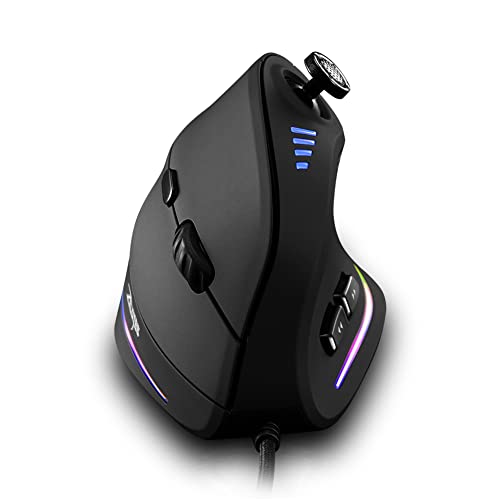
- 11 programmable buttons
- Five-direction thumb joystick
- Wired USB with up to 10,000 DPI
Best For: PC gamers wanting extensive controls without wireless battery management
Best Immersive FPS Pick
ErgoStrike7 Recoil Gaming Mouse

- 65-degree pistol-style vertical grip
- Mechanical trigger with adjustable recoil
- PAW3395 sensor and tri-mode connectivity
Best For: Right-handed FPS players seeking immersive recoil feedback
Most Versatile Gaming Pick – 5D Rocker Tri-Mode Vertical Mouse
For gamers seeking vertical mice for gaming with extensive customization, this right-handed model combines a natural handshake grip with a thumb-operated 5-direction rocker. Its tri-mode connectivity and high DPI range also make it practical for switching between gaming and everyday computer use.
Best For: Gamers who want a feature-rich vertical mouse with wireless, Bluetooth, and wired connectivity.
Pros:
- 5-direction rocker provides forward, backward, left, right, and click inputs.
- Offers 12 programmable buttons with macro support and onboard saved settings.
- Supports Bluetooth, 2.4GHz wireless, and USB-C wired connections.
- Provides five DPI presets up to 24,000 and customizable RGB lighting.
Cons:
- Right-handed design may not suit left-handed users.
- Button customization requires the included software.
- Its many controls may take time to learn.
This is one of the most gaming-focused options in the group, especially for MMO, MOBA, and FPS players who can make use of the rocker and programmable controls. The vertical shape also targets users who want a more natural wrist position during extended sessions.
Best for Large Hands – DELUX M618PLUS RGB Vertical Mouse
Among vertical mice for gaming, the DELUX M618PLUS RGB is a wired option designed specifically for larger hands. Its removable wrist rest, programmable buttons, and adjustable DPI make it suitable for gaming as well as extended desktop work.
Best For: Right-handed users with large hands who prefer a stable wired connection and wrist support.
Pros:
- Designed for hand lengths of 6.7–7.5 inches and widths of 3.1–3.9 inches.
- Removable wrist rest supports the forearm and reduces table friction.
- Six programmable buttons and six standard DPI levels from 400 to 4,000.
- USB plug-and-play connection and RGB lighting with on/off control.
Cons:
- May require a few days of adjustment to the vertical design.
- Wired connection is less flexible than wireless alternatives.
- Side buttons and driver are unavailable on Mac/iOS systems.
The large-hand fit and wrist rest are the main reasons to choose this model. It is a practical pick for users who prioritize consistent wired performance and physical support over wireless convenience.
Best Rocker Alternative – Wireless 5D Rocker Vertical Mouse
This vertical mouse for gaming focuses on thumb control and fast sensitivity changes. The 5D rocker acts as five directional inputs, while tri-mode connectivity lets you use the mouse with compatible computers and tablets through Bluetooth, 2.4GHz wireless, or USB.
Best For: Right-handed FPS, MOBA, and MMO players who want a rocker-equipped wireless gaming mouse.
Pros:
- 5-direction rocker enables thumb-controlled directional commands.
- Eleven programmable buttons support customized functions and macros.
- PMW3311 sensor supports up to 24,000 DPI, 300 IPS, and 35G acceleration.
- Tri-mode connectivity supports Bluetooth, 2.4GHz, and wired USB use.
Cons:
- Right-handed design limits orientation compatibility.
- Custom programming depends on the attached software.
- The vertical grip and numerous controls may require an adjustment period.
Compared with simpler ergonomic mice, this model is built around additional gaming inputs rather than office simplicity. It is a strong fit when the rocker and programmable controls are more important than a minimal button layout.
Best Quiet Everyday Option – UGREEN Ergonomic Wireless Mouse
For shoppers considering vertical mice for gaming but also needing a quiet productivity mouse, the UGREEN ergonomic model offers a simple five-button layout and up to 4,000 DPI. Its silent clicks, PTFE feet, and dual wireless connectivity suit work, browsing, and casual gaming.
Best For: Medium- to large-handed users who want a quiet vertical mouse for work and occasional gaming.
Pros:
- Vertical handshake design helps reduce wrist rotation and muscle strain.
- Silent clicks support quieter offices and shared spaces.
- Connects through Bluetooth or 2.4GHz wireless and switches among up to three devices.
- PTFE glide feet and four DPI settings provide smooth everyday tracking.
Cons:
- Its 4,000 DPI maximum and five-button layout are less gaming-focused than the other options.
- Designed for medium to large hands, so it may not fit small hands well.
- Uses a replaceable AA battery rather than a rechargeable battery.
The UGREEN is the most productivity-oriented choice here. It can handle casual gaming, but shoppers seeking extensive macros, RGB lighting, or dedicated gaming controls should consider one of the rocker-equipped models instead.
Most Customizable – SOLAKAKA E9 Vertical MMO Mouse
The SOLAKAKA E9 is one of the more gaming-focused vertical mice for gaming, combining a 45° handshake-style design with 10 programmable thumb buttons. It suits users who want a more upright grip without giving up extensive shortcut and macro customization.
Best For: MMO players, productivity-heavy users, and anyone who wants multi-device connectivity with extensive button remapping.
Pros:
- 45° vertical shape is designed to keep the hand and forearm in a more natural position.
- 10 fully remappable thumb buttons support game commands, shortcuts, and workflow automation.
- Tri-mode connectivity includes 2.4G wireless, Bluetooth 5.0, and USB-C wired operation.
- PAW3311 sensor, 1000Hz polling, onboard memory, and configurable RGB lighting add gaming flexibility.
Cons:
- The browser-based configuration tool supports Windows only, even though saved settings can work on other systems.
- The extensive button layout may take time to configure and learn.
Choose the E9 if you want vertical ergonomics paired with MMO-style controls and broad device compatibility. Its strongest advantage is the combination of 10 side buttons, onboard profiles, and three connection modes.
Best for Wrist-Focused Comfort – Logitech MX Vertical
The Logitech MX Vertical is a comfort-first option among vertical mice for gaming, using a 57° angle and handshake position to reduce wrist pressure and muscular activity. It is better suited to general computing and lighter gaming than to button-heavy MMO play.
Best For: Right-handed users who prioritize ergonomic posture, reduced hand movement, and reliable wireless office use.
Pros:
- The 57° vertical angle and thumb rest are designed to reduce wrist pressure.
- Ergonomist-approved shape and textured rubber surface support a stable, natural grip.
- 4000 DPI optical tracking and a cursor-speed switch allow quick sensitivity adjustments.
- Wireless operation offers up to four months of battery life, according to the supplied details.
Cons:
- With four buttons, it offers much less customization than MMO-oriented models.
- It is designed for right-handed use only.
- The supplied details identify USB connectivity but do not specify a gaming-focused high-polling mode.
The MX Vertical is the sensible pick when comfort and posture matter more than a large command grid. For gaming, it fits best with genres that do not require numerous side-button bindings.
Best Wired MMO Value – Redragon M811 MMO Gaming Mouse
The Redragon M811 is a wired MMO gaming mouse with a conventional ergonomic shape, 15 programmable buttons, adjustable DPI, and RGB lighting. It is a practical alternative to vertical mice for gaming if button access and dedicated desktop performance matter more than an upright grip.
Best For: MMO players who want many remappable controls, wired USB reliability, and customizable lighting at their desk.
Pros:
- 15 programmable buttons provide extensive options for MMO keybinds and media commands.
- Five DPI levels are built in, with software adjustment available up to 12,400 DPI.
- Dedicated software supports button assignments, DPI settings, and 16.8 million-color lighting.
- Its ergonomic shape is intended for long gaming or work sessions.
Cons:
- It is wired only, so it lacks the wireless flexibility of the other listed models.
- Its shape is ergonomic but not vertically oriented.
- The supplied details list Windows 10 as the minimum required operating system for the software.
The M811 makes the most sense for players who need a large number of accessible commands and do not mind a cable. It is not a true vertical mouse, but its 15-button layout makes it a strong gaming-focused comparison point.
Best Compact Ergonomic Pick – ProtoArc EM11 NL
For shoppers comparing vertical mice for gaming and everyday computing, the ProtoArc EM11 NL emphasizes a relaxed wrist position, quiet primary clicks, and flexible wireless connectivity. Its 1,000/1,600/2,400 DPI settings are better suited to general use and lighter gaming than competitive high-speed play.
Best For: Small- to medium-handed users who want a rechargeable vertical mouse for work, browsing, and casual gaming.
Pros:
- Designed for hand lengths under 7.5 inches to support a more natural grip.
- Connects to up to three devices through Bluetooth and a USB-A receiver.
- Rechargeable 500mAh battery and quiet left- and right-button clicks.
- Includes back and forward buttons plus adjustable DPI levels.
Cons:
- Requires a 1–2 week adjustment period for the vertical shape.
- Buttons are not programmable, and back/forward buttons do not work with Mac OS.
- Not all controls are silent, and the included receiver is USB-A rather than USB-C.
The EM11 NL is a practical comfort-first option, especially if you use multiple devices and have smaller or medium-sized hands. Competitive gamers may prefer a model with higher sensitivity and more customization.
Best Programmable Wired Pick – Zelotes C-18 Vertical Gaming Mouse
Among vertical mice for gaming, the wired Zelotes C-18 stands out for its extensive control layout, thumb joystick, and high adjustable sensitivity. The corded USB connection avoids battery management and is suited to PC gamers who want customizable inputs.
Best For: PC gamers who want a wired vertical mouse with many programmable controls and a thumb-operated joystick.
Pros:
- Five-direction joystick can be mapped to movement or other preferred inputs.
- Offers 11 programmable buttons through its software.
- Provides five DPI settings from 1,500 to 10,000 DPI.
- Vertical design supports the forearm and is compatible with Windows, Mac OS, and Linux.
Cons:
- Wired USB design limits mobility compared with wireless alternatives.
- Programming software is not fully available for Mac.
- The large button and joystick layout may require adjustment for users accustomed to conventional mice.
The C-18 is the most control-focused choice in this group. Its joystick and programmable buttons can be useful for games and productivity, while the wired connection keeps the setup straightforward.
Best Immersive FPS Pick – ErgoStrike7 Recoil Gaming Mouse
For a more specialized take on vertical mice for gaming, the ErgoStrike7 uses a 65-degree gun-grip shape, a mechanical trigger, and adjustable recoil feedback. Its PAW3395 sensor and tri-mode connectivity make it the most gaming-focused option here, particularly for players who enjoy FPS immersion.
Best For: Right-handed FPS players who want a pistol-style grip, recoil feedback, and wireless or wired connection options.
Pros:
- 65-degree vertical grip is designed around a handshake position.
- Mechanical trigger and adjustable linear motor add recoil feedback.
- PAW3395 sensor supports sensitivity up to 26,000 DPI.
- Supports 2.4GHz wireless, Bluetooth 5.1, and wired USB-C, with up to 70 hours of battery life.
Cons:
- Pistol-shaped design is specialized and may not suit users seeking a conventional mouse shape.
- Right-handed design limits hand orientation.
- Its immersive trigger and recoil features may be unnecessary for non-FPS use.
The ErgoStrike7 is the clear choice for feature-driven FPS play rather than general office use. Its high-end sensor, multiple connection modes, and recoil system offer a distinctive experience, provided you are comfortable with its specialized shape.
How We Picked the Best Vertical Mice for Gaming
We focused on the features that matter most when a vertical mouse must handle both gaming and regular computer use. Our comparison considers hand position, grip comfort, button placement, programmable controls, DPI range, connection type, cable behavior, lighting, and overall suitability for different genres.
We also separated true ergonomic productivity mice from gaming-oriented models. A mouse with a steep angle may reduce forearm rotation, while a gaming model typically adds more buttons, faster sensors, or software customization. Those benefits can come with extra weight, a larger footprint, or a longer adjustment period.
Quick Comparison
For MMO and strategy players, models with 10 or more programmable buttons offer the most convenient access to abilities and macros. FPS players should prioritize a stable grip, consistent tracking, manageable weight, and easy access to essential controls rather than simply choosing the highest DPI rating.
Wireless models provide a cleaner desk and more movement freedom, while wired mice avoid charging and connection concerns. Bluetooth is useful for general productivity, but a dedicated 2.4GHz connection is usually preferable for responsive gaming. Quiet-click models are better suited to shared spaces, though they may not provide the same tactile feedback as conventional switches.
Key Buying Factors for Vertical Mice for Gaming
Angle, Size, and Grip
Look for a shape that keeps your wrist and forearm in a relaxed handshake position without forcing your fingers to stretch. Large-handed users should check dimensions carefully, while smaller-handed players may prefer a shorter body and lower thumb rest. Claw and fingertip grips can be harder to maintain on tall vertical designs than palm or relaxed claw grips.
Buttons and Customization
Extra side buttons are valuable for MMOs, MOBAs, productivity shortcuts, and push-to-talk controls. However, crowded layouts can cause accidental presses. Confirm whether the included software supports remapping, profiles, macros, and onboard memory before buying.
Sensor, DPI, and Connection
High DPI numbers are not automatically better. Reliable tracking, consistent lift-off behavior, and adjustable sensitivity matter more. Choose wired USB for simplicity, 2.4GHz wireless for gaming freedom, or Bluetooth when convenience and device switching are priorities.
Weight and Transition Time
A vertical mouse may feel unfamiliar for several days. Moderate weight and smooth feet can make the transition easier, especially in fast games. Give yourself time to adjust sensitivity and aim before judging the design.
Who Should Buy Which Vertical Mice for Gaming?
Choose a button-heavy vertical gaming mouse if you play MMOs or want extensive shortcuts. Pick a lighter, simpler model for FPS gaming and everyday navigation. Large-handed users should favor generously sized designs, while compact ergonomic mice are more appropriate for smaller hands. If comfort during office work is the main goal, a quieter wireless ergonomic model may be a better fit than an RGB-heavy gaming mouse.