A well-chosen desk accessory can make a gaming or work setup easier to use every day. These gifts range from audio and lighting upgrades to organizers that clear space and keep essentials close.
Desk Accessory Gifts for Men
1. Fosi Audio K7 Desktop DAC and Headphone Amp
For a Headphone-Focused Setup
Fosi Audio K7 Desktop DAC and Headphone Amp

- Connects with USB-C, optical, coaxial, Bluetooth, and a 3.5 mm microphone input.
- Offers 4.4 mm, 3.5 mm, and RCA outputs for compatible audio gear.
- Has dual control knobs, shortcut buttons, and a status display.
Best For: A PC gamer or music listener with wired headphones.
2. SABRENT 10-Port Powered USB 3.0 Hub
For Peripheral-Crowded Desks
SABRENT 10-Port Powered USB 3.0 Hub

- Expands one USB 3.0 connection into 10 ports.
- Provides an individual power switch and LED indicator for each port.
- Includes a 60W power adapter and works with Windows, Mac OS, and Linux.
Best For: Someone who connects several USB desk accessories.
3. HUANUO TitanLift Heavy-Duty Monitor Arm
For a More Adjustable Screen Position
HUANUO TitanLift Heavy-Duty Monitor Arm

- Supports compatible 17- to 49-inch monitors weighing 6.6 to 44 pounds.
- Offers tilt, swivel, rotation, and extension adjustments.
- Requires a wooden desk 0.8 to 3.5 inches thick with clear space underneath.
Best For: A gamer with a VESA-compatible monitor and a suitable desk.
4. EPOMAKER Galaxy65 Wireless Mechanical Keyboard
For Custom Keyboard Fans
EPOMAKER Galaxy65 Wireless Mechanical Keyboard

- Uses a compact 65% layout with an anodized aluminum body and rotary knob.
- Supports QMK/VIA customization and hot-swappable switches.
- Connects by 2.4 GHz wireless, Bluetooth, or USB-C.
Best For: A PC gamer or typist who enjoys personalizing keyboard controls.
5. Acer 13-in-1 USB-C Laptop Dock
For a Multi-Screen Laptop Desk
Acer 13-in-1 USB-C Laptop Dock

- Includes two HDMI ports, one DisplayPort, USB ports, Ethernet, and card readers.
- Supports three independent screens on compatible Windows laptops.
- Mac systems mirror across multiple displays; extended desktop mode is unavailable.
Best For: A laptop user who wants to connect several desk peripherals and screens.
6. AOC 15.6-Inch Portable FHD Monitor
For Gaming Beyond the Main Screen
AOC 15.6-Inch Portable FHD Monitor

- Offers a 1920 × 1080 display with IPS viewing angles.
- Connects through USB-C or Mini HDMI, with no driver installation required.
- Includes a smart cover and supports compatible laptops and gaming consoles.
Best For: A laptop user who wants a second screen at home or on the go.
7. LYMAX Monitor Light Bar with Wireless Controller
For Focused Desk Lighting
LYMAX Monitor Light Bar with Wireless Controller

- Directs adjustable light toward the keyboard and desktop to limit screen reflection.
- Offers four color modes controlled by touch or wireless remote.
- Fits screens 0.2 to 1.8 inches thick and uses USB-C power.
Best For: A gamer or desk worker who wants lighting without using desk space.
8. Power Strip Tower with 12 Outlets and 4 USB Ports
For a Desk with Many Devices
Power Strip Tower with 12 Outlets and 4 USB Ports

- Combines 12 AC outlets with four USB ports, including two USB-C ports.
- Has a 6-foot extension cord with a slim, angled plug.
- Uses a vertical tower design with an on/off switch and surge protection.
Best For: A gamer who needs accessible power for multiple devices.
9. Redragon M810 PRO Wireless RGB Gaming Mouse
For Wireless, Programmable Control
Redragon M810 PRO Wireless RGB Gaming Mouse

- Connects wirelessly through a 2.4 GHz receiver and also supports USB-C.
- Has eight programmable buttons and adjustable DPI settings.
- Includes customizable RGB lighting and a rechargeable battery.
Best For: A PC gamer who wants configurable mouse buttons and wireless movement.
10. Large Extended Gaming Mouse Pad
For a Unified Mouse and Keyboard Surface
Large Extended Gaming Mouse Pad

- Measures 31.5 by 15.7 inches to fit a mouse, keyboard, and other desk items.
- Has a non-slip natural rubber base and stitched edges.
- Features a water-resistant coating and smooth tracking surface.
Best For: Someone who wants a broad, coordinated surface for desk gear.
11. Aluminum Under-Desk Dual Headphone Hook
For Clearing Headset Clutter
Aluminum Under-Desk Dual Headphone Hook
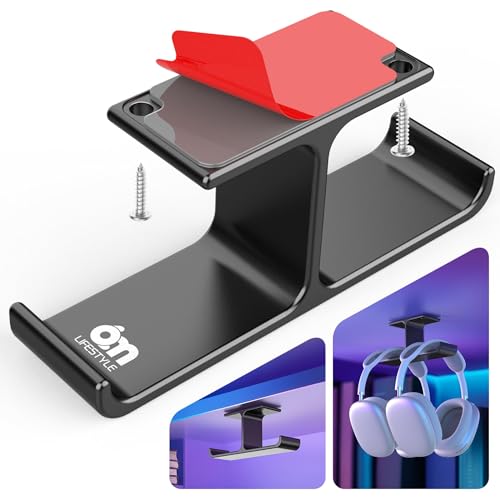
- Holds two headsets under a desk, with hooks sized for headbands up to 1.57 inches wide.
- Can attach with adhesive to smooth surfaces or with included screws.
- The dual hooks can also hold cables, bags, or VR gear.
Best For: A gamer who wants headsets stored off the desktop.
12. KEEBMONKEY Megalodon Triple-Knob Macro Pad
For Shortcut and Control Customization
KEEBMONKEY Megalodon Triple-Knob Macro Pad

- Combines 16 keys with three clickable programmable knobs.
- Supports VIA and includes four layers with a display backlight.
- Uses USB-C and has an aluminum alloy and acrylic body.
Best For: A gamer, streamer, or creative user who uses programmable shortcuts.
13. Klipsch ProMedia 2.1 Desktop Speaker System
For Headset-Free Gaming Audio
Klipsch ProMedia 2.1 Desktop Speaker System

- Pairs two satellite speakers with a subwoofer.
- Connects through a 3.5 mm input for compatible computers, TVs, and consoles.
- Includes a control pod for main volume and subwoofer gain.
Best For: A gamer who wants speakers for games, movies, and music.
14. Govee RGBIC Gaming Monitor Backlight
For Color-Matched Setup Lighting
Govee RGBIC Gaming Monitor Backlight

- Designed for 27- to 34-inch monitors, including curved screens.
- Offers 123 preset scene modes and 11 music modes through its app.
- Can match colors from screen content and sync with compatible Govee and Razer Chroma products.
Best For: A gamer who enjoys customizable lighting behind a monitor.
15. Bamboo Desk Organizer with Wireless Charging
For a Tidier Charging Spot
Bamboo Desk Organizer with Wireless Charging

- Combines a pen holder, phone stand, and wireless charging pad.
- Made from natural bamboo and includes a charging indicator light.
- Supports compatible wireless-charging phones, with charging up to 15W.
Best For: A desk user who keeps a phone and stationery nearby.
16. Simple Trending Two-Tier Metal Monitor Stand
For Screen Height and Under-Stand Storage
Simple Trending Two-Tier Metal Monitor Stand

- Raises screens by 7 inches and has a lower tier for desk gear.
- Includes two drawers, reusable cable ties, and a USB 2.0 charging port.
- Has mesh vents and a listed capacity of up to 100 pounds.
Best For: A gamer who wants to raise a screen and store accessories underneath.
17. Natwind Four-Tier Mesh Desk Organizer
For Sorting Paper and Small Supplies
Natwind Four-Tier Mesh Desk Organizer

- Includes four sliding drawers for papers and desk supplies.
- Each tray measures 10 by 13.8 by 1.8 inches internally.
- Uses a metal mesh frame and can be assembled in four steps.
Best For: Someone who wants stationery, documents, or small accessories organized.
Choosing Desk Accessory Christmas Gifts for Men
Start with how he actually uses his desk. A gamer who wears headphones may appreciate the Fosi Audio DAC and amplifier, while someone who prefers speakers could use the Klipsch 2.1 system. For a setup that already has enough audio gear, consider practical changes to lighting, storage, charging, or screen position. Look for one everyday inconvenience the gift can solve: a short supply of USB ports, a crowded desktop, a laptop without a second screen, or a headset that gets left wherever it fits.
Pay attention to the desk itself. A large mouse pad needs clear surface area, while a monitor arm needs a compatible screen and a desk that meets the product’s mounting requirements. A light bar sits on top of a monitor; a backlight attaches behind it. The shelf and organizers need room on the surface, but can add storage or move items below a screen. If you do not know the dimensions of his setup, a USB hub, mouse, or desk organizer may be easier to fit than a mount or large display.
Set a Budget Around the Upgrade
For a modest gift, focus on accessories that add a useful detail: a headphone hook, mouse pad, desk organizer, or monitor light. Mid-range options might include a powered USB hub, wireless mouse, or charging organizer. Bigger upgrades include an adjustable monitor arm, laptop dock, portable monitor, speaker system, or customizable keyboard. Product pricing changes over time, so compare current listings and decide which feature matters most before choosing.
A higher price does not automatically make an accessory a better fit. A dock is useful only if his laptop supports the connections and display features he wants. A macro pad makes sense for someone willing to configure shortcuts. A speaker system needs room for both satellites and its subwoofer. Match the scale of the gift to the setup and the recipient’s interest in adjusting or maintaining it.
Check Compatibility and Personalization
Before selecting a mount, check monitor size, weight, VESA pattern, and desk thickness. For the HUANUO arm, the supplied requirements specify a 17- to 49-inch screen weighing 6.6 to 44 pounds, with 75 × 75 mm or 100 × 100 mm VESA holes; it is recommended for wooden desks 0.8 to 3.5 inches thick without an obstructing underside beam or panel. For the Acer dock, confirm the laptop’s USB-C, graphics, and operating-system support. Its triple-screen modes depend on compatible Windows hardware, and Macs mirror rather than extend across multiple screens.
For lighting, check monitor size and shape: the Govee kit is intended for 27- to 34-inch screens, while the AOC light bar fits monitor thicknesses from 0.2 to 1.8 inches. Confirm that a phone supports wireless charging before choosing the bamboo organizer. If the recipient likes hands-on personalization, the Galaxy65 keyboard and Megalodon macro pad offer customizable controls; the Redragon mouse also has programmable buttons. A simpler organizer or desk mat asks less of its owner after unboxing.
Timing and Last-Minute Decisions
For Christmas shopping, check the seller’s current stock and delivery estimate early, since availability and shipping windows can change. When time is short, choose an item with straightforward compatibility and a clear use at the desk. A mouse pad, USB hub, or drawer organizer may require fewer setup decisions than a monitor arm or multi-display dock. If the gift depends on a specific monitor, laptop, or phone, verify that detail before ordering, or include a gift receipt so he can make the final fit decision.
Consider whether installation is part of the gift. A monitor arm may need mounting and adjustment; a dock involves moving cables; a keyboard or macro pad may reward time spent customizing it. If you are giving the item on Christmas Day, a small note naming its key fit requirement can make setup easier. The most thoughtful desk accessory is the one that suits the recipient’s equipment, habits, and available space.