Shopping for a PC gamer? These Christmas gaming desk gifts add useful touches to a setup, from tidier cables to more convenient controls.
Every pick on this list is priced below $50, with options for different desk needs and play styles.
11 Christmas Gaming Desk Gift Ideas Under $50 to Consider in 2026
More USB Ports
SABRENT 10-Port Powered USB 3.0 Hub

- Adds 10 USB 3.0 ports from one USB port.
- Individual switches and blue LEDs help manage connected devices.
- Includes a 60W power adapter and USB cable.
Best For: A PC gamer with several USB desk peripherals.
Customizable Mouse Control
Logitech G502 HERO Wired Gaming Mouse

- Features a HERO sensor with tracking up to 25,600 DPI.
- Adjustable weights let users tune balance and feel.
- 11 programmable buttons and a dual-mode scroll wheel add control options.
Best For: A PC gamer who wants a wired mouse with configurable controls.
Tidy Cable Setup
Univivi 36-Inch Under-Desk Cable Tray

- Clamps beneath a desk or can be screw-fixed.
- Unfolds for easier access when adding or removing items.
- Built-in ties help secure items in the tray.
Best For: A gamer looking to organize cords beneath a desk.
Raised Laptop Setup
Nulaxy Adjustable Foldable Laptop Stand

- Adjusts to raise a 10–16-inch laptop on the desk.
- Folds flat for carrying or storage.
- Ventilated panel and dual support rods are part of its design.
Best For: A laptop gamer who wants to raise the screen and reclaim desk space.
Voice Chat Upgrade
FIFINE AmpliGame A6V USB Gaming Microphone

- USB desktop mic includes a tripod stand and pop filter.
- Tap-to-mute button and gain knob are built in.
- RGB lighting cycles through seven gradient colors.
Best For: A gamer who chats with friends or streams casually.
Monitor-Mounted Lighting
YEELIGHT USB Monitor Light Bar

- USB-powered bar clips onto flat or curved monitors.
- Touch controls provide stepless dimming and color temperature adjustment.
- Low-profile design is intended to avoid blocking a webcam.
Best For: A gamer who uses a desk for evening play, study, or work.
RGB Desk Audio
Redragon GS560 RGB Desktop Soundbar
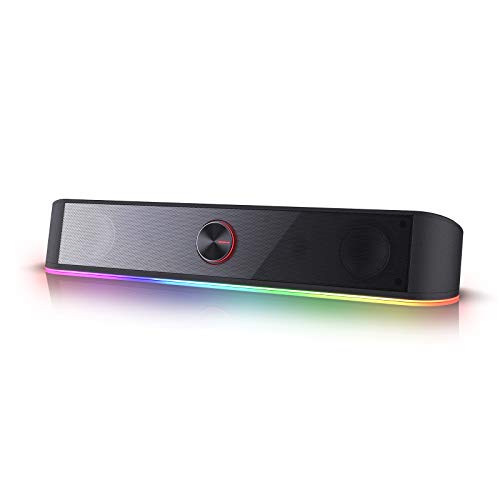
- 2.0-channel soundbar has four backlit modes.
- USB power and a 3.5 mm audio cable connect it to compatible devices.
- Volume knob combines adjustment with the on/off switch.
Best For: A PC gamer who prefers speakers for casual play and videos.
Compact Desk Fan

- Compact tabletop fan has three manual speeds.
- The head tilts 360 degrees for airflow direction.
- Detachable front cover allows access for cleaning.
Best For: A gamer who wants a small fan near their desk.
Clamp-On Drink Spot
No-Drill Rotating Desk Cup Holder

- Clamp mount adjusts for tables 0.2 to 2.48 inches thick.
- Rotates 360 degrees and includes a U-shaped slot for handled cups.
- No drilling or tools are needed for installation.
Best For: A gamer who wants to keep a drink nearby while saving desktop space.
Fold-Away Headset Hook
Foldable Under-Desk Headphone Hanger

- Clamp mounts under desks up to 50 mm thick.
- Foldable arm lies flat when not in use.
- Can hold headphones, controllers, cables, or other gadgets.
Best For: A gamer who wants a headset within reach and off the desk.
Wide Mouse Surface
BOOEUDI Extra-Large Gaming Mouse Pad

- 31.5 by 11.8-inch surface accommodates a mouse and keyboard.
- Non-slip rubber base helps keep the pad in place.
- Stitched edges and washable fabric make it easy to maintain.
Best For: A gamer who wants a wider surface for mouse and keyboard use.
Christmas Gaming Desk Gift Ideas Under $50: How to Choose
Christmas gaming desk gift ideas under $50 can make a gaming space more convenient without requiring a major upgrade. Start by thinking about how the recipient uses their desk: do they connect several peripherals, play on a laptop, chat with friends, or want more room for their mouse and keyboard? A gift that solves a visible everyday annoyance often feels more personal than a decorative extra.
Match the Gift to the Setup
Consider the recipient’s equipment and available space before choosing. A powered USB hub may suit someone with multiple USB accessories, while a laptop stand is intended for a laptop-based setup. For someone who uses a headset, a clamp-on hanger can move it off the desktop. A large mouse pad, soundbar, or monitor light bar takes up a different kind of space, so picture where it would sit before buying.
Check compatibility details when they matter. The laptop stand is described for laptops from 10 to 16 inches, and the under-desk cable tray calls for at least 5.3 inches of clear space along the desk edge if drawers or a back rod are present. Clamp-mounted accessories also depend on the desk’s shape and thickness. A quick look at the setup can help avoid a gift that does not fit.
Set a Budget That Fits the Occasion
With every listed gift under $50, you can choose a useful single item without pushing beyond the article’s budget. Think about whether the recipient would benefit most from a small convenience, such as a cup holder or headphone hook, or a more involved desk addition such as a microphone or speaker. Price alone does not determine usefulness: the right choice is the one that matches a real need.
If you are comparing several options, consider what they add to the setup and whether the person already owns something similar. A mouse, soundbar, and microphone each serve different purposes. Avoid choosing a duplicate unless you know they want a replacement or a second one.
Personalize the Choice
Personalization can come from matching the gift to the gamer’s habits rather than adding custom engraving. Someone who streams or joins voice chats may appreciate a desktop microphone with a mute button and gain control. A player who likes customizable lighting may prefer an RGB accessory, while someone focused on keeping the desktop clear may value an under-desk hanger or cable tray.
For a laptop gamer, consider whether a raised screen or a wider surface for mouse movement would be more useful. For a shared or compact desk, look at clamp-on choices that keep accessories near the edge. If you are unsure, ask about the setup or choose an everyday accessory with straightforward placement.
Last-Minute Buying Advice
Before ordering, confirm the product title and fit details against the recipient’s device and desk. Check whether the item needs a particular connection: the soundbar uses USB power and a 3.5 mm audio cable, while the microphone connects by USB. For clamp-mounted gifts, measure the desk edge and check for drawers, supports, or other obstructions.
Allow time to check current listing information and delivery estimates, since they can vary. If timing is uncertain, a short note explaining the gift can make the choice feel considered while the recipient waits. Keep the receipt or order details available in case the size or connection is not right. The most successful Christmas desk gift is one that fits naturally into the recipient’s actual setup and makes their routine a little easier.