Choosing the right headset can make or break a VR rollout. For teams, the best option balances comfort, management tools, compatibility, and total cost of ownership.
Below, we focus on vr headsets for business that can support training, demonstrations, collaboration, and mixed-use deployments without adding unnecessary complexity.
Best 10 Vr Headsets for Business Picks for 2026
Commercial VR Training Headset

- 394g lightweight build for extended wear
- Wired 3-in-1 cable for HDMI/USB commercial setups
- Made for training, simulation, education, and medical use
Best For: Commercial training and simulator deployments
Budget Smartphone VR Viewer
3D VR Headset with Bluetooth Gamepad

- Includes Bluetooth controller for simple playback control
- Fits 4.7-7 inch Android and iPhone phones
- Breathable padding and ventilation for longer comfort
Best For: Low-cost mobile VR demos and presentations
Premium Mixed Reality Workspace Headset
HTC Vive Focus Vision Mixed Reality Headset

- 5K display with eye tracking and hand tracking
- Standalone and PC VR support without base stations
- Mixed reality tools for productivity and multitasking
Best For: High-end mixed reality and PC VR productivity
Standalone Mixed Reality Headset
Meta Quest 3S 128GB VR Headset

- Wireless standalone headset with mixed reality passthrough
- Snapdragon XR2 Gen 2 with 8GB RAM
- Includes controllers and 128GB storage
Best For: Portable standalone VR and mixed reality demos
Commercial-Grade Standalone VR
HTC Vive Pro Focus Plus for Business
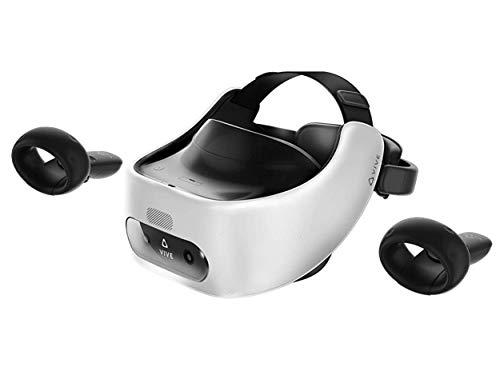
- Standalone VR with world-scale tracking
- 6DoF controller support and enterprise tools
- 2880 x 1600 resolution for clear visuals
Best For: Training, visualization, and managed business deployments
Standalone Mixed-Reality Option
Meta Quest 3S 128GB Renewed Premium

- Wireless standalone headset
- Snapdragon XR2 Gen 2 with 8GB RAM
- Full-color passthrough for mixed reality
Best For: Portable demos, collaboration, and general VR use
Mobile VR Starter Kit
TECKNET Phone VR Headset with Controller

- Works with a wide range of smartphones
- Includes Bluetooth controller
- Lightweight design with adjustable comfort
Best For: Affordable phone-based demos and basic VR viewing
Premium Standalone Mixed Reality Pick

- 512GB storage and 8GB RAM
- Full-color passthrough with dual RGB cameras
- Standalone wireless design with XR2 Gen 2
Best For: Mixed reality demos, training, and high-performance standalone use
Budget Smartphone VR Entry

- Works with 4.7-7.2 inch smartphones
- 110° FOV with adjustable lenses
- Blue-light lenses and lightweight comfort
Best For: Low-cost phone-based VR viewing and casual demos
Renewed Standalone Value Option

- 256GB storage in a standalone headset
- 1832 x 1920 resolution per eye
- Includes controllers, grip covers, and knuckle straps
Best For: Budget-friendly standalone VR with proven core features
Commercial VR Training Headset – DPVR E3S Hardstrap VR Headset
If you need vr headsets for business, the DPVR E3S is built for commercial environments rather than casual play. It combines a lightweight hardstrap design, a 110° field of view, and a 72Hz refresh rate with a wired setup that suits training, simulator, education, and medical deployments.
Best For: Commercial training rooms, simulator rides, and other multi-user business applications that need a durable wired headset.
Pros:
- Lightweight 394g design with ergonomic padding for longer sessions
- 3-in-1 5m cable supports HDMI and USB connections for commercial use
- IPD self-adjustment from 53mm to 73mm helps fit different users
- Designed for business scenarios like education, training, and medical use
Cons:
- Strictly intended for commercial use, not personal entertainment
- Uses an optimized 2.5K rendering mode now, with 4K mode planned later
Overall, the E3S looks like a practical choice when reliability and comfort matter more than consumer extras. Its wired design and broad application focus make it a strong fit for controlled business environments.
Budget Smartphone VR Viewer – 3D VR Headset with Bluetooth Gamepad
For buyers comparing vr headsets for business on a tight budget, this smartphone-based viewer is more of a presentation or demo accessory than a full enterprise system. It supports 4.7-7 inch phones, includes a Bluetooth controller, and focuses on comfort features like breathable padding and ventilation for longer viewing sessions.
Best For: Simple mobile VR demos, content viewing, or lightweight presentation use with compatible smartphones.
Pros:
- Bluetooth controller lets users pause or adjust playback without removing the headset
- Adjustable headband and breathable sponge padding improve comfort
- Compatible with many 4.7-7 inch Apple and Android smartphones
- 120° field of view and aspheric lenses aim for clearer viewing
Cons:
- Designed for smartphones, not a standalone business VR platform
- Built around gaming and movie viewing rather than commercial workflows
This is the least business-focused option in the roundup, but it can still work for low-stakes demos or mobile content playback. If you need a true enterprise headset, the smartphone format is the main limitation.
Premium Mixed Reality Workspace Headset – HTC Vive Focus Vision Mixed Reality Headset
HTC Vive Focus Vision — Mixed Reality and PC VR Headset + Controllers — Consumer Edition
Check Price On AmazonThe HTC Vive Focus Vision is a stronger fit for vr headsets for business when you want mixed reality plus PC VR support in one device. It offers a 5K display, base-station-free tracking, eye tracking, and tools aimed at productivity, making it useful for both immersive work and training use cases.
Best For: Teams that want a high-end mixed reality headset for productivity, collaboration, and PC VR applications.
Pros:
- 5K display with 2448 x 2448 pixels per eye and up to 120° field of view
- Supports standalone and PC VR use without base stations
- Eye tracking, hand tracking, and tracker support improve interaction
- Mixed reality features and VIVE Desk tools support productivity workflows
Cons:
- Consumer edition may be more headset than some simple business users need
- PC VR streaming and setup will still depend on your PC and network
For business buyers who want more than a basic viewer, this headset offers one of the broadest feature sets here. Its mix of productivity, tracking, and high-resolution display makes it well suited to demanding professional use.
Standalone Mixed Reality Headset – Meta Quest 3S 128GB VR Headset
The Meta Quest 3S is a practical standalone option among vr headsets for business if you need wireless convenience and mixed reality features. It runs on Meta Horizon OS, includes dual RGB color cameras for passthrough, and offers improved performance and memory for smooth app use.
Best For: Portable standalone VR use where wireless setup and passthrough matter more than tethered PC features.
Pros:
- Standalone operation removes the need for wires
- Dual RGB color cameras provide full-color passthrough
- Snapdragon XR2 Gen 2 and 8GB RAM support responsive performance
- Includes controllers and a 3-month Meta Horizon+ trial
Cons:
- Battery life is listed at about 2.5 hours
- Focused on gaming and video rather than dedicated commercial tools
This headset makes sense when flexibility and quick setup are the priority. It is not as business-specialized as the DPVR or HTC models, but it still offers a capable wireless mixed reality platform for mobile teams or demos.
Commercial-Grade Standalone VR – HTC Vive Pro Focus Plus for Business
If you need vr headsets for business that can handle training, demos, or internal visualization without a lot of setup, the HTC Vive Pro Focus Plus is built for that kind of use. It’s a standalone system with 6DoF controller support, world-scale tracking, and enterprise-focused tools that make deployment easier across a workplace.
Best For: Companies that want a portable, commercial-grade headset for training, visualization, and managed rollout.
Pros:
- Standalone design with world-scale tracking right out of the box
- 6DoF controller support for more natural, immersive interaction
- VIVE Enterprise features like Kiosk mode for simpler device and content management
- High-resolution 2880 x 1600 display for sharper text and graphics
Cons:
- Heavier than consumer-focused headset options at 5.4 pounds
- Uses a business-oriented feature set that may be more than casual users need
- Primarily positioned for commercial use rather than general entertainment
This is a strong pick if your priority is a portable headset designed with business deployment in mind. The balance of enterprise tools, tracking, and high display clarity makes it especially useful for organized workplace VR programs.
Standalone Mixed-Reality Option – Meta Quest 3S 128GB Renewed Premium
For teams comparing vr headsets for business, the Meta Quest 3S 128GB stands out as a simple standalone option with mixed-reality features and no wires to slow people down. Its Snapdragon XR2 Gen 2 chipset, full-color passthrough, and improved memory make it a flexible pick for demos, collaboration, or app testing where portability matters.
Best For: Business buyers who want an untethered headset for mixed reality, demos, and general-purpose VR use.
Pros:
- Standalone, wireless design for easy movement and setup
- Snapdragon XR2 Gen 2 chipset for faster performance and load times
- Dual RGB color cameras for full-color passthrough and mixed reality
- 128GB storage and 8GB RAM for a smoother experience
Cons:
- Renewed premium unit, so condition and packaging may vary from new
- Battery life is listed at around 2+ hours, which may limit long sessions
- More consumer-oriented than dedicated enterprise headsets
If your business needs a modern standalone headset with strong performance and mixed-reality features, this is an easy model to consider. It is especially appealing when you value flexibility and quick deployment over a more specialized commercial system.
Mobile VR Starter Kit – TECKNET Phone VR Headset with Controller
If you’re shopping for budget-friendly vr headsets for business presentations, product demos, or mobile learning experiments, the TECKNET phone VR headset is a simple entry point. It works with a wide range of smartphones and includes a Bluetooth controller, making it a practical option for lightweight, phone-based VR use.
Best For: Teams that want an affordable smartphone-based VR headset for basic demos and training content.
Pros:
- Compatible with many iPhone, Samsung, Pixel, and Android phones
- Includes a Bluetooth controller for basic interaction
- Lightweight design at 268g with adjustable headband and soft foam mask
- Blue light protection lenses and adjustable optics for comfort
Cons:
- Depends on a smartphone, so it is not a standalone business headset
- Better suited to basic viewing than advanced commercial VR workflows
- Not designed for enterprise deployment features
This headset makes sense when you need a low-cost way to explore mobile VR without investing in a more advanced system. It’s best viewed as an accessible starter device rather than a full workplace VR platform.
Premium Standalone Mixed Reality Pick – Meta Quest 3 512GB
If you want a serious option among vr headsets for business, the Meta Quest 3 brings strong standalone performance, full-color passthrough, and enough storage for larger apps and experiences. It is built around next-gen graphics, sharper display resolution, and wireless flexibility, which makes it a practical fit for training, demos, and mixed reality workflows.
Best For: Teams that want a high-performance standalone headset for mixed reality demos, training, and multi-use business deployments.
Pros:
- 512GB storage gives you plenty of room for apps and media.
- Snapdragon XR2 Gen 2 processor and 8GB RAM support faster performance.
- Dual RGB color cameras enable full-color passthrough for mixed reality use.
- Wireless standalone design reduces cord clutter during sessions.
Cons:
- Battery life is listed at about 2.2 hours.
- Some included items and extras are oriented toward gaming rather than business.
For business buyers who care about immersive demos and flexible deployment, this is the most capable headset in the group. It stands out for mixed reality features and stronger hardware, while the battery limit means you may still want charging plans for longer sessions.
Budget Smartphone VR Entry – TECKNET Phone VR Headset
For buyers comparing vr headsets for business on a tight budget, this TECKNET model is a simple smartphone-based option for lightweight viewing and presentation-style virtual content. It works with a wide range of phones and adds adjustable lenses and blue-light protection, but it is best understood as an entry-level viewer rather than a standalone business headset.
Best For: Low-cost phone-based VR viewing, basic demos, and casual immersive content.
Pros:
- Supports smartphones from 4.7 to 7.2 inches.
- 110° field of view is designed for immersive viewing.
- Adjustable lens settings and pupil distance help tune comfort.
- Blue-light protection lenses and lightweight build add comfort.
Cons:
- It does not automatically convert content to 3D.
- Depends on a compatible smartphone, so it is not standalone.
- Best suited to panoramic or 3D video apps rather than business software.
This is a practical low-commitment choice if you only need a basic viewer for mobile VR content. It is comfortable and widely compatible, but its phone-dependent design limits it for more serious business use.
Renewed Standalone Value Option – Meta Quest 2 256GB
If you need an affordable path into vr headsets for business, the renewed Meta Quest 2 offers standalone VR with solid core specs and a large 256GB storage capacity. It is not the newest model, but it still brings a high-resolution display, hand-tracking, and headset casting, which can be useful for budget-conscious training or presentation setups.
Best For: Budget-minded teams that want a standalone headset with good storage and proven VR basics.
Pros:
- 256GB storage provides room for a sizable app library.
- 1832 x 1920 resolution per eye supports clear visuals.
- Standalone compatibility adds deployment flexibility.
- Includes controllers plus knuckle straps and grip covers for better handling.
Cons:
- It is a renewed unit with a 90-day limited warranty.
- 90Hz refresh rate is lower than newer premium headsets.
- Field of view is listed at 90 degrees, which is modest for the category.
For teams balancing cost and capability, this headset delivers the essentials without the price of a newer flagship. It is a reasonable business value pick if you can live with renewed-condition tradeoffs and older hardware.
How We Picked the Best Vr Headsets for Business
We focused on headsets that are practical for business deployments rather than consumer-only hype. That means evaluating comfort for longer sessions, controller quality, standalone versus PC VR support, display clarity, battery life, and how easy the device is to deploy across a team.
We also considered ecosystem maturity, availability of business-oriented features, and whether a headset makes sense for one-off demos, recurring training, or broader company use.
Quick Comparison
When comparing Vr Headsets for Business, the biggest split is between standalone devices and tethered or phone-based options. Standalone headsets are usually best for mobility, training, and simple rollout. PC-tethered systems can be stronger for high-fidelity simulations but need more setup. Phone-based units are the lowest-cost path, though they are better for light demos than serious enterprise use.
Key Buying Factors for Vr Headsets for Business
Deployment and Device Management
Look for simple onboarding, shared-device support, and admin controls if multiple employees will use the same hardware. Even the best headset becomes difficult to scale if setup is cumbersome.
Comfort and Fit
Business sessions can run longer than consumer play sessions. Adjustable straps, balanced weight, and replaceable face cushions help reduce fatigue and improve adoption.
Content Compatibility
Make sure the headset supports the apps your team actually needs, whether that is training modules, collaboration tools, product demos, or simulation software. Compatibility should come before raw specs.
Tracking and Visual Quality
For presentations and training, stable tracking and sharp text readability matter more than flashy features. Mixed reality and passthrough can also be useful for guided workflows and room-aware demos.
Total Cost of Ownership
Do not stop at the sticker price. Include accessories, charging solutions, warranty coverage, hygiene replacements, and software licensing when budgeting for Vr Headsets for Business.
Who Should Buy Which Vr Headsets for Business?
Choose standalone mixed-reality headsets if you want the easiest path for teams, mobile demos, and flexible training. Choose PC VR or higher-end enterprise-style options if your use case demands deeper simulation or more demanding visuals. If you are testing a pilot program or buying for occasional presentations, a renewed or lower-cost headset may be the smartest starting point. Phone-based headsets are best reserved for simple, low-stakes viewing or very light educational use.
For most companies, the right choice is the headset that matches the workflow first and the spec sheet second. That approach leads to better adoption, fewer support headaches, and a more useful VR program overall.