If you’re looking to enhance your PC’s aesthetics, choosing the right RGB controller can make all the difference. With a variety of options available, each offering unique features and customization capabilities, it’s essential to find the one that suits your setup best. From intuitive plug-and-play solutions to advanced software-integrated models, these controllers can elevate your gaming experience. Let’s explore the top contenders that can light up your rig in style.
ShakingTank ARGB and PWM Fan Hub Controller for PC

If you’re a PC builder looking for effective fan control and lighting synchronization, the ShakingTank ARGB and PWM Fan Hub Controller is your best choice. This compact hub supports up to nine fans with PWM functionality, ensuring synchronized fan speeds. Its magnetic back design makes installation a breeze, attaching directly to your case without messy tape. Plus, with 5V 3-pin ARGB support, you can easily connect RGB fans and light bars. The SATA power input prevents voltage loss, enhancing performance. At just 2.82 ounces, it keeps your wiring tidy while delivering reliable power and control for your setup.
Best For: PC builders seeking effective fan control and RGB lighting synchronization in their setups.
Pros:
- Supports up to nine fans with PWM functionality for synchronized speeds.
- Magnetic back design allows for easy installation on metal surfaces without adhesive.
- SATA power input ensures stable voltage delivery, preventing performance issues.
Cons:
- Requires a 12V 4-pin motherboard connection for PWM functionality, which may limit compatibility.
- Limited to 5V 3-pin ARGB fans, potentially excluding other RGB fan types.
- Compact size may limit space for larger connectors or additional components within the case.
Airgoo Magnetic 16-Port Signal RGB Controller (AG-DRGB16)
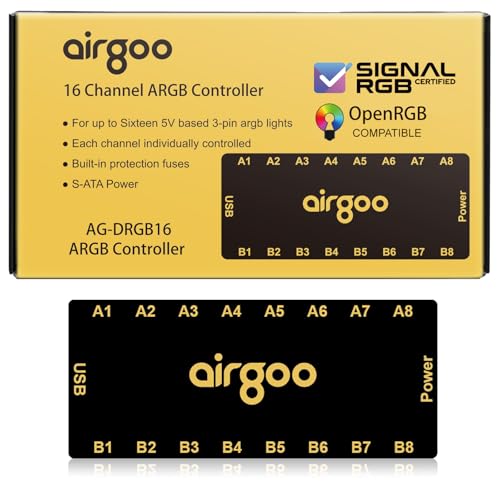
The Airgoo Magnetic 16-Port Signal RGB Controller (AG-DRGB16) is perfect for PC enthusiasts who crave extensive control over their lighting setups. With the ability to connect up to 16 RGB devices and support for 256 LEDs per channel, you can craft intricate lighting displays. Its independent channel control lets you bypass motherboard limitations, while real-time sync via USB 2.0 guarantees your commands execute instantly. Installation is a breeze, thanks to its magnetic design, and SignalRGB compatibility allows for synchronized effects across your games and music. Plus, the auto-resetting fuse guarantees safety against overloads. Illuminate your setup with style!
Best For: PC enthusiasts looking for extensive control and customization of their RGB lighting setups.
Pros:
- 16-Port Expandability: Control up to 16 RGB devices simultaneously, enhancing your lighting options.
- Independent Channel Control: Bypass motherboard limitations for complex layered lighting setups.
- User-Friendly Software Integration: Easily create dynamic patterns and effects with SignalRGB support.
Cons:
- Limited to Windows Compatibility: Only compatible with Windows 10 and 11, excluding other operating systems.
- Potential for Overload: Despite safety features, connecting too many devices could still pose risks if not managed properly.
- Weight and Size Constraints: May not fit in all PC cases or setups due to its dimensions and weight.
Thermalright ARGB Fan Hub Controller (8-Port 4 Pin PC Fan Controller)

For PC enthusiasts looking to enhance their gaming setup, the Thermalright ARGB Fan Hub Controller stands out as an exceptional choice. This powerful 8-port 4-pin controller supports eight ARGB fans and features a 5V-3Pin ARGB hub. With its strong paste installation and magnetic suction, setup is a breeze. Weighing just 5.3 ounces, it fits neatly in your case. While it offers fan speed reading and PWM regulation, remember it only recognizes the speed of a single fan connected to its red interface. Just be cautious—12V 4-pin RGB devices aren’t supported and can damage your setup.
Best For: PC enthusiasts and gamers looking to efficiently manage multiple ARGB fans in their setups.
Pros:
- Supports up to eight ARGB fans with a convenient 5V-3Pin hub.
- Easy installation with strong paste and magnetic suction features.
- Neat cable management for a clean and organized look inside PC cases.
Cons:
- Only recognizes the speed of one fan connected to the red interface for PWM regulation.
- Does not support 12V 4-pin RGB devices, which may lead to equipment damage if incorrectly connected.
- Limited functionality in controlling speed and adjusting lighting, as it primarily expands interfaces.
GSCOLER RGB PC Fan Controller Kit with Remote Control

Looking to enhance your PC’s aesthetics without the hassle? The GSCOLER RGB PC Fan Controller Kit with Remote Control is your go-to solution. Featuring a 21-key wireless remote, you can effortlessly toggle between dynamic lighting modes and choose from 12 static colors. Installation is a breeze with tool-free plug-and-play via SATA and 5V 3Pin ports, compatible with various RGB devices. Plus, you can adjust brightness and speed to fit your mood. Compact and built with durable materials, this kit guarantees a clean setup without clutter. Illuminate your gaming experience and take control of your PC’s visual flair today!
Best For: PC enthusiasts looking to enhance their setup with customizable RGB lighting and easy control options.
Pros:
- User-friendly installation with tool-free, plug-and-play setup via SATA and 5V 3Pin ports.
- Wide range of lighting options including dynamic effects and 12 static colors for personalized aesthetics.
- Compact design ensures a clean and organized interior without cluttering your PC.
Cons:
- Limited to 5V 3Pin devices, which may restrict compatibility with some RGB setups.
- Wireless remote may require battery replacement over time, which could be inconvenient.
- No software control available, limiting customization to physical remote functions only.
ARGB Controller Kit for PC RGB Fans
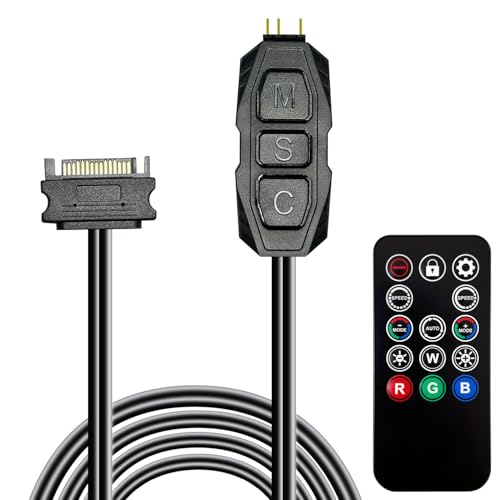
Crafted for PC enthusiasts who crave vibrant lighting effects, the ARGB Controller Kit for PC RGB Case Fans offers seamless control over your RGB setup. This kit features an ARGB splitter and a SATA power RGB fan controller, letting you manage 215 dynamic light modes and four static colors effortlessly. With its tool-free installation, you can plug it in and start customizing right away. The included 14-key remote allows for easy switching between effects like monochrome and rainbow. Plus, its compact design guarantees it fits neatly in your case. Enjoy a colorful upgrade with a warranty for peace of mind.
Best For: PC enthusiasts who want to enhance their system with customizable RGB lighting effects.
Pros:
- Easy tool-free installation with plug-and-play functionality.
- Offers a wide range of 215 dynamic light modes and four static colors for personalized lighting.
- Compact design allows for discreet placement within the PC case.
Cons:
- Limited to 5V ARGB 3Pin equipment, which may not be compatible with all fans.
- Requires SATA power connection, which may not be available on all power supplies.
- Remote control may require batteries or have limited range depending on the setup.
ManbaOne Interactive Wireless Gaming Controller for PC/Switch/iOS/Android

The ManbaOne Interactive Wireless Gaming Controller stands out with its multi-platform compatibility, making it a perfect choice for gamers who switch between devices like the PC, Switch, iOS, and Android. With various connection modes—wired, Bluetooth, and a wireless dongle—you’ll enjoy a stable gaming experience. Its innovative features, like a 2-inch interactive screen, allow you to customize settings on the fly. You can also save up to four configurations for different games and enjoy enhanced gameplay with its 6-axis gyroscope. Plus, the built-in 1800mAh battery guarantees you’re ready for long gaming sessions without interruptions.
Best For: Gamers who enjoy playing across multiple platforms and value customizable controller settings for an enhanced gaming experience.
Pros:
- Multi-platform compatibility allows seamless gaming on PC, Switch, iOS, and Android devices.
- Interactive screen enables quick customization of settings without needing additional apps.
- Long battery life with a built-in 1800mAh battery ensures extended gaming sessions.
Cons:
- Not compatible with Xbox, PlayStation, or GeForce Now, limiting options for some gamers.
- Bluetooth connection to PC is not recommended, which may hinder ease of use for some users.
- Limited configuration storage with only four customizable setups available for different games.
ASUS TUF Gaming ARGB PWM Fan Hub

For gamers and PC enthusiasts seeking superior cooling and stunning visual effects, the ASUS TUF Gaming ARGB PWM Fan Hub is an ideal solution. This hub connects up to six case fans for synchronized PWM and ARGB control, enhancing both airflow and aesthetics. You’ll appreciate the visible power indicators for quick status checks and the magnetic mounting that simplifies installation on metal surfaces. With dual SATA power connectors and safety fuses, it guarantees stable performance even under heavy loads. Weighing just 5.3 ounces, it fits perfectly in any desktop or gaming console setup while keeping your system cool and stylish.
Best For: Gamers and PC enthusiasts looking for effective cooling solutions and customizable RGB lighting effects.
Pros:
- Supports up to six fans for optimal airflow and cooling performance.
- Easy installation with magnetic mounting and visible power indicators.
- Safety features such as dual SATA power connectors and overcurrent protection ensure reliable operation.
Cons:
- Limited to six fans, which may not be sufficient for larger setups.
- Requires SATA power connections, which may not be available on all power supplies.
- No built-in fan speed control outside of PWM functionality, limiting customization options.
AOC Interactive Screen Wireless Controller

Looking for a versatile gaming controller that works across multiple platforms? The AOC Interactive Screen Wireless Controller has you covered. Compatible with PC, Switch, iOS, Android, and Steam Deck, it connects via Bluetooth, 2.4G, or wired options for ultimate flexibility. Its built-in 1.5-inch interactive screen allows you to customize settings on the fly. With Hall Effect joysticks and adjustable travel distances, you’ll experience precision like never before. Additionally, you can personalize controls, including RGB lighting and macro functions. Enjoy up to 15 hours of gameplay on a single charge, and don’t forget, you can play while it’s charging!
Best For: Gamers looking for a versatile and customizable controller compatible with multiple platforms for enhanced gameplay experiences.
Pros:
- Multiple Connectivity Options: Supports Bluetooth, 2.4G, and wired connections for flexibility across devices.
- Customization Features: Allows users to personalize controls, RGB lighting, and macro functions for tailored gaming experiences.
- Long Battery Life: Offers up to 15 hours of gameplay on a single charge, with the ability to play while charging.
Cons:
- Limited Compatibility: Not compatible with Xbox or PS5, which may restrict use for some gamers.
- Learning Curve: Customization features may require time to fully understand and utilize effectively.
- Size of Interactive Screen: The 1.5-inch screen may be too small for some users to easily view and adjust settings.
EasySMX X15 Wireless Bluetooth PC Controller

Gamers seeking precision and customization will find the EasySMX X15 Wireless Bluetooth PC Controller to be an excellent choice. With Hall joysticks and triggers, you’ll enjoy no stick drift and no dead zones, ensuring pinpoint accuracy. The RGB lighting offers seven adjustable colors, adding flair to your setup. You can also program two additional back buttons for a tailored gaming experience. Compatible with Windows, Android, Steam, and Switch, this controller’s versatility shines. Plus, with a robust 20-hour battery life, you won’t be interrupted mid-game. Elevate your gameplay and style with the EasySMX X15 controller today!
Best For: Gamers looking for precision, customization, and versatility in their gaming controllers.
Pros:
- Hall Effect sensors provide precise joystick control without stick drift or dead zones.
- RGB lighting with seven adjustable colors enhances the gaming setup and can be turned off when desired.
- 20-hour battery life ensures extended gaming sessions without interruptions.
Cons:
- Not compatible with Xbox, Luna, PS4, PS5, and Nvidia GeForce Now platforms.
- Weight may be misleading, listed as 0.012 ounces, which is likely an error and could confuse potential buyers.
- Limited feedback options for warranty or issues, as it directs users to contact the seller rather than providing direct support.
ManbaOne Interactive Screen Wireless Gaming Controller for PC/Switch/iOS/Android

The ManbaOne Interactive Screen Wireless Gaming Controller stands out as an ideal choice for players who crave seamless compatibility across multiple platforms, including PC, Switch, iOS, and Android. With its innovative 2-inch interactive screen, you can easily customize settings without needing extra software. The controller features an Anti-Stick Hall Effect Joystick for faster response times and a 6-axis gyroscope for immersive gameplay. Plus, you can save up to four configurations for different games. With a built-in 1800mAh battery and smart charging station, you’ll stay powered up during intense gaming sessions. Experience gaming like never before!
Best For: Gamers who want a versatile and customizable controller compatible with various platforms like PC, Switch, iOS, and Android.
Pros:
- Innovative 2-inch interactive screen allows for easy customization without additional software.
- Anti-Stick Hall Effect Joystick and 6-axis gyroscope enhance gameplay experience and responsiveness.
- Built-in 1800mAh battery with smart charging station ensures long-lasting power during gaming sessions.
Cons:
- Not compatible with Xbox, PlayStation, or GeForce Now, limiting platform options.
- The wake-up function is unavailable for Switch/Switch 2.
- Personalized magnetic covers for joysticks are sold separately, adding extra costs.
Factors to Consider When Choosing an Rgb Controller for Pc
When choosing an RGB controller for your PC, you’ll want to take into account several key factors. Think about compatibility with your devices, the number of ports available, and the variety of lighting effects you desire. Don’t forget to assess the power supply type and how easy it is to install the controller in your setup.
Compatibility With Devices
Choosing the right RGB controller for your PC hinges on compatibility with your devices, as using incompatible components can lead to damage or improper functionality. First, verify the controller matches the type of RGB devices you plan to use, like 5V 3-pin ARGB or 12V 4-pin RGB. Next, check if it supports the necessary software for customization, such as SignalRGB or OpenRGB, to enhance your lighting effects. Confirm that it connects to your motherboard or other devices through the right power and data connectors, such as SATA or USB 2.0. Finally, assess the maximum number of RGB devices the controller can handle, and consider its operating system compatibility to guarantee seamless integration and performance for your setup.
Number of Ports
Understanding the number of ports on an RGB controller is vital for maximizing your PC’s lighting potential. When you choose a controller, you’ll find options ranging from 8 to 16 ports, allowing you to connect multiple RGB devices at once. More ports mean greater expandability, letting you add extra fans and lighting strips for an all-encompassing setup. Each channel supports a specific number of LEDs, so make sure your total doesn’t exceed the controller’s capacity. Additionally, having more ports enhances the flexibility of your RGB configuration, allowing you to control various lighting effects independently. Controllers with fewer ports might limit your future upgrades, so it’s important to select one that meets both your current and potential needs.
Lighting Effects Variety
While selecting an RGB controller for your PC, the variety of lighting effects it supports plays an important role in enhancing your overall experience. Look for options that offer static colors, dynamic modes, gradients, and customizable animations. Some controllers provide hundreds of dynamic lighting modes, enabling intricate setups that can sync with your games and applications. Independent channel control is vital; it lets you create complex lighting patterns across multiple devices without relying solely on motherboard headers. Additionally, the ability to save multiple lighting configurations is a must for easily switching between themes for different activities. Finally, a user-friendly interface will greatly enhance your experience, allowing for straightforward customization of lighting effects and settings.
Power Supply Type
When enhancing your PC’s RGB setup, the power supply type for your RGB controller is just as important as the variety of lighting effects it offers. Most RGB controllers connect directly to SATA power, guaranteeing stable operation and minimizing voltage loss. This setup is essential, especially when managing multiple RGB devices, as it assures smooth performance. Some controllers may also support USB power connections, providing flexibility but potentially lacking stability under load. It’s imperative to check the power requirements of your RGB controller to confirm compatibility with your PC’s power supply unit (PSU). Opting for an RGB controller with dual power connectors can further enhance stability, preventing flickering or performance issues when powering several devices simultaneously.
Installation Ease
Choosing an RGB controller that’s easy to install can save you time and frustration during your PC setup. Look for a plug-and-play design that allows for tool-free installation, so you can connect everything without needing extra equipment or expertise. Magnetic fixture options are also great, as they let you easily attach the controller to metal surfaces within your case. Make sure the RGB controller has SATA power connections to streamline power supply integration and cut down on clutter. Compatibility is key, so check that the controller supports various RGB devices, minimizing installation complications. Finally, review any included installation guides or user-friendly interfaces that help you quickly set up and configure your lighting effects.
Software Integration Support
Software integration support is vital for maximizing the potential of your RGB controller. Make sure it’s compatible with popular software like SignalRGB or OpenRGB, allowing seamless synchronization of lighting effects across your games and applications. A user-friendly interface is essential, enabling easy customization of dynamic patterns, gradients, and animations. Look for controllers with real-time sync capabilities through USB connections, ensuring commands execute instantly without lag. Additionally, check if the controller can manage multiple independent channels, which lets you create complex lighting setups beyond motherboard header limitations. Finally, verify compatibility with your operating system, especially if you’re using Windows 10 or 11, to guarantee full functionality and a superior experience.
Control Options Available
While evaluating RGB controllers for your PC, consider the various control options that can enhance your experience. Many controllers come with manual switches, remote control functionality, and software integration for customizable lighting effects. With independent channel control, you can manage multiple RGB devices, creating distinct lighting patterns tailored to your setup. Wireless remotes often include dedicated buttons for toggling dynamic effects, adjusting brightness, or switching between static colors, making it easier for you to customize your ambiance. Additionally, some controllers offer real-time synchronization with games, music, and applications through compatible software, amplifying your immersion. Finally, plug-and-play designs simplify installation, with magnetic fixtures allowing for easy attachment inside your PC case or on metal surfaces.
Safety Features Included
When setting up your RGB controller, safety features play an important role in ensuring both performance and longevity. Look for controllers equipped with auto-resetting fuses that guard against overloads and short circuits, enhancing safety during use. If your controller is powered by a SATA connection, it can help prevent flickering at maximum load by providing stable power input, minimizing electrical issues. Additionally, integrated overcurrent protection prevents damage to your RGB devices and the controller itself. Visible power and operation indicators let you easily monitor the status of your lighting setup. Finally, designs with multiple safety fuses offer extra layers of protection, ensuring reliable performance under various load conditions, allowing you to enjoy your illuminated setup worry-free.