If you’re looking to elevate your gaming rig, RGB case fans are a must-have. They not only enhance the aesthetic appeal of your setup but also guarantee efficient cooling during those intense gaming sessions. With various options available, you’ll want to take into account performance, noise levels, and customization features. Let’s explore the top contenders that can transform your gaming experience, blending style and functionality seamlessly.
CORSAIR RS120 ARGB 120mm PWM Fans (Triple Pack)

If you’re a gamer looking to enhance your rig’s cooling and aesthetics, the CORSAIR RS120 ARGB 120mm PWM Fans (Triple Pack) are a top choice. With daisy-chain capabilities, you can connect multiple fans using just one 4-pin PWM and one +5V ARGB connector. Each fan boasts eight customizable LEDs, letting you sync lighting through your motherboard’s ARGB control. These fans pack a punch, reaching speeds up to 2,100 RPM with 72.8 CFM airflow and a static pressure of 2.8mm-H2O. Plus, CORSAIR’s AirGuide Technology directs airflow where it’s needed most, optimizing cooling efficiency for your critical components.
Best For: Gamers and PC enthusiasts looking to improve cooling performance and add customizable RGB lighting to their setups.
Pros:
- Customizable Lighting: Eight LEDs per fan allow for personalized lighting effects when synced with a compatible motherboard.
- High Performance: Capable of reaching speeds up to 2,100 RPM with a strong airflow of 72.8 CFM, ensuring effective cooling.
- Efficient Cooling Technology: CORSAIR AirGuide Technology optimizes airflow direction, enhancing cooling efficiency on critical components.
Cons:
- Requires Compatible Motherboard: The ARGB lighting functionality needs a motherboard with ARGB support to fully utilize the features.
- Noise Levels at High RPM: Fans may generate noise at maximum speeds, which could be a concern for users seeking a quiet operation.
- Additional Cables for Daisy-Chaining: While daisy-chaining simplifies connections, it can also lead to clutter if not managed properly.
ASUS TUF Gaming TF120 ARGB Chassis Fan 3 Pack
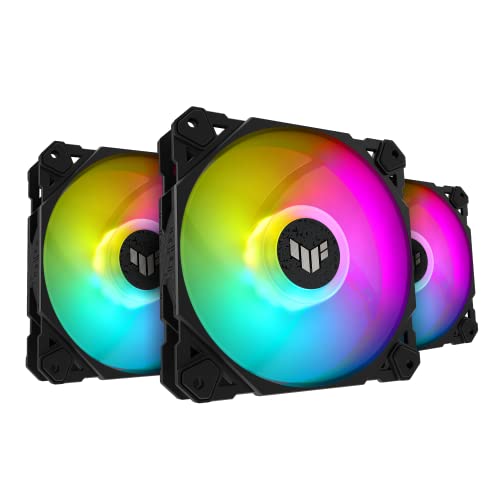
The ASUS TUF Gaming TF120 ARGB Chassis Fan 3 Pack stands out as the ideal choice for gamers who prioritize both performance and aesthetics. With class-leading airflow of 76 CFM and a low noise level of just 29 dB, these fans guarantee efficient cooling without the distraction of excess noise. The advanced fluid dynamic bearing offers up to 250,000 hours of operation, while anti-vibration pads minimize rattling. Featuring a double-layer LED array, you can customize vibrant lighting effects through the bundled ARGB hub, supporting Aura Sync for seamless integration. Elevate your rig’s performance and look with this exceptional fan pack!
Best For: Gamers and PC enthusiasts seeking high-performance cooling solutions with customizable RGB lighting.
Pros:
- Class-leading airflow of 76 CFM ensures efficient cooling for demanding systems.
- Low noise operation at just 29 dB provides a quieter gaming experience.
- Customizable ARGB lighting with Aura Sync support enhances the aesthetic appeal of any build.
Cons:
- 3-Pin power connector may not be compatible with all motherboard configurations.
- Limited to desktop compatibility, excluding use in laptops or other devices.
- Weight of 1.43 pounds may add some bulk to lightweight builds.
Thermalright TL-M12Q X3 120mm PC Case Fans (3-Pack)

Looking to elevate your gaming rig’s aesthetics and cooling performance? The Thermalright TL-M12Q X3 120mm PC Case Fans come in a convenient 3-pack, featuring high airflow at 2000 RPM. You’ll love the unique ARGB infinity-mirror lighting that creates dynamic, multi-layer RGB effects, perfectly synchronized with airflow. Thanks to high-quality S-FDB bearings, these fans minimize vibration and noise while ensuring reliable cooling. Plus, with PWM control, they’ll automatically adjust speed based on your system’s temperature. Installation is a breeze with simplified cable management, and they’re compatible with various cases and coolers. Illuminate your setup while keeping it cool!
Best For: Gamers and PC enthusiasts looking for an aesthetically pleasing cooling solution with high performance.
Pros:
- High airflow capacity at 2000 RPM ensures effective cooling.
- Unique ARGB infinity-mirror lighting enhances the visual appeal of your setup.
- PWM control allows for automatic speed adjustments based on temperature, optimizing performance and reducing noise.
Cons:
- Requires one cable per fan cluster, which may complicate cable management for some users.
- Additional connectors are sold separately, potentially increasing overall costs.
- May not be as effective in cases with limited airflow or poor ventilation.
Thermalright TL-C12C-S CPU Fan (5 Pack)

For gamers seeking both performance and style, the Thermalright TL-C12C-S CPU Fan (5 Pack) stands out as an excellent choice. These 120mm ARGB case fans deliver impressive airflow at 66.17 CFM while maintaining a quiet noise level of just 25.6 dBA. With a maximum speed of 1550 RPM, they adapt automatically through a 4-Pin PWM interface, ensuring efficient cooling based on your system’s temperature. Plus, the high-brightness LED blades offer up to 17 lighting modes, enhancing your rig’s aesthetic. Whether you’re cooling cases or CPU coolers, this fan pack provides the perfect blend of performance and visual appeal.
Best For: Gamers and PC enthusiasts seeking a combination of high-performance cooling and customizable lighting effects.
Pros:
- Impressive airflow of 66.17 CFM with a quiet noise level of just 25.6 dBA.
- Automatic speed control via 4-Pin PWM interface for efficient cooling based on system temperature.
- Multiple lighting options with up to 17 modes to enhance the aesthetic appeal of your rig.
Cons:
- Requires a compatible motherboard for synchronization of lighting effects.
- May not be suitable for builds with limited space due to the fan size.
- Limited to 120mm size, which may not fit all cooling setups.
ASUS TUF Gaming ARGB PWM Fan Hub

Designed for gamers who demand both efficient cooling and stunning visuals, the ASUS TUF Gaming ARGB PWM Fan Hub excels in seamlessly connecting up to six case fans. You’ll enjoy synchronized PWM and ARGB control, enhancing both performance and aesthetics. With visible power indicators, checking the status is a breeze. The magnetic mounting simplifies installation on any metal surface, while dual SATA power connectors guarantee stable input even under full load. Plus, two safety fuses protect against overcurrent, giving you peace of mind. Weighing just 5.3 ounces, it’s a compact yet powerful addition to your gaming setup.
Best For: Gamers looking for efficient cooling solutions combined with customizable lighting effects in their gaming setups.
Pros:
- Easy installation with magnetic mounting for quick attachment to metal surfaces.
- Dual SATA power connectors ensure stable power delivery, even under high load conditions.
- Overcurrent protection provided by two safety fuses for enhanced safety and reliability.
Cons:
- Limited to six fans, which may not be sufficient for larger cases or setups.
- Requires compatible RGB fans for full lighting effects, potentially increasing overall cost.
- May not fit all case designs due to its specific dimensions and mounting requirements.
Kingwin 120mm ARGB Case Fans 3 Pack

The Kingwin 120mm ARGB Case Fans 3 Pack is an excellent choice for gamers who want to enhance their system’s cooling without sacrificing noise levels. This 3-pack features addressable RGB lighting, allowing you to sync with your motherboard or customize colors via the included remote. With a maximum speed of 1200 RPM and airflow capacity of 40 CFM, these fans provide efficient cooling while operating at a whisper-quiet 20 decibels. Installation is a breeze with plug-and-play connectors, making them ideal for cases, CPU coolers, and mining rigs. Upgrade your setup today and enjoy both style and performance!
Best For: Gamers and PC enthusiasts looking for efficient cooling solutions with customizable RGB lighting.
Pros:
- Quiet Operation: Operates at just 20 decibels, ensuring minimal noise during use.
- Customizable RGB Lighting: Features addressable RGB lighting that can sync with motherboards or be controlled via remote.
- Easy Installation: Plug-and-play setup with 3-pin connectors makes installation straightforward for various setups.
Cons:
- Limited Maximum Speed: Maximum rotational speed of 1200 RPM may not be sufficient for high-performance cooling needs.
- Material Quality: Made of Polyvinyl Chloride, which may not be as durable as other materials used in fan construction.
- Weight: At 8 ounces, the fans may feel lightweight, potentially raising concerns about stability during operation.
Thermalright TL-C12CW-S X3 CPU Fan

With its automatic speed control and impressive airflow, the Thermalright TL-C12CW-S X3 CPU Fan is perfect for gamers who demand both performance and aesthetics. This 120mm fan operates at a maximum speed of 1550RPM while maintaining a quiet noise level of just 25.6dBA. You’ll appreciate the 66.17CFM airflow, effectively dissipating heat from your CPU and case. Its S-FDB bearings enhance stability and lifespan, minimizing noise and vibration. Plus, the stunning ARGB lighting offers 17 customizable modes, allowing you to sync colors with your setup. Whether used in a case or with a cooler, it’s a versatile choice for your gaming rig.
Best For: Gamers and PC enthusiasts seeking high-performance cooling solutions with aesthetic LED lighting.
Pros:
- Automatic speed control adjusts fan speed for optimal cooling based on temperature.
- High airflow of 66.17CFM effectively dissipates heat, enhancing system performance.
- Customizable ARGB lighting with 17 modes allows for personalized aesthetics and synchronization with other components.
Cons:
- Noise level of 25.6dBA may be noticeable in very quiet environments.
- Limited to 120mm size, which may not fit all cooling setups or preferences.
- Requires motherboard support for full RGB functionality, limiting compatibility with some systems.
ARCTIC P12 PWM PST A-RGB PC Fan (120mm)

If you’re a gamer seeking not just performance but also style, the ARCTIC P12 PWM PST A-RGB PC Fan is an excellent choice. This 120mm fan features a sleek black design with 12 A-RGB LEDs that provide even, vibrant illumination. You’ll enjoy impressive airflow of 48.80 CFM, coupled with a noise level of just 0.3 Sone, thanks to its optimized static pressure and PWM control. Whether you’re cooling heat sinks or radiators, this fan excels in efficiency. Plus, the Y-splitter makes it easy to combine multiple fans for a stunning setup. Upgrade your rig with the ARCTIC P12 for both looks and performance!
Best For: Gamers and PC enthusiasts looking for a high-performance fan that combines efficient cooling with stylish RGB lighting.
Pros:
- High static pressure makes it ideal for cooling heat sinks and radiators.
- Low noise level at just 0.3 Sone ensures a quiet operation during intense gaming sessions.
- Easy integration with multiple fans using the included Y-splitter for a cohesive and stunning aesthetic.
Cons:
- Limited RPM range may not satisfy users looking for extreme performance.
- A-RGB lighting requires a compatible motherboard or controller for full customization.
- Static pressure optimized design might not be as effective for open-air case setups.
AsiaHorse AMICI-5GT RGB PC Fans

For gamers seeking a blend of performance and aesthetics, AsiaHorse AMICI-5GT RGB PC Fans stand out with their impressive cooling efficiency and vibrant lighting. With a maximum speed of 1800 RPM and airflow of 61.5 CFM, these fans guarantee stable temperatures during intense gaming sessions. The ultra-long lifespan of 50,000 hours and HDB bearing technology enhance durability and efficiency. You’ll appreciate the quiet operation, maxing out at just 30 dB(A). Plus, the infinity mirror design with 24 LED beads offers dazzling color options, compatible with major RGB software for synchronized effects. Installation is straightforward, connecting up to three fans in series.
Best For: Gamers and PC enthusiasts looking for efficient cooling and customizable RGB lighting in their builds.
Pros:
- High airflow of 61.5 CFM and a maximum speed of 1800 RPM ensure effective heat dissipation.
- Ultra-long lifespan of 50,000 hours with HDB bearing technology for enhanced durability.
- Vibrant RGB lighting with 24 LED beads, compatible with popular RGB software for synchronized effects.
Cons:
- Maximum noise level of 30 dB(A), which may still be audible in quiet environments.
- Limited to connecting a maximum of three fans in a daisy chain, which may restrict larger setups.
- Not modular splicing or wireless daisy chain compatible, limiting installation flexibility.
Thermalright TL-C12C-S X3 CPU Fan (120mm ARGB Case Cooler Fan)

The Thermalright TL-C12C-S X3 CPU Fan stands out as an ideal choice for gamers seeking efficient cooling without the distracting noise. With a maximum speed of 1550 RPM, it delivers impressive airflow at 66.17 CFM while maintaining a whisper-quiet noise level of just 25.6 dBA. The fan’s S-FDB bearings guarantee longevity and stability, reducing vibrations effectively. Plus, its vibrant ARGB lighting features 17 customizable modes, allowing you to synchronize it with your motherboard for a stunning visual experience. Versatile enough to serve as both a case fan and CPU cooler, it’s a perfect addition to any gaming setup.
Best For: Gamers and PC enthusiasts looking for a high-performance cooling solution with customizable lighting effects.
Pros:
- Whisper-quiet operation: Maintains a noise level of just 25.6 dBA for a distraction-free gaming experience.
- Efficient cooling performance: Delivers a maximum airflow of 66.17 CFM at 1550 RPM, effectively removing heat from your system.
- Customizable ARGB lighting: Features 17 lighting modes that can be synchronized with your motherboard, enhancing the visual appeal of your setup.
Cons:
- Limited to 120mm size: May not fit all cases or cooling setups, especially those requiring larger fans.
- ARGB lighting requires compatible motherboard: Full potential of lighting effects can only be utilized with compatible hardware.
- Potential over-reliance on PWM control: Automatic speed control may not cater to all users’ preferences for manual fan speed settings.
Factors to Consider When Choosing RGB Case Fans for Gaming
When you’re choosing RGB case fans for gaming, there are several key factors to weigh. You’ll want to think about fan speed, noise levels, and airflow capacity, as they greatly affect your system’s performance. Additionally, consider lighting customization and the overall build quality to guarantee durability and style.
Fan Speed Considerations
Choosing the right fan speed is essential for optimizing your gaming rig’s cooling performance. Fan speed, measured in RPM, directly impacts airflow and cooling efficiency. Look for fans that can reach speeds upwards of 2000 RPM, as they typically offer better airflow ratings, often exceeding 70 CFM. While higher speeds provide increased airflow, they may generate more noise, so it’s vital to find a balance. PWM technology is a great option, allowing fans to adjust speeds based on system temperatures, ensuring efficient cooling without excessive noise. Opt for fans with a wide RPM range for versatility; this enables quieter operation during idle periods and enhanced cooling when your system’s under load, helping keep your gaming experience seamless.
Noise Level Assessment
While optimizing your gaming setup, noise level is an essential factor to take into account when selecting RGB case fans. Noise levels, measured in decibels (dB), range from 20 dB to 30 dB, with lower values indicating quieter operation. Consider fans that utilize advanced bearing technologies like fluid dynamic bearings, which produce less noise and last longer than traditional sleeve bearings. Additionally, keep an eye on the fan’s RPM; higher speeds, like 2000 RPM, generate more noise compared to 1200 RPM. Look for anti-vibration features such as rubber pads to minimize rattling sounds. Fans with PWM control automatically adjust speeds based on temperature, ensuring effective cooling while keeping noise levels down when full power isn’t needed.
Airflow Capacity Importance
Airflow capacity plays a crucial role in maintaining ideal temperatures in your gaming rig, as it directly affects how efficiently heat is dissipated from critical components. Measured in cubic feet per minute (CFM), airflow capacity determines how much air your fans can move, which is essential for effective cooling. For high-performance gaming, look for fans with airflow ratings between 40 to 76 CFM to handle intense sessions. Balance is key; fans should also operate quietly, ideally around 20-30 dB, to maintain a peaceful gaming environment. Additionally, consider the fan design, as optimizing airflow direction guarantees critical components are cooled efficiently. Finally, aim for fans operating within a static pressure range of 1.5 to 2.8 mm-H2O for pushing air through restrictive spaces effectively.
Lighting Customization Options
Cooling performance isn’t the only factor to contemplate when picking RGB case fans for your gaming setup; lighting customization options can greatly enhance your overall experience. Many RGB fans let you choose from various lighting effects and modes, enabling you to synchronize colors and patterns with your PC’s hardware for a unified look. With addressable RGB (ARGB) technology, you can control each LED individually, giving you a broader spectrum of colors and dynamic effects. Some fans come with hubs to simplify managing multiple units. Compatibility with motherboard software like ASUS Aura Sync or MSI Mystic Light allows for synchronized lighting setups. Plus, models featuring dual-layer LED arrays or infinity mirror designs amplify color saturation and create stunning visual effects.
Build Quality and Durability
When choosing RGB case fans for your gaming rig, you can’t overlook build quality and durability, as these factors directly impact performance and longevity. Look for fans with high-quality S-FDB bearings; they minimize vibration and noise while lasting up to 250,000 hours. The materials used in construction matter too—durable plastic or metal frames enhance longevity and withstand demanding gaming environments. Evaluate the fan’s RPM range; higher speeds, like 2100 RPM, often indicate better airflow and cooling efficiency. Features like anti-vibration pads can reduce noise and wear on components, improving overall durability. Finally, check warranty offerings or customer feedback to gauge reliability and performance consistency over time. Investing in quality fans pays off in the long run.
Compatibility With Motherboards
Choosing the right RGB case fans for your gaming setup hinges on compatibility with your motherboard. First, make certain the fans have the necessary connectors, like 3-pin ARGB headers for addressable RGB lighting. Check if your motherboard supports RGB synchronization technologies, such as ASUS Aura Sync or MSI Mystic Light, to create cohesive lighting effects across all components. Consider the number of available fan headers since this determines how many fans you can connect directly. Additionally, pay attention to the voltage requirements—typically 12V for standard fans and 5V for ARGB fans—to guarantee proper operation. Finally, review your motherboard’s specifications for PWM control compatibility, allowing dynamic fan speed adjustments based on your system’s temperature.
Installation and Setup Ease
Installing RGB case fans can be a breeze if you keep a few key factors in mind. First, look for fans with simplified cable management, allowing you to daisy-chain multiple fans using a single connector. This makes installation much easier. Confirm the fans are compatible with your motherboard‘s RGB header, as some require specific connectors for proper lighting control. Also, consider fans that come with hubs or remote controls for straightforward synchronization and lighting customization. Clear installation instructions and user-friendly designs can save you from frustration during setup. Finally, opt for modular fans that let you easily add or remove components without reconfiguring your entire setup. This way, you’ll enjoy a hassle-free installation experience.
Price and Value Comparison
Selecting the right RGB case fans for gaming involves weighing several essential factors to guarantee you get the best value for your investment. First, consider airflow performance, measured in CFM; higher airflow can justify a higher price due to better cooling efficiency. Next, pay attention to noise levels, as fans with lower dBA ratings might cost more but enhance your gaming experience. Longevity is also important—look for fans with advanced bearing technology that can last up to 250,000 hours. Additionally, customizable lighting options add aesthetic value, especially for gamers focused on style. Finally, bundled features like fan hubs or remote controls can offer significant value, making them worth the investment when comparing prices.