When it comes to optimizing your PC’s cooling system, a fan controller with a display can make a significant difference. These devices not only enhance performance but also add a touch of style to your setup. With features like real-time monitoring and customizable settings, you can keep your system running cool and quiet. Curious about the top options available? Here’s a closer look at some of the best choices on the market.
JONSBO ZC-360W PC Fan with LCD Screen Control
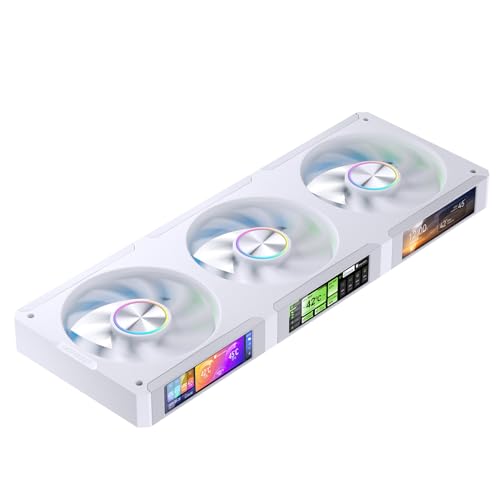
If you’re a tech enthusiast looking to elevate your PC cooling setup, the JONSBO ZC-360W PC Fan with LCD Screen Control is designed just for you. This fan boasts a sleek 3.38″ magnetic LCD screen for real-time monitoring of your system’s stats like CPU and GPU usage. With a noise level ranging from 21.3 to 37.3 dB(A) and a maximum speed of 2400 RPM, it balances performance and quiet operation. Plus, the ARGB lighting synchronizes beautifully with your motherboard. Installation is a breeze thanks to its magnetic suction design, ensuring a secure fit. Optimize your cooling in style!
Best For: Tech enthusiasts seeking a stylish and efficient cooling solution for their PC setup.
Pros:
- Customizable display patterns allow users to personalize their monitoring interface.
- Easy installation with magnetic suction ensures a secure and hassle-free setup.
- ARGB lighting synchronization enhances the aesthetics of the PC while providing dynamic effects.
Cons:
- Software optimization may not be suitable for Linux users, limiting compatibility.
- Noise levels can reach up to 37.3 dB(A), which might be noticeable in quiet environments.
- Requires a specific connection to motherboard or controller for ARGB lighting functionality, which may not be available on all systems.
SaiDian 5.25 inch Fan Speed Controller with LCD Display

The SaiDian 5.25 inch Fan Speed Controller with LCD Display is an excellent choice for PC enthusiasts who want precise control over their system’s cooling. This sleek unit fits perfectly in your optical drive slot, providing easy access to fan management. You can manually or automatically adjust fan speeds, and an alarm system alerts you to fan failures or high temperatures, keeping your components safe. The large LCD display shows essential metrics, including temperature and fan status. With the ability to control up to three groups of fans, this controller combines functionality and style to enhance your PC experience.
Best For: PC enthusiasts looking for precise fan control and monitoring to enhance system cooling and performance.
Pros:
- Versatile Control: Allows both manual and automatic fan speed adjustments for tailored cooling solutions.
- Comprehensive Monitoring: Large LCD display provides real-time temperature, fan speed, and hard disk status information.
- Alarm Features: Alerts users to fan failures and high temperatures, ensuring system safety.
Cons:
- Limited to 3 Fans: Can only control up to three groups of fans, which may not suffice for larger systems.
- Installation Required: Requires fitting into a 5.25-inch optical drive bay, which may not be available in all cases.
- Power Limitations: Maximum power output of 10W may not support high-performance fans.
Fan Controller Temperature Monitor for Computer Cooling Fans
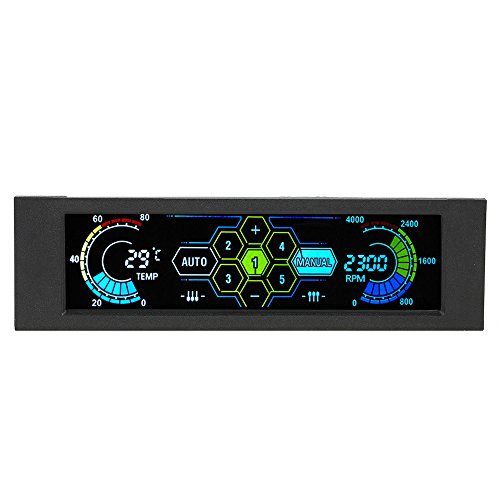
For users seeking an efficient way to manage their computer cooling fans, the Fan Controller Temperature Monitor stands out with its advanced touchscreen interface. This model, the STW-5036, fits perfectly in a 5.25-inch drive bay and supports up to five fan channels, providing output voltages from 5V to 12V. You’ll appreciate the automatic and manual control options, allowing you to monitor temperatures and adjust fan speeds to prevent overheating. With an audible alarm for high temperatures and an efficiency mode displaying RPM, this controller makes optimizing your cooling system both simple and stylish.
Best For: Users looking for an efficient and stylish solution to manage multiple computer cooling fans with temperature monitoring capabilities.
Pros:
- Advanced Touchscreen Interface: Offers easy monitoring and control for user convenience.
- Automatic and Manual Control Options: Provides flexibility in fan speed adjustments based on user preference and temperature needs.
- Temperature Monitoring Features: Includes an audible alarm for overheating, enhancing system protection.
Cons:
- Average Customer Rating: The product has a moderate rating of 3.0 out of 5 stars, indicating mixed user satisfaction.
- Limited Output Power: Each channel supports a maximum of 10W, which may not suffice for high-performance fans.
- Size Compatibility: Only fits in a 5.25-inch drive bay, limiting its use in smaller cases or setups.
STW‑6041 Multi Fan Speed Controller for PC Fans

Designed for enthusiasts looking to optimize their PC cooling, the STW-6041 Multi Fan Speed Controller excels with its sleek aluminum front panel and wide LCD display. This 5.25-inch optical drive module controls up to four fans, showing real-time speeds and temperatures for each. With built-in over-temperature warnings and a PWM circuit, it minimizes noise while conserving power. The controller’s compatibility with 3-pin and 4-pin connectors guarantees versatility in any chassis. Weighing just 10.5 ounces and measuring 5.24 inches square, it fits neatly in your setup, making it a perfect choice for those aiming for efficient and stylish cooling.
Best For: PC enthusiasts and gamers looking to enhance cooling performance and monitor temperatures effectively.
Pros:
- Sleek design with an aluminum front panel and clear LCD display for real-time monitoring.
- Versatile compatibility with both 3-pin and 4-pin fan connectors, allowing for a wide range of fan options.
- Built-in safety features like over-temperature warnings and PWM circuit for noise reduction and energy efficiency.
Cons:
- Limited to four fans, which may not be sufficient for users with larger setups.
- Requires a 5.25-inch optical drive bay, potentially limiting installation options in compact cases.
- May be overkill for casual users who do not require detailed fan speed and temperature monitoring.
ICSTATION DC 12V PWM Fan Temperature Controller Module

If you’re looking for precise thermal management in your PC setup, the ICSTATION DC 12V PWM Fan Temperature Controller Module stands out with its ability to automatically adjust fan speeds based on real-time temperature readings. This 4-wire module is designed for 3A fans, offering both manual and automatic control modes for versatile cooling options. Its digital display shows current temperature and fan RPM, accommodating high-performance fans up to 30,000 RPM. With a 42cm temperature probe, you’ll get accurate thermal regulation, ensuring your system runs efficiently. Just remember, it only works with 4-wire PWM fans, so choose wisely!
Best For: PC enthusiasts and gamers seeking precise thermal management and customizable fan speed control for optimal cooling performance.
Pros:
- Versatile Control: Offers both manual and automatic fan speed adjustments to meet different cooling needs.
- High RPM Support: Compatible with high-performance fans, displaying RPM up to 30,000, suitable for various applications.
- Accurate Temperature Regulation: Includes a 42cm temperature probe for real-time monitoring and precise thermal control.
Cons:
- Limited Compatibility: Only works with 4-wire PWM fans, excluding 2-3 wire fan types.
- Voltage Dependency: Requires matching voltage with fan specifications, limiting flexibility in fan choice.
- Complex Setup: May require technical knowledge for installation and optimal configuration.
PWM Driver Module for 4-Wire Fan Temperature Control

The PWM Driver Module for 4-Wire Fan Temperature Control stands out as an excellent choice for PC builders who prioritize efficient cooling management. It’s compatible with DC 12V, 24V, and 48V fans, making it versatile for various setups. With a digital display, you can easily monitor temperature and speed for two channels—plus, it features four LED indicators to keep you informed at a glance. The stall alarm functionality guarantees you’re alerted to any fan performance issues. Remember, though, that the fan interface pin current must not exceed 3A, so connect higher current fans directly to the main power supply.
Best For: PC builders seeking efficient and versatile cooling management solutions.
Pros:
- Compatible with multiple fan voltages (12V, 24V, 48V) for flexible integration.
- Digital display allows easy monitoring of temperature and fan speed.
- Stall alarm feature enhances fan performance monitoring and alerts.
Cons:
- Current limit of 3A for fan interface pin may restrict use with high-power fans.
- Requires matching fan voltage to avoid potential damage.
- Installation may be complex for users unfamiliar with PWM controllers.
JONSBO ZC-360B PC Fan with LCD Screen Control
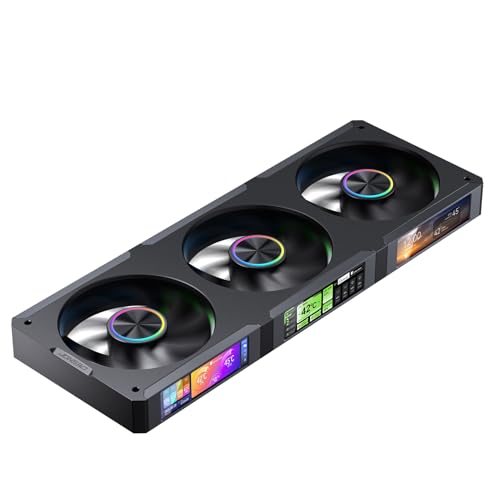
For gamers and PC enthusiasts seeking a blend of performance and aesthetics, the JONSBO ZC-360B PC Fan with LCD Screen Control stands out as an excellent choice. This fan features a powerful PWM 4Pin connector and a stunning 3.38″ magnetic LCD screen that displays real-time CPU, GPU, RAM, and HDD status. With a maximum speed of 2400 RPM and airflow up to 62.40 CFM, it guarantees efficient cooling while maintaining a noise level between 21.3 and 37.3 dB(A). Plus, its easy installation and customizable lighting effects via software make it a stylish addition to any setup.
Best For: Gamers and PC enthusiasts looking for a high-performance fan that combines efficient cooling with customizable aesthetic features.
Pros:
- Powerful PWM control with adjustable speed up to 2400 RPM for optimal cooling performance.
- Stunning 3.38″ magnetic LCD screen that provides real-time system monitoring and customizable display options.
- Easy installation with strong magnetic adhesion and a user-friendly design.
Cons:
- Software primarily available in Chinese, requiring adjustments for English use.
- Linux users may encounter compatibility issues as the software is not optimized for Linux systems.
- The noise level can reach up to 37.3 dB(A), which may be noticeable in quiet environments.
4 Pin 12V PWM Fan Controller for PC Fans
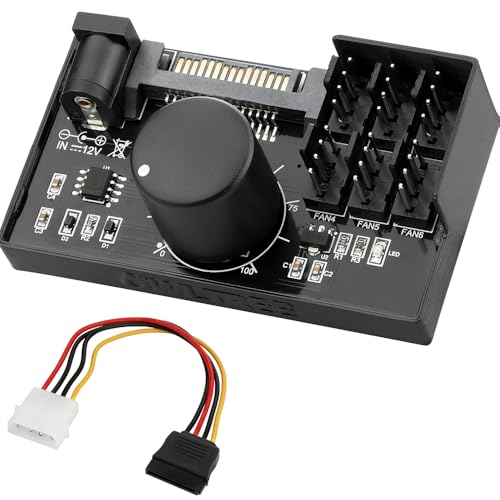
Designed specifically for enthusiasts who demand peak cooling and control, the 4 Pin 12V PWM Fan Controller is an excellent choice for managing up to six PC fans. This controller isn’t compatible with 3-pin or 2-pin fans, ensuring ideal performance with PWM-enabled units. You can power it flexibly via SATA 12V or a DC 5.5×2.5mm input. With a maximum output of 60W and each port supporting up to 2A, you won’t have to worry about overloads. Plus, the adjustable PWM duty cycle from 1% to 99% lets you tailor your cooling to suit your needs perfectly.
Best For: Enthusiasts looking for an efficient solution to control and manage multiple PWM PC fans.
Pros:
- Supports up to 6 fans: Ideal for custom PC builds requiring advanced cooling.
- Flexible power options: Can be powered via SATA 12V or DC inputs for convenience.
- Adjustable PWM duty cycle: Allows for precise cooling adjustments between 1% and 99%.
Cons:
- Not compatible with 3-pin or 2-pin fans: Limits options for fan types that can be used.
- Maximum total power output of 60W: May restrict usage with higher-powered fans.
- Fans not included: Requires additional purchases for complete setup.
Lian Li UNI Fan SL LCD Wireless 120mm ARGB Fan – Triple Pack

Offering a sleek design and advanced features, the Lian Li UNI Fan SL LCD Wireless 120mm ARGB Fan – Triple Pack is perfect for PC builders seeking both performance and aesthetics. With a 1.6″ LCD display, you can customize visuals and monitor temperatures. The 2.4 GHz wireless signal allows for easy fan control and RGB adjustments without messy cables. Each fan operates silently at just 31 decibels while delivering impressive airflow of 51.45 CFM. Plus, the UNIFAN interlocking system simplifies installation. For those wanting top-tier cooling with style, this triple pack is a fantastic choice that enhances any build.
Best For: PC builders looking for a combination of high-performance cooling and customizable RGB aesthetics.
Pros:
- Customizable LCD display allows for temperature monitoring and visual personalization.
- Wireless control eliminates cable clutter, providing a cleaner setup.
- Quiet operation at just 31 decibels ensures minimal noise during use.
Cons:
- Requires a wireless controller for operation, which may not be included in single pack purchases.
- Limited to specific case dimensions, necessitating compatibility checks before purchase.
- Higher initial cost compared to standard fan options might deter budget-conscious builders.
4 Fans Computer Fan Controller with LCD Display

If you’re looking to optimize your PC’s cooling system while keeping an eye on performance metrics, the 4 Fans Computer Fan Controller with LCD Display is an excellent choice. This model features a sleek alloy panel that fits seamlessly into any chassis design. Its wide LCD screen displays four sets of fan speeds and temperatures, providing real-time monitoring. Safety’s a priority, too, with a high-temperature alarm that activates if temperatures exceed 60 degrees. Plus, the PWM circuit guarantees quiet operation while high-spec capacitors enhance longevity and protect against electrical issues. Enjoy efficient cooling in style with this reliable fan controller!
Best For: PC enthusiasts and gamers looking to enhance cooling efficiency and monitor fan performance in real-time.
Pros:
- User-friendly LCD display showing real-time fan speeds and temperatures for easy monitoring.
- High-temperature alarm system ensures safety by alerting users when temperatures exceed 60 degrees.
- PWM circuit design reduces noise levels while maintaining effective cooling.
Cons:
- Limited to four fans, which may not be sufficient for high-performance builds with more cooling needs.
- Installation may require some technical knowledge, potentially challenging for beginners.
- Alloy panel design might not appeal to all aesthetic preferences in PC builds.
Factors to Consider When Choosing a PC Fan Controller With Display
When you’re choosing a PC fan controller with a display, consider the type of display that suits your setup best. You’ll also want to verify compatibility with your fans and look into the available control modes and temperature monitoring features. Finally, think about how easy it is to install and the overall design, as these factors can greatly enhance your experience.
Display Type Considerations
Choosing the right display type for your PC fan controller can greatly enhance your user experience. Advanced touchscreens provide intuitive navigation, while traditional LCD screens might only show basic information. Pay attention to resolution; higher resolutions offer clearer visuals, making it easier to monitor performance metrics like temperature and fan speed. Consider customization options, too—being able to upload custom patterns or videos can add a personal touch. The size of the display matters as well; larger screens can show more information at once, reducing the hassle of cycling through multiple screens. Finally, multi-channel displays can track multiple fans simultaneously, which is particularly useful if you’re managing a complex cooling setup.
Compatibility With Fans
Selecting the right PC fan controller hinges on compatibility with your fans. First, check the connector type; make sure your controller supports either 3-pin or 4-pin fans, as they often vary. Next, pay attention to voltage requirements; most controllers run on either 5V or 12V, and using the wrong voltage can damage your fans. Additionally, consider the total wattage capacity of the controller; exceeding this limit can lead to overheating or failure. If you’re aiming for peak performance, look for a controller that supports PWM (Pulse Width Modulation) for better speed management. Finally, verify the number of channels available; this determines how many fans you can control and monitor independently, enhancing your cooling setup’s efficiency.
Control Modes Available
While evaluating PC fan controllers, it’s essential to take into account the available control modes, as they directly impact your cooling efficiency and user experience. Many controllers provide both automatic and manual settings, letting you adjust fan speeds based on temperature readings or set specific speeds manually. Look for intelligent temperature monitoring features that automatically optimize fan speeds to prevent overheating. Advanced models may even offer customizable modes for different scenarios like gaming or idle use. Consider options with alarm functionalities that alert you to fan failures or excessive temperatures, enhancing system safety. Finally, the ability to switch between Celsius and Fahrenheit displays can cater to your personal preferences, adding to the overall usability of the controller.
Temperature Monitoring Features
When evaluating a PC fan controller, you’ll want to pay close attention to its temperature monitoring features, as they play an essential role in maintaining ideal system performance. Look for adjustable temperature thresholds, typically ranging from 50°C to 90°C, which help prevent overheating. Many controllers also include audible alarms that alert you when temperatures exceed preset levels, ensuring you catch potential issues early. Real-time temperature readings for your CPU, GPU, and system status displayed on an LCD screen facilitate quick assessments. Advanced models can adjust fan speeds automatically based on temperature, optimizing cooling efficiency without manual changes. Additionally, consider controllers with multiple temperature probes for precise monitoring across different components, enhancing overall system management.
Installation and Design Ease
Choosing the right PC fan controller involves considering both installation ease and design compatibility. Look for controllers with a magnetic suction design that allows for effortless installation, eliminating the need for screws or tools. Controllers fitting standard 5.25-inch optical drive bays provide a seamless look in most cases. Opt for models with joint fan connections to simplify wiring and minimize clutter, promoting better airflow. Additionally, evaluate the weight and dimensions to guarantee a proper fit without obstructing other components. Finally, choose controllers featuring user-friendly interfaces like touchscreen or LCD displays, making it easy for you to monitor and adjust fan speeds and temperatures. This thoughtful approach enhances both functionality and aesthetics in your setup.
Customization Options Offered
You’ll find that customization options are key to enhancing your PC fan controller experience. Many controllers offer customizable lighting effects, letting you sync colors and patterns with your motherboard’s RGB settings. If you opt for advanced models, you might enjoy software that allows you to import custom display patterns or even upload videos for a unique visual touch. Some fan controllers let you display different fan speeds and temperatures for various components, giving you detailed insights at a glance. You can also toggle between display modes, like switching Celsius and Fahrenheit readings. Additionally, customizable alarm settings let you set thresholds for temperature warnings and fan failure alerts, ensuring your system stays cool and responsive.
Power Supply Requirements
Customization options enhance your experience, but understanding power supply requirements is just as important when selecting a PC fan controller. Different controllers typically support input voltages of 5V and 12V, which align with most PC fans. Look for controllers that offer flexible power supply options, like SATA 12V connectors or DC 5.5×2.5mm inputs, to fit your setup. Confirm the total current draw from your connected fans doesn’t exceed the controller’s maximum power output—usually rated at 5A at 12V. Each port typically supports up to 2A, allowing for adequate power distribution. Finally, always check that your fan’s working voltage matches the controller’s output voltage to prevent damage or failures in your cooling system.