When it comes to gaming, noise can be a major distraction. You want to immerse yourself in the experience without the constant hum of fans and components. Choosing the right PC case can make all the difference in achieving that quiet environment. With options designed specifically for silent performance and effective cooling, you can find the perfect fit for your setup. Let’s explore the top contenders that promise to keep the noise at bay while you play.
be quiet! Light Base 600 LX Black PC Case
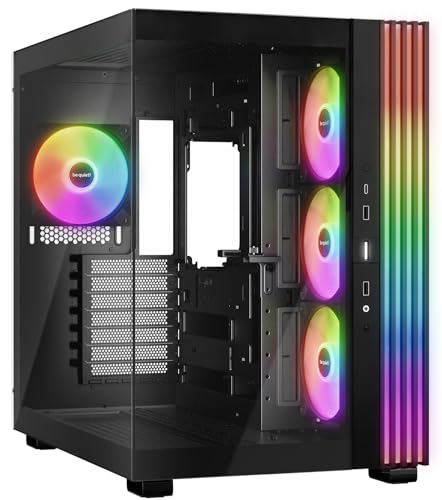
Light Base 600 LX Black PC Case is a top contender for silent gaming. With large front and side windows, it showcases your components beautifully. You’ll appreciate the massive ARGB LED strip, customizable to sync with your motherboard. Equipped with four pre-installed Light Wings LX 120mm PWM fans, it supports up to ten, ensuring excellent airflow while keeping noise to a minimum. The dual chamber design enhances cooling by neatly hiding drives and cables. Plus, it accommodates ATX motherboards and offers flexible graphics card support. Enjoy a tidy, stylish setup that performs quietly during your marathon gaming sessions.
Best For: Gamers and PC enthusiasts looking for a stylish, silent case with customizable lighting and efficient cooling.
Pros:
- Large window panels showcase internal components beautifully.
- Customizable ARGB LED strip offers aesthetic flexibility and synchronization.
- Dual chamber design improves airflow and cable management.
Cons:
- Limited to ATX motherboard support, which may restrict options for some users.
- Weighty at 26.6 pounds, making it less portable.
- Higher price point compared to some budget cases on the market.
MUSETEX ATX PC Case with 7 PWM ARGB Fans

If you’re a gamer seeking a quiet yet visually stunning setup, the MUSETEX K2 ATX PC Case with its 7 PWM ARGB fans is an excellent choice. This mid-tower case features dual tempered glass panels, providing a sleek look while showcasing your components. With three fans on the side, three on the top, and one at the back, it guarantees peak airflow and heat dissipation. You’ll appreciate the adjustable fan speeds, controlled via motherboard software for customized cooling and lighting effects. Plus, it supports various motherboard sizes and offers convenient connectivity options, making installation a breeze. Enjoy your silent gaming experience!
Best For: Gamers looking for a stylish and efficient PC case that offers excellent airflow and customizable lighting options.
Pros:
- Ample Cooling: Equipped with 7 PWM ARGB fans, ensuring optimal airflow and heat dissipation.
- Sleek Design: Dual tempered glass panels showcase your components while providing an attractive aesthetic.
- User-Friendly Installation: Compatible with multiple motherboard sizes and features an organized internal layout for easy assembly.
Cons:
- Weight: At 15 pounds, it may be heavier than some other mid-tower cases.
- Limited Expansion: While expandable to 10 fans, some users may find this limiting compared to cases designed for more fans.
- Return Policy: The 30-day return policy may be restrictive for some customers, depending on their location or situation.
be quiet! Light Base 600 DX Black PC Case

Looking for a sleek and adaptable case that enhances your silent gaming experience? The be quiet! Light Base 600 DX Black PC Case is an excellent choice. With full glass front and side panels, it showcases your high-performance components beautifully. The 1.33m ARGB LED strip adds customizable lighting that syncs with your motherboard. You’ll appreciate the flexible layout, supporting inverted or horizontal setups. It accommodates powerful GPUs and CPU coolers while allowing for ideal airflow with up to 10 fans. Plus, the dual-chamber cable management keeps everything organized, making it a perfect fit for your gaming rig.
Best For: Gamers and PC enthusiasts looking for a stylish, customizable case that offers optimal airflow and flexibility for high-performance builds.
Pros:
- Full glass panels for showcasing components and customizable ARGB lighting.
- Flexible layout options with support for large GPUs and CPU coolers.
- Excellent airflow management with the capability to install up to 10 fans.
Cons:
- May require additional fans for optimal cooling performance.
- The full glass design might be prone to fingerprints and smudges.
- Higher price point compared to basic PC cases without advanced features.
Lian Li V100 ATX Mid-Tower PC Case

For gamers seeking a blend of performance and tranquility, the Lian Li V100 ATX Mid-Tower PC Case stands out with its optimized airflow design and noise-reducing features. Pre-installed with four 120mm ARGB PWM fans, it keeps your system cool while maintaining a noise level between 26.5-30.8 dBA. You’ll love the striking aesthetics, thanks to the integrated LED strip that syncs with your motherboard for vibrant color control. Tool-less panel removal simplifies your build process, and the case supports GPUs up to 420mm and CPU coolers up to 178mm, ensuring compatibility with high-performance components.
Best For: Gamers and PC builders looking for a stylish mid-tower case that offers excellent cooling performance and easy accessibility for high-performance components.
Pros:
- Pre-installed ARGB PWM fans provide effective cooling while minimizing noise levels.
- Tool-less panel removal allows for hassle-free access to internal components during builds or upgrades.
- Integrated LED strip syncs with motherboard software for customizable lighting effects.
Cons:
- Limited to ATX and Micro-ATX motherboard compatibility, which may not suit all users.
- The maximum CPU cooler height of 178mm may restrict options for users seeking larger cooling solutions.
- The unique slanted front PSU shroud design may not appeal to all aesthetic preferences.
Lian Li LANCOOL 217 Mid-Tower ATX PC Case
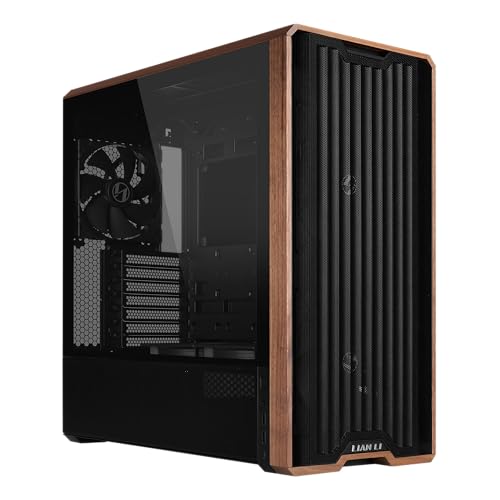
The Lian Li LANCOOL 217 Mid-Tower ATX PC Case stands out for its impressive cooling capabilities, making it an ideal choice for gamers who prioritize silent operation without sacrificing performance. With five pre-installed PWM fans—including two 170mm front fans and a 140mm rear fan—it guarantees maximum airflow while keeping noise levels low. The sleek design features real wood accents, enhancing its aesthetic appeal. You’ll appreciate the dual PSU mounting options for better cable management, and its excellent customer reviews reflect its reliability. If you’re looking for a stylish, efficient case, the LANCOOL 217 could be your perfect match.
Best For: Gamers and PC enthusiasts seeking a stylish mid-tower case with exceptional cooling performance and quiet operation.
Pros:
- Impressive cooling capabilities with five pre-installed PWM fans for maximum airflow.
- Elegant design featuring real wood accents that enhance aesthetic appeal.
- Versatile power supply options for improved cable management and organization.
Cons:
- Limited color options may not suit everyone’s taste beyond the wood finishes.
- Weighty design at 23.1 pounds could be cumbersome for frequent transport.
- Potentially high price point compared to basic PC cases on the market.
MUSETEX ATX PC Case with 6 PWM ARGB Fans

If you’re seeking a stylish yet efficient case for silent gaming, the MUSETEX ATX PC Case Y6 stands out with its six PWM ARGB fans that not only enhance cooling but also add a vibrant visual flair. Its striking pure white design and 270° dual tempered glass panels showcase your high-end hardware beautifully. The innovative airflow system, featuring a reverse blade design, guarantees effective heat dissipation for stable performance. With ample compatibility for GPUs and liquid cooling, plus USB 3.2/Type-C connectivity, this case keeps your setup modern. Plus, magnetic dust filters make maintenance a breeze, guaranteeing a clean, efficient environment.
Best For: Gamers and PC enthusiasts looking for an aesthetically pleasing case that offers efficient cooling and compatibility with high-end components.
Pros:
- Stylish Design: The pure white exterior and dual tempered glass panels provide a visually appealing showcase for your hardware.
- Excellent Cooling: Equipped with six PWM ARGB fans and an innovative airflow design, ensuring optimal heat dissipation for stable performance.
- User-Friendly Maintenance: Magnetic dust filters simplify cleaning and maintenance, helping to keep the interior dust-free.
Cons:
- Size Limitations: While it supports standard components, larger GPUs or cooling systems may not fit due to spatial constraints.
- Potential Noise: Depending on fan speed settings, the operation might generate noise that could be distracting in quiet environments.
- Limited Color Options: The pure white design may not appeal to users who prefer darker or more varied color schemes in their setups.
KEDIERS ATX Mid Tower Computer Case with ARGB Fans

Experience gaming like never before with the KEDIERS ATX Mid Tower Computer Case, designed specifically for those who value silence without sacrificing performance. Weighing 18.04 pounds and featuring a sleek black design, it houses seven PWM ARGB fans for superior cooling. The dual tempered glass panels not only provide a stunning 270° panoramic view but also enhance sound insulation. With extensive compatibility for various motherboards and cooling solutions, you can customize your setup effortlessly. Plus, the I/O panel includes a USB 3.2 Gen 2 Type-C port, ensuring fast connectivity. Elevate your gaming experience with this stylish, quiet case.
Best For: Gamers and PC enthusiasts seeking a stylish, quiet, and highly customizable mid-tower case with excellent cooling capabilities.
Pros:
- Seven PWM ARGB fans provide superior cooling and aesthetic appeal.
- Dual tempered glass panels allow for a stunning panoramic view while enhancing durability and sound insulation.
- Extensive compatibility with various motherboards and cooling solutions, including support for large GPUs and radiators.
Cons:
- Weighing 18.04 pounds, it may be heavier than some other mid-tower cases.
- Limited to ATX power supply size, which may restrict options for some users.
- The 30-day return policy may not be sufficient for customers needing more time to assess the product.
be quiet! Shadow Base 800 DX White ARGB Gaming PC Case

For gamers who prioritize a silent experience without sacrificing performance, the be quiet! Shadow Base 800 DX White ARGB Gaming PC Case is an excellent choice. With its sleek white design and dynamic ARGB lighting, it not only looks stunning but also offers high airflow with preinstalled Pure Wings 3 fans. You’ll appreciate the tempered glass side panel, showcasing your components while keeping noise to a minimum. It supports ATX and E-ATX motherboards and allows for vertical GPU installation. Plus, the USB 3.2 Gen 2 Type-C port guarantees fast connectivity for all your peripherals. Enjoy a quieter gaming session!
Best For: Gamers seeking a stylish and silent PC case that offers excellent cooling performance and component visibility.
Pros:
- High Airflow Design: Equipped with three preinstalled Pure Wings 3 fans for optimal cooling and low noise levels.
- Tempered Glass Panel: Showcases your internal components while maintaining a sleek aesthetic.
- Versatile Compatibility: Supports both ATX and E-ATX motherboards, along with optional vertical GPU installation for enhanced customization.
Cons:
- Weight: At 26 pounds, it may be heavier than some other mid-tower cases, making portability a challenge.
- Riser Cable Not Included: Vertical GPU installation requires a separate purchase of a riser cable.
- Limited Color Options: Available only in white, which may not suit all personal styles or setups.
KEDIERS Mid Tower ATX PC Case with ARGB Fans
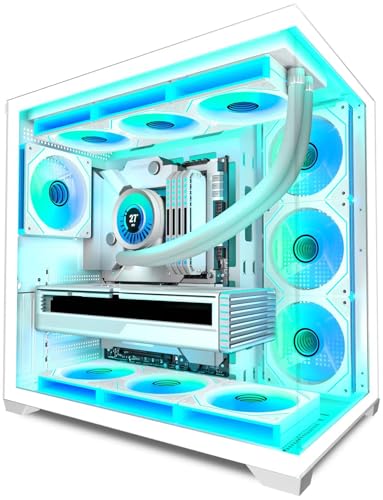
The KEDIERS Mid Tower ATX PC Case with ARGB Fans is an excellent choice for gamers seeking a visually striking yet quiet solution for their setups. With its 270° panoramic view and durable tempered glass panels, this case showcases your components beautifully while minimizing noise. The dual-channel airflow design and seven high-performance PWM ARGB fans keep your system cool without disruptive sounds. Plus, you’ll appreciate the upgrade high-speed I/O panel and ample expansion options, accommodating various motherboard sizes. Weighing just 14.19 pounds, this case combines style and functionality, making your gaming experience both efficient and enjoyable.
Best For: Gamers and PC enthusiasts looking for a stylish and efficient mid-tower case with excellent cooling and airflow features.
Pros:
- Aesthetic Appeal: The 270° panoramic view and diamond cut angles provide a visually stunning showcase for your components.
- Effective Cooling: Equipped with 7 high-performance PWM ARGB fans and a dual-channel airflow design to maintain optimal temperatures.
- Versatile Compatibility: Supports various motherboard sizes and has ample expansion options for upgrades and additional components.
Cons:
- Weight: At 14.19 pounds, it may be heavier than some competing cases, making it less portable.
- Limited Warranty Information: Warranty details are not extensively provided on the product page, which may concern some buyers.
- Potential Noise from Fans: While designed for quiet operation, the performance of the fans may still produce noise under heavy load.
be quiet! Light Base 600 LX White PC Case

If you’re a gamer who values both aesthetics and silent performance, the be quiet! Light Base 600 LX White PC Case is a stellar choice. With its large window panels, you can showcase your components while enjoying a tidy setup thanks to the flexible GPU holder and wire-free motherboard tray. The four pre-installed Light Wings fans guarantee efficient cooling with minimal noise, and you can expand to ten fans if needed. Its dual chamber design enhances airflow, while the top-mounted ARGB and PWM hubs simplify hardware connections. This case beautifully balances style and function, making your gaming experience both immersive and quiet.
Best For: Gamers and PC builders who prioritize aesthetics, silent operation, and efficient cooling solutions.
Pros:
- Stylish Design: Large window panels and a clean layout showcase components beautifully.
- Efficient Cooling: Comes with 4 pre-installed fans and the option to add up to 10 for optimal airflow.
- Flexible Layout Options: Can be inverted or positioned horizontally to fit various gaming setups.
Cons:
- Limited Pre-installed Fans: While it supports up to 10 fans, only 4 come included, requiring additional purchases for maximum cooling.
- Potential Space Constraints: The dual chamber design may limit some configurations for larger components.
- Premium Price Point: Higher cost compared to basic cases may not appeal to budget-conscious builders.
Factors to Consider When Choosing a PC Case for Quiet Gaming
When choosing a PC case for quiet gaming, you’ll want to focus on several key factors. Noise dampening materials and fan configuration options play a huge role in reducing sound levels, while cooling performance efficiency guarantees your components stay safe. Don’t forget to take into account the design and size compatibility with your setup, as aesthetics and fit are just as important.
Noise Dampening Materials
Choosing a PC case designed for silent gaming means considering noise dampening materials that can greatly enhance your gaming experience. Look for cases that feature sound-absorbing foam or acoustic panels, as these can considerably reduce noise from fans and hard drives. Thicker steel or aluminum cases naturally attenuate sound better than lighter materials, contributing to a quieter operation. Some manufacturers use rubber grommets and pads to isolate vibrations, further minimizing noise transmission. Opt for sealed or semi-sealed designs that strategically place ventilation to contain sound while maintaining airflow. Finally, pairing your case with low-noise fans, especially those with fluid dynamic bearings, can enhance overall system quietness without sacrificing cooling performance.
Fan Configuration Options
Considering fan configuration is crucial for achieving a quiet gaming setup in your PC case. Look for cases that feature multiple, optimized airflow fans—around 7 blades each—to minimize noise while enhancing cooling. Many cases come with pre-installed fans, typically ranging from 4 to 7, allowing for immediate use. It’s also important to choose a case that supports additional fans, with some accommodating up to 10, greatly improving air circulation. A balanced mix of intake and exhaust fans ensures cool air enters while hot air exits efficiently. Finally, consider cases that support various radiator sizes, like two 360mm radiators, as they offer versatile cooling options and help maintain thermal performance quietly.
Design and Aesthetics
The overall design and aesthetics of your PC case can greatly enhance your gaming experience while maintaining a quiet environment. Look for cases with large tempered glass panels that showcase your components beautifully and effectively. This not only adds a sleek touch but also helps minimize noise. A modular design allows for flexible layouts, perfect for any room arrangement or personal style. Consider integrated ARGB lighting systems for customizable visual appeal, syncing with your other components for a cohesive look. Additionally, features like GPU sag prevention holders and organized cable management contribute to a tidy setup, improving both aesthetics and functionality. Ultimately, your case should reflect your style while ensuring a serene gaming atmosphere.
Cooling Performance Efficiency
While you might prioritize aesthetics in your PC case, effective cooling performance is equally important for achieving a quiet gaming experience. Look for cases that come with multiple pre-installed fans and airflow-optimized designs to keep temperatures low without cranking up the noise. Features like dust filters and optimized air ducts enhance airflow efficiency, reducing the need for loud cooling solutions. Consider cases with a dual chamber layout, as they help organize drives and cables, promoting better airflow to critical components. Additionally, make sure your chosen case can support larger radiators and extra fans—these features can greatly improve cooling efficiency and facilitate quieter operation during intense gaming sessions.
Size and Compatibility
When choosing a PC case for quiet gaming, verifying compatibility with your components is essential to prevent frustrating issues down the line. Make sure the case supports the appropriate motherboard size, like ATX or Micro-ATX, to fit your setup. Consider the case dimensions; larger cases can house more fans and cooling systems, enhancing airflow and reducing noise. Look for flexible layouts that allow for inverted or horizontal positioning to optimize fan placement. Confirm there’s enough clearance for larger graphics cards (up to 400mm) and CPU coolers (up to 170mm) to avoid overheating. Finally, opt for dual-chamber designs that isolate drives and cables, promoting better airflow and minimizing internal noise, making your gaming experience quieter and more enjoyable.
Cable Management Features
Effective cable management is essential for maintaining a quiet gaming environment, and several features can greatly enhance this aspect of your PC case. Look for backside connector designs and dual-chamber layouts that help keep your setup tidy while improving airflow. Cases with removable cable management panels or channels make routing and securing cables a breeze, reducing clutter and enhancing aesthetics. Integrated systems often include multiple tie-down points and cable grommets, which help organize cables and minimize tangling. Additionally, some cases feature dedicated compartments for power supply units and storage drives, isolating cables from airflow paths to prevent obstruction. Good cable management not only keeps your build clean but also boosts cooling efficiency during those intense gaming sessions.