If you’re serious about gaming, a KVM switch can transform your setup, allowing you to control multiple systems seamlessly. With options supporting up to 8K resolutions and quick switching capabilities, you can elevate both efficiency and performance. But choosing the right one isn’t always straightforward. Let’s explore the top KVM switches that cater specifically to gamers like you, ensuring you get the most out of your equipment.
8K HDMI KVM Switch for Dual Monitors and Computers

If you’re a gamer looking to enhance your setup, the 8K HDMI KVM Switch for dual monitors and computers is an ideal choice. It supports dual monitor functionality with both copy and extension modes, giving you flexibility in how you display your games. With resolutions up to 8K@60Hz, you’ll enjoy breathtaking visuals with vibrant colors. The four USB 3.0 ports let you share devices like printers and keyboards at lightning-fast speeds. Switching between computers is easy with the panel button or external controller. Plus, the included power adapter guarantees stable performance for all your high-power devices.
Best For: Gamers and professionals who require dual monitor setups for enhanced visual performance and multitasking capabilities.
Pros:
- Supports stunning 8K@60Hz and 4K@120Hz resolutions for immersive visuals.
- Features four USB 3.0 ports for fast data transfer and device sharing.
- Easy switching between computers with a panel button or external controller.
Cons:
- Requires dual graphics cards for full dual monitor functionality.
- Keyboard shortcuts for toggling between sources are not supported.
- Limited to computers with two HDMI ports for optimal use.
USB 3.0 HDMI KVM Switch for 2 Computers Sharing Monitor and Peripherals

For gamers who want to streamline their setup, the USB 3.0 HDMI KVM Switch is an ideal choice, as it allows you to effortlessly control two computers with a single monitor, keyboard, and mouse. Supporting 4K resolution at 60Hz, this switch guarantees stunning visuals. You’ll appreciate the three USB 3.0 ports for fast peripheral sharing, with speeds up to 5Gbps. Switching between computers is a breeze with the on-switch button or wired remote. Plus, its plug-and-play design means no extra drivers are needed. Weighing just 9.6 ounces, it’s compact and easy to integrate into your gaming rig.
Best For: Gamers and professionals who need to control multiple computers using a single set of peripherals while maintaining high-resolution display quality.
Pros:
- Supports stunning 4K resolution at 60Hz for an exceptional visual experience.
- Features three USB 3.0 ports for high-speed peripheral sharing up to 5Gbps.
- Easy to set up with a plug-and-play design and multiple switching options for convenience.
Cons:
- Limited to two computers, which may not be sufficient for users with more extensive setups.
- Requires HDMI-compatible monitors, which could limit compatibility with older displays.
- The wired remote switch may not be as convenient for all users, depending on their setup.
AV Access KVM Switch Dock for Dual Monitors and Laptops
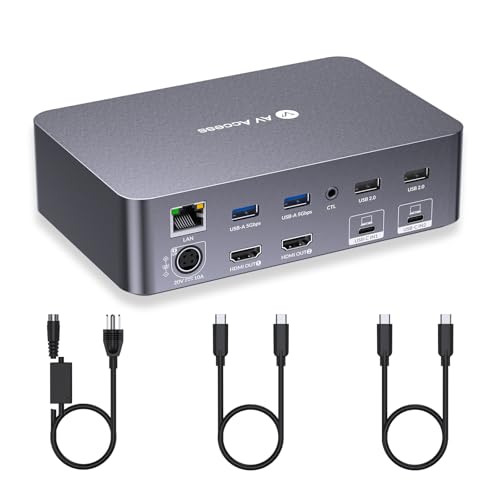
The AV Access KVM Switch Dock is an ideal choice for gamers who need seamless control over multiple devices without sacrificing performance. With support for dual monitors and laptops, you can enjoy stunning resolutions up to 4K@60Hz. Its 2x USB-C inputs guarantee quick connections, while the 2x HDMI outputs deliver crisp visuals. Switching between devices takes only 2-3 seconds, maintaining your gaming flow. Plus, the dock features various ports for peripherals, including USB 3.0 and a 1G Ethernet connection. Just remember, it doesn’t support FreeSync or G-Sync, so plan your setup accordingly for the best experience!
Best For: Gamers and professionals who require seamless control over dual monitors and laptops with high-resolution support.
Pros:
- Supports stunning resolutions up to 4K@60Hz, enhancing visual experience.
- Quick switching between devices in just 2-3 seconds, maintaining workflow and gaming momentum.
- Multiple ports for peripherals and a reliable 1G Ethernet connection enhance connectivity options.
Cons:
- Not compatible with 5K monitors, limiting high-resolution setups.
- Mac OS users can only duplicate screens, restricting multitasking capabilities.
- Does not support FreeSync or G-Sync, which may affect gaming performance for some users.
UGREEN 8K Displayport KVM Switch (2 in 1 Out)

Designed specifically for gamers seeking high performance, the UGREEN 8K DisplayPort KVM Switch (2 in 1 Out) stands out with its support for stunning 8K resolutions at 60Hz. You can easily connect two computers to a single monitor while sharing up to four USB 3.0 devices, enhancing your productivity. Switching between hosts is a breeze with a one-button option or a desktop controller. It’s compatible with various operating systems, including Windows and Mac OS, ensuring versatility. Just remember, to achieve that 8K experience, both your computers and monitor need to support it, along with the right cables.
Best For: Gamers and professionals looking for high-performance KVM switching with 8K resolution support.
Pros:
- Supports stunning 8K resolutions at 60Hz, providing exceptional visual quality.
- Easy switching between two computers with a single monitor using a one-button option or desktop controller.
- Compatible with multiple operating systems, enhancing versatility for different user environments.
Cons:
- Does not support hotkey switching, which may limit convenience for some users.
- Requires both computers and monitor to support 8K for optimal performance.
- USB-C power cable or adapter is not included, necessitating additional purchases for high-power devices.
8K Displayport KVM Switch for Dual Monitors and Computers
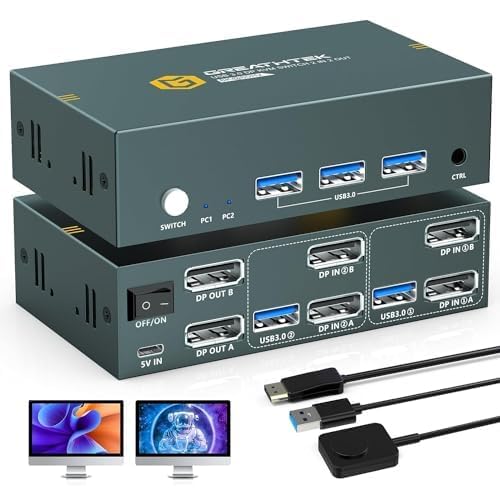
If you’re looking to enhance your gaming setup, the 8K DisplayPort KVM Switch for dual monitors and computers is a game-changer. This switch supports impressive 8K resolution at 60Hz, ensuring crystal-clear visuals for your gaming or productivity needs. It accommodates two computers and allows for extended or mirrored displays, making multitasking seamless. With three USB 3.0 ports for quick data transfer, you can easily connect peripherals like keyboards and printers. Switching between systems is straightforward using panel buttons or a wired remote. Ideal for gamers and professionals alike, this KVM switch truly elevates your dual-monitor experience.
Best For: Gamers and professionals seeking high-resolution dual-monitor setups for enhanced productivity and immersive experiences.
Pros:
- Supports stunning 8K resolution at 60Hz for crystal-clear visuals.
- Easy switching between two computers using panel buttons or a wired remote.
- Three USB 3.0 ports allow for quick data transfer and compatibility with various peripherals.
Cons:
- Hotkey switching is not supported, which may limit convenience for some users.
- Requires 8K-capable hardware and specific cables for optimal performance.
- External power adapter is recommended for high-power devices, adding to the setup complexity.
UGREEN USB 3.0 Switch for Sharing Devices Between Two Computers

For gamers who need to share peripherals between two computers without the hassle of constantly switching cables, the UGREEN USB 3.0 Switch is an ideal solution. This device lets you connect up to four USB devices, like keyboards and mice, making your setup efficient. It features one USB-C port and three USB-A ports for versatile connectivity. With data transfer speeds up to 5Gbps, it guarantees quick performance. You can easily switch between computers using the controller or button mode. Plus, for high-power devices, using the optional USB-C power supply assures stable operation. Tidy up your gaming space with this compact design!
Best For: Gamers and professionals needing to efficiently share USB peripherals between two computers without constant cable switching.
Pros:
- Supports connection of up to four USB devices, enhancing workspace efficiency.
- High data transfer speeds of up to 5Gbps ensure quick performance.
- Compact design allows for neat desktop organization and easy switching between devices.
Cons:
- Not designed for video transmission, limiting its use as a KVM switch.
- Requires a power supply for stable operation with high-power devices, which may be an extra cost.
- USB ports are primarily for data transfer and not recommended for charging devices.
UGREEN 8K@60Hz Displayport KVM Switch for Dual Monitors and Computers

The UGREEN 8K@60Hz DisplayPort KVM Switch stands out as an excellent choice for gamers who want to streamline their setup with dual monitors. With support for ultra HD 8K resolution and a sleek aluminum design, it seamlessly manages two computers using just one keyboard and mouse. You can easily switch between devices using the button or desktop controller, though hotkeys aren’t supported. It features four USB 3.0 ports for quick data transfer, and it’s compatible with Windows, MacOS, and Linux. This KVM switch is ideal for enhancing your gaming experience while keeping your workspace tidy and efficient.
Best For: Gamers and professionals who need to manage multiple computers with dual monitors efficiently.
Pros:
- Supports ultra HD 8K@60Hz resolution, providing high-quality visuals.
- Four USB 3.0 ports enable quick and efficient data transfer between devices.
- Compatible with multiple operating systems, including Windows, MacOS, and Linux.
Cons:
- Does not support keyboard shortcuts for switching, which may be less convenient for some users.
- Requires external power supply for operation, adding to the setup complexity.
- The maximum length for the required 8K DP1.4 cable is limited to 2 meters, which may restrict placement options.
Unitek Dual Monitor DisplayPort KVM Switch

Designed for gamers and multitaskers, the Unitek Dual Monitor DisplayPort KVM Switch lets you effortlessly control two computers with two monitors. Supporting 4K resolution at 60Hz, it’s perfect for home offices, gaming, and professional setups. Each computer connects via a single DisplayPort, allowing for extended or mirrored displays. With USB-C and three USB-A 3.0 ports, you can connect various devices like keyboards and webcams. Switching is instant with no lag, using either a front button or a wired remote. Plus, its compact design and aluminum housing guarantee excellent performance and heat dissipation, making it a top choice for any setup.
Best For: Gamers and multitaskers who require seamless control of multiple computers with dual monitor setups.
Pros:
- Supports 4K resolution at 60Hz, providing sharp and vibrant visuals.
- Instant switching between computers with no lag, enhancing productivity.
- Compact and lightweight design with aluminum housing for effective heat dissipation.
Cons:
- Limited to DisplayPort connections, which may not suit all users.
- Requires a wired remote for switching, which may not be convenient for everyone.
- May not support certain advanced features found in higher-end KVM switches.
UGREEN 8K@60Hz HDMI KVM Switch for 4 Computers

If you’re looking to streamline your gaming setup, the UGREEN 8K@60Hz HDMI KVM Switch is an excellent choice for managing up to four computers with a single monitor. With support for stunning 8K resolution and backward compatibility, you’ll enjoy vibrant visuals and smooth gameplay. It comes with four HDMI and USB cables, plus a handy desktop controller for easy switching. Just make sure each PC is awake and connected to power for seamless operation. Compatible with various systems and devices, this switch enhances your workspace while allowing quick access to all your gaming rigs and peripherals.
Best For: Gamers and professionals looking to efficiently manage multiple computers with a single monitor while maintaining high video quality.
Pros:
- Supports stunning 8K@60Hz resolution for vibrant visuals.
- Includes four HDMI and USB cables, and a desktop controller for easy switching.
- Compatible with a wide range of systems and devices, enhancing workspace efficiency.
Cons:
- Requires each PC to be awake for seamless switching.
- Not compatible with docking stations.
- Does not support hotkey switching for quick access.
AV Access KVM Switch Docking Station for Dual Monitors

Looking for a versatile solution to streamline your gaming setup? The AV Access KVM Switch Docking Station lets you connect two computers to two monitors, supporting stunning 4K resolution at 60Hz and higher refresh rates at lower resolutions. With its 11-in-1 design, you’ll enjoy multiple ports, including USB 3.0 and HDMI outputs. Switching between devices is a breeze with a single button, enhancing your productivity. Plus, the built-in 1G Ethernet guarantees a fast, stable connection for online gaming. Enjoy 100W USB-C charging while you work, making this dock a perfect choice for both gaming and home office needs.
Best For: The AV Access KVM Switch Docking Station is best for gamers and remote workers looking to efficiently manage multiple devices with dual monitor setups.
Pros:
- Supports stunning 4K resolution at 60Hz and high refresh rates for immersive gaming experiences.
- Effortless switching between two computers with a single button enhances productivity.
- 11-in-1 connectivity options, including multiple USB ports and a built-in 1G Ethernet port for stable internet access.
Cons:
- Only supports mirrored mode on macOS, limiting functionality for Mac users.
- Ethernet connection is available only for laptops, which may not suit all setups.
- Requires three specific cables (USB-B, HDMI, DP) for full functionality, which may need to be purchased separately.
Factors to Consider When Choosing a KVM Switch for Gaming PC
When choosing a KVM switch for your gaming PC, you’ll want to take into account key factors like resolution and refresh rates to guarantee smooth gameplay. USB connectivity options can also impact your experience, especially if you have multiple devices. Finally, don’t forget to check compatibility with your hardware and the power supply requirements for peak performance.
Resolution and Refresh Rates
Choosing the right KVM switch for your gaming PC hinges on understanding resolution and refresh rates. You’ll want a switch that supports high resolutions like 8K@60Hz or 4K@120Hz to guarantee sharp visuals. Refresh rates are equally important; aim for at least 144Hz to enjoy smooth gameplay, especially in fast-paced titles. It’s also wise to look for backward compatibility with lower resolutions, such as 4K@60Hz and 1080p, to accommodate different gaming setups. Additionally, make sure the KVM switch maintains low latency and lag during resolution switching to keep your gameplay seamless. Finally, high bandwidth support like HDMI 2.1 or DisplayPort 1.4 is essential for achieving those high resolutions and refresh rates without sacrificing quality.
USB Connectivity Options
USB connectivity plays an essential role in the functionality of a KVM switch for gaming PCs. When choosing a KVM switch, consider the number of USB ports it offers. More ports allow you to connect additional peripherals like keyboards, mice, and gaming headsets. Look for switches that support USB 3.0, providing data transfer speeds up to 5Gbps—crucial for fast, responsive gaming. Compatibility with various USB devices, including USB-A and USB-C, maximizes your setup’s flexibility. Also, check for power supply options for USB ports, which is important for high-power devices like external hard drives. Finally, opt for switches that allow easy changes between computers, so you won’t have to constantly re-plug your devices.
Switching Mechanisms Available
While evaluating KVM switches for your gaming PC, consider the various switching mechanisms available, as they can greatly enhance your gaming experience. KVM switches typically offer options like physical buttons, wired remote controls, and keyboard shortcuts for quick changes between devices. Some models even feature advanced technologies like automatic EDID emulation, ensuring stable image transmission and lag-free switching. The speed of switching can vary, with some devices achieving changes in just 2-3 seconds, perfect for gaming or multitasking. However, not all switches support hotkey functionality, which could limit your convenience. Finally, a compact and intuitive design can make accessing these controls easier, promoting better organization on your desktop for an optimized setup.
Compatibility With Devices
When selecting a KVM switch for your gaming PC, it is crucial to guarantee compatibility with your devices. First, verify the switch supports your video output and resolution, opting for options like 4K@60Hz or 8K@60Hz to enhance your gaming experience. Next, check compatibility with your peripherals—keyboards, mice, and controllers—as some switches limit the number of USB devices. If you plan to connect multiple input sources, confirm that the KVM switch can accommodate those devices, like consoles or laptops. Finally, validate that the switching mechanism, whether it’s a button, remote, or hotkey, aligns with your preferences for seamless changeovers. This compatibility will help you maintain a smooth and responsive gaming setup.
Power Supply Requirements
Choosing the right KVM switch for your gaming PC means considering power supply requirements to guarantee stable performance. Many KVM switches need an external power supply, especially when you’re connecting high-power USB devices like printers or external hard drives. Pay attention to the voltage and current ratings; some switches require a 5V or 12V adapter. If you’re aiming for higher resolutions, such as 8K, look for switches with a power supply rated at 12V/2A. Additionally, features like Power Delivery (PD) can charge your laptop while transferring data, demanding a stronger power setup. Always check the power needs of both the KVM switch and your connected devices to avoid disconnection issues during vital gaming sessions.