When it comes to uninterrupted gaming, having a reliable charging station for your mouse is essential. These devices not only keep your gear powered up but also enhance your overall gaming setup with features like customizable lighting and quick charging capabilities. As you explore your options, consider which stations align best with your gaming style and gear. Let’s take a closer look at the top contenders that can keep you in the game longer.
ATTACK SHARK X11 Lightweight Wireless Gaming Mouse

The ATTACK SHARK X11 Lightweight Wireless Gaming Mouse is perfect for gamers who crave both performance and comfort during long sessions. Weighing just 62g, its ergonomic design guarantees you stay comfortable while gaming. With tri-mode connectivity—2.4G, USB-C wired, and Bluetooth (BT5.2)—you can easily connect to any device. The PAW3311 Optical sensor offers six adjustable DPI settings, guaranteeing precision in every move. Plus, the durable HUYU switch technology ensures up to 20 million clicks, making it reliable for intense gaming. The customizable RGB backlight charging dock not only keeps your mouse powered but also adds a stylish touch to your setup.
Best For: Gamers seeking a lightweight, comfortable, and versatile mouse for extended gaming sessions and multi-device connectivity.
Pros:
- Tri-mode connectivity allows seamless switching between devices (2.4G, USB-C wired, and Bluetooth).
- Lightweight design (62g) and ergonomic contours enhance comfort during long gaming sessions.
- Durable click technology with 20 million clicks ensures reliability for intense gaming use.
Cons:
- Lightweight design may not appeal to users who prefer a heavier mouse for better control.
- The customizable features may require additional software installation for full functionality.
- RGB backlight charging dock might not be essential for all users, adding to the overall cost.
Razer Mouse Dock Pro with Wireless Charging Puck

For competitive gamers seeking a seamless charging experience, the Razer Mouse Dock Pro with Wireless Charging Puck stands out with its magnetic wireless charging feature. Simply attach the puck to your compatible Razer mouse, and it effortlessly snaps into place on the dock. With an integrated HyperPolling 8K Hz transceiver, you’ll enjoy ultra-responsive performance, essential for those intense gaming moments. The anti-slip base keeps your setup stable, while the customizable Chroma RGB lighting not only enhances aesthetics but also indicates your battery level. This dock is perfect for gamers who demand both style and functionality in their gear.
Best For: Competitive gamers seeking a seamless and stylish charging solution for their Razer mice.
Pros:
- Magnetic wireless charging for a secure and effortless connection.
- Ultra-responsive performance with integrated HyperPolling 8K Hz transceiver, ideal for fast-paced gaming.
- Customizable Chroma RGB lighting with multiple color options and effects, enhancing the aesthetic of your gaming setup.
Cons:
- Limited compatibility as it only works with specific Razer mouse models (Basilisk V3 Pro, Cobra Pro, Naga V2 Pro).
- Premium price point may not be suitable for budget-conscious gamers.
- Requires a compatible charging puck to function, adding an extra accessory to manage.
ATTACK SHARK X11 Lightweight Wireless Gaming Mouse

Looking for a gaming mouse that combines performance and versatility? The ATTACK SHARK X11 Lightweight Wireless Gaming Mouse is your answer. Weighing just 62g, it’s ultra-portable and designed for comfort during long sessions. With a tri-mode connection, you can easily switch between 2.4G wireless, USB-C wired, and Bluetooth. Experience incredible precision with the PAW3311 optical sensor and up to 22,000 DPI. Plus, its RGB charging dock not only looks great but charges quickly. With five programmable buttons, you can customize your gameplay effortlessly. This mouse truly delivers on performance, making it a top choice for gamers.
Best For: Gamers looking for a lightweight, versatile mouse that offers exceptional performance and customizable features.
Pros:
- Tri-mode connectivity provides flexibility with 2.4G wireless, USB-C wired, and Bluetooth options.
- High 22,000 DPI precision caters to both casual and competitive gamers.
- Ergonomic design and anti-slip grip tape enhance comfort during long gaming sessions.
Cons:
- Some users may prefer a heavier mouse for better control.
- The RGB charging dock may not appeal to those who prefer a minimalistic look.
- Programmable buttons require software setup, which may be a hurdle for some users.
RGB Gaming Mouse Pad with Wireless Charging and Foldable Phone Stand

Imagine a gaming setup where your mouse glides effortlessly on a smooth surface while your devices stay charged and organized. The RGB Gaming Mouse Pad with Wireless Charging offers that perfect blend. Measuring 800x350mm, it features a built-in magnetic stand for compatible phones, charging up to two devices simultaneously, including your earbuds. With vibrant RGB lighting and 15 customizable modes, it enhances your gaming aesthetic while the anti-slip base guarantees stability. Its water-resistant coating and reinforced stitching assure durability, making it an ideal gift for gamers. Elevate your gaming experience with this stylish, functional addition to your setup.
Best For: Gamers and tech enthusiasts looking for a stylish and functional mouse pad that enhances their gaming setup while providing wireless charging capabilities.
Pros:
- Large surface area allows for smooth mouse movement and ample space for keyboard placement.
- Integrated wireless charging for multiple devices, including phones and earbuds, streamlines your setup.
- Customizable RGB lighting with 15 modes adds a visually appealing element to your gaming environment.
Cons:
- Requires a compatible phone for the magnetic stand feature to work effectively.
- The size may not fit well on smaller desks or gaming setups.
- RGB lighting customization may be overwhelming for users who prefer a simpler aesthetic.
Charging Dock for Logitech Gaming Mice

The Soarking charging dock stands out as the perfect solution for Logitech gaming mouse users who value convenience and efficiency. Compatible with popular models like the G Pro X Superlight and G502, this dock acts as a reliable home base for your mice, ensuring they’re always charged and ready. Its compact design (2.5 x 2.5 x 1.5 inches) saves space, making it ideal for both home and travel. With a non-slip feature, you won’t have to worry about it sliding off surfaces. Plus, the Powerplay continuous charging technology simplifies charging, so you can jump back into gaming without delay.
Best For: Logitech gaming mouse users looking for a convenient and efficient charging solution.
Pros:
- Compact design saves space, perfect for home or travel.
- Non-slip feature prevents accidental sliding off surfaces.
- Continuous charging technology ensures mice are always ready for use.
Cons:
- Not an OEM original stock charger dock.
- Limited compatibility with only specific Logitech mouse models.
- May require additional adapters or cables not included in the package.
G Pro X Superlight 2 Gaming Mouse Fast Charging Dock

For gamers seeking seamless connectivity and convenience, the G Pro X Superlight 2 Gaming Mouse Fast Charging Dock stands out as an essential companion. Compatible with several models, including the Razer Viper V3 Pro and G Pro Wireless, it features a front-mounted receiver design that minimizes signal interference. The innovative magnetic easy-pull tab allows you to quickly release your mouse without damage. Weighing just 1.87 ounces, it’s lightweight and easy to handle. Plus, the included USB-C cables and magnetic tips enhance usability. With a solid customer rating of 4.4 stars, it’s a reliable choice for any serious gamer.
Best For: Gamers looking for a lightweight and efficient charging solution for multiple gaming mouse models.
Pros:
- Front-mounted receiver design minimizes signal interference for faster response times.
- Innovative magnetic easy-pull tab allows for easy removal of mice without damage.
- Includes multiple USB-C cables and magnetic tips for enhanced compatibility and usability.
Cons:
- Limited compatibility with mice that do not have deeper charging ports without the ejection tab.
- May require additional care when using magnetic tips to ensure longevity.
- Size could be a concern for those with limited desk space, as the dock takes up some area.
Compact Magnetic Charging Dock for Razer Mice

Designed specifically for Razer mice like the Basilisk V3 Pro, Cobra Pro, and Naga V2 Pro, the Compact Magnetic Charging Dock R3 is an essential accessory for gamers who prioritize efficiency and convenience. Measuring just 3.1 x 2 x 1.7 inches, it saves valuable desktop space while offering high-speed charging with magnetic alignment for effortless attachment. The LED indicator lets you monitor charge status and can be toggled off for light-sensitive environments. With an anti-slip silicone base and a 2-meter power cord, it provides stability and flexibility, making it the perfect home base for your gaming mouse.
Best For: Gamers who use Razer mice and seek a compact, efficient charging solution that enhances their gaming setup.
Pros:
- Space-saving design allows for a clutter-free desktop while maintaining functionality.
- High-speed charging with smart technology prevents overheating and ensures safety.
- LED charge status indicator can be adjusted for light-sensitive environments, adding to user convenience.
Cons:
- Limited compatibility as it is designed specifically for select Razer models.
- Non-removable power cord may restrict placement options compared to wireless charging solutions.
- Small size might not accommodate larger gaming mice or additional accessories.
Charging Dock for Razer Mouse DeathAdder V2 Pro, Naga Pro, Viper Ultimate, and Basilisk Ultimate

If you own a Razer mouse like the DeathAdder V2 Pro, Naga Pro, Viper Ultimate, or Basilisk Ultimate, this charging dock is a game-changer. Its compact design (2.5 x 2.5 x 1.5 inches) fits perfectly on your desk or nightstand, ensuring it doesn’t take up much space. With Powerplay continuous charging technology, your mouse is always ready for action whenever you need it. Simply place your mouse on the dock, and you’re good to go. Plus, its non-slip feature keeps it securely in place, minimizing the risk of accidental falls during intense gaming sessions or travel.
Best For: Gamers and tech enthusiasts who own Razer mice and want a reliable and compact charging solution.
Pros:
- Compact design allows for easy placement on desks or nightstands without taking up much space.
- Powerplay continuous charging technology ensures your mouse is always charged and ready for use.
- Non-slip feature provides stability, preventing accidental slips during intense gaming or travel.
Cons:
- Not an OEM original stock charger dock, which may concern some users looking for brand authenticity.
- Limited compatibility as it only works with specific Razer mouse models.
- Requires a dedicated space on your desk, which might be an issue for users with minimal surface area.
MOSHOU Wireless Charger Station for Gaming Mice
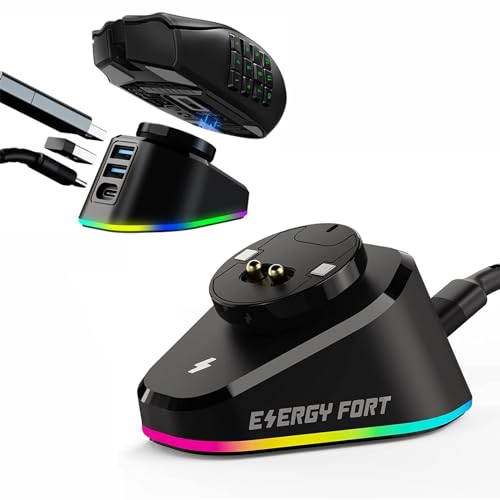
The MOSHOU Wireless Charger Station stands out as an ideal choice for gamers using Logitech or Razer mice, thanks to its seamless compatibility with popular models like the Logitech G502 and Razer Viper Ultimate. This station features adjustable RGB lighting with 16 million colors, enhancing your gaming atmosphere. With a unique POWER PLAY storage compartment for Logitech mice, you’ll keep everything organized. Plus, two USB ports enable quick file transfers. The charging indicator alerts you to battery levels, ensuring safety with overcharge protection. Simply place your mouse on the station for hassle-free charging, making it a perfect gift for any gamer.
Best For: Gamers using Logitech and Razer mice looking for a convenient and stylish charging solution with customizable features.
Pros:
- Compatible with popular gaming mouse models from Logitech and Razer, ensuring versatility.
- Adjustable RGB lighting with 16 million color options enhances the gaming setup ambiance.
- Hassle-free charging with a one-piece design that allows for easy placement of the mouse on the station.
Cons:
- Limited compatibility as it only supports specific Logitech and Razer mouse models.
- Additional software (Logitech G HUB) is recommended for real-time battery monitoring, which may not appeal to all users.
- Higher price point compared to standard chargers, which might not be justified for casual gamers.
ATTACK SHARK X11 Lightweight Wireless Gaming Mouse
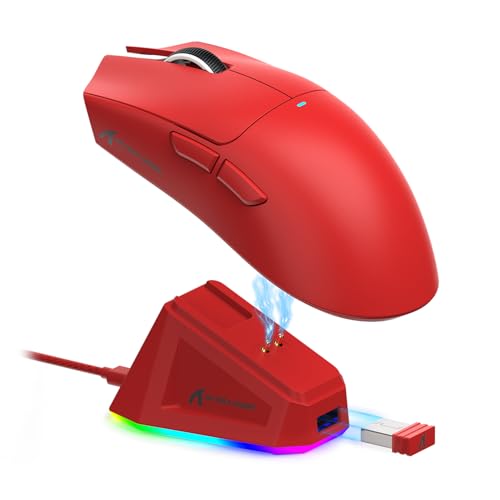
For gamers seeking versatility and performance, the ATTACK SHARK X11 Lightweight Wireless Gaming Mouse stands out with its tri-mode connection. You can easily switch between 2.4G, USB-C wired, and Bluetooth, making it compatible with various devices. The PAW3311 optical sensor offers impressive DPI settings up to 22,000, ensuring precise tracking at 300 IPS. Weighing just 62g, its ergonomic design reduces fatigue during long gaming sessions. With 5 programmable buttons, you’re in control of shortcuts and macros. Plus, the RGB backlight charging dock adds a stylish touch. Experience durability with a lifespan of 20 million clicks, perfect for intense gameplay.
Best For: Gamers and professionals seeking a versatile, high-performance mouse for both gaming and office tasks.
Pros:
- Tri-mode connection allows seamless switching between devices via 2.4G, USB-C wired, and Bluetooth.
- Impressive performance with a PAW3311 optical sensor and DPI settings up to 22,000 for precise tracking.
- Ergonomic design weighs only 62g, reducing hand fatigue during extended use.
Cons:
- Limited battery life during heavy usage in wireless mode may require frequent charging.
- Learning curve for customizing programmable buttons via the driver might be challenging for some users.
- RGB backlight may not appeal to all users and could be distracting in certain environments.
Factors to Consider When Choosing a Gaming Mouse Charging Station
When choosing a gaming mouse charging station, you need to take into account several key factors. Make sure it’s compatible with your mouse model and check the charging technology for efficiency. Also, think about the design, size, and any additional features that could enhance your gaming setup.
Compatibility With Mouse Models
Choosing a gaming mouse charging station becomes much easier once you guarantee compatibility with your specific mouse model. Many docks are designed for particular brands or models, so it’s essential to check if your mouse is included in the compatibility list. Some charging stations utilize proprietary technologies, like Powerplay or magnetic alignment, which only work with specific mice. Don’t forget to evaluate the connection type, whether it’s USB-C or a proprietary connector, as not all docks support every connection type. Additionally, look out for extra features like RGB lighting or additional USB ports that may enhance your setup. Ensuring compatibility not only streamlines your gaming experience but also maximizes the functionality of your charging station.
Charging Technology Efficiency
Once you’ve guaranteed compatibility with your gaming mouse, it’s time to evaluate the efficiency of the charging technology in your chosen station. Look for features like magnetic alignment for easy attachment and fast charging capabilities to reduce downtime. Continuous charging technology is a game changer, allowing your mouse to stay powered without the hassle of unplugging. Smart chips that cut off power once fully charged can prevent overheating and extend battery life. If you’re always on the go, high-speed charging options, such as 20W power delivery, can greatly cut charge times. Finally, integrated charge status indicators, like LED lights, offer real-time feedback, so you’ll know when your mouse is low on power or fully charged.
Design and Aesthetics
While functionality is essential, the design and aesthetics of a gaming mouse charging station can greatly enhance your overall gaming setup. Look for models that feature sleek, modern designs to align with current gaming trends. If you love vibrant visuals, consider options with customizable RGB lighting; adjustable color modes let you personalize your station to match your gaming environment. A compact design is vital to save desk space without sacrificing functionality. Additionally, choose a charging station with anti-slip materials on the base to guarantee stability during intense gaming sessions. By prioritizing style alongside performance, you’ll create an immersive gaming atmosphere that not only looks great but also supports your gaming needs.
Size and Portability
An impressive gaming setup combines style with practical functionality, and the size and portability of your gaming mouse charging station play an essential role in that balance. Look for compact designs, typically around 2.5 inches by 2.5 inches, to save desktop space while ensuring seamless integration into your gaming area. Lightweight and small charging stations are perfect for gamers on the go, allowing easy transport during travels. A well-designed dock securely holds your mouse, often featuring non-slip bases to prevent sliding during intense gaming sessions. Additionally, consider stations with streamlined designs for quick access and convenience, along with built-in cable management systems to keep your workspace tidy. Choose wisely, and elevate your gaming experience!
Additional Features Offered
When choosing a gaming mouse charging station, it’s essential to take into account additional features that can enhance your overall experience. Look for customizable RGB lighting options; these can transform your setup with millions of colors and effects. Some models also include built-in USB ports, allowing for high-speed data transfer and doubling as a docking station for other devices. Advanced charging technology, like magnetic alignment, guarantees your mouse stays secure and charged without overheating. Consider charging docks with anti-slip bases, providing stability during intense gaming sessions. Finally, features like battery level indicators help you monitor your mouse’s charge status at a glance, keeping you ready for action without unexpected interruptions.
LED Charge Indicators
LED charge indicators play an essential role in your gaming mouse charging station experience, as they provide instant visual feedback on your mouse’s battery status. You’ll typically see colors like red for low battery, yellow for mid-level, and green for a full charge. Many charging stations let you turn the LED indicator on or off, which is great if you prefer a less distracting setup, especially in low light. Some models even offer multiple LED zones for detailed charge level monitoring at a glance. This convenience eliminates guesswork about battery life, making your gaming sessions smoother. Plus, customizable lighting options can enhance your gaming aesthetic while serving a functional purpose.
Stability and Anti-Slip
To guarantee your gaming mouse charging station performs reliably, stability and anti-slip features are essential. A stable dock keeps your charger securely in place during intense gaming sessions, preventing accidental disconnections or drops. Look for non-slip designs made from materials like rubber or silicone that grip various surfaces effectively, enhancing overall stability. A compact size can also reduce the center of gravity, making it less prone to tipping over when you place your mouse on it. Additionally, stations with anti-slip features protect surfaces beneath, avoiding sticky residues or scratches. By prioritizing stability, you’ll enhance your gaming experience, allowing for quick and easy docking without worrying about the charger shifting or falling off your desk.
Price and Value Analysis
Understanding price and value is essential for selecting the right gaming mouse charging station, especially since costs can vary widely based on features and compatibility. You’ll find options ranging from $20 to over $100, so comparing prices is vital. Look for charging speed and technology; faster charging and advanced features like wireless options often justify a higher price. Consider additional functionalities such as integrated USB ports or compatibility with various mouse brands, as these enhance value. Don’t overlook warranty and customer support, as longer warranties and responsive service can make pricier models more appealing. Finally, customer ratings and reviews give insight into reliability and performance, helping you determine if the price reflects the product’s effectiveness and durability.