When it comes to optimizing your gaming setup, a heavy-duty monitor arm can make a significant difference. With options that support ultra-wide screens and offer impressive weight capacities, finding the right one is essential for both ergonomics and aesthetics. In 2026, several top contenders will stand out in this category. Let’s explore which monitor arms could elevate your gaming experience and why they matter for serious gamers.
HUANUO TitanLift Heavy Duty Monitor Arm for Screens up to 49

If you’re looking for a robust solution to support your large gaming setup, the HUANUO TitanLift Heavy Duty Monitor Arm is an excellent choice. It accommodates screens from 17 to 49 inches and supports weights between 6.6 to 44 lbs. Crafted from high-strength aluminum alloy, it boasts a reinforced VESA head and a wider base for enhanced stability. You’ll appreciate the full range of motion, allowing you to tilt, swivel, and rotate your monitor effortlessly. Installation is quick with its VESA head, and built-in cable management keeps your workspace tidy. Plus, tension adjustments are a breeze with the included Allen key.
Best For: Gamers and professionals seeking a durable and adjustable monitor arm for large screens up to 49 inches.
Pros:
- Sturdy construction: Made from high-strength aluminum alloy for enhanced durability and stability.
- Full range of motion: Offers tilt, swivel, and rotation for optimal ergonomic positioning.
- Easy installation: Quick-install VESA head and built-in cable management simplify setup and workspace organization.
Cons:
- Weight limit: May not accommodate heavier monitors exceeding 44 lbs.
- Requires VESA compatibility: Only works with monitors that have VESA mounting holes (75x75mm or 100x100mm).
- Allen key adjustment: Tension adjustments require the use of the included Allen key, which may be less convenient for some users.
WALI Heavy Duty Single Monitor Arm (GSM001XLN)

The WALI Heavy Duty Single Monitor Arm (GSM001XLN) is ideal for gamers and professionals who need a reliable solution for larger monitors, supporting screens from 17 to 49 inches and weighing up to 33 lbs. With gas spring technology, it offers zero-drift stability, so you won’t have to worry about constant readjustments. You can tilt, swivel, and rotate your monitor for the perfect viewing angle. Plus, it elevates your screen up to 20.79 inches, enhancing ergonomic comfort. By freeing up over 80% of desk space and featuring integrated cable management, it keeps your setup clean and organized.
Best For: Gamers and professionals who require a sturdy and adjustable monitor arm for larger screens ranging from 17 to 49 inches.
Pros:
- Gas Spring Technology ensures zero-drift stability, eliminating the need for frequent adjustments.
- Versatile Adjustability with ±75° tilt, ±90° swivel, and 360° rotation for customizable viewing angles.
- Space-Saving Design that frees up over 80% of desk space while providing integrated cable management for a tidy setup.
Cons:
- Weight Limit of 33 lbs may not accommodate heavier monitors or additional equipment.
- Mounting Restrictions as it is recommended for solid wood or composite desktops, which may limit installation options.
- Initial Setup can be complicated for those unfamiliar with monitor arm installations.
Heavy Duty Monitor Arm for Ultrawide Monitors

For gamers and professionals using ultrawide monitors, the Heavy Duty Monitor Arm is a game-changer. It supports monitors up to 57 inches and 44 lbs, ensuring your setup remains stable and secure. With a pneumatic height-adjustable design and modular extension arms, it offers flexible positioning. You’ll enjoy a wide range of motion with tilt, swivel, and rotation adjustments. Plus, the c-clamp and grommet mount options make installation easy on various desk types. If you plan on expanding, this arm can support dual or triple monitor setups, accommodating your growing gaming or work needs effortlessly.
Best For: Gamers and professionals seeking a stable and adjustable monitor setup for ultrawide screens.
Pros:
- Supports large ultrawide monitors up to 57 inches and 44 lbs, ensuring compatibility with a range of displays.
- Offers extensive adjustability with pneumatic height adjustment, tilt, swivel, and rotation for optimal viewing angles.
- Expandable design allows for dual or triple monitor setups, catering to growing workspace or gaming needs.
Cons:
- Installation may require tools and some assembly, which could be a drawback for users seeking a quick setup.
- Limited grommet mount compatibility with a maximum thickness of 1.9 inches, which might not fit all desk types.
- Additional cost for upgrades if expanding to dual or triple monitor setups, which could be a consideration for budget-conscious users.
VIVO Heavy Duty Aluminum Ultrawide Monitor Tension Arm for up to 49 inch Screens

Designed specifically for gamers with ultrawide screens, the VIVO Heavy Duty Aluminum Ultrawide Monitor Tension Arm supports monitors up to 49 inches and 44 lbs, making it an excellent choice for those who crave immersive gameplay. It fits desks up to 3.2 inches thick using a sturdy C-clamp or 1.4 inches with a grommet mount. Enjoy ergonomic height adjustments with the premium spring-assist arm, while the arm offers +50° to -20° tilt, 180° swivel, and 360° rotation. Plus, integrated cable management keeps your setup tidy, and the detachable VESA plate simplifies installation, ensuring you’re gaming in no time.
Best For: Gamers seeking an ergonomic and adjustable monitor mount for ultrawide screens up to 49 inches and 44 lbs.
Pros:
- Premium spring-assist arm allows for smooth ergonomic height adjustments.
- Versatile mounting options with a heavy-duty C-clamp or grommet mount.
- Integrated cable management keeps your gaming setup organized and clutter-free.
Cons:
- Limited to desk thickness of 3.2 inches with C-clamp and 1.4 inches with grommet mount.
- May require additional tools for assembly depending on individual setup.
- Potential compatibility issues with certain monitor designs outside of VESA patterns.
Gaming Monitor Arm for Flat/Ultrawide/Curved Monitors

Offering exceptional versatility, the Gaming Monitor Arm for Flat/Ultrawide/Curved Monitors is perfect for gamers and professionals who want to optimize their workspace. With a load capacity of 2 to 18 kg, it supports monitors ranging from 27” to 50”. You’ll appreciate the mechanical spring for easy height adjustments up to 250 mm, along with 360-degree rotation and -50 to +50-degree tilt. This arm promotes ergonomic health, reducing discomfort in your spine, neck, and shoulders during long sessions. Plus, the integrated cable management keeps your setup tidy. Installation is a breeze with straightforward instructions and all necessary hardware included.
Best For: Gamers and professionals seeking an ergonomic and versatile monitor setup for flat, ultrawide, or curved screens ranging from 27” to 50”.
Pros:
- Adjustable Features: Offers flexible height, tilt, and swivel adjustments to enhance viewing comfort.
- Ergonomic Health Benefits: Reduces discomfort in the spine, neck, and shoulders during extended use.
- Cable Management: Integrated cable management system keeps your workspace organized and clutter-free.
Cons:
- Weight Limitations: Maximum load capacity of 18 kg may not accommodate heavier monitors.
- Installation Required: Users must install the arm themselves, which may be challenging for some.
- Limited Color Options: Available only in grey black, which may not match all setups.
monTEK Heavy-Duty Monitor Arm for Ultrawide Curved Screens

If you’re looking to elevate your gaming experience with an ultrawide curved screen, the monTEK Heavy-Duty Monitor Arm is a standout choice. It supports monitors from 17 to 57 inches, with a hefty weight capacity of 59.4 lbs. Enjoy full motion adjustment, including +75° to -75° tilt and 180° swivel, for the perfect ergonomic setup. Made from durable steel and aluminum, it minimizes wobbling for stability, while a quick-release VESA plate simplifies installation. Plus, its integrated cable management keeps your workspace tidy, making it an ideal addition to any gaming room or office.
Best For: Gamers and professionals seeking an ergonomic and customizable setup for ultrawide curved monitors.
Pros:
- Full motion adjustment allows for optimal viewing angles with tilt, swivel, and rotation features.
- Durable construction from high-quality steel and aluminum ensures long-lasting stability and performance.
- Integrated cable management keeps your workspace organized and clutter-free.
Cons:
- Installation may require additional adapters if the monitor does not have compatible VESA mount holes.
- Weight limit may not accommodate heavier monitors, potentially limiting some users.
- Height adjustment range may not suit all desk setups, depending on the user’s height preferences.
Ergotron HX HD Premium Heavy Duty Gaming Monitor Arm
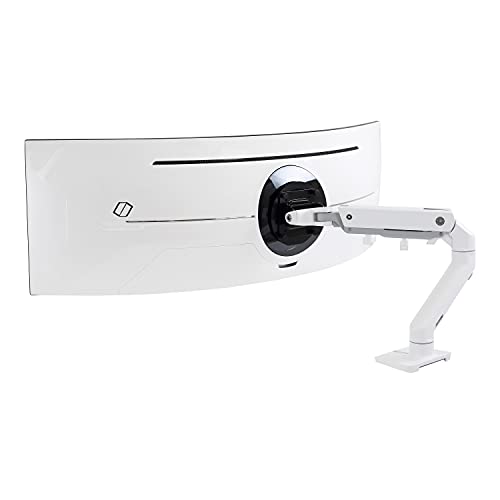
The Ergotron HX HD Premium Heavy Duty Gaming Monitor Arm stands out for gamers seeking a robust solution for ultrawide monitors up to 49 inches. It supports weights between 28 to 42 lbs, ensuring stability. With an impressive full range of motion, you can lift your screen 17.8 inches, tilt 20 degrees, and rotate 360 degrees. Its sleek white design enhances your setup while reclaiming workspace by replacing bulky bases. Installation is straightforward, thanks to included hardware and clamps. Plus, with a 10-year warranty and expert support, you can trust its quality and durability for an excellent gaming experience.
Best For: Gamers looking for a heavy-duty monitor arm that supports ultrawide monitors and offers extensive adjustability for an optimal viewing experience.
Pros:
- Full range of motion with 11.5 inches of lift and 360-degree rotation for customizable screen positioning.
- Sleek white design that enhances aesthetics while saving desk space by eliminating bulky monitor bases.
- Backed by a 10-year warranty and expert technical support, ensuring long-term reliability and peace of mind.
Cons:
- Heavier than some alternatives, which may require more effort during installation.
- Higher price point compared to basic monitor mounts, reflecting its premium features and durability.
- Limited compatibility with monitors outside the specified size and weight range.
Ergotron HX VHD Premium Heavy Duty Gaming Monitor Arm for Ultrawide Monitors

For gamers seeking to elevate their ultrawide monitor experience, the Ergotron HX VHD Premium Heavy Duty Gaming Monitor Arm stands out with its impressive weight capacity, supporting screens between 28.7 to 37.5 pounds. This single monitor desk mount accommodates ultrawide displays up to 57 inches, making it perfect for immersive gaming. You’ll enjoy full mobility with 11.5 inches of vertical lift and 17.6 inches of horizontal extension, allowing you to customize your setup easily. Plus, it reclaims valuable desk space while ensuring stability and durability, backed by a 10-year warranty. Installation is straightforward with included mounting hardware, making setup a breeze.
Best For: Gamers looking for a premium, heavy-duty monitor arm that supports large ultrawide displays and enhances their gaming setup.
Pros:
- Supports ultrawide monitors up to 57 inches, accommodating various gaming preferences.
- Full range of motion with significant vertical lift and horizontal extension for optimal positioning.
- 10-year warranty ensures long-term durability and peace of mind.
Cons:
- Weight limit may not accommodate lighter or smaller monitors effectively.
- Installation may require tools and some technical skill, which could be challenging for some users.
- Desk space for clamp installation is limited to surfaces up to 2.6 inches thick, potentially excluding some desks.
ARES WING Monitor Wall Mount for Ultrawide Gaming Screens

Gamers looking to elevate their ultrawide gaming experience will find the ARES WING Monitor Wall Mount an exceptional choice. Designed for 24-57 inch ultrawide screens, this mount supports up to 60 lbs, making it perfect for both gaming and professional setups. You’ll appreciate the effortless tilt adjustments and ergonomic customization, which help reduce neck and back strain. Built from high-strength steel and aluminum, it boasts a sleek matte black finish. Plus, the integrated cable management system keeps your workspace tidy. Installation is straightforward with included hardware and instructions, ensuring a seamless setup on any compatible wall.
Best For: Gamers and professionals seeking a sturdy and adjustable wall mount for ultrawide monitors.
Pros:
- Effortless tilt, swivel, and rotation adjustments for ergonomic customization.
- Built from high-strength steel and aluminum for durability and a professional look.
- Integrated cable management system keeps workspace organized and tidy.
Cons:
- Installation may require additional tools if mounting on certain wall types.
- VESA adapter needed for non-VESA screens, which may incur extra costs.
- Limited to screens between 24-57 inches, potentially excluding larger monitors.
Ultrawide Monitor Arm for 17-49” Screens

Designed to accommodate a wide range of monitor sizes, the ultrawide monitor arm for 17-49” screens is perfect for those who crave extensive screen real estate. It supports flat and curved monitors weighing between 4.4 to 44 lbs, including popular models like the Samsung Odyssey G9. With full motion capabilities, you can effortlessly rotate, tilt, and swivel your screen for ideal viewing angles. Enjoy customizable RGB lighting to set the mood for gaming or work. Plus, its sturdy construction guarantees durability, while adjustable gas springs allow for easy height adjustments. Elevate your setup with this versatile monitor arm!
Best For: Gamers and professionals seeking a versatile monitor arm that accommodates large ultrawide screens while enhancing ergonomic comfort and workspace aesthetics.
Pros:
- Full motion capabilities allow for effortless adjustments to achieve the perfect viewing angle.
- Customizable RGB lighting adds ambiance for both gaming and work environments.
- Sturdy construction ensures durability and stability for a wide range of monitor weights.
Cons:
- Requires a VESA mount adapter for monitors without VESA holes, which may not be included.
- Desk thickness must be within specific ranges for optimal clamp stability.
- Initial setup may require adjustments to gas spring tension based on monitor weight.
Factors to Consider When Choosing a Gaming Monitor Arm Heavy Duty
When choosing a heavy-duty gaming monitor arm, you need to take into account several key factors. Make sure it’s compatible with your monitor’s size and weight, as well as stable enough for your setup. Adjustability for ergonomics, installation methods, and overall build quality also play vital roles in your decision.
Compatibility With Monitor Size
Choosing the right gaming monitor arm requires careful consideration of compatibility with your monitor size. First, check that the arm supports your monitor’s dimensions, typically ranging from 17 to 57 inches. Make certain it can handle your monitor’s weight, which may vary from 4.4 lbs to 59.4 lbs. Confirm that the arm has VESA compatibility, needing mounting holes of 75x75mm or 100x100mm for proper installation. If you’re using an ultrawide monitor, look for arms specifically designed to accommodate widths of 49 inches or more. Finally, guarantee the arm offers full motion adjustability, allowing for tilt, swivel, and height adjustments to enhance your gaming experience and maintain ergonomic positioning.
Weight Capacity and Stability
Weight capacity and stability are critical factors to evaluate in a heavy-duty gaming monitor arm. Most of these arms support between 33 to 44 lbs, making them ideal for larger monitors. Look for options made from reinforced materials like high-strength aluminum or steel, as these enhance load-bearing capabilities. It’s also wise to choose a monitor arm that has passed rigorous stability tests, such as 50,000 cycle motion tests, which guarantee long-term performance and prevent wobbling. Additionally, a design featuring a wider base and thicker arms greatly boosts stability. Finally, verify your monitor arm is compatible with VESA mounting standards (typically 75x75mm or 100x100mm) to secure your monitor and avoid any tilting or falling.
Adjustability for Ergonomics
To enhance your gaming experience, consider how adjustability plays an essential role in ergonomics. Look for monitor arms that provide a full range of motion, including tilt angles of +50° to -50°, 180° swivel capabilities, and 360° rotation. These features optimize viewing angles and reduce neck strain. Height adjustment should allow for elevations of 20 inches or more, catering to your specific height for ergonomic comfort. Gas spring technology is ideal, as it offers smooth adjustments and prevents monitor sagging. Additionally, make sure the arm can extend up to 22.5 inches for flexible positioning. Finally, integrated cable management keeps cords organized, reducing clutter and distractions, ultimately enhancing your setup’s overall ergonomics.
Installation Methods Available
When selecting a heavy-duty gaming monitor arm, it’s crucial to evaluate the installation methods available. You’ll typically encounter C-clamp mounts, which securely attach to desk edges, and grommet mounts that fit through pre-drilled holes in your desk. C-clamp mounts are versatile, compatible with desk thicknesses ranging from 0.39 to 2.6 inches. On the other hand, grommet mounts work well for surfaces between 0.39 to 1.9 inches, offering a sleek installation. Many monitor arms include quick-release VESA plates, making it easy to attach and detach your monitor for adjustments or relocation. Installation often comes with all necessary hardware and detailed instructions, ensuring a user-friendly setup that gets you gaming quicker.
Build Quality and Durability
As you explore heavy-duty gaming monitor arms, paying attention to build quality and durability is vital for making sure your setup remains stable and effective. Look for arms made from high-strength materials like steel or aluminum, which enhance durability and stability under load. It’s important to choose models that have passed rigorous testing standards, such as 50,000 cycle motion tests, to guarantee longevity. Reinforced components, like thicker arms and wider bases, contribute to better strength and wear resistance. Additionally, consider the arm’s weight capacity—higher limits, ranging from 33 to 59.4 lbs, signify stronger construction for larger monitors. Finally, evaluate the design to minimize wobbling and maintain consistent performance during height adjustments and full range of motion.
Cable Management Solutions
Having a sturdy gaming monitor arm is just the start; effective cable management solutions are equally important for a clean and efficient workspace. Many heavy-duty monitor arms come with built-in cable management channels, allowing you to conceal wires and prevent tangling during adjustments. This feature not only reduces desk clutter but also enhances your setup’s aesthetics.
Look for models that include detachable cable clips or sleeves, letting you customize your organization based on your needs. A well-designed system promotes better airflow around your devices, which can help reduce overheating and improve performance. Plus, integrated cable management simplifies installation and maintenance, making it easy to reposition monitors without the hassle of disconnecting cables.