A cooling feature can make long gaming sessions more comfortable, but it is only one part of choosing a chair. Lumbar support, armrest adjustment, seat fit, and control placement matter just as much.
These three AutoFull M6 models offer ventilated seating alongside different comfort and adjustment features. Here is what to compare before choosing one for your desk.
Best 3 Gaming Chair with Cooling Fan Picks for 2026
Best for Adjustable Support
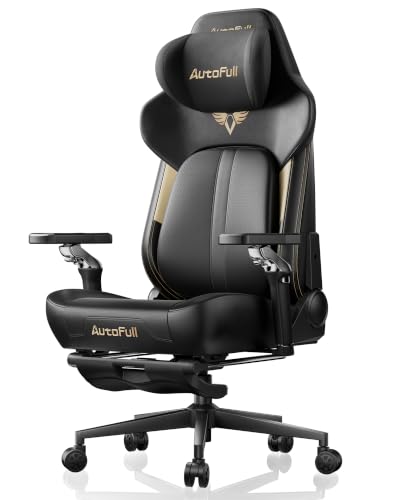
- Two-fan ventilated seat with heating
- Adjustable, posture-tracking lumbar support
- Highly adjustable armrests and vibration massage
Best For: Gamers seeking cooling and fine-tuned support
Best with Footrest

- Ventilated and heated seat
- Retractable footrest for reclining
- Dynamic lumbar support and vibration massage
Best For: Gamers wanting cooling plus a reclining footrest
Best for Deep Recline

- Dual-fan ventilation with graphene heating
- Reclines up to 160° with a footrest
- External battery not included
Best For: Buyers wanting cooling and a deep recline
Best for Adjustable Support – AutoFull M6 Ultra 2.0
If you want a gaming chair with cooling fan functionality and extensive fit adjustments, the AutoFull M6 Ultra 2.0 combines a ventilated seat with heating, dynamic lumbar support, and highly adjustable armrests.
Best For: Gamers who want active seat cooling and fine-tuned support for long sessions.
Pros:
- Two seat fans and three settings provide adjustable ventilation; graphite heating adds a cold-weather option.
- Dynamic lumbar support adjusts in height and depth and swivels with your posture.
- Armrests offer height, depth, rotation, and tilt adjustments; lumbar and thigh vibration massage add break-time comfort.
Cons:
- At 75 pounds, it may be cumbersome to move.
- The listed maximum weight recommendation is 300 pounds.
This is the most adjustment-focused choice here if positioning matters as much as cooling. Check its dimensions and weight recommendation against your setup before buying.
Best with Footrest – AutoFull M6 Black-Ultra
The AutoFull M6 Black-Ultra is a gaming chair with cooling fan functionality for buyers who also want a retractable footrest. Its ventilated and heated seat, dynamic lumbar support, and lumbar and thigh vibration massage cover both play sessions and breaks.
Best For: Gamers who want seat climate control and a footrest for reclining between sessions.
Pros:
- Ventilation and graphite heating each offer three adjustable levels.
- Retractable footrest adds leg support when leaning back.
- Dynamic lumbar support, adjustable armrests, and a 3D headrest offer multiple ways to tune the fit.
Cons:
- Assembly is required.
- The faux-leather seat may not suit buyers who prefer fabric upholstery.
The footrest is the practical differentiator from the other climate-controlled options. The listing also gives this model a 350-pound maximum weight recommendation, but confirm its 26.38-by-26.77-inch footprint fits your space.
Best for Deep Recline – AutoFull M6 Black-Basic
For a gaming chair with cooling fan features that can also recline for breaks, the AutoFull M6 Black-Basic pairs dual-fan seat ventilation with graphene heating, an integrated footrest, and a recline of up to 160°.
Best For: Buyers who prioritize a deep recline alongside adjustable cooling and heating.
Pros:
- Dual fans and dual heating elements offer three adjustable settings.
- Auto-tracking lumbar support adjusts as you shift position.
- 6D armrests, a 3D headrest, and an integrated footrest provide several comfort adjustments.
Cons:
- An external battery is not included.
- At 77 pounds, it is a substantial chair to handle during setup.
Its 160° recline makes it a strong fit for buyers who take breaks at their desk. Account for the separate battery requirement before counting on the climate-control features.
How We Picked the Best Gaming Chair with Cooling Fan
We focused on the three selected AutoFull M6 configurations and the features identified in their product descriptions: ventilated seating, lumbar support, armrest adjustability, and, where listed, heating and massage. This is a feature-based comparison, not a claim that we independently measured airflow, noise, cooling performance, or long-term durability. Check the current listing for exact specifications, since similarly named M6 versions may differ.
Quick Comparison
M6 Ultra 2.0: Consider this version if you want the listed 720° mechanical armrests, dynamic lumbar support, adjustable headrest, and massage features. M6 with 3rd-Gen Dynamic Lumbar Support: This configuration lists lumbar and leg massage, a ventilated and heated seat, and 720° mechanical armrests. M6 with AUTO Dynamic Tracking Lumbar Support: Look here if 6D adjustable armrests and automatic lumbar tracking are your priorities; its listing also identifies ventilated heating.
The model names alone do not establish which chair moves more air or fits better. Compare the actual controls, dimensions, and return terms alongside the feature lists.
Key Buying Factors for a Gaming Chair with Cooling Fan
Ventilation and Controls
Confirm how the seat ventilation works before buying. Look for fan or airflow settings, the area being ventilated, power requirements, and whether the controls are reachable while seated. Ventilation can help manage heat at the seat, but it is not a substitute for room cooling. If you also want warmth, verify that heating and ventilation can be controlled in the way you expect.
Fit and Support
Start with seat width and depth, backrest height, recommended user dimensions, and weight capacity. Dynamic lumbar support may feel different from a fixed cushion, so look at its range of adjustment rather than assuming it will suit every posture. An adjustable headrest is useful only if it can meet your neck at a comfortable height.
Armrests, Massage, and Everyday Use
Consider whether the armrests can align with your desk and keep your shoulders relaxed. Terms such as “720°” and “6D” describe different adjustment systems; check the specific movements instead of treating the numbers as a direct quality ranking. Massage features may be appealing for breaks, but they should not outweigh fit, support, and ease of use. Also check assembly requirements, warranty coverage, and return conditions.
Who Should Buy Which Gaming Chair with Cooling Fan?
Choose the M6 Ultra 2.0 if its combination of adjustable headrest, mechanical armrests, and massage matches your priorities. Consider the 3rd-Gen Dynamic Lumbar Support M6 if you specifically want listed lumbar and leg massage with both ventilation and heating. The AUTO Dynamic Tracking Lumbar Support M6 is the clearest match if automatic lumbar tracking and 6D armrest adjustment matter most.
For any Gaming Chair with Cooling Fan functionality, make fit and the exact ventilation controls your final checks. Those details are more useful than a long feature list if you will sit in the chair every day.