If you want a game room that’s both visually appealing and functional, the right cable management solutions are essential. With so many options available, finding the best products can seem overwhelming. However, the right tools can transform your setup, minimizing clutter and enhancing your overall gaming experience. Let’s explore some of the top cable management solutions that can help you create that tidy space you’ve been aiming for.
Cinati Under Desk Cable Management Tray

If you’re looking for a hassle-free way to organize your gaming setup, the Cinati Under Desk Cable Management Tray is your best choice. This sturdy metal tray attaches directly to your desk without drilling, making installation a breeze. It fits various desk materials and features an adjustable clamp for easy repositioning. With anti-scratch mats, you won’t have to worry about damaging your surfaces. The tray supports up to 10 lbs and includes cable clips and ties to keep your cords neat. Rated 4.6 out of 5 stars, it’s perfect for eliminating wire clutter in any space, including your game room.
Best For: Those looking to organize their gaming setup or workspace without the hassle of drilling into their desks.
Pros:
- No drilling required for installation, making it easy to set up and reposition.
- Compatible with various desk materials including wood and glass, ensuring versatility.
- Includes cable clips and ties for comprehensive organization of cords and cables.
Cons:
- Limited weight capacity of 10 lbs may not accommodate heavy power strips or numerous cables.
- May require adjustment to find the optimal position for some desk setups.
- Size may be insufficient for larger setups with extensive cabling needs.
Under Desk Cable Management Tray (27.5 Inch Cord Organizer)

The Under Desk Cable Management Tray (27.5 Inch Cord Organizer) is the perfect solution for gamers looking to declutter their setups. This efficient cord organizer features fire-retardant blocks that keep dust at bay while hiding unsightly cables. Its ventilated mesh side not only offers visibility but also promotes airflow. Installation is a breeze with a strong adjustable clamp, requiring no tools or drilling. Plus, it’s compatible with various desk thicknesses. With 63 inches of hook-and-loop straps, you can secure your cables safely out of reach, ensuring a tidy and professional gaming environment for you and your visitors.
Best For: Gamers and professionals seeking an organized and clutter-free workspace.
Pros:
- Effortless installation with adjustable clamp design, requiring no tools or drilling.
- Fire-retardant materials provide safety while hiding cables and keeping dust away.
- Includes ample hook-and-loop straps for secure cable management, reducing tripping hazards.
Cons:
- May not fit thicker desks exceeding 2.5 inches.
- Limited color options might not match all aesthetic preferences.
- Some users may prefer a more permanent installation method over clamps.
No-Screw Under Desk Cable Management Tray – Set of 2

Looking to declutter your game room setup? The No-Screw Under Desk Cable Management Tray set is your solution. With a self-adhesive design, you can easily install it without tools, keeping your cables neatly organized. Each tray measures 17 x 3.5 inches, providing ample space for multiple cables and power strips. This sturdy black tray is compatible with various surfaces like wood and glass, ensuring a secure hold. Rated 4.5 stars by over 6,400 customers, it enhances your desk aesthetics while eliminating visible clutter. Upgrade your space effortlessly with this simple yet effective cable management solution!
Best For: Individuals looking to organize their workspace by reducing cable clutter without the need for tools or drilling.
Pros:
- Easy Installation: Self-adhesive design allows for quick setup on various surfaces.
- Durable Construction: Sturdy material securely holds cables and power strips without bending.
- Improves Aesthetics: Enhances the overall look of your desk by hiding unsightly cables.
Cons:
- Adhesive Limitations: May not adhere well to textured or uneven surfaces.
- Weight Capacity: Limited to the weight of cables and equipment it can hold securely.
- Size Constraints: May not fit larger power strips or extensive cable setups.
Cable Management Under Desk Cord Organizer

For anyone seeking a tidy and organized game room, the 25-inch under desk cable management organizer is a perfect solution. Made of sturdy metal with a mesh structure, it supports up to 15 lbs and fits desks from 0.4 to 2 inches thick. You’ll love its no-drill installation, using an adjustable clamp that makes setup a breeze. The open design lets cables pass through easily, while non-slip rubber pads protect your desk’s surface. Plus, it keeps cords out of reach from children, enhancing safety. With quick assembly and easy maintenance, this organizer is a must-have for any gaming space.
Best For: Anyone looking to declutter their gaming area and keep cables organized and safe from children.
Pros:
- No-drill installation makes setup quick and easy with an adjustable clamp.
- Open design allows for easy cable access and ventilation, preventing overheating.
- Non-slip rubber pads ensure the desk surface remains scratch-free and protected.
Cons:
- Weight capacity of 15 lbs may limit the number of cables that can be organized.
- Compatibility only extends to desks between 0.4 to 2 inches thick, which may not fit all desk types.
- Metal construction may not blend seamlessly with all decor styles, potentially affecting aesthetics.
Univivi No Drill Under Desk Cable Management Tray (36″ Cord Organizer)

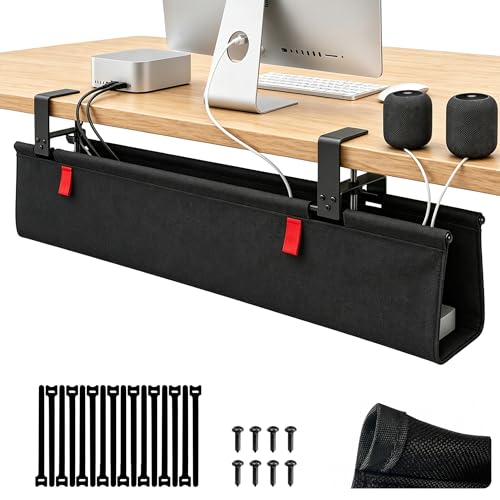
Struggling with tangled cords beneath your gaming setup? The Univivi No Drill Under Desk Cable Management Tray is your perfect solution. Measuring 36″ long and 5.5″ wide, it fits seamlessly under your desk, keeping cables organized and hidden. Its large capacity accommodates all types of adapters, and the durable 600D oxford fabric guarantees it holds up under weight. You can install it without drilling or by using screws, making it versatile for different surfaces. Plus, the unfoldable design and built-in ties simplify cable management, so you can focus on gaming without the mess. Enjoy a tidy setup today!
Best For: Those seeking an effective and stylish solution to manage and hide cables under their desks, particularly gamers and remote workers.
Pros:
- Large capacity accommodates various adapter sizes, ensuring all your cables fit neatly.
- Durable material made from thick 600D oxford fabric, providing flame retardant properties and maintaining shape under heavy weight.
- Versatile installation options allow for no-drill or screw-fixing methods, compatible with multiple tabletop materials.
Cons:
- Installation may require space considerations, as it needs at least 5.3 inches along the edges if there are built-in drawers.
- Clips used for fixing may not be completely invisible, potentially affecting the aesthetic of your setup.
- Unfoldable design may require more effort to secure items tightly compared to fixed trays.
98 Pcs Cable Management Kit for Organizing Cords and Wires

If you want a tidy and organized gaming setup, the 98 Pcs Cable Management Kit is perfect for you. This all-in-one solution prevents cable tangling, making it ideal for your computer, desk, or gaming room. The kit includes cable sleeves, magnetic holders, adhesive clips, and reusable ties, ensuring compatibility with various cables. Installation’s a breeze with self-adhesive components—no tools required! Plus, it’s made from durable nylon and plastic, providing long-lasting use. Its pet-proof design protects your cables from chewing, while the split sleeve keeps everything neat. With an impressive 4.6-star rating, it’s a must-have for any gamer.
Best For: This product is best for gamers and professionals who want to maintain a tidy and organized workspace by managing their cords and cables effectively.
Pros:
- High-quality nylon and plastic materials ensure durability and long-term use.
- Easy installation with self-adhesive components requires no tools.
- Pet-proof design protects cables from chewing and tangling.
Cons:
- May not accommodate extremely thick cables or specialized equipment.
- Limited color options for aesthetic customization.
- Requires clean surfaces for optimal adhesion of adhesive components.
EVEO Under Desk Cable Management Kit (6 Units)

The EVEO Under Desk Cable Management Kit is the ideal choice for gamers and home office enthusiasts seeking a sleek, clutter-free workspace. With six raceways, you can easily organize up to 10 power cords or 16 ethernet cables. The strong adhesive guarantees a tool-free installation, making it simple to set up. Its non-locking channels allow for easy placement and removal whenever you need to adjust your setup. Weighing just 1.85 pounds, it’s lightweight yet effective. Users love it, giving it an impressive average rating of 4.6 out of 5 stars. Experience tidy organization with this must-have cable management solution!
Best For: Gamers and home office enthusiasts seeking a sleek, clutter-free workspace.
Pros:
- Strong adhesive allows for easy, tool-free installation.
- Organizes a large number of cables, accommodating up to 10 power cords or 16 ethernet cables.
- Lightweight design makes it easy to handle and adjust as needed.
Cons:
- Non-locking channels may lead to cables being less secure if frequently adjusted.
- Limited to a specific number of cables, which may not be sufficient for larger setups.
- Adhesive may lose effectiveness over time, especially on certain surfaces.
Under Desk Cable Management with Silicone Pads and 16 Cable Ties
For gamers who demand a clean and organized setup, the AHOMO Under Desk Cable Management system is an ideal solution. This premium cord organizer features a heavy-duty clamp with silicone pads that grip tightly without scratching your desk, supporting up to 75 lbs. Measuring 36 inches, it fits desks 0-2.1 inches thick and boasts a washable PE honeycomb base that won’t sag or warp. With 16 reusable cable ties and 7 built-in straps, you can easily manage thick cables and power strips. Plus, its durable, fireproof materials guarantee long-lasting use, backed by a 3-year warranty for peace of mind.
Best For: Gamers and professionals seeking a clean and organized workspace with reliable cable management solutions.
Pros:
- Durable and waterproof base material ensures long-lasting use without sagging or warping.
- Includes 16 reusable cable ties and 7 built-in straps for effective management of thick cables and power strips.
- Easy to install with a no-scratch clamp that fits a variety of desk thicknesses up to 2.1 inches.
Cons:
- The 36-inch length may not accommodate larger setups or desks with extensive cable needs.
- Clamp may not fit desks thicker than 2.1 inches, limiting compatibility for some users.
- Slightly higher price point compared to basic cable management solutions on the market.
ZhiYo Professional Server Rack Cable Management Raceway

When you need a reliable solution for organizing your cables, the ZhiYo 99in Professional Server Rack Cable Management Raceway stands out as an ideal choice for homes, offices, and industrial environments. This raceway accommodates up to 40 network cables, making it perfect for complex wiring setups. Constructed from electrically safe, flame-retardant PVC, it’s designed to last. With a simple installation process using screws and foam strips, you can easily mount it in any space. Plus, its matte surface reduces scratches while adding a sleek touch. Trust the ZhiYo Raceway for efficient cable management and a tidy setup.
Best For: The ZhiYo 99in Professional Server Rack Cable Management Raceway is best for individuals and businesses seeking an efficient and organized solution for managing multiple network cables in various environments.
Pros:
- Durable Construction: Made from electrically safe, flame-retardant PVC that withstands high temperatures and resists deformation.
- Easy Installation: Comes with screws and foam strips for straightforward mounting, featuring evenly spaced holes for convenience.
- Sleek Design: Matte surface treatment minimizes scratches and enhances the visual appeal of any setup.
Cons:
- Limited Capacity: Accommodates up to 40 network cables, which may not be sufficient for larger installations.
- Size Restrictions: Fixed dimensions may not fit all spaces or allow for extensive customization without modifications.
- Painting Requirement: Option to spray paint for aesthetic purposes, which could require additional effort and materials.
Updated Cable Raceway Kit for Under Desk Cable Management (Pack of 5)

Looking to declutter your game room setup? The Updated Cable Raceway Kit for under-desk cable management is your solution. This pack of five raceways, each measuring 15.4 inches, conceals cords from TVs, computers, and more with ease. With a wire slot diameter of 0.4 inches, it accommodates thicker cables like Cat-6 Ethernet and power cords. Installation is a breeze, taking about 15 minutes thanks to the adhesive tape. Plus, it’s made from durable, fireproof PVC, ensuring safety for kids and pets. Keep your gaming space tidy and organized with this essential cable management kit!
Best For: Those looking to organize and conceal cables in their gaming or workspaces for a cleaner and safer environment.
Pros:
- Easy installation with adhesive tape, taking only about 15 minutes.
- Accommodates a variety of cable types, including thicker power and Ethernet cables.
- Durable, fireproof PVC material ensures safety for children and pets.
Cons:
- Adhesive may not stick well to all surfaces, especially if not clean or dust-free.
- Limited length per raceway may require multiple kits for larger setups.
- Some users may prefer a more permanent mounting solution than adhesive tape.
Factors to Consider When Choosing Game Room Cable Management
When choosing cable management for your game room, contemplate installation methods that suit your space and how many cables you need to manage. It’s also essential to take into account the design aesthetics that match your style and guarantee compatibility with your surfaces. Don’t forget to prioritize safety features to keep your gaming area organized and hazard-free.
Installation Method Options
Choosing the right installation method for your game room cable management can greatly impact both functionality and aesthetics. You have a few options to evaluate. No-drill solutions, like strong adhesives or clamps, let you set up without damaging surfaces. If you prefer a tool-free setup, adjustable clamps can fit desk thicknesses from 0.4 to 2.5 inches, ensuring a snug fit. For added security, some systems allow for screw mounting, which is ideal depending on your desk materials. Many products come with self-adhesive components that stick to smooth surfaces like wood, glass, or metal. Look for efficient systems that let you easily reposition and adjust cables, enhancing usability in your game room setup.
Cable Capacity Requirements
Before diving into cable management solutions, you should assess your game room’s needs to determine the cable capacity required. Start by evaluating the number and type of devices you have, like consoles, PCs, monitors, and audio systems. This helps you figure out the total cable capacity you’ll need. Also, consider the weight limit of your chosen cable management solution; some can hold over 15 lbs, which is essential for multiple power strips and heavier cables. Look for options that accommodate thicker cables to prevent overcrowding and maintain airflow. Plus, think about how many individual cables you’ll manage—some organizers can handle multiple cords, reducing clutter. Finally, make certain your solution allows for future expansion, as your setup may grow.
Design Aesthetics and Style
While you focus on creating the perfect gaming environment, don’t overlook the importance of cable management in enhancing your room’s design aesthetics. A well-organized system can greatly reduce visible clutter, giving your space a cleaner, polished look. Consider using color-coordinated cable raceways or trays that complement your decor and theme for a cohesive feel. Match cable management solutions with your furniture’s materials, like wood or metal, to seamlessly integrate them into your style. Under-desk options can maintain open floor space, improving the layout and creating an inviting atmosphere for gaming and socializing. Finally, opt for sleek, minimalistic designs that preserve a modern aesthetic while ensuring functionality and safety in your game room.
Surface Compatibility Considerations
Aesthetics matter, but the surface you’re working with also plays a significant role in effective cable management. When choosing cable management solutions, consider your desk’s material—wood, glass, metal, or stone—as each requires different installation methods. Make certain the installation method suits your desk’s thickness, which can range from 0.4 to 2.5 inches. Look for options with non-slip, scratch-proof pads to protect your desk while guaranteeing stability. Be cautious with adhesive-backed solutions; their effectiveness hinges on the smoothness and cleanliness of the surface. If your desk has built-in features like drawers, select a cable management system that allows for adequate spacing to maintain accessibility and prevent interference. This attention to detail guarantees a tidy, functional game room setup.
Safety Features Importance
When you’re setting up your game room, prioritizing safety features in cable management is vital to prevent accidents, especially with kids and pets around. Look for solutions that minimize tripping hazards by keeping cables organized and out of the way. Proper organization not only keeps your space tidy but also reduces the risk of electrical fires caused by tangled or overloaded wires. Choose products with child safety features, like elevated cable trays or secured cords, to keep dangerous cables out of reach. Non-slip and scratch-proof materials protect your furniture and individuals from accidents. Additionally, guarantee adequate spacing and ventilation in your cable management designs to maintain airflow around electrical components, further reducing the risk of overheating.